2014 Acura MDX Snow
[x] Cancel search: SnowPage 358 of 500

357
uuWhen DrivinguLane Keeping Assist System (LKAS)
*
Driving
The system may not detect lane markings and the position of your vehicle properly
under the following conditions.■LKAS Limitations
Condition
●The vehicle interior is reflected onto the front windshield.●Headlight lenses are dirty or the headlights are not properly adjusted.●The windshield is fogged.●Driving on snowy or wet roads.●The ambient brightness suddenly changes (e.g., at the entrance or exit of a tunnel).●You drive into the low sun (e.g., at dawn or dusk).●A strong light is reflected onto the roadway.●Roadway lane markers are difficult to see due to weather (rain, snow, fog, etc.) or road conditions.●Driving on a road with temporary lane markings.●Multiple or varied lane markings are visible on the roadway due to road repairs or old lane markings.●Roadway objects or structures are misinterpreted as lane markers.●There is little contrast between lane lines and the roadway surface.●The vehicle in front of you is driving near the lane lines.●Driving over bumps.●Where marked lanes merge or split.●Where the lane is extremely narrow, wide or changing.●Where the road is hilly or the vehicle is approaching the crest of a hill.
Page 360 of 500

359
uuWhen DrivinguVSA® (Vehicle Stability Assist), aka ESC (Electronic Stability Control), System
Driving
This button is on the driver side control panel.
To turn the VSA® system on and off, press and
hold it until you hear a beep.
VSA® will stop and the indicator will come on.
To turn it on again, press the (VSA® OFF)
button until you hear a beep.
VSA® is turned on every time you start the
engine, even if you turned it off the last time
you drove the vehicle.
■VSA® On and Off
1VSA® (Vehicle Stability Assist), aka ESC (Electronic Stability Control), System
Without VSA®, your vehicle will have normal braking
and cornering ability, but it will not have VSA®
traction and stability enhancement.
In certain unusual conditions when your vehicle gets
stuck in shallow mud or fresh snow, it may be easier
to free it with the VSA® temporarily switched off.
When the VSA® system is off, trailer stability assist is
also off.
2Trailer Stability Assist
* P. 317
When the VSA® system is off, the traction control
system is also off. You should only attempt to free
your vehicle with the VSA® off if you are not able to
free it when the VSA® is on.
Immediately after freeing your vehicle, be sure to
switch VSA® on again. We do not recommend driving
your vehicle with the VSA® and traction control
systems switched off.
If the low tire pressure/TPMS indicator comes on or
blinks, the VSA® system turns on automatically. In
this case, you cannot turn the system off by pressing
the button.
You may hear a motor sound coming from the
engine compartment while system checks are being
performed immediately after starting the engine or
while driving. This is normal.
VSA® OFF Indicator
* Not available on all models
Page 363 of 500
uuWhen DrivinguBlind Spot Information (BSI) System
*
362Driving
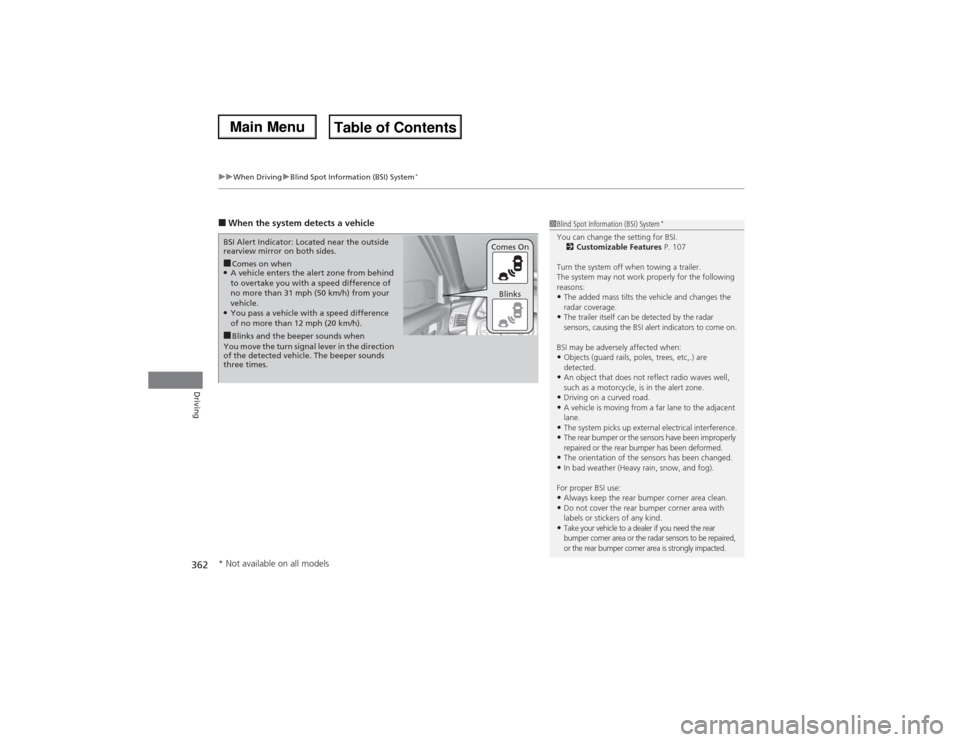
■When the system detects a vehicle
1Blind Spot Information (BSI) System
*
You can change the setting for BSI.
2Customizable Features P. 107
Turn the system off when towing a trailer.
The system may not work properly for the following
reasons:•The added mass tilts the vehicle and changes the
radar coverage.•The trailer itself can be detected by the radar
sensors, causing the BSI alert indicators to come on.
BSI may be adversely affected when:•Objects (guard rails, poles, trees, etc,.) are
detected.•An object that does not reflect radio waves well,
such as a motorcycle, is in the alert zone.•Driving on a curved road.•A vehicle is moving from a far lane to the adjacent
lane.•The system picks up external electrical interference.•The rear bumper or the sensors have been improperly
repaired or the rear bumper has been deformed.•The orientation of the sensors has been changed.•In bad weather (Heavy rain, snow, and fog).
For proper BSI use:•Always keep the rear bumper corner area clean.•Do not cover the rear bumper corner area with
labels or stickers of any kind. •Take your vehicle to a dealer if you need the rear
bumper corner area or the radar sensors to be repaired,
or the rear bumper corner area is strongly impacted.
■Comes on when●A vehicle enters the alert zone from behind
to overtake you with a speed difference of
no more than 31 mph (50 km/h) from your
vehicle.●You pass a vehicle with a speed difference
of no more than 12 mph (20 km/h). BSI Alert Indicator: Located near the outside
rearview mirror on both sides.■Blinks and the beeper sounds when
You move the turn signal lever in the direction
of the detected vehicle. The beeper sounds
three times.Comes On
Blinks
* Not available on all models
Page 364 of 500

363
uuWhen DrivinguSuper Handling-All Wheel Drive
TM (SH-AWD®)
*
Continued
Driving
Super Handling-All Wheel Drive
TM (SH-AWD®)
*
The system controls and transfers varying amounts of engine torque to each wheel
in accordance with the driving conditions.
SH-AWD® helps to enhance driving stability, and lets you handle situations like
slippery surfaces, such as snow, sand, mud, and steep hills, better than when driving
with two wheel drive. However, the system does not help to enhance braking. Be
precautious about the following:
•It is still your responsibility to drive safely when you steer, accelerate, and apply
brakes.
•Leave a sufficient margin when braking on slippery surfaces.Tire Pressure Monitoring System (TPMS)
Monitors the tire pressure while you are
driving. If your vehicle’s tire pressure becomes
significantly low, the low tire pressure/TPMS
indicator comes on and a message appears on
the MID.
1Super Handling-All Wheel Drive
TM (SH-AWD®)
*
NOTICEAvoid continuously driving in sand or mud where a
wheel is likely to spin out, and do not drive once the
SH-AWD® indicator starts blinking. Driving
continuously under such conditions can damage the
system’s torque distribution unit.
Do not drive through deep water.
The SH-AWD® system may not function properly if
tire type and size are mixed.
Make sure to use the same size and type of tire, and
the air pressures as specified.
2Tire and Wheel Replacement P. 4231Tire Pressure Monitoring System (TPMS)
Conditions such as low ambient temperature and
altitude change directly affect tire pressure and can
trigger the low tire pressure/TPMS indicator to come
on.
2If the Low Tire Pressure/TPMS Indicator
Comes On or Blinks P. 468
Tire pressure checked and inflated in:•Warm weather can become under-inflated in
colder weather.•Cold weather can become over-inflated in warmer
weather.
The low tire pressure/TPMS indicator will not come
on as a result of over inflation.
* Not available on all models
Page 370 of 500

369
uuBrakinguAnti-lock Brake System (ABS)
Driving
Anti-lock Brake System (ABS)Helps prevent the wheels from locking up, and helps you retain steering control by
pumping the brakes rapidly, much faster than you.
The electronic brake distribution (EBD) system, which is part of the ABS, also
balances the front-to-rear braking distribution according to vehicle loading.
You should never pump the brake pedal. Let the ABS work for you by always
keeping firm, steady pressure on the brake pedal. This is sometimes referred to as
“stomp and steer.”■ABS operation
The brake pedal may pulsate slightly when the ABS is working. Keep holding the
pedal firmly down. On dry pavement, you will need to press on the brake pedal very
hard before the ABS activates. However, you may feel the ABS activate immediately
if you are trying to stop on snow or ice.
When the vehicle speed goes under 6 mph (10 km/h), the ABS stops.■ABS
1Anti-lock Brake System (ABS)NOTICEThe ABS may not function correctly if you use an
incorrect tire type and size.
When the ABS indicator comes on while driving,
there may be a problem with the system.
While normal braking is not affected, there is a
possibility of the ABS not operating. Have the vehicle
checked by a dealer immediately.
The ABS does not reduce the time or distance it takes
to stop the vehicle. It only helps with steering control
during hard braking.
In the following cases, your vehicle may need more
stopping distance than a vehicle without the ABS:•When driving on rough road surfaces, including
when driving on uneven surfaces, such as gravel or
snow.•When tire chains are installed.
You may hear a motor sound coming from the
engine compartment while system checks are being
performed immediately after starting the engine or
while driving. This is normal.
Page 376 of 500

Continued
375
uuBrakinguCollision Mitigation Braking System
TM (CMBS
TM)*
Driving
Press this button for about one second to turn
on and off the system.
When the CMBS
TM is off:
•The beeper sounds.
•The CMBS
TM indicator in the instrument
panel comes on.
•A message on the MID reminds you that the
system is off.
The CMBS
TM is in the previously selected ON or
OFF setting each time you start the engine.
■CMBS
TM On and Off
1Collision Mitigation Braking System
TM (CMBS
TM)*
The CMBS
TM may automatically shut off, and the
CMBS
TM indicator will come and stay on when:
•You drive off-road or on a mountain road for an
extended period.•You drive with the parking brake applied.•You drive in bad weather (rain, fog, snow, etc.)•The radar sensor cover is blocked by dirt, mud, dry
leaves, wet snow, etc.•An abnormal tire condition is detected (wrong tire
size, flat tire, etc.)
Once the conditions that caused the CMBS
TM to shut
off improve, the system comes back on.
* Not available on all models
Page 378 of 500

377Driving
Parking Your VehicleWhen Stopped1.Depress the brake pedal firmly with the shift lever in
(D.
2.Firmly apply the parking brake.
3.Move the shift lever from
(D to
(P.
4.Turn off the engine.
Always set the parking brake firmly, in particular if you are parked on an incline.
1Parking Your Vehicle
Do not park your vehicle near flammable objects,
such as dry grass, oil, or timber.
Heat from the exhaust can cause a fire.
Raise the wiper arms when snow is expected.1When StoppedNOTICEThe following can damage the transmission:•Depressing the accelerator and brake pedals
simultaneously.•Holding the vehicle in place when facing uphill by
depressing the accelerator pedal.•Moving the shift lever into
(P before the vehicle
stops completely.
Page 379 of 500

378
uuParking Your VehicleuParking Sensor System
*
Driving
Parking Sensor System
*
The corner and center sensors monitor obstacles near your vehicle. The beeper and
audio/information screen let you know the approximate distance between your
vehicle and the obstacle.■The sensor location and range
1Parking Sensor System
*
Even when the system is on, always confirm if there is
no obstacle near your vehicle before parking.
The system may not work properly when:•The sensors are covered with snow, ice, mud or
dirt, etc.•The vehicle is on uneven surface, such as grass,
bumpy road, or a hill.•The vehicle has been out in hot or cold weather.•The system is affected by some electronic devices
that generate ultrasonic waves.•Driving in bad weather.
The system may not sense:•Thin or low objects.•Sonic-absorptive materials, such as snow, cotton,
or sponge.•Objects directly under the bumper.
Do not put any accessories on or around the sensors.
Within about 24 in (60 cm) or less Front Corner Sensors
Rear Corner SensorsRear Center Sensors
Within about 43 in (110 cm) or less
* Not available on all models