Page 202 of 500

201
uuAudio SystemuAudio System Theft Protection
Features
Audio System Theft ProtectionThe audio system is disabled when it is disconnected from the power source, such as
when the battery is disconnected or goes dead.■Reactivating the audio system
1.Set the power mode to ON, and turn on the audio system.
uYou will be requested to enter the audio security code. See step 3.
2.Press and hold the power button again for more than two seconds.
uThe audio system is reactivated when the system’s control unit recognizes that
the system is in your vehicle.
If the control unit fails to recognize, Enter PIN appears on the audio/
information screen.
3.If the first two steps do not work, you can enter the audio security code using the
On Demand Multi-Use Display
TM. If you enter an incorrect digit, continue to the
last digit, then try again. If you do not enter code correctly after 10 tries, leave the
system for one hour before trying again, or visit a dealer to have the system reset.
1Audio System Theft Protection
Find the audio system’s security code and serial
number label in your owner’s manual kit.
We recommend that you write down the serial
number, but not the security code, in this owner’s
manual.
Do not store the label in your vehicle. If you lose the
label, you must first retrieve the serial number, and
then obtain the code.
You can find out about your serial number and
security code from a dealer.
You can register the security code at Acura Owners
(owners.acura.com.), and find information on how to
retrieve the serial number and obtain the code at
radio-navicode.acura.com.U.S. models
Page 256 of 500
255
uuCustomized Featuresu
Continued
Features
*1:Default SettingSetup
GroupCustomizable Features Description Selectable SettingsSystem
Settings
Others
Language
Changes the display language.
English
*1/Français/
Español
Display Operation
Restriction Tips
Alerts you when manual control of the system is
disabled to prevent distraction while driving.
On
*1/Off
Background Color
Changes the background color of the audio/
information screen and the On Demand Multi-
Use Display
TM.
Blue
*1/Amber/Red/
Green
Header Clock Display
Selects whether the clock display comes on.
On
*1/Off
Factory Data Reset
Resets all the settings to their factory default.2Defaulting All the Settings P. 265
—
Default
Cancels /Resets all customized items in the
System Settings group as default.
Default/OK
Page 258 of 500
257
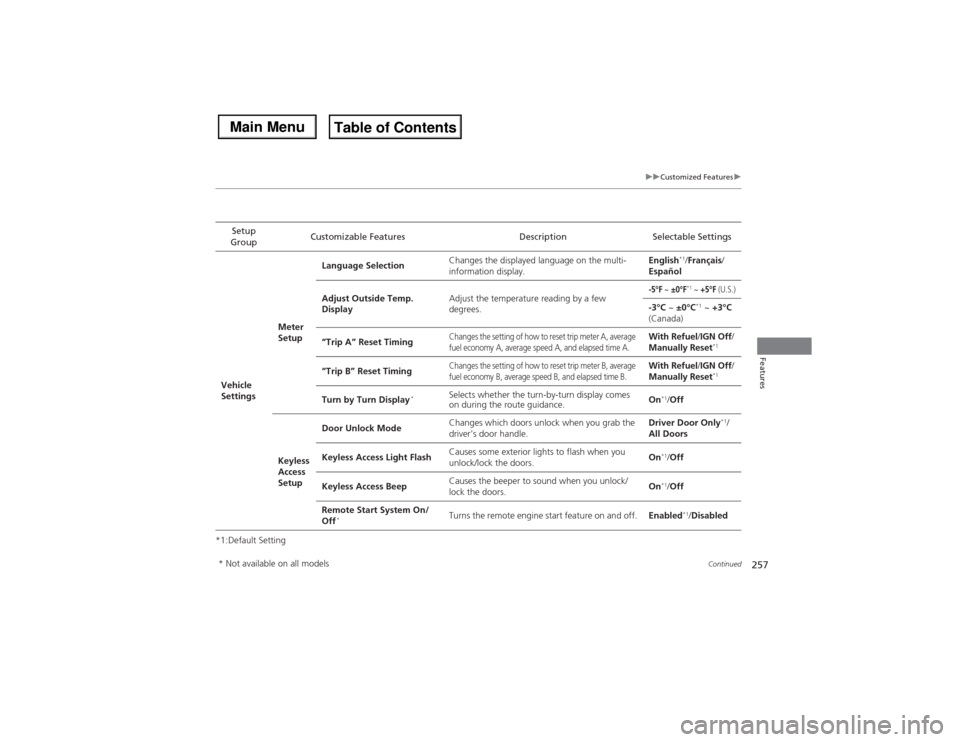
uuCustomized Featuresu
Continued
Features
*1:Default SettingSetup
GroupCustomizable Features Description Selectable SettingsVehicle
SettingsMeter
SetupLanguage SelectionChanges the displayed language on the multi-
information display.English
*1/Français/
Español
Adjust Outside Temp.
DisplayAdjust the temperature reading by a few
degrees.
-5°F
~ ±0°F
*1 ~ +5°F
(U.S.)
-3°C ~ ±0°C
*1 ~ +3°C
(Canada)
“Trip A” Reset Timing
Changes the setting of how to reset trip meter A, average
fuel economy A, average speed A, and elapsed time A.
With Refuel/IGN Off/
Manually Reset
*1
“Trip B” Reset Timing
Changes the setting of how to reset trip meter B, average
fuel economy B, average speed B, and elapsed time B.
With Refuel/IGN Off/
Manually Reset
*1
Turn by Turn Display
*
Selects whether the turn-by-turn display comes
on during the route guidance.On
*1/Off
Keyless
Access
SetupDoor Unlock ModeChanges which doors unlock when you grab the
driver’s door handle.Driver Door Only
*1/
All Doors
Keyless Access Light FlashCauses some exterior lights to flash when you
unlock/lock the doors.On
*1/Off
Keyless Access BeepCauses the beeper to sound when you unlock/
lock the doors.On*1/Off
Remote Start System On/
Off
*
Turns the remote engine start feature on and off.Enabled
*1/Disabled
* Not available on all models
Page 270 of 500
269
uuBluetooth® HandsFreeLink®uUsing HFL
Features
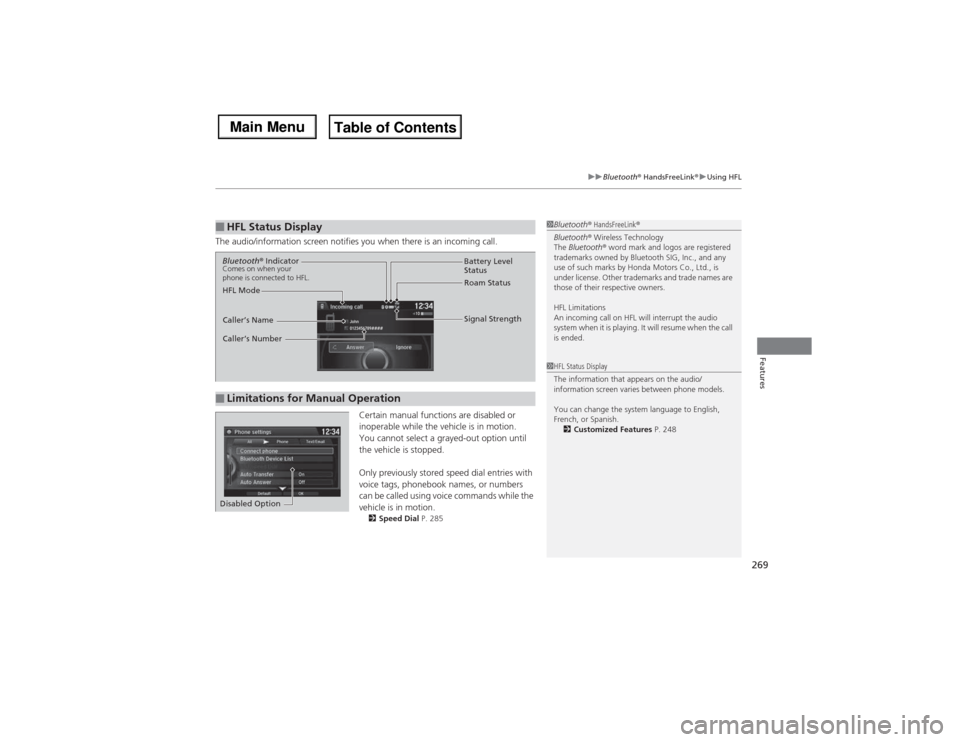
The audio/information screen notifies you when there is an incoming call.
Certain manual functions are disabled or
inoperable while the vehicle is in motion.
You cannot select a grayed-out option until
the vehicle is stopped.
Only previously stored speed dial entries with
voice tags, phonebook names, or numbers
can be called using voice commands while the
vehicle is in motion.
2Speed Dial P. 285
■HFL Status Display
1Bluetooth® HandsFreeLink®
Bluetooth® Wireless Technology
The Bluetooth® word mark and logos are registered
trademarks owned by Bluetooth SIG, Inc., and any
use of such marks by Honda Motors Co., Ltd., is
under license. Other trademarks and trade names are
those of their respective owners.
HFL Limitations
An incoming call on HFL will interrupt the audio
system when it is playing. It will resume when the call
is ended.1HFL Status Display
The information that appears on the audio/
information screen varies between phone models.
You can change the system language to English,
French, or Spanish.
2Customized Features P. 248
■Limitations for Manual OperationBluetooth® IndicatorComes on when your
phone is connected to HFL.
Signal Strength HFL ModeBattery Level
Status
Roam Status
Caller’s Name
Caller’s Number
Disabled Option
Page 290 of 500
Continued
289
uuBluetooth® HandsFreeLink®uHFL Menus
Features
■To make a call using the imported
phonebook
1.Press the PHONE button.
2.Press the MENU button.
3.Rotate to select Phonebook, then
press .
4.The phonebook is stored alphabetically.
Move to Search.
uYou can use the keyboard on the touch
screen for an alphabetical search.
5.Rotate to select a number, then press
.
uDialing starts automatically.
1To make a call using the imported phonebook
This function is disabled while the vehicle is moving.
However, you can call a stored voice-tagged speed
dial number, phonebook name, or number using
voice commands.
2Limitations for Manual Operation P. 269
2Speed Dial P. 285
You can use the keyboard on the On Demand Multi-
Use Display
TM for an alphabetical search.
Page 291 of 500
uuBluetooth® HandsFreeLink®uHFL Menus
290Features
■To make a call using a phone number
1.Press the PHONE button.
2.Press the MENU button.
3.Rotate to select Dial, then press .
4.Rotate to select a number, then press
.
5.Rotate to select , then press .
uDialing starts automatically.■To make a call using redial
1.Press the PHONE button.
2.Press the MENU button.
3.Rotate to select Redial, then press .
uDialing starts automatically.
1To make a call using a phone number
This function is disabled while the vehicle is moving.
However, you can call a stored voice-tagged speed
dial number, phonebook name, or number using
voice commands.
2Limitations for Manual Operation P. 269
2Speed Dial P. 285
You can use the keyboard on the On Demand Multi-
Use Display
TM to input numbers.
Select numbers, then to start dialing.
Page 324 of 500
Continued
323
uuWhen DrivinguStarting the Engine
Driving
You can turn the engine off when the vehicle is completely stopped.
1.Shift to
(P.
2.Press the ENGINE START/STOP button with your foot on the brake pedal.
■Stopping the Engine
1Starting the Engine
The immobilizer system protects your vehicle from
theft.
If an improperly coded device is used, the engine’s
fuel system is disabled.
2Immobilizer System P. 135
Page 325 of 500

uuWhen DrivinguStarting the Engine
324Driving
You can remotely start the engine using the two-way keyless access remote from
distances up to 328 feet (100 meters) from the vehicle.■To start the engine
The engine runs for up to 10 minutes without you starting the vehicle.
To extend the run time for another 10 minutes during the first run, press the
button, then press and hold the button.
uThe amber LED blinks, then the green LED comes back on if a 10-minute
extension request was transmitted successfully.
After pressing the (lock) button, wait for the green LED to blink. This indicates that
the all the doors and the tailgate are locked. ■Remote Engine Start with Vehicle Feedback
*
1Remote Engine Start with Vehicle Feedback
*
WARNING:
Carbon monoxide gas is toxic and can
rapidly accumulate in closed or even partly enclosed
areas.
Breathing it can cause unconsciousness and even kill
you.
Never use the remote engine starter with the vehicle
parked in a garage or other areas with limited
ventilation.
Operate the remote in an open space from distances
up to 328 feet (100 meters) from the vehicle. If there
are buildings and obstacles between your vehicle and
the remote, the range will be reduced.
This distance may vary by external electrical
interference.
The engine may not start by the remote engine start
if:
•You have disabled a remote engine start setting
using the multi-information display (MID).•The power mode is not in VEHICLE OFF (LOCK).•The shift lever is in a position other than
(P.
•The hood is open, or any door or the tailgate is
unlocked.•You have already used the remote twice to start
the engine.•Another registered keyless access remote is in the
vehicle.•There is any antenna failure.•Door is unlocked with the built-in key.
With the doors locked, Press the button,
then press and hold the button.
Amber LED: Blinks when any button is pressed.
Continues to blink
during a vehicle
self check until the
engine starts.Go within the range,
and try again.
Green LED: Comes on while
the engine is running.Red LED: Blinks when the
remote is out of the keyless
access system range.
* Not available on all models


