Page 170 of 500

Continued
169
uuAdjusting the SeatsuRear Seats
Controls
Separately fold down the left and right halves of the second row seat to make room
for cargo.
1.Store the center seat belt first. Insert the latch plate into the slot on the side of the
anchor buckle.
2.Retract the seat belt into the holder on the ceiling.
2Seat Belt with Detachable Anchor P. 36
3.Lower the center head restraint to its lowest position. Put the armrest back into
the seat-back.
4.Pull up on the seat-back angle adjustment
lever.
To return the seat to the original position, pull
up the seat-back in the upright position.■Folding Down the Second Row Seat
1Folding Down the Second Row Seat
Make sure that the folded seat-back does not press
against the front passenger seat, as this can cause the
weight sensors in the front passenger seat to work
improperly.
2Passenger Airbag Off Indicator P. 52
The front seats must be far enough forward so they
do not interfere with the second row seats as they
fold down.
To lock the seat-back upright, push it backwards until
it locks.
Make sure the seat-back, head restraints and seat
cushion are securely latched back into place before
driving. Also, make sure all rear shoulder belts are
positioned in front of the seat-back, and the center
shoulder belt is re-positioned in the holding slot.
Lever
Page 172 of 500
171
uuAdjusting the SeatsuArmrest
Controls
Armrest
The console lid can be used as an armrest.
To adjust:
Slide the armrest to a desired position.
Pull down the armrest in the center seat-back.
■Using the Front Seat Armrest■Using the Rear Seat Armrest
Page 178 of 500
Continued
177
uuInterior Lights/Interior Convenience ItemsuInterior Convenience Items
Controls
■Front seat beverage holders
Are located in the console between the front
seats.■Second row seat beverage holders
Fold the armrest down to use the rear seat
beverage holders.■Third row seat beverage holders
■Beverage Holders
1Beverage HoldersNOTICESpilled liquids damage the upholstery, carpeting, and
electrical components in the interior.
Be careful when you are using the beverage holders.
Hot liquid can scald you.
Page 183 of 500

uuInterior Lights/Interior Convenience ItemsuInterior Convenience Items
182Controls
If the power mode is in ON:
Seat heater - The HI setting heats the seats
faster than the LO setting.
Seat ventilation
* - The HI setting ventilates
the seats faster than the LO setting.
1.Select .
2.Change the setting with one of the
following:
The Heat/Cool* level indicators: Select your
desired level setting. The left is for a LO
setting, the center is for a MID setting, and
to the right for a HI setting.
(+/(-: To go up or down one level at a
time.
AUTO*: The system automatically selects
the setting most suitable to the ambient
environment.
OFF: Turn off the system.
When a comfortable temperature is reached
while using the seat heaters in HI, select MID
or LO to keep the seat warm.
■Front Seat Heaters and Seat Ventilation
*
1Front Seat Heaters and Seat Ventilation
*
Do not use the seat heaters and the seat ventilation
even in LO when the engine is off. Under such
conditions, the battery may be weakened, making
the engine difficult to start.
3
WARNING
Heat induced burns are possible when
using seat heaters.
Persons with a diminished ability to sense
temperature (e.g., persons with diabetes,
lower-limb nerve damage, or paralysis) or
with sensitive skin should not use seat
heaters.
Models with seat ventilationModels without seat ventilation* Not available on all models
Page 186 of 500
185
Continued
Controls
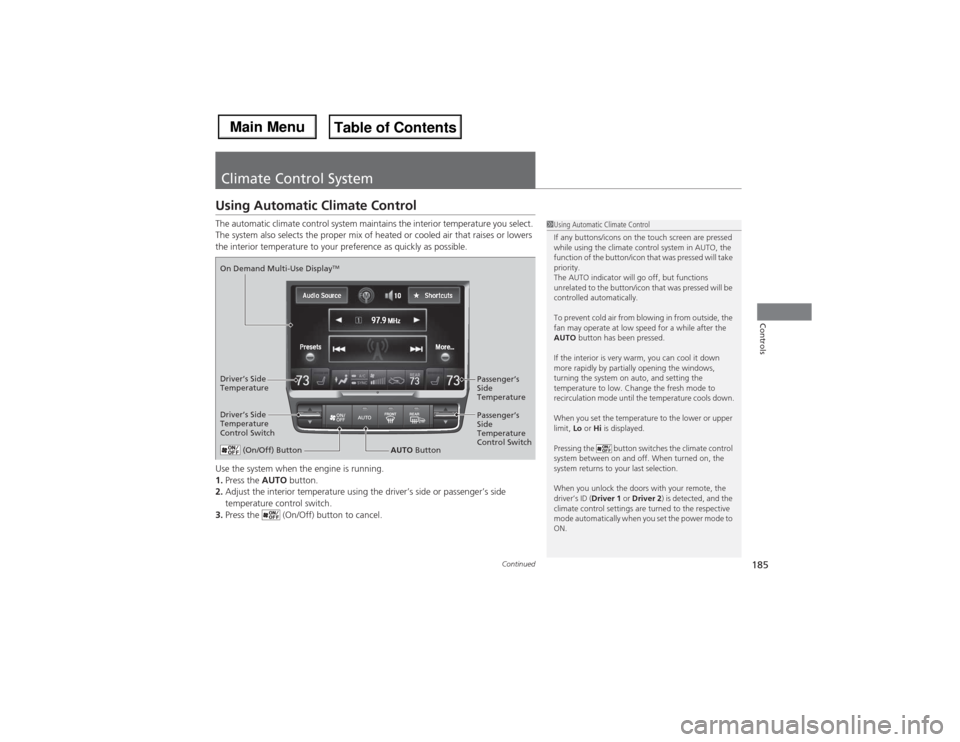
Climate Control SystemUsing Automatic Climate ControlThe automatic climate control system maintains the interior temperature you select.
The system also selects the proper mix of heated or cooled air that raises or lowers
the interior temperature to your preference as quickly as possible.
Use the system when the engine is running.
1.Press the AUTO button.
2.Adjust the interior temperature using the driver’s side or passenger’s side
temperature control switch.
3.Press the (On/Off) button to cancel.
1Using Automatic Climate Control
If any buttons/icons on the touch screen are pressed
while using the climate control system in AUTO, the
function of the button/icon that was pressed will take
priority.
The AUTO indicator will go off, but functions
unrelated to the button/icon that was pressed will be
controlled automatically.
To prevent cold air from blowing in from outside, the
fan may operate at low speed for a while after the
AUTO button has been pressed.
If the interior is very warm, you can cool it down
more rapidly by partially opening the windows,
turning the system on auto, and setting the
temperature to low. Change the fresh mode to
recirculation mode until the temperature cools down.
When you set the temperature to the lower or upper
limit, Lo or Hi is displayed.
Pressing the button switches the climate control
system between on and off. When turned on, the
system returns to your last selection.
When you unlock the doors with your remote, the
driver’s ID (Driver 1 or Driver 2) is detected, and the
climate control settings are turned to the respective
mode automatically when you set the power mode to
ON.
(On/Off) Button
AUTO Button On Demand Multi-Use Display
TM
Driver’s Side
Temperature
Control SwitchPassenger’s
Side
Temperature
Control Switch Passenger’s
Side
Temperature Driver’s Side
Temperature
Page 188 of 500

Continued
187
uuClimate Control SystemuUsing Automatic Climate Control
Controls
■Changing the interior temperature setting
1.Select the driver’s or passenger’s side
temperature control icon.
2.Change the temperature setting from the
following:
Temperature bar: Select a point where your
desired temperature setting is.
Farther to the left is for a lower, and to the
right for a higher setting.
3/4: To raise or lower the temperature
setting one degree at a time.
While you select and hold 3/4, the
temperature decreases or increases.
MAX COOL ON/OFF: To rapidly cool down
the interior.
uThe A/C indicator comes on. The setting
returns to the previously selected value
when you select it again.
MAX HEAT ON/OFF: To rapidly warm up the
interior.
uThe A/C indicator goes off. The setting
returns to the previously selected value
when you select it again.
1Using Automatic Climate Control
When you set the temperature to the lower or upper
limit, Lo or Hi is displayed.
When you set the MAX COOL or MAX HEAT, MAX
COOL or MAX HEAT is displayed.
The side you selected.
Temperature Bar
Page 323 of 500

322Driving
When DrivingStarting the Engine
1.Make sure the parking brake is applied.
2.Check that the shift lever is in
(P, then
depress the brake pedal.
uAlthough it is possible to start the vehicle
in
(N, it is safer to start it in
(P.
3.Press the ENGINE START/STOP button
without depressing the accelerator pedal.
The engine will crank until it starts.
1Starting the Engine
Keep your foot firmly on the brake pedal when
starting the engine.
The engine is harder to start in cold weather and in
thinner air found at altitudes above 8,000 feet (2,400
meters).When starting the engine in cold weather, turn off all
electrical accessories such as the lights, climate control
system, and rear defogger in order to reduce battery drain.If you live in a region where winter is extremely cold,
an engine block heater will improve starting and
warming of the engine. If temperatures consistently
below -22°F (-30°C) are expected, the coolant
mixture should be changed to a higher concentration
to prevent freezing. Consult a dealer for details.
If the exhaust system sounds abnormal or you can
smell exhaust gas inside the vehicle, have your vehicle
checked by a dealer. There may be a problem with
the engine or exhaust system.
Bring the keyless access remote close to the ENGINE
START/STOP button if the battery in the keyless
access remote is weak.
2If the Keyless Access Remote Battery is
Weak P. 458
The engine may not start if the keyless access remote
is subjected to strong radio waves.
Do not hold the ENGINE START/STOP button to
start the engine.
If the engine does not start, wait at least 10 seconds
before trying again.
Brake Pedal
Page 364 of 500

363
uuWhen DrivinguSuper Handling-All Wheel Drive
TM (SH-AWD®)
*
Continued
Driving
Super Handling-All Wheel Drive
TM (SH-AWD®)
*
The system controls and transfers varying amounts of engine torque to each wheel
in accordance with the driving conditions.
SH-AWD® helps to enhance driving stability, and lets you handle situations like
slippery surfaces, such as snow, sand, mud, and steep hills, better than when driving
with two wheel drive. However, the system does not help to enhance braking. Be
precautious about the following:
•It is still your responsibility to drive safely when you steer, accelerate, and apply
brakes.
•Leave a sufficient margin when braking on slippery surfaces.Tire Pressure Monitoring System (TPMS)
Monitors the tire pressure while you are
driving. If your vehicle’s tire pressure becomes
significantly low, the low tire pressure/TPMS
indicator comes on and a message appears on
the MID.
1Super Handling-All Wheel Drive
TM (SH-AWD®)
*
NOTICEAvoid continuously driving in sand or mud where a
wheel is likely to spin out, and do not drive once the
SH-AWD® indicator starts blinking. Driving
continuously under such conditions can damage the
system’s torque distribution unit.
Do not drive through deep water.
The SH-AWD® system may not function properly if
tire type and size are mixed.
Make sure to use the same size and type of tire, and
the air pressures as specified.
2Tire and Wheel Replacement P. 4231Tire Pressure Monitoring System (TPMS)
Conditions such as low ambient temperature and
altitude change directly affect tire pressure and can
trigger the low tire pressure/TPMS indicator to come
on.
2If the Low Tire Pressure/TPMS Indicator
Comes On or Blinks P. 468
Tire pressure checked and inflated in:•Warm weather can become under-inflated in
colder weather.•Cold weather can become over-inflated in warmer
weather.
The low tire pressure/TPMS indicator will not come
on as a result of over inflation.
* Not available on all models

