2014 Acura MDX blind
[x] Cancel search: blindPage 317 of 500

316
uuTowing a TraileruTowing Preparation
Driving
■Hitches
Read the trailer manufacturer’s instructions, and select the appropriate draw bar for
the height of the trailer you will be towing.■Weight distribution hitches
Your vehicle is designed to tow without the need for a load distributing hitch. If you
wish to use one, please consult your trailer maker for proper installation and set-up.
Improper set-up could degrade the handling, stability, and braking performance of
your vehicle.■Safety chains
Always use safety chains when you tow a trailer. Leave enough slack to allow the
trailer to turn corners easily, but do not allow the chains to drag on the ground.■Sway control
This device can be used if your trailer tends to sway. Your trailer maker can tell you
what kind of sway control you need and how to install it. Improper installation could
degrade the handling and stability of your vehicle.■Automatic transmission cooler
Install an additional ATF (automatic transmission fluid) cooler to help prevent the
transmission from overheating, and damaging. You can get the additional ATF
cooler at a dealer.An additional ATF cooler is required to keep the transmission from overheating when
towing more than 3,500 lbs (1,588 kg). You can get the additional ATF cooler at a dealer.■Trailer mirrors
Many states, provinces and territories require special exterior mirrors when towing a
trailer. Install special mirrors whenever you cannot clearly see behind you, or if the
trailer creates a blind spot.4WD models
Page 362 of 500

361
uuWhen DrivinguBlind Spot Information (BSI) System
*
Continued
Driving
Blind Spot Information (BSI) System
*
Is designed to detect vehicles in specified alert zones adjacent to your vehicle,
particularly in harder to see areas commonly known as “blind spots.”
When the system detects vehicles approaching from behind in adjacent lanes, the
appropriate indicator comes on for a few seconds, providing assistance when you
change lanes.■How the system works
1Blind Spot Information (BSI) System
*
Important Safety Reminder
Like all assistance systems, BSI has limitations. Over
reliance on BSI may result in a collision.
The system is for your convenience only. Even if an
object is within the alert zone, the following
situations may occur.•The BSI alert indicator may not come on due to
obstruction (splashes, etc.) even without the Blind
Spot Not Available MID appearing.•The BSI alert indicator may come on even with the
message appearing.
The BSI alert indicator may not come on under the
following conditions:•A vehicle does not stay in the alert zone for more
than two seconds.•A vehicle is parked in a side lane.•The speed difference between your vehicle and the
vehicle you are passing is greater than 6 mph (10
km/h).•An object not detected by the radar sensors
approaches or passes your vehicle.
3
WARNING
Failure to visually confirm that it is safe to
change lanes before doing so may result in
a crash and serious injury or death.
Do not rely only on the blind spot
information system when changing lanes.
Always look in your mirrors, to either side
of your vehicle, and behind you for other
vehicles before changing lanes.
●The shift lever is in
(D.
●Your vehicle speed is
between 20 mph (32 km/h)
and 100 mph (160 km/h)
Alert zone range
A: Approx. 1.6 ft. (0.5 m)
B: Approx. 10 ft. (3 m)
C: Approx. 10 ft. (3 m)Radar Sensors:
underneath the
rear bumper
cornersAlert Zone
A
B
C
* Not available on all models
Page 363 of 500
uuWhen DrivinguBlind Spot Information (BSI) System
*
362Driving
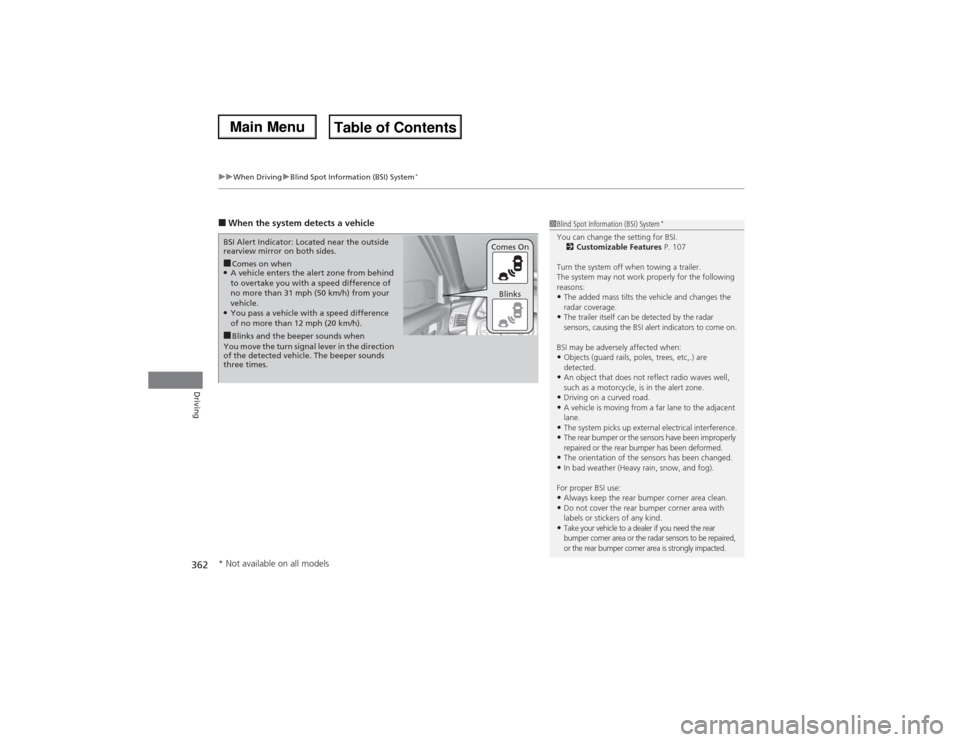
■When the system detects a vehicle
1Blind Spot Information (BSI) System
*
You can change the setting for BSI.
2Customizable Features P. 107
Turn the system off when towing a trailer.
The system may not work properly for the following
reasons:•The added mass tilts the vehicle and changes the
radar coverage.•The trailer itself can be detected by the radar
sensors, causing the BSI alert indicators to come on.
BSI may be adversely affected when:•Objects (guard rails, poles, trees, etc,.) are
detected.•An object that does not reflect radio waves well,
such as a motorcycle, is in the alert zone.•Driving on a curved road.•A vehicle is moving from a far lane to the adjacent
lane.•The system picks up external electrical interference.•The rear bumper or the sensors have been improperly
repaired or the rear bumper has been deformed.•The orientation of the sensors has been changed.•In bad weather (Heavy rain, snow, and fog).
For proper BSI use:•Always keep the rear bumper corner area clean.•Do not cover the rear bumper corner area with
labels or stickers of any kind. •Take your vehicle to a dealer if you need the rear
bumper corner area or the radar sensors to be repaired,
or the rear bumper corner area is strongly impacted.
■Comes on when●A vehicle enters the alert zone from behind
to overtake you with a speed difference of
no more than 31 mph (50 km/h) from your
vehicle.●You pass a vehicle with a speed difference
of no more than 12 mph (20 km/h). BSI Alert Indicator: Located near the outside
rearview mirror on both sides.■Blinks and the beeper sounds when
You move the turn signal lever in the direction
of the detected vehicle. The beeper sounds
three times.Comes On
Blinks
* Not available on all models
Page 484 of 500

483Information
Devices that Emit Radio WavesThe following products and systems on your vehicle emit radio waves when in operation.Each of the above complies with the appropriate requirements or the required standards of
FCC (Federal Communications Commission) and Industry Canada Standard, described below:As required by the FCC:This device complies with Part 15 of the FCC rules. Operation is
subject to the following two conditions: (1) This device may not cause
harmful interference, and (2) this device must accept any interference
received, including interference that may cause undesired operation.Changes or modifications not expressly approved by the party responsible
for compliance could void the user’s authority to operate the equipment.This device complies with Industry Canada Standard RSS-Gen/210/310. Operation is
subject to the following two conditions: (1) this device may not cause interference,
and (2) this device must accept any interference, including interference that may
cause undesired operation of the device.AcuraLinkAudio SystemBlind Spot Information SystemBluetooth® AudioBluetooth® HandsFreeLink®HomeLink® Universal TransceiverCollision Mitigation Braking System
TM
Immobilizer SystemRemote TransmitterKeyless Access SystemTire Pressure Monitoring System (TPMS)
Page 493 of 500

492Index
BBack-Up Light............................................ 411
Battery....................................................... 426
Charging System Indicator ................. 71, 465
Jump Starting .......................................... 460
Maintenance (Checking the Battery) ........ 426
Belts (Seat).................................................. 31
Beverage Holders...................................... 177
Blind Spot Information (BSI) System........ 361
Indicator .................................................... 83
Bluetooth® Audio..................................... 237
Bluetooth® HandsFreeLink®..................... 268
Booster Seats (For Children)....................... 65
Brake System............................................. 367
Anti-lock Brake System (ABS) ................... 369
Brake Assist System ................................. 370
Brake System Indicator............................... 70
Fluid ........................................................ 406
Foot Brake ............................................... 368
Indicator ............................................ 70, 467
Parking Brake .......................................... 367
Brightness Control (Instrument Panel).... 153
BSI (Blind Spot Information) System........ 361
Bulb Replacement..................................... 407
Back-Up Light .......................................... 411
Brake Light and Turn Signal Light............. 409
Daytime Running Light ............................ 148
Front Turn Signal/Front Side Marker/
Parking Light.......................................... 408
Headlights ............................................... 407
High-Mount Brake Light .......................... 412LED Puddle Light ..................................... 412
Rear License Plate Light ........................... 412
Side Turn Signal/Emergency Indicator
Light...................................................... 408
Taillight and Rear Side Marker Light ........ 410
Bulb Specifications................................... 480
CCarbon Monoxide Gas............................... 66
Carrying Cargo................................. 305, 307
CD Player................................................... 224
Center Pocket........................................... 176
Certification Label.................................... 482
Changing Bulbs........................................ 407
Charging System Indicator................. 71, 465
Child Safety................................................. 54
Childproof Door Locks............................. 126
Child Seat.................................................... 54
Booster Seats ............................................ 65
Child Seat for Infants................................. 56
Child Seat for Small Children ..................... 57
Installing a Child Seat with a Lap/Shoulder
Seat Belt .................................................. 61
Larger Children ......................................... 64
Rear-facing Child Seat ............................... 56
Selecting a Child Seat ................................ 58
Childproof Door Locks............................. 126
Cleaning the Exterior............................... 434
Cleaning the Interior................................ 432
Client Service Information....................... 490Climate Control System........................... 185
Changing the Mode................................ 188
Defrosting the Windshield and
Windows .............................................. 191
Dust and Pollen Filter .............................. 431
Rear Climate Control System................... 192
Recirculation/Fresh Air Mode................... 190
Sensors ................................................... 196
Synchronized Mode ................................ 189
Using Automatic Climate Control ............ 185
Clock......................................................... 114
CMBS
TM (Collision Mitigation Braking
SystemTM)................................................ 371
Coat Hook................................................ 180
Collision Mitigation Braking System
TM
(CMBS
TM)................................................. 371
Indicator ................................................... 83
Compact Spare Tire.......................... 439, 481
Compass.................................................... 301
Console Compartment............................. 175
Controls.................................................... 113
Coolant (Engine)...................................... 403
Adding to the Radiator ........................... 404
Adding to the Reserve Tank .................... 403
Overheating ............................................ 463
Creeping (Automatic Transmission)........ 328
Cruise Control.......................................... 334
Indicator ................................................... 78
Cup Holders.............................................. 177
Customized Features....................... 104, 248
Page 495 of 500

494Index
Fuel...................................................... 16, 383
Economy ................................................. 385
Gauge ....................................................... 97
Instant Fuel Economy ............................... 101
Low Fuel Indicator ..................................... 73
Range ...................................................... 101
Recommendation .................................... 383
Refueling ................................................. 383
Fuel Economy............................................ 385
Fuel Fill Cap......................................... 16, 384
Message .................................................. 466
Fuel Fill Door....................................... 16, 384
Unable to Unlock ..................................... 476
Fuses.......................................................... 469
Inspecting and Changing ......................... 474
Locations ......................... 469, 471, 472, 473GGasoline (Fuel)
Economy ................................................. 385
Gauge ....................................................... 97
Information ............................................. 383
Low Fuel Indicator ..................................... 73
Refueling ................................................. 383
Gauges......................................................... 97
Gear Shift Lever Positions
Automatic Transmission ........................... 329
Glass (care)................................................ 435
Glove Box.................................................. 174
HHandling the Unexpected........................ 437
HandsFreeLink® (HFL)............................... 268
Auto Answer ........................................... 282
Automatic Import of Cellular Phonebook
and Call History ..................................... 284
Automatic Transferring............................ 282
Displaying Messages................................ 297
Editing User Name................................... 281
HFL Buttons............................................. 268
HFL Menus .............................................. 270
HFL Status Display ................................... 269
Limitations for Manual Operation ............ 269
Making a Call .......................................... 288
Options During a Call .............................. 294
Phone Setup............................................ 274
Receiving a Call ....................................... 293
Receiving a Text Message/E-mail.............. 295
Ring Tone................................................ 283
Selecting a Mail Account ......................... 296
Speed Dial ............................................... 285
To Create a Security PIN .......................... 280
To Set Up a Text Message/E-mail
Options ................................................. 279
Use Contact Photo .................................. 283
Hazard Warning Button.............................. 2
HDMI Jack..................................................... 5
Head Restraints........................ 164, 165, 166
Headlight Washers................................... 152
Headlights................................................. 145
Aiming .................................................... 407Automatic Operation .............................. 146
Dimming......................................... 145, 148
Operating ............................................... 145
Heated Door Mirrors............................... 154
Heated Steering Wheel........................... 181
Heated Windshield Button...................... 154
Heater (Steering Wheel).......................... 181
Heaters (Seat)................................... 182, 183
HFL (HandsFreeLink®).............................. 268
High Beam Indicator.................................. 76
Hill Start Assist System............................. 326
HomeLink® Universal Transceiver........... 266
IIdentification Numbers............................ 482
Engine and Transmission ......................... 482
Vehicle Identification............................... 482
IDS (Integrated Dynamics System).......... 333
IDS Button................................................ 333
Illumination Control................................ 153
Button .................................................... 153
Immobilizer System.................................. 135
Indicator ................................................... 77
Indicators.................................................... 70
Adaptive Cruise Control (ACC) with
Low Speed Follow (LSF) ................... 82, 337
Anti-lock Brake System (ABS) .................... 74
Blind Spot Information (BSI) .............. 83, 362
Brake System ............................................ 70
Charging System............................... 71, 465