Page 117 of 293
Instruments and controls115
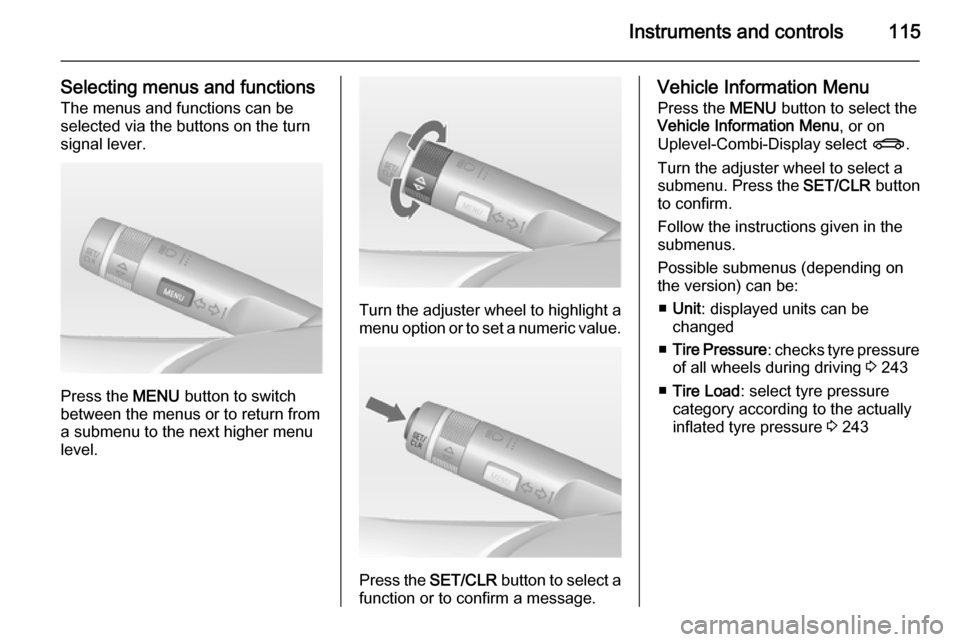
Selecting menus and functionsThe menus and functions can be
selected via the buttons on the turn signal lever.
Press the MENU button to switch
between the menus or to return from
a submenu to the next higher menu
level.
Turn the adjuster wheel to highlight a
menu option or to set a numeric value.
Press the SET/CLR button to select a
function or to confirm a message.
Vehicle Information Menu
Press the MENU button to select the
Vehicle Information Menu , or on
Uplevel-Combi-Display select X.
Turn the adjuster wheel to select a
submenu. Press the SET/CLR button
to confirm.
Follow the instructions given in the submenus.
Possible submenus (depending on the version) can be:
■ Unit : displayed units can be
changed
■ Tire Pressure : checks tyre pressure
of all wheels during driving 3 243
■ Tire Load : select tyre pressure
category according to the actually
inflated tyre pressure 3 243
Page 118 of 293
116Instruments and controls
■Remaining Oil Life : indicates when
to change the engine oil and filter
3 104
■ Speed Warning : if exceeding the
preset speed, a warning chime will
be activated
■ Traffic Sign Assistant : displays
detected traffic signs for the current
route section 3 198
■ Following Dist. : displays the
distance to a moving vehicle ahead
3 186
Selection and indication can be
different between Midlevel-Display,
Uplevel-Display, and Uplevel-Combi-
Display.
Trip/Fuel Information Menu
Press the MENU button to select the
Trip/Fuel Information Menu , or select
W on Uplevel-Combi-Display.
Turn the adjuster wheel to select a
submenu. Press the SET/CLR button
to confirm.
■ Trip odometer 1
■ Trip odometer 2
■ Digital speed
Trip odometer 2 and digital speed are
only available on vehicles with
Uplevel-Display or Uplevel-Combi-
Display.
Page 119 of 293

Instruments and controls117
Reset trip odometer by pressing the
SET/CLR button on the turn signal
lever for a few seconds or by pressing
the reset knob between speedometer and Driver Information Centre with
the ignition on.
On vehicles with trip computer, more
submenus are available.
Selection and indication can be
different between Midlevel-Display,
Uplevel-Display, and Uplevel-Combi-
Display.
Trip/Fuel Information Menu, Trip
Computer 3 124.
ECO Information Menu Press the MENU button to select
s in the top line of the Uplevel-
Combi-Display.
Turn the adjuster wheel to select a
submenu. Press the SET/CLR button
to confirm.Submenus are:
■ Shift indication : Current gear is
indicated inside an arrow. The
figure above recommends
upshifting for fuel saving reasons.
Eco index display : The current fuel
consumption is indicated on a segment display. For economical
driving, adapt your driving style to
keep the filled segments within the
Eco area. The more segments are
filled, the higher the fuel
consumption. Simultaneously the
current consumption value is
indicated.
■ Top Consumers : List of top comfort
consumers currently switched on is displayed in descending order. Fuel
saving potential is indicated. A
switched-off consumer disappears from the list and the consumption
value will be updated.
During sporadic driving conditions,
the engine will activate the heated
rear window automatically to
increase the engine load. In that
case, rear window heating is
indicated as one of the top
consumers, without activation by
the customer.
Page 122 of 293
120Instruments and controls
Press (the outer ring)■ To select or activate the marked option
■ To confirm a set value
■ To switch a system function on/off
BACK button
Press button to: ■ exit a menu without changing settings
■ return from a submenu to a higher menu level
■ delete the last character in a character sequence
Press and hold the button for a few
seconds to delete the entire entry.
Vehicle personalisation 3 127.
Memorised settings 3 21.Vehicle messages
Messages are indicated mainly in the
Driver Information Centre (DIC), in
some cases together with a warning and signal buzzer.
Press the SET/CLR button, the
MENU button or turn the adjuster
wheel to confirm a message.
Vehicle messages on the
Midlevel-Display
The vehicle messages are displayed
as code numbers.
No.Vehicle message2No radio remote control
detected, depress clutch pedal
for a restart3Engine coolant level low4Air conditioning off5Steering wheel is locked
Page 123 of 293

Instruments and controls121
No.Vehicle message6Depress brake pedal to release
electric parking brake7Turn steering wheel, switch
ignition off and then on9Turn steering wheel, start
engine again12Vehicle overloaded13Compressor overheated15Centre high-mounted brake
light failure16Brake light failure17Headlight levelling malfunction18Left low beam failure19Rear fog light failure20Right low beam failure21Left sidelight failure22Right sidelight failure23Reversing light failureNo.Vehicle message24Number plate light failure25Left front turn signal failure26Left rear turn signal failure27Right front turn signal failure28Right rear turn signal failure29Check trailer brake light30Check trailer reversing light31Check left trailer turn signal32Check right trailer turn signal33Check trailer rear fog light34Check trailer rear light35Replace battery in radio remote
control48Clean side blind zone alert
system49Lane departure warning
unavailable53Tighten gas capNo.Vehicle message54Water in diesel fuel filter55Diesel particle filter is full
3 15956Tyre pressure imbalance on
front axle57Tyre pressure imbalance on
rear axle58Tyres without TPMS sensors
detected59Open and then close driver
window60Open and then close front
passenger window61Open and then close rear left
window62Open and then close rear right
window65Theft attempted66Service theft alarm system67Service steering wheel lock
Page 126 of 293
124Instruments and controls
1. Switch off immediately anyelectrical consumers which are
not required for a safe ride, e.g.
seat heating, heated rear window
or other main consumers.
2. Charge the vehicle battery by driving continuously for a while or
by using a charging device.
The warning message or warning
code will disappear after the engine
has been started two times
consecutively without a voltage drop.
If the vehicle battery cannot be
recharged, have the cause of the fault
remedied by a workshop.Trip computer
The menus and functions can be
selected via the buttons on the turn
signal lever.
Press the MENU button to select the
Trip/Fuel Information Menu , or select
W on the Uplevel-Combi-Display.
Trip/Fuel Information Menu on
Uplevel-Display
Turn the adjuster wheel to select one of the submenus:
Page 127 of 293
Instruments and controls125
■ Trip odometer 1
■ Trip odometer 2
■ Range
■ Average consumption
■ Instantaneous consumption
■ Average speed
■ Digital speed
■ Traffic sign assistant
■ Route guidance
Trip/Fuel Information Menu on
Uplevel-Combi-Display
Turn the adjuster wheel to select the
submenus:■ Trip odometer 1
■ Average consumption 1
■ Average speed 1
■ Trip odometer 2
■ Average consumption 2
■ Average speed 2
■ Digital speed
■ Range
■ Instantaneous consumption
■ Route guidance
Trip computer 1 and 2
The information of two trip computers can be reset separately for odometer,
average consumption and average
speed by pressing the SET/CLR
Page 136 of 293

134Lighting
It switches to low beam when:■ a sensor detects the lights of oncoming or preceding vehicles
■ the vehicle speed is slower than 12 mph
■ it is foggy or snowy
■ driving in urban areas
If there are no restrictions detected,
the system switches back to high
beam.
Activation
The high beam assist is activated by
pushing the indicator lever twice with
a speed above 25 mph.
The green control indicator l
illuminates continuously when the
assist is activated, the blue one 7
illuminates when high beam is on.
Control indicator l 3 113.
Deactivation
Push indicator lever once. It is also deactivated when front fog lights are
switched on.
If a headlight flash is activated when
the high beam is on, the high beam
assist will be deactivated.
If a headlight flash is activated when
the high beam is off, the high beam
assist will stay activated.
The latest setting of the high beam
assist will remain after the ignition is
switched on again.
High beam assist with adaptive
forward lighting 3 135.
Headlight flash To activate the headlight flash, pull
lever.Headlight range
adjustment
Manual headlight range
adjustment
To adapt headlight range to the
vehicle load to prevent dazzling: turn
thumb wheel ? to required position.
0=front seats occupied1=all seats occupied2=all seats occupied and load
compartment laden3=driver's seat occupied and load
compartment laden.