2014.5 Peugeot 308 phone
[x] Cancel search: phonePage 41 of 415
39
touch screen
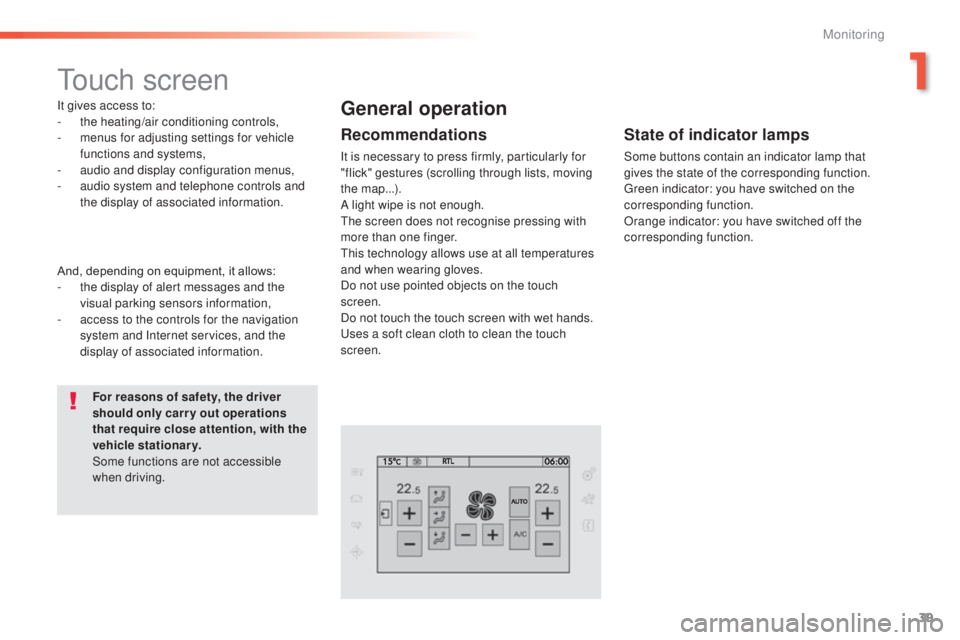
It gives access to:
- the heating/air conditioning controls,
-
m
enus for adjusting settings for vehicle
functions and systems,
-
a
udio and display configuration menus,
-
a
udio system and telephone controls and
the display of associated information.
For reasons of safety, the driver
should only carr y out operations
that require close attention, with the
vehicle stationary.
Some functions are not accessible
when driving.General operation
Recommendations
It is necessary to press firmly, particularly for
"flick" gestures (scrolling through lists, moving
the map...).
A light wipe is not enough.
th
e screen does not recognise pressing with
more than one finger.
th
is technology allows use at all temperatures
and when wearing gloves.
Do not use pointed objects on the touch
screen.
Do not touch the touch screen with wet hands.
us
es a soft clean cloth to clean the touch
screen.
And, depending on equipment, it allows:
-
t
he display of alert messages and the
visual parking sensors information,
-
a
ccess to the controls for the navigation
system and Internet services, and the
display of associated information.
State of indicator lamps
Some buttons contain an indicator lamp that
gives the state of the corresponding function.
gr
een indicator: you have switched on the
corresponding function.
Orange indicator: you have switched off the
corresponding function.
1
Monitoring
Page 42 of 415
40
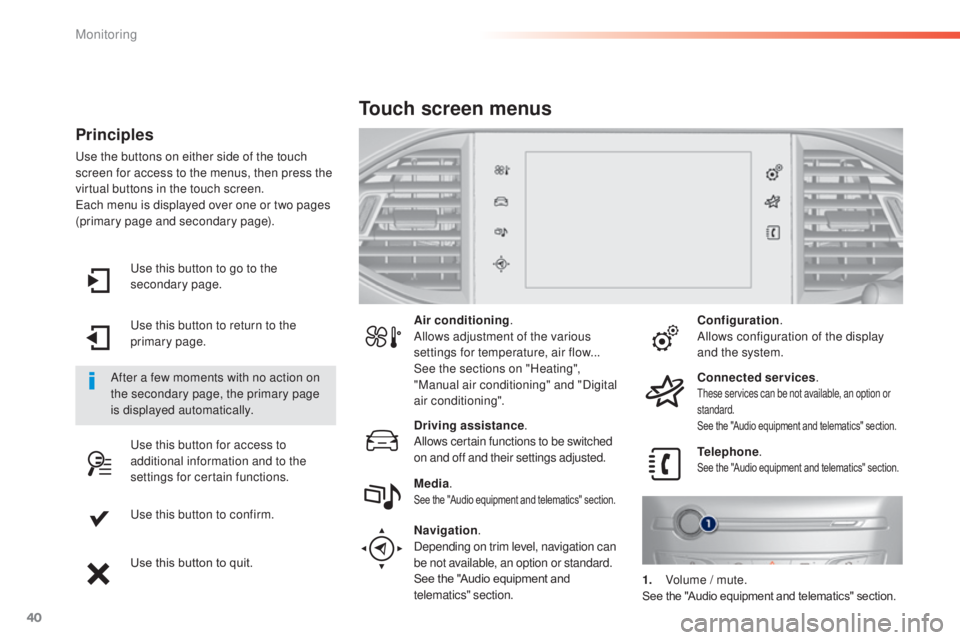
use this button to go to the
secondary page.
us
e this button to return to the
primary page.
us
e this button for access to
additional information and to the
settings for certain functions.
us
e this button to confirm.
Use this button to quit.
Principles
use the buttons on either side of the touch
screen for access to the menus, then press the
virtual buttons in the touch screen.
ea
ch menu is displayed over one or two pages
(primary page and secondary page).
After a few moments with no action on
the secondary page, the primary page
is displayed automatically. Air conditioning
.
Allows adjustment of the various
settings for temperature, air flow...
See the sections on "Heating",
"Manual air conditioning" and "Digital
air conditioning".
Touch screen menus
Driving assistance .
Allows certain functions to be switched
on and off and their settings adjusted. Telephone
.
See the "Audio equipment and telematics" section.Media.See the "Audio equipment and telematics" section.
Navigation .
Depending on trim level, navigation can
be not available, an option or standard.
See the "Audio equipment and
telematics" section. Configuration
.
Allows configuration of the display
and the system.
Connected services .
these services can be not available, an option or
standard.
See the "Audio equipment and telematics" section.
1. Volume / mute.See the "Audio equipment and telematics" section.
Monitoring
Page 69 of 415
67
Lost keys, remote control, electronic key
Visit a PEUGEOT dealer with the vehicle's V5 registration document and your personal identification documents.
The PEUGEOT dealer will be able to retrieve the key code and the transponder code required to order a replacement.
Remote control
The high frequency remote control is a sensitive system; do not operate it while it is in your pocket as there is a possibility that it may unlock the
vehicle, without you being aware of it.
Do not repeatedly press the buttons of your remote control out of range and out of sight of your vehicle. You run the risk of stopping it from
working and the remote control would have to be reinitialised.
th
e remote control does not operate when the key is in the ignition, even when the ignition is switched off.
Locking the vehicle
Driving with the doors locked may make access to the passenger compartment by the emergency services more difficult in an emergency.
As a safety precaution (with children on board), remove the key from the ignition or take the electronic key when you leave the vehicle, even for
a short time.
Electrical interference
the Keyless en try and Starting electronic key may not operate if close to certain electronic devices: telephone, laptop computer, strong
magnetic fields, ...
Anti-theft protection
Do not make any modifications to the electronic engine immobiliser system; this could cause malfunctions.
Don't forget to turn the steering to engage the steering lock.
When purchasing a second-hand vehicle
Have the key codes memorised by a Pe ugeOt dealer, to ensure that the keys in your possession are the only ones which can start the vehicle.
2
Access
Page 265 of 415
263
System which manages the duration of use of certain functions to conserve a sufficient level of
charge in the battery.
After the engine has stopped, you can still use functions such as the audio and telematics
system, windscreen wipers, dipped beam headlamps, courtesy lamps, etc. for a maximum
combined duration of about forty minutes.
energy economy mode
Switching to economy
mode
A message then appears in the instrument
panel screen indicating that the vehicle has
switched to economy mode and the active
functions are put on standby.
If a telephone call is being made at this time,
it
will be maintained for around 10 minutes with
the Bluetooth hands-free system of your audio
system.
Exiting economy mode
these functions are reactivated automatically
next time the vehicle is driven.
In order to restore the use of these functions
immediately, start the engine and let it run:
-
f
or less than ten minutes, to use the
equipment for approximately five minutes,
-
f
or more than ten minutes, to use the
equipment for up to approximately
thirty
minutes.
Let the engine run for the duration specified to
ensure that the battery charge is sufficient.
Do not repeatedly and continuously restart the
engine in order to charge the battery.
A flat battery prevents the engine from starting
(refer to the "Battery" section).
Load reduction mode
System which manages the use of certain
functions according to the level of charge
remaining in the battery.
When the vehicle is being driven, the load
reduction function temporarily deactivates
certain functions, such as the air conditioning,
the heated rear screen...
th
e deactivated functions are reactivated
automatically as soon as conditions permit.
7
Practical information
Page 303 of 415
301
t
he system is protected in such a way that it will only
operate in your vehicle.
7-inch touch screen
01 General operation
For safety reasons, the driver must carry out operations
which require prolonged attention while the vehicle is
stationary.
When the engine is switched off and to prevent
discharging of the battery, the system switches off
following the activation of the energy economy mode.
CONTENTS
02
First steps - Control
panel
04
Media
05
Navigation
06
Configuration
07
Connected service
s
08
Telephone p.
p.
p.
p.
p.
p.
p.
Frequently asked questions p.
GPS satellite navigation system
Multimedia audio system
Bluetooth
® telephone
302
304
324 306
344
354
356
366
03
Steering mounted
controls p. 305
Page 304 of 415
01GENERAL OPERATION
* Depending on equipment.
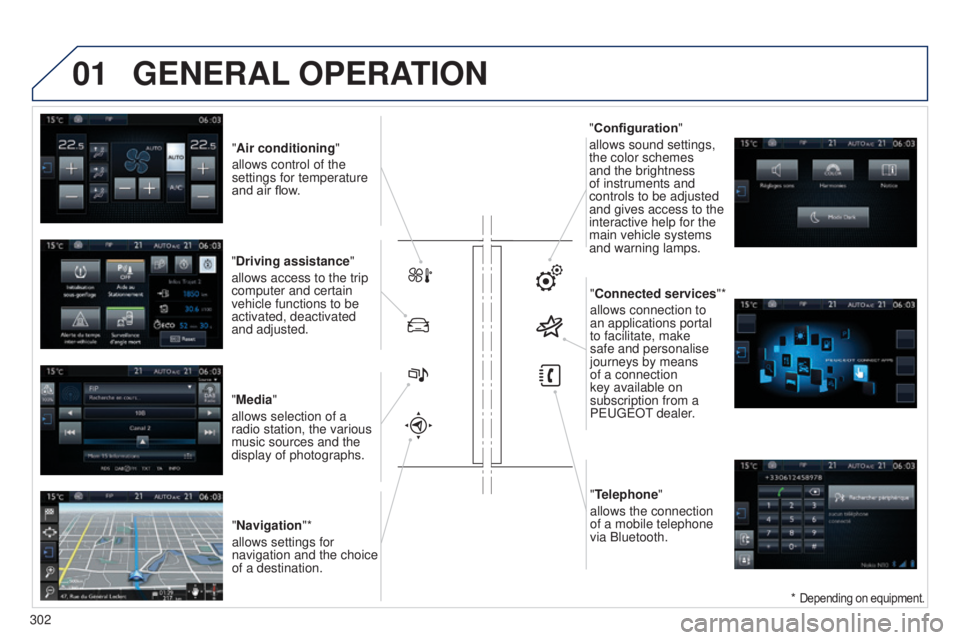
"Air conditioning "
allows control of the
settings for temperature
and air flow.
"Driving assistance"
allows access to the trip
computer and certain
vehicle functions to be
activated, deactivated
and adjusted.
"Media"
allows selection of a
radio station, the various
music sources and the
display of photographs. "Navigation"*
allows settings for
navigation and the choice
of a destination. "Configuration
"
allows sound settings,
the color schemes
and the brightness
of instruments and
controls to be adjusted
and gives access to the
interactive help for the
main vehicle systems
and warning lamps.
"Connected services "*
allows connection to
an applications portal
to facilitate, make
safe and personalise
journeys by means
of a connection
key available on
subscription from a
P
euge O t
dealer
.
"Telephone"
allows the connection
of a mobile telephone
via Bluetooth.
302
Page 306 of 415
02
304
FIRST STEPS
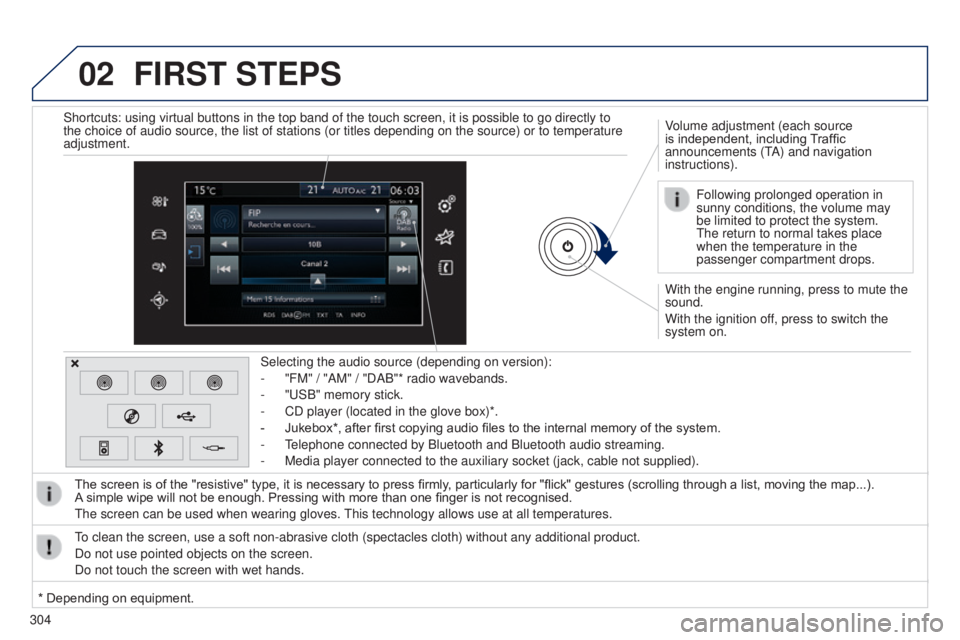
With the engine running, press to mute the
sound.
With the ignition off, press to switch the
system on. Volume adjustment (each source
is independent, including Traffic
announcements (t
A) and navigation
instructions).
Selecting the audio source (depending on version):
-
"FM" / "AM" / "DAB"* radio wavebands.
-
"
u
SB" memory stick.
-
CD player (located in the glove box)*.
-
Jukebox*, after first copying audio files to the internal memory of the system.
-
t
elephone connected by Bluetooth and Bluetooth audio streaming.
-
Media player connected to the auxiliary socket (jack, cable not supplie\
d).
The screen is of the "resistive" type, it is necessary to press firmly , particularly for "flick" gestures (scrolling through a list, moving the map...).
A
simple wipe will not be enough. Pressing with more than one finger is not recognised.
t
he screen can be used when wearing gloves.
t
his technology allows use at all temperatures.
to clean the screen, use a soft non-abrasive cloth (spectacles cloth) w\
ithout any additional product.
Do not use pointed objects on the screen.
Do not touch the screen with wet hands. Following prolonged operation in
sunny conditions, the volume may
be limited to protect the system.
t
he return to normal takes place
when the temperature in the
passenger compartment drops.
Shortcuts: using virtual buttons in the top band of the touch screen, it\
is possible to go directly to
the choice of audio source, the list of stations (or titles depending o\
n the source) or to temperature
adjustment.
* Depending on equipment.
Page 307 of 415
03
305
STEERING MOUNTED CONTROLS
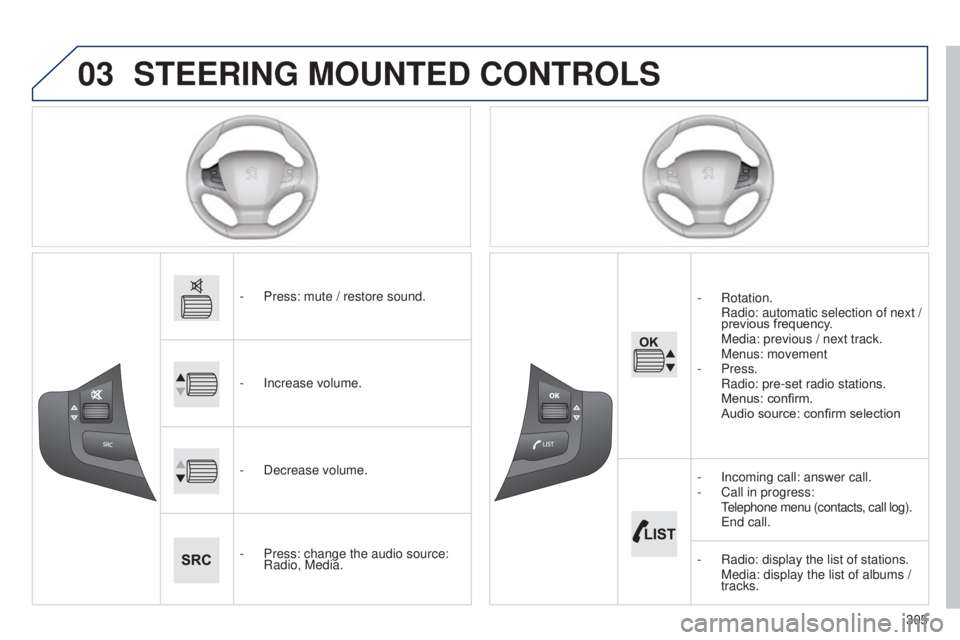
- Press: mute / restore sound.
-
Increase volume.
-
Decrease volume.
-
Press: change the audio source:
Radio, Media. -
Rotation.
Radio:
automatic selection of next /
previous frequency.
Media: previous / next track. Menus: movement
-
Press.
Radio: pre-set radio stations. Menus: confirm. Audio source: confirm selection
-
Incoming call: answer call.
-
Call in progress:
t
elephone menu (contacts, call log).
e nd call.
-
Radio: display the list of stations. Media: display the list of albums /
tracks.