Page 22 of 444
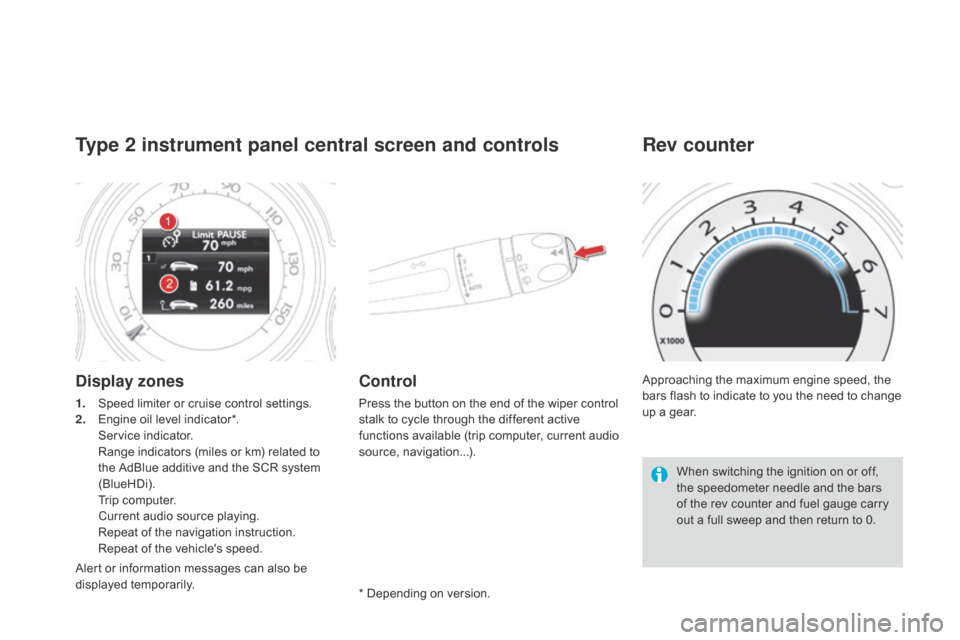
Type 2 instrument panel central screen and controls
Display zones
1. Speed limiter or cruise control settings.
2. Engine oil level indicator*.
S
ervice indicator.
R
ange indicators (miles or km) related to
the AdBlue additive and the SCR system
(BlueHDi).
T
rip computer.
C
urrent audio source playing.
R
epeat of the navigation instruction.
R
epeat of the vehicle's speed.
Control
Press the button on the end of the wiper control
stalk to cycle through the different active
functions available (trip computer, current audio
source, navigation...). Approaching the maximum engine speed, the
bars flash to indicate to you the need to change
up a gear.
Rev counter
When switching the ignition on or off,
the speedometer needle and the bars
of the rev counter and fuel gauge carry
out a full sweep and then return to 0.
* Depending on version.
Alert or information messages can also be
displayed temporarily.
Page 28 of 444

Warning/indicator lampis on Cause Action/Observations
Anti-lock Braking
System (ABS) fixed.
The anti-lock braking system has
a fault. The vehicle retains conventional braking.
Drive carefully at reduced speed and contact a
CITROËN dealer or a qualified workshop without delay.
Dynamic stability
control
(DSC/ASR) flashing.
Regulation by the system is active. The system optimises traction and improves the
directional stability of the vehicle.
fixed, associated with
illumination of the indicator
lamp in the deactivation
button, accompanied by an
audible signal and a message.The DSC/ASR or hill start assist
system has a fault.Have it checked by a CITROËN dealer or a qualified
workshop.
Engine
autodiagnosis
system
flashing.
The engine management system has
a fault. Risk of destruction of the catalytic converter.
Have it checked by a CITROËN dealer or a qualified
workshop.
fixed. The emission control system has a
fault.
The warning lamp should go off when the engine is started.If it does not go off, contact a CITROËN dealer or qualified
workshop without delay.
Low fuel level fixed, accompanied by
and audible signal and
a message. When it first comes on there remains
approximately
6 litres of fuel in the
tank.
At this point, you begin to use the fuel
reserve. Refuel as soon as possible to avoid running out of fuel.
Until sufficient fuel is added, this warning lamp will
come on every time the ignition is switched on,
accompanied by an audible signal and a message.
This audible signal and message are repeated
with increasing frequency as the fuel level drops
towards
"
0".
Fuel tank capacity: approximately 60 litres .
Never continue to drive until you run out of fuel,
as this could damage the emission control and
injection systems.
Page 44 of 444

System allowing certain screens to be switched
off for night driving.
The instrument panel remains on with
the analogue vehicle speed, electronic or
automatic gearbox gear selected, cruise control
or speed limiter information, if in use, and the
low fuel alerts as appropriate.
If there is an alert or a change in a function
or to a setting, the black panel mode is
interrupted.
Black panel (black screen)
Activation
F With the vehicle lighting on, press this button again to activate the black panel.
F
P
ress once more to illuminate on the
various screens again.
In order to retain the digital reading of the
speed in km/h, activation of black panel mode
is prohibited in countries that use metric units. In the instrument panel, you can change the
colour of its dials (button A
) independently from
that of the screens (button B ).
There are five colour variants, from white to
blue.
F
P
ress the appropriate button as many
times as needed to obtain the desired
c o l o u r.
Customising the instrument
panel colours
Page 55 of 444
53
"Settings" menu
The functions available through this menu are detailed in the table below.Button Corresponding function Comments
Audio settings Adjustment of volume, balance...
Turn off screen Turns off the display in the the touch screen tablet (black screen).
Pressing the black screen restores the display.
System Settings Choice of units:
-
t
emperature (°Celsius or °Fahrenheit)
-
d
istance and fuel consumption (l/100 km, mpg or km/l).
Time/Date Setting the date and time.
Languages Choice of language used: French, English, Italian, Spanish, German, Dutch, Portuguese,
Polish, Turkish, Russian, Serb, Croat, Hungarian.
Screen settings Adjustment of the display settings (scrolling of text, animations...)
Calculator Display the calculator.
Calendar Display the calendar.
Multifunction screens
Page 57 of 444
55
Trip computer
Monochrome screen C
Information displays
You can choose between two types of display
by pressing button A:
-
t
he trip computer information appears
temporarily above the audio information,
displayed permanently in full screen,
or
-
t
he trip computer and audio information
both appear permanently in a shared
screen. F
P
ress the button, located at the end of
the wiper stalk , to display the various trip
computer tabs in succession.
System that gives you information on the current journey (range, fuel consumption…).
Multifunction screens
Page 58 of 444
- the current information tab with:● t he range,
●
t
he current fuel consumption,
●
t
he Stop & Start time counter.
-
t
he trip "1" tab with:
●
t
he distance travelled,
●
t
he average fuel consumption,
●
t
he average speed,
f
or the first trip.
-
t
he trip "2" tab with:
●
t
he distance travelled,
●
t
he average fuel consumption,
●
t
he average speed,
f
or the second trip.
Trip zero reset
F When the trip required is displayed, press the button on the end of the wiper stalk for
more than two seconds.
Tr i p s "1" and "2" are independent but their use
is identical.
For example, trip "1" can be used for daily
figures, and trip "2" for monthly figures.
Page 59 of 444

57
Type 2 central instrument panel screen
Information displays
- Display of instantaneous information with:● t he range,
●
t
he current fuel consumption,
●
S
top & Start time counter,
-
D
isplay of trip "1" with:
●
t
he distance travelled,
●
t
he average fuel consumption,
●
t
he average speed,
f
or the first trip.
-
D
isplay of trip "2" with:
●
t
he distance travelled,
●
t
he average fuel consumption,
●
t
he average speed,
f
or the second trip.
F
P
ress the button, located on the end of
the wiper stalk to display the following
information in turn:
●
r
eminder of the speed,
●
in
stantaneous information,
●
t
rip "1" ,
●
t
rip "2" ,
●
i
nformation on the current audio source,
●
b
lack screen,
●
n
avigation instructions.
Trip zero reset
F When the required trip is displayed, press the button on the end of the wiper stalk for
more than two seconds.
Tr i p s "1" and "2" are independent but their use
is identical.
For example, trip "1" can be used for daily
figures and trip "2" for monthly figures.
Multifunction screens
Page 60 of 444

Touch screen tablet
Display of information
Permanent display:Temporary display in a new window:
F
P
ress the end of the wiper control stalk for
access to the information and display the
different tabs.
The current instantaneous fuel
consumption tab with:
-
t
he range,
-
t
he current fuel consumption,
-
t
he Stop & Start time counter.
The trip "1" tab with:
-
t
he distance travelled.
-
t
he average fuel consumption,
-
t
he average speed,
f
or the first trip.
The trip "2" tab with:
-
t
he distance travelled.
-
t
he average fuel consumption,
-
t
he average speed,
f
or the second trip.
Trip reset
F Select the "Driving assistance "
menu.
The trip computer information is displayed in
the primary page of the menu.
F
P
ress one of the buttons to display the
desired tab. F
W hen the desired trip is
displayed, press the reset button
or press and hold the end of the
wiper control stalk.
Tr i p s "1" and "2" are independent but their use
is identical.
For example, trip "1" can be used for daily
figures, and trip "2" for monthly figures.