Page 51 of 494
49
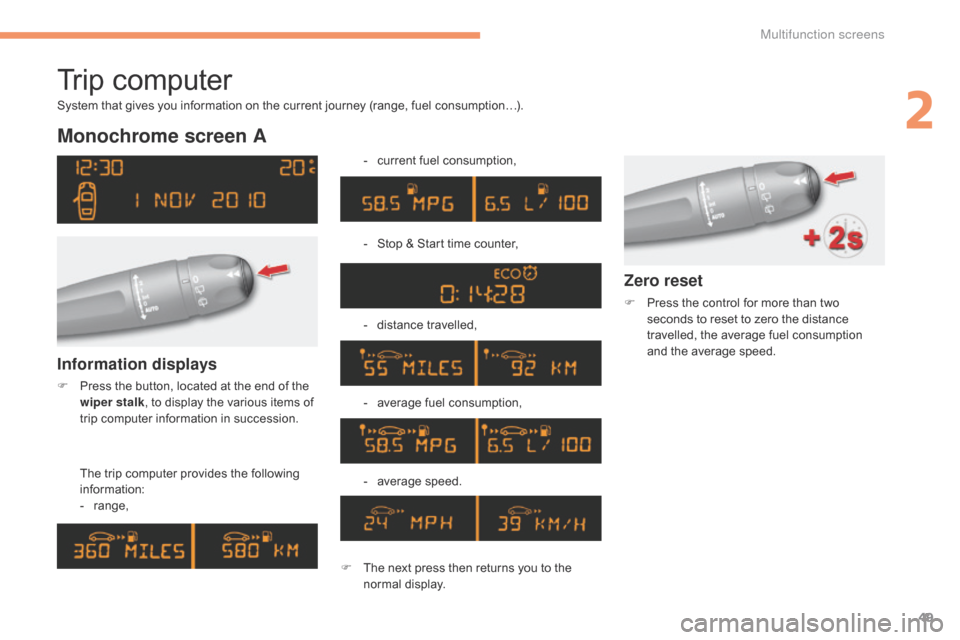
Trip computer
Monochrome screen A
The trip computer provides the following i
nformation:
-
ra
nge, -
c
urrent fuel consumption,
-
S
top & Start time counter,
-
d
istance travelled,
-
a
verage fuel consumption,
- a verage s peed.
Information displays
F Press the button, located at the end of the w
iper stalk ,
to display the various items of
t
rip computer information in succession.
System
that gives you information on the current journey (range, fuel consumption…).
Zero reset
F Press
the control for more than two s
econds to reset to zero the distance
t
ravelled, the average fuel consumption
a
nd the average speed.
F
T
he
next
press
then
returns
you
to
the
n
ormal
d
isplay.
2
Multifunction screens
Page 52 of 494

50
Monochrome screen C
Information displays
You can choose between two types of display by pressing button A:
-
t
he trip computer information appears
t
emporarily above the audio information,
d
isplayed permanently in full screen,
or
-
t
he trip computer and audio information
b
oth appear permanently in a shared
sc
reen. -
t
he current information tab
w
ith:
●
t
he range,
● t he current fuel c
onsumption,
●
t
he Stop & Start time
c
ounter,
-
t
he trip "1"
tab with:
●
t
he distance travelled,
●
t
he average fuel
c
onsumption,
●
t
he average speed,
f
or the first trip.-
t
he trip "2"
tab with:
●
t
he distance travelled,
●
t
he average fuel
c
onsumption,
●
t
he average speed,
f
or the second trip.
F
P
ress the button, located at the end of
t
he wiper stalk
, to display the various trip
c
omputer tabs in succession.
Trip zero reset
F When
the trip required is displayed, press the b
utton on the end of the wiper stalk for more t
han two seconds.
Tr i p s "1"
and "2"
are independent but their use
i
s identical.
For
example, trip "1"
can be used for daily
f
igures, and trip "2"
for monthly figures.
Multifunction screens
Page 53 of 494

51
Touch screen tablet
Temporary display in a new window:
F P ress the end of the wiper control stalk for
a
ccess to the information and display the
d
ifferent tabs.
Display of information
Permanent display: The current instantaneous fuel
consumption
tab with:
-
t
he range,
-
t
he current fuel consumption,
-
t
he Stop & Start time counter.
The trip "1"
tab with:
-
t
he distance travelled,
- t he average fuel consumption,
- t he average speed,
f
or the first trip.
The trip "2"
tab with:
-
t
he distance travelled,
-
t
he average fuel consumption,
-
t
he average speed,
f
or the second trip.
Trip reset
The trip computer information is displayed in the primary page of the menu.
F
P
ress one of the buttons to display the
de
sired
t
ab.
F
Sel
ect the "
Driving assistance "
menu. F
W
hen the desired trip is
d
isplayed, press the reset button
o
r press and hold the end of the
w
iper control stalk.
Tr i p s "1" and "2" are independent but their use
i
s identical.
For
example, trip "1"
can be used for daily
f
igures, and trip "2"
for monthly figures.
2
Multifunction screens
Page 54 of 494

52
A few definitions…
Range
(miles or km)
W
hen
the
range falls below 20 miles
(30
km),
dashes are displayed. After filling with at
l
east
5
litres
of fuel, the range is recalculated and
i
s
displayed
when it exceeds 60 miles (100 km).
Current fuel consumption
(mpg or l/100 km or km/l)
Average fuel
consumption
(mpg or l/100 km or km/l)
Average speed
(mph or km/h)
Distance travelled
(miles or km)
Stop & Start time counter
(minutes / seconds or hours / minutes)
If
dashes
are
displayed
continuously
w
hile
driving
in
place
of
the
digits,
c
ontact
a
CITROËN
dealer
or
a
qualified
w
orkshop. The
fuel
consumption
of
your
vehicle
w
ill
be
higher
than
the
official
figures
o
btained
by
CITROËN
during
the
first
3
000
miles
(5
000
km)
of
the
vehicle's
l
ife.
This
function
is
only
displayed
from
2
0 mph
(30
km/h).
This
value
may
vary
following
a
change
i
n
the
style
of
driving
or
the
relief,
r
esulting
in
a
significant
change
in
the
c
urrent
fuel
consumption.
This
indicates
the
distance
which
can
still
be
t
ravelled
with
the
fuel
remaining
in
the
tank
in
r
elation
to
the
average
fuel
consumption
over
t
he
last
few
miles
(kilometres)
travelled.
This
is
the
average
fuel
consumption
during
the
l
ast
few
seconds.
T
his
is
the
average
fuel
consumption
since
the
l
ast
trip
computer
zero
reset.
If
your
vehicle is fitted with Stop & Start, a time
c
ounter
calculates the time spent in STOP
m
ode
during a journey.
It
resets
to zero every time the ignition is
s
witched
on.
This
indicates the distance travelled since the
l
ast
trip
computer zero reset.
This
is
the average speed calculated since the
l
ast
trip
computer zero reset (ignition on).
Multifunction screens
Page 288 of 494
01GENERAL OPERATION
286 * Depending on equipment.
"Driving assistance"
allows access to the trip
computer
and certain vehicle
functions
to be activated,
deactivated
and adjusted.
"Media"
allows selection of a radio
station,
the various music
sources
and the display of
photographs.
"
Navigation"*
allows settings for navigation
and
the choice of a destination.
"Configuration"
allows sound settings and the
brightness
of instruments and
controls
to be adjusted.
"Connected services
"*
allows connection to an
applications portal to facilitate,
make safe and personalise
journeys
by means of a
connection
key available on
subscription
from a CITROËN
dealer
.
"Telephone"
allows the connection of a
mobile telephone via Bluetooth.
Page 360 of 494
03
358"Multimedia": Media parameters,
Radio
parameters.
"Trip computer": Warning log.
For a detailed global view of the
menus
available, refer to "Screen
menu
map" section.
"Bluetooth connection
":
Connections
management,
Search
for a device.
"Telephone": Call, Directory
management,
T
elephone
management,
Hang up.
MAIN MENU
"Personalisation-configuration
": Define the
vehicle parameters, Choice of language,
Display
configuration, Choice of units, Date
and
time adjustment.
Screen C
Screen A
Page 383 of 494
07
381
Screen A
RDS optionsFrançais
Portuguès
Cestina
Read mode
Diagnostics Infotext Italiano
English Portuguès-brasil
Hrvatski
Radiotext Nederlands
Español Deutsch
Magyar
MAIN FUNCTION
Option A1
Option
A1
1
Option A
Option B...1
2
3
1
RADIO LANGUAGES
MEDIA
TRIP COMPUTER DATE AND TIME
VEHICLE PARAM*
SCREEN MENU MAP(S)
* Depending on vehicle equipment.
2
2
2
2
2
2
1
1
1
1
1
1
2
2
2
2
2
2
2
2
2
2
Normal
Random
Random all3
3
3
Page 384 of 494
07
382
SCREEN MENU MAP(S)
S
creen C
Dial2
Media parameters
Choice of playback mode
Normal
1
2
3
Random3
Random all3
Repeat3
Choice of track listingBy folders2
3
by artists3
By genres3
by playlists3
Call1
Directory2
Calls list2
Voice mail box2
Directory management
Consult an entry
1
2
Delete an entry2
Delete all entries2
Telephone management
Telephone status
1
2
Hang up1
Vehicle diagnosis
Connections management
1
1
Search for a device1
MEDIA TELEPHONETRIP COMPUTER
BLUETOOTH CONNECTION
Radio parameters
1