2014.5 Citroen C4 DAG wheel
[x] Cancel search: wheelPage 35 of 340

33
C4-2_en_Chap01_controle-de-marche_ed01-2014
System allowing certain screens to be switched
off for night driving.
The
instrument
panel
remains
on
with
the
vehicle
speed,
electronic
or
auto
-
matic
gearbox
gear
selected,
cruise
control
or
speed
limiter
information,
if
in
use,
and
the
low
fuel
alerts
as
ap
-
propriate.
If
there
is
an
alert
or
a
change
in
a
function
or
to
a
setting,
the
black
panel
mode
is interrupted.
Black panel (black screen)
Activation
F
With
the
vehicle
lighting
on,
press
this
button
again
to
activate
the
black
panel.
F
Press
once
more
to
illu
minate
on
the
various screens again.
Permits manual adjustment of the bright -
ness of the instruments and controls in relation
to
the
exterior
brightness.
Only operates
when
the
vehicle
lighting
is
on
in night
mode.
Lighting dimmer
Activation
F
Press button
A
to
change
the
bright
-
ness
of the instruments and controls.
F
When
the
lighting
reaches
the
mini
-
mum
setting,
release
the
button,
then
press again to increase it.
or
F
When
the
lighting
reaches
the
maxi
-
mum
setting,
release
the
button,
then
press again to reduce it.
F
When
the
lighting
reaches
the
level
of
brightness
required,
release
the
button.Deactivation
When
the
vehicle
lighting
is
of
f,
or
in
day
mode
(daytime
running
lamps
on),
pressing
the
button
or
turning
the
thumb
wheel does not have any effect.
You
can also modify the level of lighting
by
turning
the
thumb
wheel
B
,
located
on
the left of the steering wheel:
F
upwards;
to reduce the level,
F
downwards;
to increase the level.
This
indicator
and
the
lighting
value
appear
in
the
middle
of
the
instrument
panel
during
adjustment
to
show
the
lighting
level
compared
to
the
16
levels
avail
-
able.
1
MONITORING
Page 67 of 340

33
65
C4-2_en_Chap03_confort_ed01-2014
Automatic day/night model
By
means
of
a
sensor
,
which
measures
the
light
from
the
rear
of
the
vehicle,
this
system
automatically
and
progres
-
sively
changes
between
the
day
and
night
uses.In
order
to
ensure
optimum
vis
-
ibility
during
your
manoeuvres,
the
mirror
lightens
automatically
when
reverse gear is engaged.STEERING WHEEL AD j USTMENT
F When stationary, pull the control
lever to release the adjustment
mechanism.
F
Adjust
the
height
and
reach
to
suit
your
driving position.
F
Push
the
control
lever
to
lock
the
adjustment
mechanism.
a
s a safety precaution, these
operations
should
only
be
carried out
with the vehicle stationary.
Rear view mirror
Adjustable mirror providing a central rearward
view.
Equipped
with
an
anti-dazzle
system,
which
darkens
the
mirror
glass
and
re
-
duces
the
nuisance
to
the
driver
caused
by
the
sun,
headlamps
from
other
ve
-
hicles...
Manual day/night model
Adjustment
F
Adjust
the
mirror
so
that
the
glass
is
directed
correctly in the "day" position.
Day/night position
F
Pull
the
lever
to
change
to
the
"night"
anti-dazzle position.
F
Push
the
lever
to
change
to
the
normal
"day" position.
COMFORT
Page 77 of 340
75
C4-2_en_Chap04_ouvertures_ed01-2014
Operating fault
When the ignition is switched on, fixed illumination
of the indicator lamp in the button
indicates a fault with the system.
Have
it
checked
by
a
CITROËN
dealer
or
a qualified workshop.
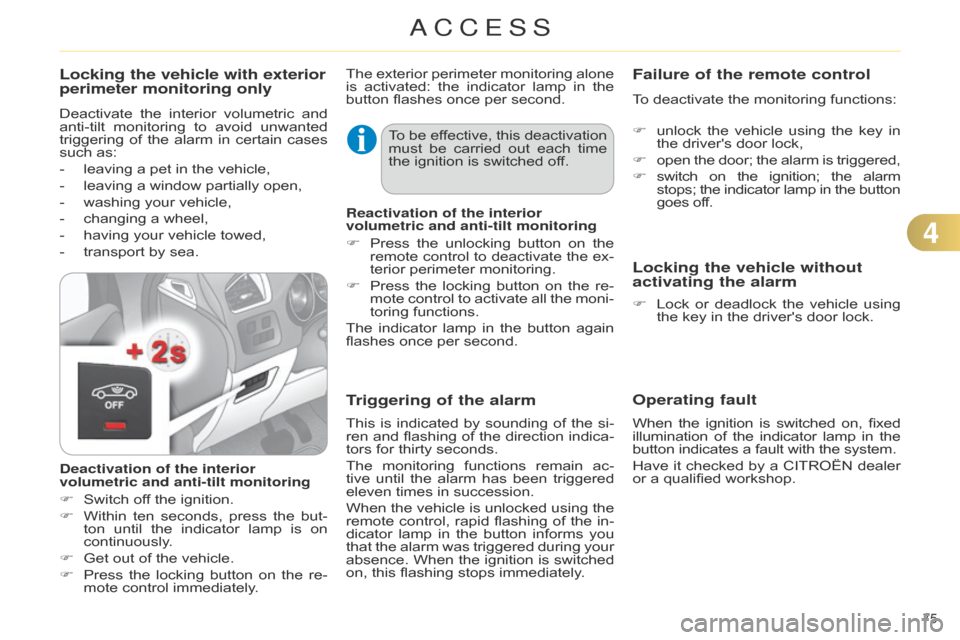
Locking the vehicle with exterior
perimeter monitoring only
Deactivate the interior volumetric and anti-tilt
monitoring to avoid unwanted
triggering
of
the
alarm
in
certain
cases
such
as:
-
leaving
a pet in the vehicle,
-
leaving
a window partially open,
-
washing
your vehicle,
-
changing
a wheel,
-
having
your vehicle towed,
-
transport
by sea.
Deactivation of the interior
volumetric and anti-tilt monitoring
F
Switch
off the ignition.
F
Within
ten
seconds,
press
the
but
-
ton
until
the
indicator
lamp
is
on
continuously
.
F
Get
out of the vehicle.
F
Press
the
locking
button
on
the
re
-
mote
control immediately. The
exterior
perimeter
monitoring
alone
is
activated:
the
indicator
lamp
in
the
button
flashes once per second.
To
be
ef
fective,
this
deactivation
must
be
carried
out
each
time
the
ignition is switched off.
Reactivation of the interior
volumetric and anti-tilt monitoring
F
Press
the
unlocking
button
on
the
remote
control
to
deactivate
the
ex
-
terior
perimeter monitoring.
F
Press
the
locking
button
on
the
re
-
mote
control
to
activate
all
the
moni
-
toring
functions.
The
indicator
lamp
in
the
button
again
flashes
once per second.
Triggering of the alarm
This is indicated by sounding of the si -
ren and flashing of the direction indica -
tors
for thirty seconds.
The
monitoring
functions
remain
ac
-
tive
until
the
alarm
has
been
triggered
eleven
times in succession.
When
the
vehicle
is
unlocked
using
the
remote
control,
rapid
flashing
of
the
in
-
dicator
lamp
in
the
button
informs
you
that
the
alarm
was
triggered
during
your
absence.
When
the
ignition
is
switched
on,
this flashing stops immediately.
Failure of the remote control
To deactivate the monitoring functions:
F
unlock
the
vehicle
using
the
key
in
the
driver's door lock,
F
open
the
door;
the
alarm
is
triggered,
F
switch
on
the
ignition;
the
alarm stops;
the
indicator
lamp
in
the
button goes
off.
Locking the vehicle without
activating the alarm
F Lock or deadlock the vehicle using the
key in the driver's door lock.
4
ACCESS
Page 91 of 340

55
89
C4-2_en_Chap05_visibilite_ed01-2014
CORNERING LIGHTING
With dipped or main beams, this func -
tion makes use of the beam from a
front
foglamp
to
illu
minate
the
inside
of
a
bend,
when
the
vehicle
speed
is
below
25
mph
(approximately
40
km/h)
(urban
driving,
winding
road,
intersec
-
tions,
parking manoeuvres...). with cornering lighting
without cornering lighting Switching on
The
system operates:
-
when
the
corresponding
direction
indicator
is switched on,
or
-
from
a
certain
angle
of
rotation
of
the
steering wheel.
Switching off
The
system does not operate:
-
below
a
certain
angle
of
rotation
of
the
steering wheel,
-
above
25 mph (40 km/h),
-
when
reverse gear is engaged.
Programming The
system
is
activated
or
deactivated
in
the
vehicle
con
-
figuration
menu.
The
system is activated by default.
VISIBILITY
Page 107 of 340

105
C4-2_en_Chap06_amenagement_ed01-2014
To remove the shelf:
F
unhook
the two cords,
F
raise
the
shelf
slightly
,
then
remove
it.
There
are
several
options
for
storing
the
shelf:
-
either
upright
behind
the
front
seats,
-
or
flat at the base of the boot.
Rear parcel shelf
The hooks can be used to secure shop -
ping bags.
Hooks
An additional hook under the shelf
is used to hold up the boot
floor
using
its
cord,
to
facilitate
access
to
the
tools
and
spare
wheel
or
the
temporary
puncture
repair
kit...
Access to the storage box
F
T
o
connect
a
12
V
accessory
(max
power:
120
W),
remove
the
cap
and
connect
an appropriate adaptor.
F
T
urn
the
key
to
the
ignition
on
posi
-
tion.
12 V accessory socket
6
FITTINGS
Page 108 of 340

106
C4-2_en_Chap06_amenagement_ed01-2014
This is a removable lamp, fitted in the boot
wall, which can be used to light the
boot
or as a torch.
For
the
boot
lamp
function,
refer
to
the
"V
isibility - § Boot lamp" section.
Torch
Operation
This torch operates with
n
iMH type re-
chargeable
batteries.
It
has
a
battery
life
of
approximately
45
minutes
and
charges
while
you
are
driving. Use
F
Extract
the
torch
from
its
location
pullin
g it upwards.
F
Press
the
switch,
located
on
the
back,
to switch the torch on or off.
F
Unfold
the
support,
located
on
the
back,
to
set
down
and
raise
the
torch;
for
example,
when
changing
a
wheel.
Storing
F
Put
the
torch
back
in
place
in
its
lo
-
cation
starting with the lower part.
If
you
have
forgotten
to
switch
of
f
the torch, this switches it of
f auto-
matically. F
Raise the boot carpet for access to
the
storage box.
This
has
areas
for
the
storage
of
a
box
of
spare
bulbs,
a
first
aid
kit,
two
warn
-
ing triangles...
It also contains the vehicle tools, the
temporary puncture repair kit...
Storage box
Observe the
polarities when fit -
ting the rechargeable batteries.
Never
replace
the
rechargeable
batteries
with
normal
disposable
batteries. It
the torch is not engaged cor -
rectly,
it may not charge and may
not
come
on
when
the
boot
is
opened.
6
FITTINGS
Page 124 of 340

88
122
C4-2_en_Chap08_securite_ed01-2014
DIRECTION INDICATORS
F Left: lower the lighting stalk passing the
point of resistance.
F
Right:
raise
the
lighting
stalk
pass
-
ing
the point of resistance.
HAZARD WARNING LAMPS
F Press this button, the direction indi -
cators flash.
They
can operate with the ignition off.
Automatic operation of hazard
warning lamps
When braking in an emergency , de -
pending on the deceleration, the hazard
warning
lamps come on automatically.
They
switch
of
f
automatically
the
first
time
you accelerate.
F
Y
ou
can
also
switch
them
of
f
by
pressing
the button.
HORN
A visual warning by means of the direc -
tion indicators to alert other road users
to
a
vehicle
breakdown,
towing
or
ac
-
cident.
Three flashes of the direction
indicators
F
Press
briefly
upwards
or
down
-
wards,
without
going
beyond
the
point
of
resistance;
the
direction
in
-
dicators
will
flash
3
times.
If
you
forget
to
cancel
the
di
-
rection
indicators
for
more
than
twenty
seconds,
the
volume
of
the
audible
signal
will
increase
if
the
speed
is
above
40
mph
(60
km/h). Audible
warning system to alert other road
users to an imminent danger.
Use
the
horn
moderately
and
only
in
situations
allowed
by
the
motoring
regulations
in
the
country
you are driving in.
F
Press
the
central
part
of
the
multi
-
function
steering wheel.
SAFETY
Page 125 of 340

88
123
C4-2_en_Chap08_securite_ed01-2014
BRAKING ASSISTANCE SYSTEMS
Group of supplementary systems which help
you to obtain optimum braking in complete
safety in emergency situations:
-
anti-lock
braking system (ABS),
-
electronic
brake
force
distribution
(E
b F d ),
-
emergency
braking assistance (EBA).
When
braking
in
an
emergency
,
press
very
firmly
without
releas
-
ing
the pressure. When
replacing
wheels
(tyres
and
rims),
ensure
that
they
con
-
form
to
the
manufacturer's
rec
-
ommendations. When
braking
in
an
emergency
,
press
firmly
without
releasing
the
pressure.
Anti-lock braking system
and electronic brake force
distribution
Linked systems which improve the sta -
bility and manoeuvrability of your vehicle when
braking,
in
particular
on
poor
or slippery
surfaces.
Activation
The
anti-lock
braking
system
comes
into
operation
automatically
when
there
is
a risk of wheel lock.
Normal
operation
of
the
ABS
may
make
itself
felt
by
slight
vibration
of
the
brake
pedal. Operating fault
If
this
warning
lamp
comes
on,
accompanied
by
an
audible
signal
and
a
message
in
the
screen,
it
indicates
a
malfunc
-
tion
of
the
anti-lock
braking
system
which
could
result
in
loss
of
control
of
the
vehicle when braking.
If
this
warning
lamp
comes
on, together
with
the
ST
OP
and ABS
warning
lamps,
accompa
-
nied
by
an
audible
signal
and a
message
in
the
screen,
it
indicates
a malfunction
of
the
electronic
brake
force distribution
which
could
result
in
loss
of control
of the vehicle when braking.
You must stop as soon as it is safe
to do so.
Emergency braking assistance
System which, in an emergency , en -
ables you to obtain the optimum braking
pressure
more
quickly
,
thus
reducing
the
stopping distance.
Activation
It
is
triggered
by
the
speed
at
which
the
brake
pedal is pressed.
The
ef
fect
of
this
is
a
reduction
in
the
resistance
of
the
pedal
and
an
increase
in
braking efficiency.
In either case, contact a CITR
o
Ë
n
dealer
or
a
qualified
workshop.
SAFETY