Page 26 of 389

24
Screen 1 Screen 2Cause Solution - ActionObservations
The brake fluid level is too low. Top up using a brake fluid listed by
CITROËN.If the problem persists, contact
a CITROËN dealer or a qualified
workshop.
Fault with the braking system. You must stop as soon as it is safe to do so.Have the system checked by a
CITROËN dealer or a qualified
workshop.
Fault with the anti-lock braking
system (ABS). Contact a CITROËN dealer or a
qualified workshop.The vehicle retains conventional
braking without assistance but you
are advised to stop.
The tyre pressure is too low in one
or more tyres. Check the tyre pressures as soon
as possible.
This check should preferably
be done with the tyres cold.
You must reinitialise the system
after adjusting one or more tyre
pressures or after changing one or
more wheels.
For more information, refer to the
"Under-inflation detection system"
section.If the problem persists, contact
a C
ITR
oËn d
ealer or a qualified
workshop.
There is a fault with the under-
inflation detection system and/or
at least one wheel does not have a
detected sensor. The tyre pressures are no longer
monitored.
Have the system checked by a
CITROËN dealer or a qualified
workshop.
Monitoring
Page 32 of 389
30
Screen 1 Screen 2SystemObservations
Information messages (ignition at "ON")
2WD two wheel drive
systemFlashes for a few moments when the "2WD" (2 wheel drive) mode is selected using
the transmission mode selector, for 4 wheel drive versions.
4WD four wheel drive
system Flashes for a few moments when the "4WD" (4 wheel drive) mode is selected using
the transmission mode selector, for 4 wheel drive versions.
4WD LOCK four wheel
drive system Flashes for a few moments when the "LOCK" (4 wheel drive) mode is selected using
the transmission mode selector, for 4 wheel drive versions.
Active stability control
(ASC) Flashes when the stability control system (ASC) is operating.
Monitoring
Page 46 of 389
44
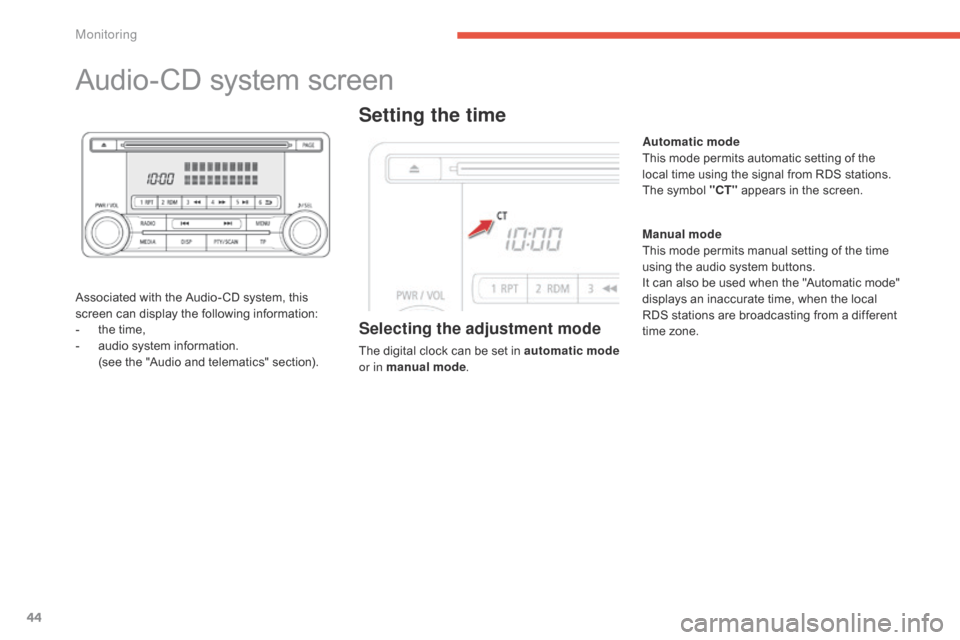
Audio-CD system screen
Associated with the Audio- CD system, this
screen can display the following information:
-
t
he time,
-
a
udio system information.
(
see the "Audio and telematics" section).
Setting the time
Selecting the adjustment mode
The digital clock can be set in automatic mo de
or in manual mode . Manual mode
This mode permits manual setting of the time
using the audio system buttons.
It can also be used when the "Automatic mode"
displays an inaccurate time, when the local
RDS stations are broadcasting from a different
time zone. Automatic mode
This mode permits automatic setting of the
local time using the signal from RDS stations.
The symbol "CT"
appears in the screen.
Monitoring
Page 47 of 389
45
If no action is carried out within
10 seconds, the selection menu closes
automatically.
To select the mode:
F
P
ress the "
PWR / VOL " button to switch on
the audio system.
F
P
ress the MENU
button.
F
P
ress the SEL
knob to scroll through
the menus and select " RDS setting -
CT ON - CT OFF " (clock time).
F
T
urn the SEL
knob to the left or to the right
to select " CT OFF" (manual mode)
or " CT ON
" (automatic mode).
F
P
ress the SEL
knob to confirm.
The digital clock does not display
seconds.
The time setting is lost if the battery is
disconnected.
Manual adjustment
F Press the PWR / VOL button to switch on
the audio system.
F
P
ress the MENU button.
F
P
ress the SEL knob to run scroll through
the menus and select " Time Setting
Adjust ".
F
T
urn the SEL knob to select " ON" for
access to time setting.
F
P
ress the SEL knob to confirm.
F
T
urn the SEL knob to adjust the time.
F
P
ress the SEL knob to confirm.
1
Monitoring
Page 49 of 389
47
Display format
You can the display format for the date and
time:
F
P
ress the MENU button.
F
P
ress " Setting ".
F
P
ress " System Setting ".
F
P
ress " Time Setting ".
F
P
ress " Time Display Settings ".
Permanent display
Once the data and time are set, you can
choose to have them always displayed in the
screen. To do this:
F
P
ress the MENU button.
F
P
ress " Setting ".
F
P
ress " Clock Screen ".
You and then select the format for the display
of the date and time (" Date / Time Format")
and activate automatic adjustment of the time
("Clock Time "). The date and time are displayed.
Simply touch the screen again to return to the
original display.
F
P
ress "
Time Adjustment ".
F
U
se the virtual arrows in the screen to
adjust the date and time.
F
P
ress " Set" to conform or " Back" to cancel
and return to the previous screen.
1
Monitoring
Page 51 of 389
49
System screen
once in the "Tuning…" menu, select " System"
to modify the time zone, the units, or the
display language (English, Dutch, Swedish,
French, Portuguese, Italian, German, Spanish,
Nor wegian, Flemish or Danish) and adjust
other settings.
"Settings" menu
Press the S ETTINGS button on the control
panel to open the menu.
Uses a soft clean cloth to clean the
screen. Do not use pointed objects on the touch
screen.
Do not touch the screen with wet hands. For reasons of safety, the driver
should only carry out operations that
require close attention with the vehicle
stationary.
In addition, some functions are not
accessible when driving.
For more information on these menus,
refer to the "Audio and telematics"
section.
Setting the time
The digital clock is set automatically .
This mode enables the system to set the local
time automatically using the signal from the
RDS stations.
F
o
n t
he control panel, press the SETTINGS
button for access to settings.
1
Monitoring
Page 54 of 389
52
System which permits central unlocking or locking of the vehicle using the door lock or remotely. It is also used for the guide-me-home lighting and
starting the engine, as well as providing protection against theft.
Remote control key
Unfolding the key
F First press this button to unfold the key.
Unlocking the vehicle
Complete unlocking using
the remote control
F Press the open padlock to unlock the vehicle.
Unlocking using the key
F Turn the key to the front in the driver's door lock to unlock it.
Unlocking is confirmed by the interior
lighting which comes on for around
15
seconds and the direction indicators
which flash twice .
According to version, the door mirrors
unfold at the same time.
Access
Page 55 of 389
53
F Press the open padlock once to unlock the driver's door only.
Selective unlocking using
the remote control
Selective unlocking is only available on
versions not fitted with deadlocking.
Selective unlocking is not available
using the key.
F
P
ress the open padlock again to unlock the
other doors and the boot. Unlocking is confirmed by illumination
of the interior lighting for about
15 seconds and the direction indicators,
which flash twice .
According to version, the door mirrors
unfold at the same time as the first
unlocking action.
2
Access