Page 121 of 162

8-29
8
3. To increase the throttle lever free play, turn
the throttle lever free play adjusting bolt in di-
rection (a). To decrease the throttle lever free
play, turn the adjusting bolt in direction (b).
4. Tighten the locknut.
5. Slide the rubber cover to its original position.
EBU24060Valve clearance The valve clearance changes with use, resulting in
improper air-fuel mixture and/or engine noise. To
prevent this from occurring, the valve clearance must be adjusted by a Yamaha dealer at the inter-
vals specified in the periodic maintenance and lu-
brication chart.
EBU24080Adjusting the reverse lock release ca-
ble The reverse lock release cable stretches with use,
which can result in improper function. Therefore,
the reverse lock release cable should be checked
and adjusted at the intervals specified in the peri-
odic maintenance and lubrication chart.EBU29601Brakes Replacement of brake components requires pro-
fessional knowledge. Brake service should be per-
formed by a Yamaha dealer.
WARNING
EWB02571Operating with improperly serviced or adjust-
ed brakes could lead to a loss in braking ability
and an accident.
1. Rubber cover
2. Throttle lever free play adjusting bolt
3. Locknut
4. Throttle lever free play
32
4
(a)(b)
1
U1PE60E0.book Page 29 Friday, March 2, 2012 1:22 PM
Page 125 of 162
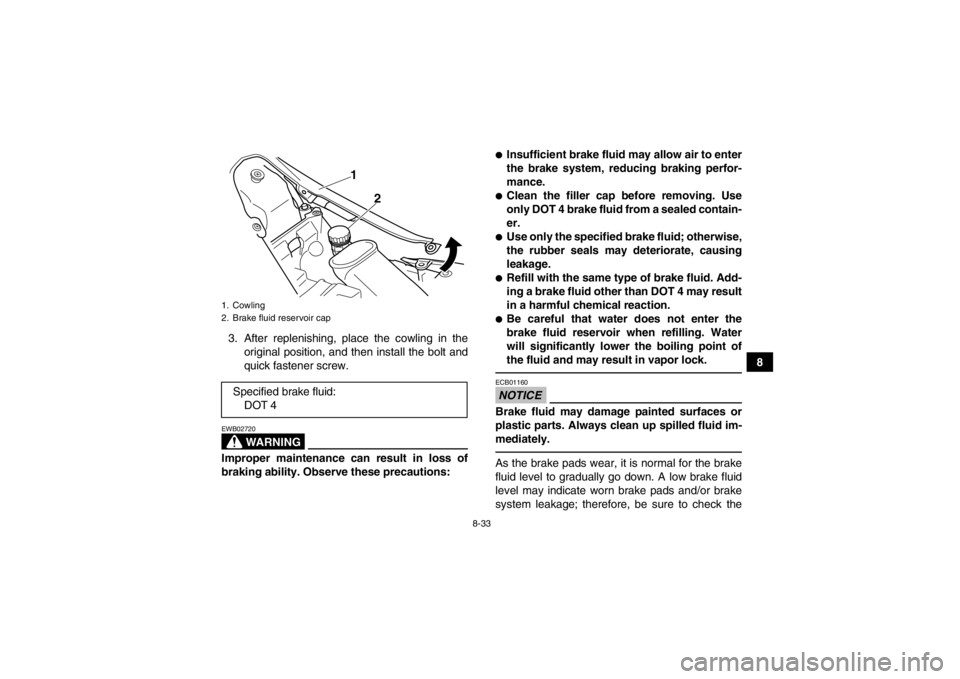
8-33
8
3. After replenishing, place the cowling in the
original position, and then install the bolt and
quick fastener screw.
WARNING
EWB02720Improper maintenance can result in loss of
braking ability. Observe these precautions:
●Insufficient brake fluid may allow air to enter
the brake system, reducing braking perfor-
mance.●Clean the filler cap before removing. Use
only DOT 4 brake fluid from a sealed contain-
er.●Use only the specified brake fluid; otherwise,
the rubber seals may deteriorate, causing
leakage.●Refill with the same type of brake fluid. Add-
ing a brake fluid other than DOT 4 may result
in a harmful chemical reaction.●Be careful that water does not enter the
brake fluid reservoir when refilling. Water
will significantly lower the boiling point of
the fluid and may result in vapor lock.NOTICEECB01160Brake fluid may damage painted surfaces or
plastic parts. Always clean up spilled fluid im-
mediately.As the brake pads wear, it is normal for the brake
fluid level to gradually go down. A low brake fluid
level may indicate worn brake pads and/or brake
system leakage; therefore, be sure to check the
1. Cowling
2. Brake fluid reservoir capSpecified brake fluid:DOT 4
1
2
U1PE60E0.book Page 33 Friday, March 2, 2012 1:22 PM
Page 127 of 162
8-35
8
EBU24715Adjusting the parking brake free play The parking brake free play must be checked and,
if necessary, adjusted at the intervals specified in
the periodic maintenance and lubrication chart.
Cable length “A” should measure 47–51 mm
(1.85–2.01 in). Adjust the parking brake free play
as follows.1. Release the parking brake by moving the
parking brake lever to the right.
2. Fully loosen the locknut and the adjusting bolt at the rear brake caliper.
3. Slide the rubber cover back at the brake ca- ble.
4. Loosen the locknut.
5. Turn the parking brake free play adjusting nut in direction (a) to increase the cable length,
and in direction (b) to decrease it.1. Brake pedal height
1
1. Adjusting bolt
2. Cable length “A”
3. Locknut
1
2
3
U1PE60E0.book Page 35 Friday, March 2, 2012 1:22 PM
Page 128 of 162

8-36
8
TIPIf the cable length cannot be adjusted to specifica-
tion, consult a Yamaha dealer.6. Tighten the locknut on the brake cable.
7. Slide the rubber cover to its original position.
8. Turn in the adjusting bolt at the rear brake cal-iper until it feels tight, then turn it out 1/8 turn
and tighten its locknut to the specified torque.
NOTICE: When tightening the locknut, hold the adjusting bolt with a wrench so
that it does not turn together with the lock-
nut.
[ECB00521]
WARNING
EWB02090Operating with improperly serviced or adjust-
ed brakes could cause the brakes to malfunc-
tion, resulting in reduced braking
performance. This could increase the chance
of a collision or accident. After adjusting the
parking brake free play, block the rear of the
ATV off the ground and spin the rear wheels.
Check to make sure there is no brake drag. If
brake drag is noticed, perform the adjustment
again.EBU24743Brake light switches The brake light, which is activated by the brake
pedal and brake lever, should come on just before
braking takes effect.
1. Rubber cover
2. Parking brake free play adjusting nut
3. Locknut
1
(b)
(a) 2
3
Tightening torque:
Locknut (rear brake caliper):16 Nm (1.6 m·kgf, 12 ft·lbf)
U1PE60E0.book Page 36 Friday, March 2, 2012 1:22 PM
Page 129 of 162

8-37
8
The brake light switch for the brake pedal can be
adjusted as follows, but the front brake light switch
should be adjusted by a Yamaha dealer.
Turn the rear brake light switch adjusting nut while
holding the brake light switch in place. To make the
brake light come on earlier, turn the adjusting nut
in direction (a). To make the brake light come on
later, turn the adjusting nut in direction (b).
EBU29750Adjusting the clutch lever free play The clutch lever free play must be checked and, if
necessary, adjusted at the intervals specified in the
periodic maintenance and lubrication chart. The clutch lever free play should measure 5.0–
10.0 mm (0.20–0.39 in) as shown. If the free play
is incorrect, adjust it as follows.
1. Slide the rubber cover back.
2. Loosen the locknut at the clutch lever.
3. To increase the clutch lever free play, turn the adjusting bolt at the clutch lever in direction
(a), and to decrease it, turn the bolt in direction
(b).
4. Tighten the locknut at the clutch lever.
5. Slide the rubber cover to its original position.1. Rear brake light switch
2. Rear brake light switch adjusting nut
1
2
(a)
(b)
1. Rubber cover
2. Clutch lever free play adjusting bolt
3. Locknut
4. Clutch lever free play
3
1
2
(a)
(b)
4
U1PE60E0.book Page 37 Friday, March 2, 2012 1:22 PM
Page 130 of 162

8-38
8If the specified free play cannot be obtained,
proceed with the following steps.
6. Loosen the locknut at the clutch lever.
7. Fully turn the adjusting bolt at the clutch lever in direction (a) to loosen the clutch cable.
8. Loosen the locknut at the crankcase.
9. To increase the clutch lever free play, turn the adjusting nut at the crankcase in direction (a),
and to decrease it, turn the nut in direction (b).
10. Tighten the locknut at the crankcase and the clutch lever.
TIPIf the specified free play cannot be obtained as de-
scribed above or if the clutch does not operate cor-
rectly, have a Yamaha dealer check the internal
clutch mechanism.EBU26864Drive chain slack The drive chain slack should be checked before
each ride and adjusted if necessary.
To check the drive chain slack1. Place the ATV on a level surface.TIPWhen checking and adjusting the drive chain
slack, there should be no weight on the ATV and
all tires must be touching the ground.2. Move the ATV back and forth to locate the tightest portion of the drive chain, and then
measure the drive chain slack as shown.
1. Clutch lever free play adjusting nut
2. Locknut
1
2
(a)
(b)
Drive chain slack:
25.0–35.0 mm (0.98–1.38 in)
U1PE60E0.book Page 38 Friday, March 2, 2012 1:22 PM
Page 143 of 162
8-51
8
3. Remove the headlight bulb holder by pushing
it in and turning it counterclockwise, and then
remove the burnt-out bulb. 4. Place a new headlight bulb into position.
NOTICE: Do not touch the glass part of the
headlight bulb to keep it free from oil, oth-
erwise the transparency of the glass, the
luminosity of the bulb, and the bulb life will
be adversely affected. Thoroughly clean
off any dirt and fingerprints on the head-
light bulb using a cloth moistened with al-
cohol or thinner.
[ECB00651]
1. Headlight bulb holder cover
1
1. Headlight bulb holder
1
U1PE60E0.book Page 51 Friday, March 2, 2012 1:22 PM
Page 144 of 162
8-52
85. Install the headlight bulb holder by pushing it
in and turning it clockwise.
6. Install the headlight bulb holder cover.
7. Place the headlight unit in the original posi- tion, and then install the bolt.
8. Adjust the headlight beam if necessary.
EBU25561Adjusting a headlight beam NOTICEECB00690It is advisable to have a Yamaha dealer make
this adjustment.
To raise a headlight beam, turn the headlight beam
adjusting bolt in direction (a).
To lower a headlight beam, turn the adjusting bolt
in direction (b).EBU26920Tail/brake light This model is equipped with an LED type of
tail/brake light.
If the tail/brake light does not come on, have a
Yamaha dealer check it.EBU25651Removing a wheel 1. Place the ATV on a level surface.
1. Do not touch the glass part of the bulb.
1. Headlight beam adjusting bolt1
(a)(b)
U1PE60E0.book Page 52 Friday, March 2, 2012 1:22 PM


