2013 VOLVO XC90 instrument panel
[x] Cancel search: instrument panelPage 81 of 310

02 Instruments and controls
Cruise control
02
79
NOTE
Cruise control is automatically disengaged
if:
•When the brake pedal is depressed.
•the engine is switched off
•the gear selector is placed in (N) Neutral
•the wheels start to spin or lock
•if an increase in speed is maintained for
more than one minute
•if the vehicle's speed falls below
approximately 20 mph (30 km/h).
Temporarily disengaging the cruise
control
1.
Press 0 to temporarily disengage cruise
control.
>
CRUISE will be displayed in the infor-
mation window in the instrument panel.
2. Depress the brake pedal.
Pressing "resume"
causes the vehicle to
return to the previously set speed.
WARNING
Cruise control should not be used in heavy
traffic or when driving on wet or slippery
roads, or when driving on unpaved or
uneven road surfaces. Cruise control may
not maintain set speed on steep down-
grades.
Page 85 of 310

02 Instruments and controls
Power windows
02
83
Lockout switch for rear windowsThe power rear door windows can be disabled
by a switch located on the driver's door (see
illustration).
If the light in the switch is OFF: The rear door
windows can be raised or lowered with the
buttons on the rear door armrests or with the
buttons on the driver's door armrest.
If the light in the switch is ON: The rear door
windows can only be raised or lowered with the
buttons on the driver's door armrest.
G029573
Power window on the front passenger's
side
The control for the power window in the front
passenger's seat operates that window only.
G029574
Power windows in the rear doorsThe rear door windows can be operated with
the control on each door and the switch on the
driver's door. If the light in the switch for block-
ing power windows in the rear doors (located
in the driver's door control panel) is on, the rear
door windows can only be operated from the
driver's door.
Page 97 of 310

03 Climate
Climate control system – general information
03
95 Climate system blower
The climate system blower will be automati-
cally switched off when the engine is not run-
ning (even if the ignition key is in position I or
II) to avoid unnecessary battery drain. To acti-
vate the blower, turn the control to the desired
setting.
The climate system blower may start automat-
ically during a period of up to approximately
50 minutes after the ignition has been turned
off to remove condensation in the A/C evapo-
rator. It will run for 15 minutes and switch off
automatically.
Passenger compartment blower
Approximately 50 minutes after the ignition is
turned off, the blower may come on automati-
cally, and run for seven minutes, to remove
condensation in the A/C evaporator.
Blower function to reduce battery drain
The climate system's blower functions nor-
mally while the engine is running.
However, when the engine is switched off
(even if the ignition is switched to positions I or
II), the blower control will be automatically
switched off to avoid unnecessary battery
drain.The following points pertain if the ignition is on
but the engine in not running:
•To restart the blower, turn the control knob
to the setting of your choice.
•After approximately 2 minutes, the blower
speed will be reduced to avoid battery
drain.
You can reset the blower speed at any time.
Please be aware that the system has been
designed to reduce the blower's speed again
after 2 minutes, until the engine is started.
If the battery becomes drained:
•LOW BATTERY, FAN IS REDUCED will
be displayed in the text window in the
instrument panel.
•The yellow warning light in the instrument
panel (see page 58) will also light up.
Page 134 of 310

05 Locks and alarm
Child safety locks
05
132* Option/accessory, for more information, see Introduction.
G021513
Child safety locks in the rear doors - driver's side
and passenger's side respectively
Manual child safety locks – rear doorsThe controls are located on the rear door
jambs. Use a key or small screwdriver to adjust
these controls.
Turn outward: the door cannot be
opened from the inside. The door can be
opened from the outside.
Turn inward: the door locks function
normally (the door can be opened from the
inside).
WARNING
Remember, in the event of an accident, the
rear seat passengers cannot open the doors
from the inside with the buttons in position
A.
REAR
AC
G027105
Power child locks*To prevent the rear doors from being opened
from the inside:
1. Turn the vehicle's ignition key to at least
position I or II.
2. Press the button in the center console (see
the illustration).Indicator light in the button ON: the rear
doors and windows cannot be opened from the
inside.
Indicator light in the button OFF: the rear
doors can be opened from the inside and the
windows can be opened.
A message will appear in the instrument panel
display when the child safety locks are acti-
vated/deactivated.
Page 142 of 310

06 Starting and driving
Fuel requirements
06
140
Gasoline containing alcohol and ethers,
"Oxygenated fuels"
Some fuel suppliers sell gasoline containing
"oxygenates" which are usually alcohols or
ethers. In some areas, state or local laws
require that the service pump be marked indi-
cating use of alcohols or ethers. However,
there are areas in which the pumps are
unmarked. If you are not sure whether there is
alcohol or ethers in the gasoline you buy, check
with the service station operator. To meet sea-
sonal air quality standards, some areas require
the use of "oxygenated" fuel.
Volvo allows the use of the following "oxygen-
ated" fuels; however, the octane ratings listed
on page 139 must still be met.
Alcohol – EthanolFuels containing up to 10% ethanol by volume
may be used. Ethanol may also be referred to
as Ethyl alcohol, or "Gasohol".
Ethers – MTBE: Fuels containing up to
15% MTBE may be used.
MethanolDo not use gasolines containing methanol
(methyl alcohol, wood alcohol). This practice
can result in vehicle performance deterioration
and can damage critical parts in the fuel sys-
tem. Such damage may not be covered under
the New Vehicle Limited Warranty.
Weight distribution affects handlingAt the specified curb weight your vehicle has a
tendency to understeer, which means that the
steering wheel has to be turned more than
might seem appropriate for the curvature of a
bend.
This ensures good stability and reduces the
risk of rear wheel skid. Remember that these
properties can alter with the vehicle load.
The heavier the load in the cargo area, the less
the tendency to understeer.
Handling, roadholdingVehicle load, tire design and inflation pressure
all affect vehicle handling. Therefore, check
that the tires are inflated to the recommended
pressure according to the vehicle load. See
"Tire pressure" section.
Loads should be distributed so that capacity
weight or maximum permissible axle loads are
not exceeded.
Conserving electrical currentKeep the following in mind to help minimize
battery drain:
•When the engine is not running, avoid turn-
ing the ignition key to position II (see
page 145). Many electrical systems (the
audio system, the optional infotainment/
navigation systems, power windows, etc)
will function with the ignition key in positionI. This position reduces drain on the bat-
tery.
•Please keep in mind that using systems,
accessories, etc that consume a great deal
of current when the engine is not running
could result in the battery being completely
drained. Driving or having the engine run-
ning for approximately 15 minutes will help
keep the battery charged.
NOTE
A warning message will be displayed in the
text window in the instrument panel when
the battery charge is low.
Page 150 of 310

06 Starting and driving
Automatic transmission
06
148
G026990
P (Park)Use this position when starting the engine or
parking the vehicle.
Never use P while the vehicle is in motion.
The parking brake should also be set whenever
the vehicle is parked.
The gear selector is mechanically locked in
the P position (SHIFTLOCK). To release the
gear selector from this position, the engine
must be running (or the ignition key must be in
position II) and the brake pedal must be
depressed.
N (Neutral)Neutral – no gear engaged. Use the parking
brake.
WARNING
Never leave the vehicle unattended when
the engine is running. If, by mistake, the gear
selector is moved from P, the vehicle may
start moving.
R (Reverse)Never engage R while the vehicle is moving.
D (Drive)D is the normal driving position and should be
used as often as possible to help improve fuel
economy. The vehicle should not be moving
when shifting from R to the D position.
NOTE
The transmission has 6 forward speeds.
Automatic transmission – shift gate
positions
G020237
Shift gate positions
Depress the button on the front of the gear
selector knob to move between the R, N, D,
and P positions.
CAUTION
The transmission’s temperature is moni-
tored to help prevent damage to the trans-
mission or other drivetrain components. If
there is a risk of overheating, the warning
symbol on the instrument panel will illumi-
nate and a text message will be displayed.
Follow the instructions provided there.
Page 151 of 310
06 Starting and driving
Automatic transmission
06
149
KickdownAutomatic shift to a lower gear (kickdown) is
achieved by depressing the accelerator pedal
fully and briskly. An upshift will occur when
approaching the top speed for a particular gear
or by releasing the accelerator pedal slightly.
Kickdown can be used for maximum acceler-
ation or when passing at highway speeds.
NOTE
The gear selector must be in the D (Drive)
position for kickdown to function.
Manual shifting – Geartronic
You can move the gear selector freely between
the MAN (Manual) and D (Drive) positions to
select forward gears while driving. Gears 3, 4,
5, and 6 have a "lock-up" function which
reduces engine speed and helps save fuel.
NOTE
Reverse, Neutral, and Park cannot be
selected in Geartronic mode.
•A "lock-up" feature1 reduces engine speed
and help saves fuel.The currently selected gear will be displayed in
the instrument panel (see page 58).
•To access the MAN shifting position from
D, move the gear selector to the left to
MAN.
•To return to the D positions from MAN,
move the gear selector to the right.
While driving
If you select the MAN position while driving, the
gear that was being used in the D position will
also initially be selected in MAN position.
•Move the gear selector forward (toward
"+") to shift to a higher gear or rearward
(toward "– ") to shift to a lower gear.
•If you hold the gear selector toward "–", the
transmission will downshift one gear and
will utilize the braking power of the engine.
If the current speed is too high for using a
lower gear, the downshift will not occur
until the speed has decreased enough to
allow the lower gear to be used.
•If you slow down to a very low speed, the
transmission will automatically shift down.
•When starting in the MAN position, 3rd
gear is the highest gear that may be
selected.
W – Winter/Wet driving mode –
enhanced vehicle traction
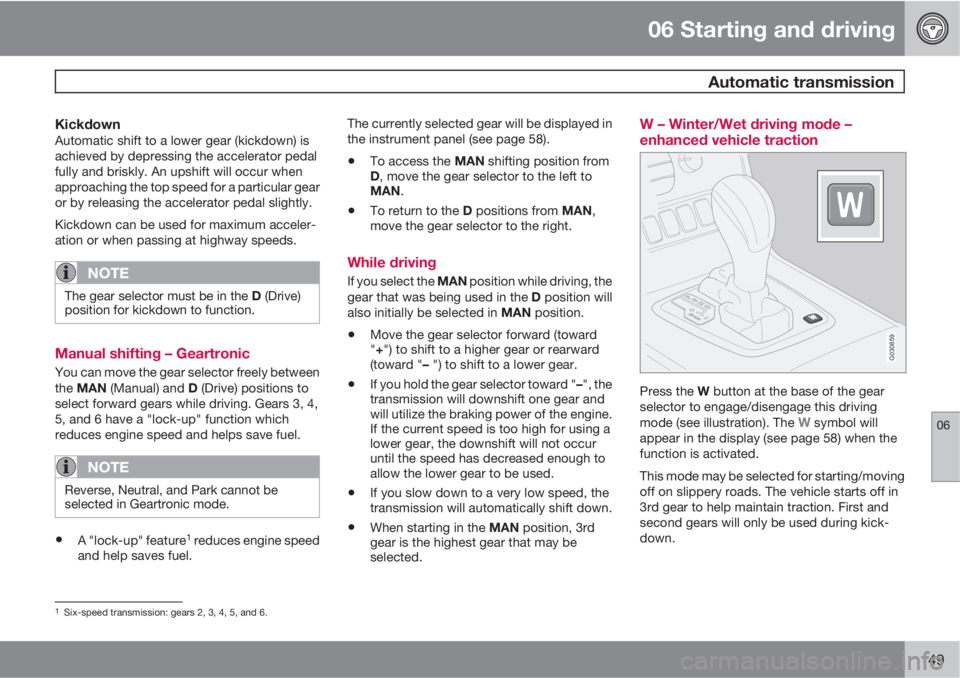
G030859
Press the W button at the base of the gear
selector to engage/disengage this driving
mode (see illustration). The
W symbol will
appear in the display (see page 58) when the
function is activated.
This mode may be selected for starting/moving
off on slippery roads. The vehicle starts off in
3rd gear to help maintain traction. First and
second gears will only be used during kick-
down.
1Six-speed transmission: gears 2, 3, 4, 5, and 6.
Page 155 of 310

06 Starting and driving
Brake system
06
* Option/accessory, for more information, see Introduction.153 BRAKE Brake circuit malfunction
The brake system is a hydraulic system con-
sisting of two master cylinders and two sepa-
rate brake circuits. If a problem should occur in
one of these circuits, it is still possible to stop
the vehicle with the other brake circuit.
If the brake pedal must be depressed farther
than normal and requires greater foot pressure,
the stopping distance will be longer.
A warning light in the instrument panel will light
up to warn the driver that a fault has occurred.
If this light comes on while driving or braking,
stop immediately and check the brake fluid
level in the reservoir.
NOTE
Press the brake pedal hard and maintain
pressure on the pedal – do not pump the
brakes.
WARNING
If the fluid level is below the MIN mark in the
reservoir or if a BRAKE FAILURE STOP
SAFELY message is displayed in the text
window: DO NOT DRIVE. Have the vehicle
towed to a trained and qualified Volvo serv-
ice technician and have the brake system
inspected.
NOTE
When the vehicle is at a standstill and the
engine is idling, e.g. at a traffic light and the
brake pedal is depressed, the pedal may go
down slightly. This is a normal function of
the power-assisted brake system.
Brake pad inspectionOn vehicles equipped with a jack*, the condi-
tion of the brake pads can be checked by rais-
ing the vehicle (see page 195 for information
about using the jack and removing a wheel)
and performing a visual inspection of the brake
pads.
WARNING
•If the vehicle has been driven immedi-
ately prior to a brake pad inspection, the
wheel hub, brake components, etc., will
be very hot. Allow time for these com-
ponents to cool before carrying out the
inspection.
•Apply the parking brake and put the
gear selector in the Park (P) position.
•Block the wheels standing on the
ground, use rigid wooden blocks or
large stones.
WARNING
•Use the jack intended for the vehicle
when changing a tire. For any other job,
use stands to support the vehicle.
•The jack should be kept well-greased
and clean, and should not be damaged.
•Be sure the jack is on a firm, level, non-
slippery surface.
•No objects should be placed between
the base of jack and the ground, or
between the jack and the attachment
bar on the vehicle.
•The jack must correctly engage the jack
attachment.
•Never allow any part of your body to be
extended under a vehicle supported by
a jack.
Power brakes function only when the
engine is running
The power brakes utilize vacuum pressure
which is only created when the engine is run-
ning. Never let the vehicle roll to a stop with the
engine switched off.
If the power brakes are not working, consider-
ably higher pressure will be required on the
brake pedal to compensate for the lack of
power assistance. This can happen for exam-
ple when towing your vehicle or if the engine is