2013 VOLVO XC90 fuel
[x] Cancel search: fuelPage 142 of 310

06 Starting and driving
Fuel requirements
06
140
Gasoline containing alcohol and ethers,
"Oxygenated fuels"
Some fuel suppliers sell gasoline containing
"oxygenates" which are usually alcohols or
ethers. In some areas, state or local laws
require that the service pump be marked indi-
cating use of alcohols or ethers. However,
there are areas in which the pumps are
unmarked. If you are not sure whether there is
alcohol or ethers in the gasoline you buy, check
with the service station operator. To meet sea-
sonal air quality standards, some areas require
the use of "oxygenated" fuel.
Volvo allows the use of the following "oxygen-
ated" fuels; however, the octane ratings listed
on page 139 must still be met.
Alcohol – EthanolFuels containing up to 10% ethanol by volume
may be used. Ethanol may also be referred to
as Ethyl alcohol, or "Gasohol".
Ethers – MTBE: Fuels containing up to
15% MTBE may be used.
MethanolDo not use gasolines containing methanol
(methyl alcohol, wood alcohol). This practice
can result in vehicle performance deterioration
and can damage critical parts in the fuel sys-
tem. Such damage may not be covered under
the New Vehicle Limited Warranty.
Weight distribution affects handlingAt the specified curb weight your vehicle has a
tendency to understeer, which means that the
steering wheel has to be turned more than
might seem appropriate for the curvature of a
bend.
This ensures good stability and reduces the
risk of rear wheel skid. Remember that these
properties can alter with the vehicle load.
The heavier the load in the cargo area, the less
the tendency to understeer.
Handling, roadholdingVehicle load, tire design and inflation pressure
all affect vehicle handling. Therefore, check
that the tires are inflated to the recommended
pressure according to the vehicle load. See
"Tire pressure" section.
Loads should be distributed so that capacity
weight or maximum permissible axle loads are
not exceeded.
Conserving electrical currentKeep the following in mind to help minimize
battery drain:
•When the engine is not running, avoid turn-
ing the ignition key to position II (see
page 145). Many electrical systems (the
audio system, the optional infotainment/
navigation systems, power windows, etc)
will function with the ignition key in positionI. This position reduces drain on the bat-
tery.
•Please keep in mind that using systems,
accessories, etc that consume a great deal
of current when the engine is not running
could result in the battery being completely
drained. Driving or having the engine run-
ning for approximately 15 minutes will help
keep the battery charged.
NOTE
A warning message will be displayed in the
text window in the instrument panel when
the battery charge is low.
Page 143 of 310

06 Starting and driving
Refueling
06
141 Fuel filler door
G027073
The fuel filler cap can be placed on the hook on
the fuel filler door while refueling
Press the button on the light switch panel (see
the illustration on page 67) when the vehicle is
at a standstill to unlock the fuel filler door.
Please note that the fuel filler door will remain
unlocked until the vehicle begins to move for-
ward. An audible click will be heard when the
fuel filler door relocks.
If you intend to leave your vehicle while it is
being refueled, this feature enables you to lock
the doors/tailgate while leaving the fuel filler
door unlocked.You can also keep the vehicle locked if you
remain inside it during refueling. The central
locking button does not lock the fuel filler door.
Be sure the fuel filler door is not obstructed and
is completely closed after refueling.
Open the fuel filler cap slowly during hot
weather.
NOTE
During a transitional period, a small number
of service stations may still have fuel noz-
zles that are not compatible with the fuel
filler neck on vehicles equipped with the
evaporative control system.
RefuelingThe fuel tank is designed to accommodate
possible expansion of the fuel in hot weather.
See page 290 for fuel tank volume. Be aware
that the "usable" tank capacity will be some-
what less than the specified maximum. When
the fuel level is low, such factors as ambient
temperature, the fuel's "Reid vapor pressure"
characteristics, and terrain can affect the fuel
pump's ability to supply the engine with an
adequate supply of fuel. Therefore, it is advis-
able to refuel as soon as possible when theneedle nears the red zone, or when the fuel
warning light comes on.
WARNING
Never carry a cell phone that is switched on
while refueling your vehicle. If the phone
rings, this may cause a spark that could
ignite gasoline fumes, resulting in fire and
injury.
Page 144 of 310

06 Starting and driving
Refueling
06
142
CAUTION
•Do not refuel with the engine running1.
Turn the ignition off or to position I. If the
ignition is on, an incorrect reading could
occur in the fuel gauge.
•After refueling, close the fuel filler cap
by turning it clockwise until it clicks into
place
1.
•Avoid overfilling the fuel tank. Do not
press the handle on the filler nozzle
more than one extra time. Too much fuel
in the tank in hot weather conditions can
cause the fuel to overflow. Overfilling
could also cause damage to the emis-
sion control systems.
•Avoid spilling gasoline during refueling.
In addition to causing damage to the
environment, gasolines containing
alcohol can cause damage to painted
surfaces, which may not be covered
under the New Vehicle Limited War-
ranty.
•Do not use gasolines containing meth-
anol (methyl alcohol, wood alcohol).
This practice can result in vehicle per-
formance deterioration and can dam-
age critical parts in the fuel system.
Such damage may not be covered
under the New Vehicle Limited War-
ranty.
1If the fuel filler cap is not closed tightly or if the engine is running when the vehicle is refueled, the Check Engine Light (malfunction indicator lamp) may indicate a fault. However, your vehicle's
performance will not be affected. Use only Volvo original or approved fuel filler caps.
Page 148 of 310

06 Starting and driving
Economical driving
06
146
Economical driving conserves natural
resources
Better driving economy may be obtained by
thinking ahead, avoiding rapid starts and stops
and adjusting the speed of your vehicle to
immediate traffic conditions. Observe the fol-
lowing rules:
•Bring the engine to normal operating tem-
perature as soon as possible by driving
with a light foot on the accelerator pedal for
the first few minutes of operation. A cold
engine uses more fuel and is subject to
increased wear.
•Whenever possible, avoid using the vehicle
for driving short distances. This does not
allow the engine to reach normal operating
temperature.
•Drive carefully and avoid rapid acceleration
and hard braking.
•Use the transmission's D (Drive) position
as often as possible and avoid using "kick-
down" to help improve fuel economy.
•Do not exceed posted speed limits.
•Avoid carrying unnecessary items (extra
load) in the vehicle.
•Maintain correct tire pressure. Check tire
pressure regularly (when tires are cold).
•Remove snow tires when threat of snow or
ice has ended.
•Note that roof racks, ski racks, etc,
increase air resistance and also fuel con-
sumption.
•At highway driving speeds, fuel consump-
tion will be lower with the air conditioning
on and the windows closed than with the
air conditioning off and the windows open.
•Using the onboard trip computer's fuel
consumption modes can help you learn
how to drive more economically.
Other factors that decrease gas mileage
are:
•Dirty air cleaner
•Dirty engine oil and clogged oil filter
•Dragging brakes
•Incorrect front end alignment.
Some of the above mentioned items and others
are checked at the standard Maintenance
Service intervals.
CAUTION
Drive slowly and carefully if going through
standing water (i.e. flooded roadways, etc.).
Damage to the engine could result if excess
water is drawn in through the air intake sys-
tem. Never drive the vehicle in water deeper
than 18 inches (48 cm).
Page 149 of 310

06 Starting and driving
Difficult driving conditions
06
147 Driving on rough/unpaved surfaces
The Volvo XC90 is designed primarily for on-
road driving, and it has excellent handling cha-
racteristics on very rough or unpaved roads.
When driving on poorly maintained or unpaved
roads, please keep the following in mind:
•Reduce speed on rough surfaces to mini-
mize possible damage to the vehicle's
underbody.
•When driving on soft surfaces such as dry
sand or snow, try to avoid stopping if at all
possible.
WARNING
•Avoid driving diagonally across steep
inclines as this could increase the risk of
a roll-over. Try to drive straight up or
down the slope.
•If the road is very steep, avoid turning
the vehicle around to help avoid the risk
of rolling over. Back the vehicle up or
down the incline instead.
NOTE
Avoid driving on steep inclines if the fuel
tank is nearly empty. If the flow of fuel to the
engine is interrupted due to the vehicle's
angle of inclination, this could result in dam-
age to the three-way catalytic converter. We
recommend keeping the fuel tank at least
half full when driving on steep inclines.
Driving through water
The vehicle can be driven through water up to
a depth of approximately 16 inches (40 cm), at
a maximum speed of 6 mph (10 km/h).
Take particular care when driving through flow-
ing water.
Clean the electrical connections for trailer wir-
ing after driving in mud or water.
When driving through water, maintain low
speed and do not stop in the water.
WARNING
After driving through water, press lightly on
the brake pedal to ensure that the brakes
are functioning normally. Water or mud can
make the brake linings slippery, resulting in
delayed braking effect.
CAUTION
•Engine damage will occur if water is
drawn into the air cleaner.
•If the vehicle is driven through water
deeper than 18 in (48 cm), water may
enter the differential and the transmis-
sion. This reduces the oil's lubricating
capacity and may shorten the service
life of these components.
•Do not allow the vehicle to stand in
water up to the door sills longer than
absolutely necessary. This could result
in electrical malfunctions.
•If the engine has been stopped while the
car is in water, do not attempt to restart
the engine. Have the car towed out of
the water.
Page 150 of 310

06 Starting and driving
Automatic transmission
06
148
G026990
P (Park)Use this position when starting the engine or
parking the vehicle.
Never use P while the vehicle is in motion.
The parking brake should also be set whenever
the vehicle is parked.
The gear selector is mechanically locked in
the P position (SHIFTLOCK). To release the
gear selector from this position, the engine
must be running (or the ignition key must be in
position II) and the brake pedal must be
depressed.
N (Neutral)Neutral – no gear engaged. Use the parking
brake.
WARNING
Never leave the vehicle unattended when
the engine is running. If, by mistake, the gear
selector is moved from P, the vehicle may
start moving.
R (Reverse)Never engage R while the vehicle is moving.
D (Drive)D is the normal driving position and should be
used as often as possible to help improve fuel
economy. The vehicle should not be moving
when shifting from R to the D position.
NOTE
The transmission has 6 forward speeds.
Automatic transmission – shift gate
positions
G020237
Shift gate positions
Depress the button on the front of the gear
selector knob to move between the R, N, D,
and P positions.
CAUTION
The transmission’s temperature is moni-
tored to help prevent damage to the trans-
mission or other drivetrain components. If
there is a risk of overheating, the warning
symbol on the instrument panel will illumi-
nate and a text message will be displayed.
Follow the instructions provided there.
Page 151 of 310
06 Starting and driving
Automatic transmission
06
149
KickdownAutomatic shift to a lower gear (kickdown) is
achieved by depressing the accelerator pedal
fully and briskly. An upshift will occur when
approaching the top speed for a particular gear
or by releasing the accelerator pedal slightly.
Kickdown can be used for maximum acceler-
ation or when passing at highway speeds.
NOTE
The gear selector must be in the D (Drive)
position for kickdown to function.
Manual shifting – Geartronic
You can move the gear selector freely between
the MAN (Manual) and D (Drive) positions to
select forward gears while driving. Gears 3, 4,
5, and 6 have a "lock-up" function which
reduces engine speed and helps save fuel.
NOTE
Reverse, Neutral, and Park cannot be
selected in Geartronic mode.
•A "lock-up" feature1 reduces engine speed
and help saves fuel.The currently selected gear will be displayed in
the instrument panel (see page 58).
•To access the MAN shifting position from
D, move the gear selector to the left to
MAN.
•To return to the D positions from MAN,
move the gear selector to the right.
While driving
If you select the MAN position while driving, the
gear that was being used in the D position will
also initially be selected in MAN position.
•Move the gear selector forward (toward
"+") to shift to a higher gear or rearward
(toward "– ") to shift to a lower gear.
•If you hold the gear selector toward "–", the
transmission will downshift one gear and
will utilize the braking power of the engine.
If the current speed is too high for using a
lower gear, the downshift will not occur
until the speed has decreased enough to
allow the lower gear to be used.
•If you slow down to a very low speed, the
transmission will automatically shift down.
•When starting in the MAN position, 3rd
gear is the highest gear that may be
selected.
W – Winter/Wet driving mode –
enhanced vehicle traction
G030859
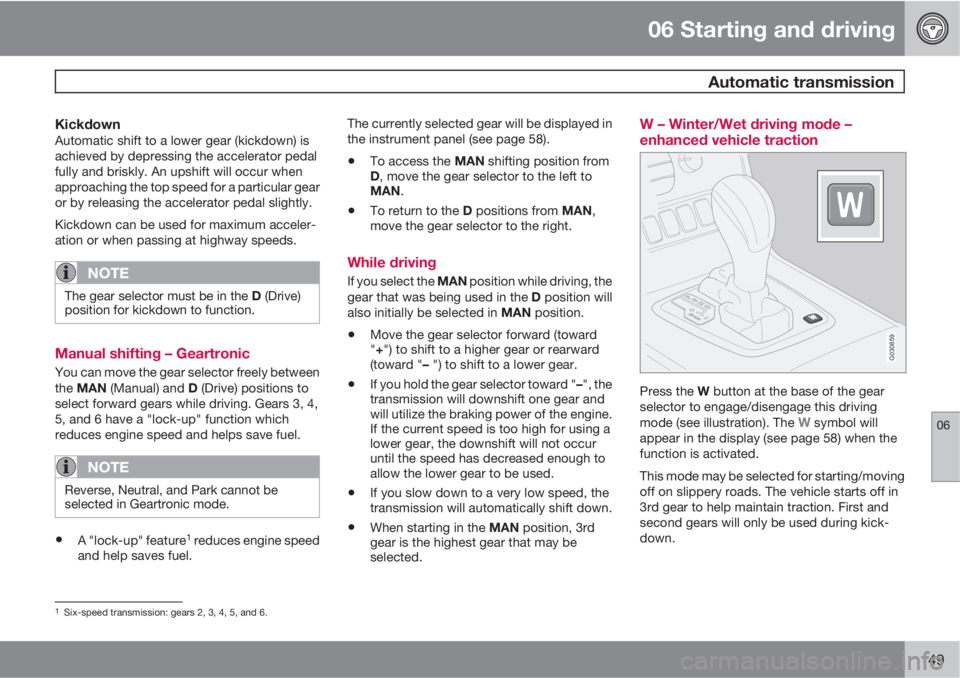
Press the W button at the base of the gear
selector to engage/disengage this driving
mode (see illustration). The
W symbol will
appear in the display (see page 58) when the
function is activated.
This mode may be selected for starting/moving
off on slippery roads. The vehicle starts off in
3rd gear to help maintain traction. First and
second gears will only be used during kick-
down.
1Six-speed transmission: gears 2, 3, 4, 5, and 6.
Page 153 of 310

06 Starting and driving
Jump starting
06
151
G030860
Follow these instructions to jump start your
vehicle's dead battery or to jump start another
vehicle's dead battery using your vehicle.
Although your vehicle's battery is located
under the floor of the cargo area, jumper cables
should be connected in the engine compart-
ment, to the points shown in the illustrations.
If the 12-volt auxiliary battery to be used is in
another vehicle, check that the vehicles are not
touching to prevent premature completion of a
circuit. Be sure to follow jump starting instruc-
tions provided for the other vehicle.
To jump start your vehicle:1. Switch off the ignition.2. First connect the auxiliary battery positive
(+) terminal (1) to the positive (+) terminal in
your vehicle's engine compartment (2),
located under a small black plastic cover
attached to the fuse box cover, marked
with a "+" sign. Remove the cover on the
main fuse box if necessary to access this
terminal. Then connect the auxiliary bat-
tery's negative (–) terminal (3) to the ground
point in your vehicle's engine compartment
(4).
3. Start the engine in the assisting vehicle,
then start the engine in the vehicle with
dead battery.
4. After the engine has started, first remove
the negative (–) terminal jumper cable.
Then remove the positive (+) terminal
jumper cable.
WARNING
PROPOSITION 65 WARNING!
Battery posts, terminals, and related acces-
sories contain lead and lead compounds,
chemicals known to the state of California
to cause cancer and reproductive harm.
Wash hands after handling.
WARNING
•Do not connect the jumper cable to any
part of the fuel system or to any moving
parts. Avoid touching hot manifolds.
•Never expose the battery to open flame
or electric spark.
•Do not smoke near the battery.
•Batteries generate hydrogen gas, which
is flammable and explosive.
•Battery fluid contains sulfuric acid. Do
not allow battery fluid to contact eyes,
skin, fabrics or painted surfaces. If con-
tact occurs, flush the affected area
immediately with water. Obtain medical
help immediately if eyes are affected.
•Failure to follow the instructions for
jump starting can lead to personal
injury.