Page 125 of 382

03 Your driving environment
Brakes
03
123
NOTE
•When the EBA system is activated, the
brake pedal will go down and pressure
in the brake system immediately increa-
ses to the maximum level. You must
maintain full pressure on the brake
pedal in order to utilize the system com-
pletely. There will be no braking effect if
the pedal is released. EBA is automati-
cally deactivated when the brake pedal
is released.
•When the vehicle has been parked for
some time, the brake pedal may sink
more than usual when the engine is
started. This is normal and the pedal will
return to its usual position when it is
released.
Symbols in the instrument panel
SymbolSpecification
Steady glow – Check the brake
fluid level. If the level is low, fill
with brake fluid and check for
the cause of the brake fluid
loss.
Steady glow for two seconds
when the engine is started –
There was a fault in the brake
system's ABS function when
the engine was last running.
WARNING
If and come on at the same time
and the brake level is below the MIN mark
in the reservoir or if a brake system-related
message is shown in the information dis-
play: DO NOT DRIVE. Have the vehicle
towed to a trained and qualified Volvo serv-
ice technician and have the brake system
inspected.
Page 135 of 382

04 Driver support
Stability system
04
133
Symbols and messages in the main instrument panel
SymbolMessageDescription
DSTC Temporarily OFFThe DSTC system function has been temporarily reduced due to high brake disc temperature. DSTC
reactivates automatically when the brakes have cooled.
DSTC Service requiredThe DSTC system is not functioning properly.
•Stop the vehicle in a safe place, turn off the engine and restart it.
•If the message is still displayed when the engine has restarted, drive to an authorized Volvo work-
shop to have the system inspected.
and
"Message"Read the message in the information display
Steady glow for 2 secs.The system is performing a self-diagnostic test.
Flashing symbolDSTC is actively functioning to help counteract wheel spin and/or a skid.
-Sport mode has been activated.
WARNING
The stability system is intended to help
improve driving safety. It supplements, but
can never replace, the driver's judgment
and responsibility when operating the vehi-
cle. Speed and driving style should always
be adapted to traffic and road conditions.
Page 153 of 382
04 Driver support
Distance Alert*
04
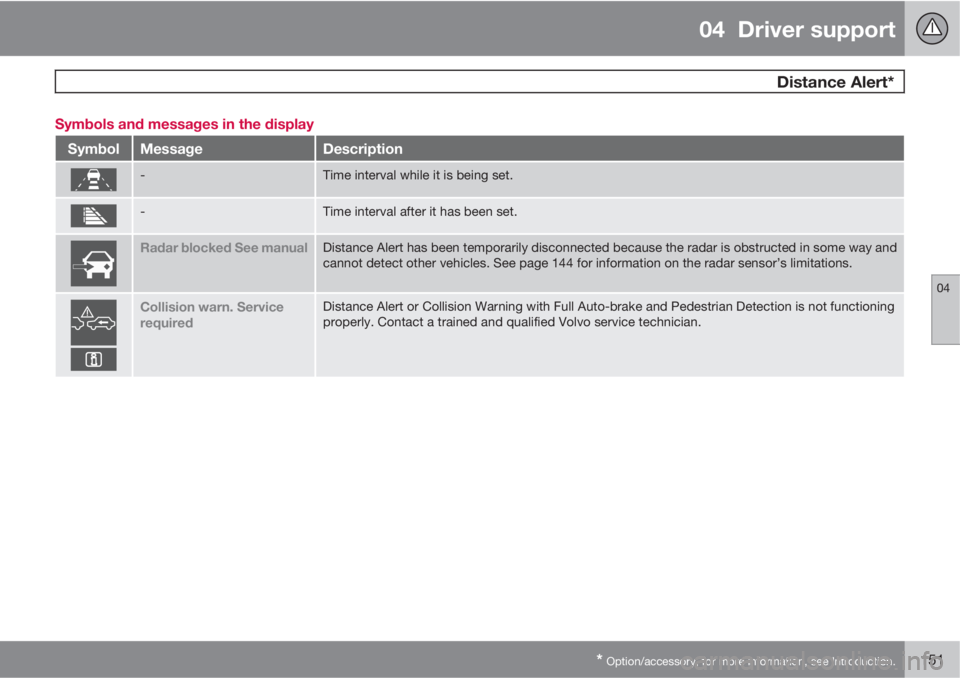
* Option/accessory, for more information, see Introduction.151 Symbols and messages in the display
SymbolMessageDescription
-Time interval while it is being set.
-Time interval after it has been set.
Radar blocked See manualDistance Alert has been temporarily disconnected because the radar is obstructed in some way and
cannot detect other vehicles. See page 144 for information on the radar sensor’s limitations.
Collision warn. Service
requiredDistance Alert or Collision Warning with Full Auto-brake and Pedestrian Detection is not functioning
properly. Contact a trained and qualified Volvo service technician.
Page 158 of 382

04 Driver support
City Safety™
04
156
WARNING
Eye injury may occur if any of the following
points are not followed:
•It is essential that all pertinent instruc-
tions be followed when handling laser
instruments. Testing, repairing, remov-
ing, adjusting and/or replacing any
components in the laser sensor may
only be done by a trained and qualified
Volvo service technician.
•Do not remove the laser sensor (includ-
ing removal of the lenses). A laser sen-
sor that has been removed belongs to
laser class 3B according to standard
IEC 60825-1. Devices in laser class 3B
present a risk of injury to the eyes.
•The laser sensor’s connector must be
disconnected before the sensor is
removed from the windshield.
•The laser sensor must be mounted in
place on the windshield before con-
necting the sensor’s connector.
•Do not view the laser sensor (which
emits spreading, invisible laser beams)
with optical instruments from a distance
of less than 4 inches (100 mm).
Symbols and messages in the display
When City Safety™ automatically applies the
brakes, one or more of the symbols in the main
instrument panel may illuminate and its asso-
ciated message will be displayed.
A text message can be erased by pressing
briefly on the OK button on the turn signal
lever.
Page 166 of 382

04 Driver support
Collision warning with Full Auto-brake and Pedestrian Detection*
04
164* Option/accessory, for more information, see Introduction.
CauseAction
The surface of the windshield in front of the camera is dirty or covered
with ice or snow.Clean or clear the section of the windshield in front of the camera.
Fog, heavy rain or snow is interfering with the function of the camera.No action possible. Heavy precipitation may affect the function of the
camera.
The surface of the windshield is clean but the message remains in the
display.Wait a short time. It may take several minutes for the camera to register
visibility.
The surface between the inside of the windshield and the camera is dirty.Contact an authorized Volvo retailer or service technician to have this
surface cleaned.
Symbols and messages in the display
SymbolMessageDescription
Collision Warning OffCollision Warning is switched off. This message is displayed when the engine is started and will dis-
appear after approx. 5 seconds. It can also be erased by pressing the OK button.
Collision Warning Unavail-
ableCollision Warning cannot be activated. This message is displayed when the driver attempts to activate
the function. It will disappear after approx. 5 seconds or can be erased by pressing the OK button.
Auto braking was acti-
vatedAuto-braking has been active. This message can be erased by pressing the OK button.
Windscreen Sensors
blockedThe camera is temporarily not functioning. This message is displayed if the camera is obstructed by
snow, ice, dirt, etc., on the windshield. Clean the area of the windshield in front of the camera, see
page 162 for more information on the camera’s limitations.
Page 172 of 382

04 Driver support
Driver Alert System*
04
170* Option/accessory, for more information, see Introduction.
Settings
Settings for Lane Departure Warning can be
made in the menu system by pressing My
Car. Go to Settings
Car settingsDriver
support systems
Lane Departure
Warning.
There are two alternatives:
On at start-up: This selection switches LDW
on each time the engine is started. Otherwise,the system will be in the mode that it was in
when the engine was switched off.
Increased sensitivity: This selection increa-
ses the function’s sensitivity. Warnings will be
given at an earlier stage and fewer limitations
apply. When this setting is being used, the sys-
tem only needs to monitor lane marker lines on
one side of the vehicle to change status to
Lane Depart Warn Available.
Symbols and messages in the display
SymbolMessageDescription
Lane departure warning ON/Lane
departure warning OFFThe function is switched on or off. The text disappears after 5 seconds.
-Lane Depart Warn AvailableThe function is monitoring the road’s marker lines.
-Lane Depart Warn Standby <40
mph (Lane Depart Warn Standby
<65 km/h)
The function has gone into standby mode because the vehicle's speed is below 40 mph
(65 km/h).
-Lane Depart Warn UnavailableThe road lacks clear marker lines.
Page 174 of 382

04 Driver support
Park assist*
04
172* Option/accessory, for more information, see Introduction.
Introduction
The park assist system is designed to assist
you when driving into parking spaces, garages,
etc. It utilizes ultrasound sensors in the front
bumper and rear bumper(s) to measure the dis-
tance to a vehicle or an object that may be
close to the front or rear of your vehicle. An
audible signal and symbols in the audio sys-
tem’s display indicate the distance to the
object.
NOTE
A trailer hitch whose wiring is integrated
with the vehicle's electrical system will be
included in the measurement of the availa-
ble space behind the vehicle.
WARNING
Park Assist is an information system, NOT a
safety system. This system is designed to
be a supplementary aid when parking the
vehicle. It is not, however, intended to
replace the driver's attention and judge-
ment.
Function
Park assist button
The system is activated automatically when the
vehicle is started. The indicator light in the but-
ton in the center console illuminates when the
system is on.
•The front park assist system is active from
the time the engine is started until the vehi-
cle exceeds a speed of approximately
10 mph (15 km/h). It is also active when the
vehicle is backing up.
•Rear park assist is active when the engine
is running and reverse gear has been
selected.
Activating/deactivatingThe system is activated automatically when the
vehicle is started.
–Press the Park assist button on the center
console to temporarily deactivate the sys-
tem(s).
> The indicator light in the button will go
out when the system has been deacti-
vated.
Park assist will be automatically reactivated the
next time the engine is started, or if the button
is pressed (the indicator light in the button will
illuminate).
NOTE
Park assist is disengaged automatically
when the parking brake is applied.
Page 341 of 382
09 Maintenance and specifications
Battery09
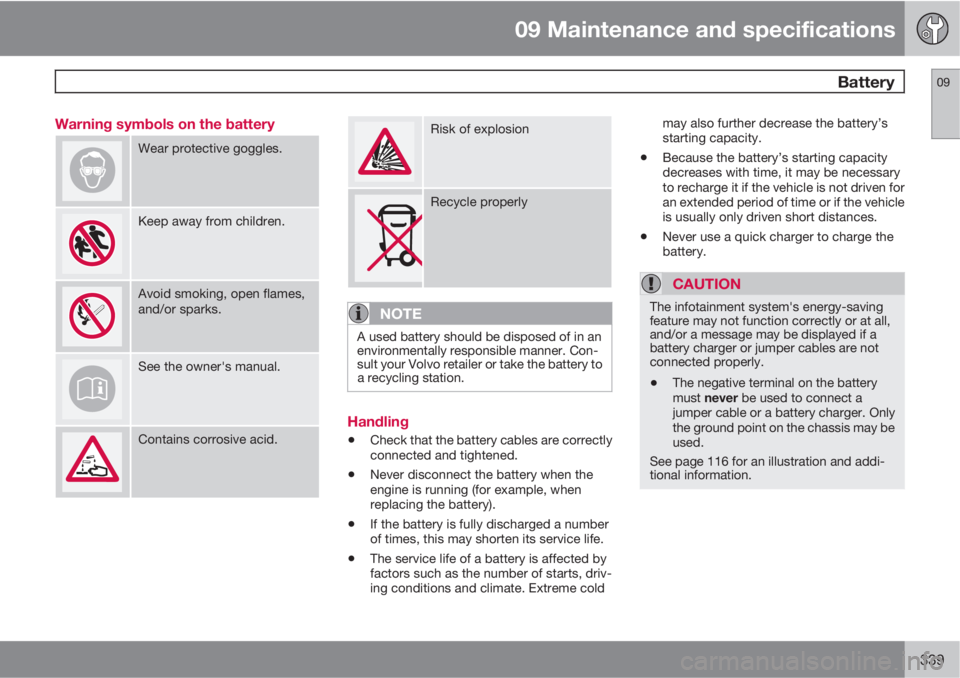
339 Warning symbols on the battery
Wear protective goggles.
Keep away from children.
Avoid smoking, open flames,
and/or sparks.
See the owner's manual.
Contains corrosive acid.
Risk of explosion
Recycle properly
NOTE
A used battery should be disposed of in an
environmentally responsible manner. Con-
sult your Volvo retailer or take the battery to
a recycling station.
Handling
•Check that the battery cables are correctly
connected and tightened.
•Never disconnect the battery when the
engine is running (for example, when
replacing the battery).
•If the battery is fully discharged a number
of times, this may shorten its service life.
•The service life of a battery is affected by
factors such as the number of starts, driv-
ing conditions and climate. Extreme coldmay also further decrease the battery’s
starting capacity.
•Because the battery’s starting capacity
decreases with time, it may be necessary
to recharge it if the vehicle is not driven for
an extended period of time or if the vehicle
is usually only driven short distances.
•Never use a quick charger to charge the
battery.
CAUTION
The infotainment system's energy-saving
feature may not function correctly or at all,
and/or a message may be displayed if a
battery charger or jumper cables are not
connected properly.
•The negative terminal on the battery
must never be used to connect a
jumper cable or a battery charger. Only
the ground point on the chassis may be
used.
See page 116 for an illustration and addi-
tional information.