2013 VOLVO XC60 remote key
[x] Cancel search: remote keyPage 91 of 382

03 Your driving environment
Seats
03
* Option/accessory, for more information, see Introduction.89
NOTE
•The seat will move to this position even
if someone else has moved it to a dif-
ferent position and locked the vehicle
with a different remote key.
•This feature will work in the same way
with all of the remote keys that you use
with your vehicle.
Emergency stop
WARNING
•Because the driver's seat can be
adjusted with the ignition off, children
should never be left unattended in the
vehicle.
•Movement of the seat can be STOPPED
at any time by pressing any button on
the power seat control panel.
•Do not adjust the seat while driving. The
seat should be adjusted so that the
brake pedal can be depressed fully. In
addition, position the seat as far rear-
ward as comfort and control allow.
•The seat rails on the floor must not be
obstructed in any way when the seat is
in motion.
Heated seats*See page 201.
Rear seats
Rear center head restraint
The center head restraint should be adjusted
according to the passenger's height. The
restraint should be carefully adjusted to sup-
port the occupant's head.
•Pull the head restraint up as required.
•To lower, press and hold the button
(located at the center, between the back-
rest and the head restraint) while pressing
the head restrain down carefully.
Page 102 of 382
03 Your driving environment
Lighting
03
100* Option/accessory, for more information, see Introduction.
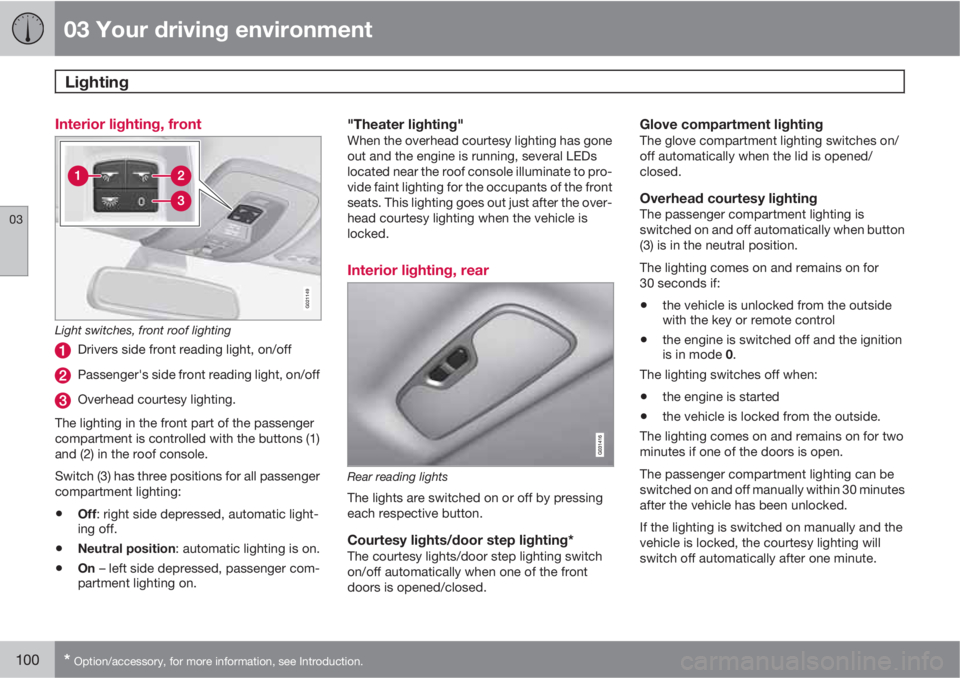
Interior lighting, front
G021149
Light switches, front roof lighting
Drivers side front reading light, on/off
Passenger's side front reading light, on/off
Overhead courtesy lighting.
The lighting in the front part of the passenger
compartment is controlled with the buttons (1)
and (2) in the roof console.
Switch (3) has three positions for all passenger
compartment lighting:
•Off: right side depressed, automatic light-
ing off.
•Neutral position: automatic lighting is on.
•On – left side depressed, passenger com-
partment lighting on.
"Theater lighting"When the overhead courtesy lighting has gone
out and the engine is running, several LEDs
located near the roof console illuminate to pro-
vide faint lighting for the occupants of the front
seats. This lighting goes out just after the over-
head courtesy lighting when the vehicle is
locked.
Interior lighting, rear
Rear reading lights
The lights are switched on or off by pressing
each respective button.
Courtesy lights/door step lighting*The courtesy lights/door step lighting switch
on/off automatically when one of the front
doors is opened/closed.
Glove compartment lightingThe glove compartment lighting switches on/
off automatically when the lid is opened/
closed.
Overhead courtesy lightingThe passenger compartment lighting is
switched on and off automatically when button
(3) is in the neutral position.
The lighting comes on and remains on for
30 seconds if:
•the vehicle is unlocked from the outside
with the key or remote control
•the engine is switched off and the ignition
is in mode 0.
The lighting switches off when:
•the engine is started
•the vehicle is locked from the outside.
The lighting comes on and remains on for two
minutes if one of the doors is open.
The passenger compartment lighting can be
switched on and off manually within 30 minutes
after the vehicle has been unlocked.
If the lighting is switched on manually and the
vehicle is locked, the courtesy lighting will
switch off automatically after one minute.
Page 103 of 382

03 Your driving environment
Lighting
03
101
Cargo area lightingThe cargo area lighting comes on automatically
when the tailgate is opened.
Home safe lighting
When you leave your vehicle at night, you can
make use of the home safe lighting function to
illuminate the area in front of the vehicle.
1. Remove the key from the ignition slot to put
the ignition in mode 0 (see page 85 for
information about the ignition modes).
2. Pull the turn signal lever as far as possible
towards the steering wheel and release it.
3. Exit the vehicle and lock the doors.
The headlights, parking lights, turn signals,
lights in the door mirrors, license plate lights,
and footwell lighting will illuminate and remain
on for 30
3, 60 or 90 seconds. The time interval
can be set in MY CAR under Settings
Car
settings
Light settingsHome safe light
duration. See page 191 for a description of
the menu system.
Approach lighting
Approach lighting is activated by pressing the
approach light button on the remote key (see
the illustration on page 59).
When the function has been activated, the
parking lights, indicator lights, door mirror
lights, license plate lighting, dome lighting and
door step lighting come on.
The time interval for this lighting can be set by
pressing MY CAR and going to Car settings
Light settingsApproach light
duration. See page 191 for a description of
the menu system.
3Factory setting
Page 107 of 382

03 Your driving environment
Power windows
03
* Option/accessory, for more information, see Introduction.105 Power windows
Driver's door control panel
Switch for power child safety locks* and
disengaging rear power window buttons,
see page 52
Rear window controls
Front window controls.
WARNING
•Always remove the ignition key when
the vehicle is unattended to put the igni-
tion in mode 0 (see page 85 for infor-
mation about the ignition modes).
•Never leave children unattended in the
vehicle.
•Make sure that the windows are com-
pletely unobstructed before they are
operated.
Operating
Operating the power windows
Manual up/down
Auto up/down.
All power windows can be operated using the
control panel in the driver's door. The controlpanels in the other doors only operate the win-
dow in the respective doors.
For the power windows to function, the ignition
must be in at least mode I. When the vehicle
has been running, the power windows can be
operated for several minutes after the remote
key has been removed from the ignition slot, or
until a door has been opened.
NOTE
•Movement of the windows will stop if
they are obstructed in any way.
•To reduce buffeting wind noise if the
rear windows are opened, also open the
front windows slightly.
Manual up/down–Move one of the controls up/down slightly.
> The power windows move up/down as
long as the control is held in position.
Auto up/down–Move one of the controls up/down as far
as possible and release it.
> The window will open or close com-
pletely.
Page 109 of 382

03 Your driving environment
Mirrors
03
* Option/accessory, for more information, see Introduction.107 Power door mirrors
Door mirror controls
Adjusting1.
Press the L button for the left door mirror
or the R button for the right door mirror.
The light in the button comes on.
2. Adjust the position with the joystick in the
center.
3.
Press the L or R button again. The light
should no longer be on.
WARNING
Objects seen in the mirrors may appear fur-
ther away than they actually are.
Retractable power door mirrors*The mirrors can be retracted for parking/driving
in narrow spaces:
1.
Press down the L and R buttons at the
same time.
2. Release them after approximately one sec-
ond. The mirrors automatically stop in the
fully retracted position.
Fold out the mirrors by pressing down the L
and R buttons at the same time. The mirrors
automatically stop in the fully extended posi-
tion.
Storing the position*The mirror positions are stored in the key mem-
ory when the vehicle has been locked with the
remote key. When the vehicle is unlocked with
the same remote control the mirrors and the
driver's seat adopt the stored positions when
the driver's door is opened.
The function can be activated/deactivated in
MY CAR under Settings
Car settings
Car key memoryPersonal settings in key
memory. See page 191 for a description of the
menu system.
Tilting the door mirrors when parking*The door mirrors can be tilted down to help
give the driver a better view along the sides of
the vehicle, for example when parallel parking.To activate this function, select reverse gear
and press the L or R mirror control button to tilt
the mirror down.
The function can be activated/deactivated in
MY CAR under Settings
Car settings
Side mirror settingsTilt left mirror or Tilt
right mirror
. See page 191 for a description
of the menu system.
The door mirror will reset to its normal position:
•after 10 seconds when reverse is disen-
gaged and the car remains stopped.
•immediately when reverse is disengaged
and the vehicle's forward speed exceeds
approximately 6 mph (10 km/h).
•immediately if you press the correspond-
ing L or R button again.
•when the engine is turned off.
•when the side mirrors are folded in.
NOTE
Only one mirror can be tilted down at a time.
Automatically tilting the door mirrors
when parking
The door mirrors can tilt down automatically to
help give the driver a better view along the
sides of the vehicle, for example when parallel
parking. When the transmission is no longer in
Page 110 of 382

03 Your driving environment
Mirrors
03
108
reverse, the mirrors will automatically return to
their original position.
This function can be activated/deactivated in
MY CAR under Settings
Car settings
Side mirror settingsIn reverse gear tilt
left mirror or
In reverse gear tilt right
mirror. See page 191 for information about
the MY CAR menu system.
Automatic retraction when lockingWhen the vehicle is locked/unlocked with the
remote key the door mirrors are automatically
retracted/extended.
The function can be activated/deactivated in
MY CAR under Settings
Car settings
Side mirror settingsRetract side mirrors
when locking. See page 191 for a description
of the menu system.
Resetting to neutralMirrors that have been moved out of position
by an external force must be electrically reset
to the neutral position for electric retracting/
extending to work.
•Retract the mirrors with the L and R but-
tons.
•Fold them out again with the L and R but-
tons.
The mirrors are now reset in neutral position.
Home safe and approach lightingThe light on the door mirrors comes on when
approach lighting or home safe lighting is
selected, see page 101.
Rear window and door mirror
defrosters
Use the defroster to quickly remove fog and ice
from the rear window and the door mirrors.
Press the button once to start simultaneous
rear window and door mirror defrosting. The
light in the button indicates that the function is
active. Switch the function off when then win-
dows have cleared to help avoid battery drain.
The rear window is defogged/de-iced auto-
matically if the vehicle is started in an outside
temperature lower than 48 °F (9 °C). Auto-
defrosting can be selected in MY CAR underSettings
Climate settingsAutomatic
rear defroster. See page 191 for a description
of the menu system.
Interior rearview mirror
Auto-dim functionAn integrated sensor reacts to headlights from
following traffic and automatically reduces
glare in the mirror.
Page 113 of 382

03 Your driving environment
Laminated panoramic roof*
03
* Option/accessory, for more information, see Introduction.111
WARNING
•During manual closing, if the laminated
panoramic roof is obstructed, immedi-
ately open it again.
•Never open or close the laminated pan-
oramic roof if it is obstructed in any way.
•Never allow a child to operate the lami-
nated panoramic roof.
•Never leave a child alone in a vehicle.
•When leaving the vehicle, ensure that
the ignition is in mode 0 (see page 84 for
information about the various ignition
modes) to disable the laminated panor-
amic roof. Never leave the remote key/
PCC* in the vehicle.
•Never extend any object or body part
though the open laminated panoramic
roof, even if the vehicle's ignition is
completely switched off.
Automatic operation1. To open the sun shade completely, pull the
control as far back as possible (to the auto
open position) and release it.
2. To fully open the laminated panoramic
roof, pull the control as far back as possible
a second time (to the auto open position)
and release it.
Quick open/closeThe laminated panoramic roof and the sun
shade can be opened/closed at the same time:
•Open - pull the control back (to the auto
open position) twice in quick succession
and release it.
•Close - push the control forward (to the
auto close position) twice in quick succes-
sion and release it.
Manual operation1.
Opening the sun shade: Pull the control
back to the first stop (the manual open
position) and hold it until the sun shade has
opened to the position of your choice.
2.
Opening the rear edge of the laminated
panoramic roof: Pull the control back to
the first stop (the manual open position) a
second time to open the rear edge of the
laminated panoramic roof.
3.
Opening the front glass section: Pull the
control back to the first stop (the manual
open position) a third time and hold it until
the laminated panoramic roof has opened
to the position of your choice.
Perform this procedure in reverse order to
close the laminated panoramic roof and/or sun
shade.
NOTE
For manual opening, the sun shade must
first be fully open before it will be possible
to open the laminated panoramic roof.
When closing, the laminated panoramic roof
must be fully closed before the sun shade
can be closed.
Tilt position
Tilt position, raised at the rear edge
Open (raise the rear edge of the front glass
section) by pressing the rear edge of the
control upward.
Close by pulling the rear edge of the con-
trol downward and holding it until the lami-
nated panoramic roof has closed com-
pletely.
If the sun shade is completely closed, it will
open approximately 2 inches (5 cm) when the
Page 118 of 382

03 Your driving environment
Starting the engine
03
116* Option/accessory, for more information, see Introduction.
Start
Ignition slot with remote key inserted ( see
page 84 for more information on ignition modes)
WARNING
Before starting the engine:
•Fasten the seat belt.
•Check that the seat, steering wheel and
mirrors are adjusted properly.
•Make sure the brake pedal can be
depressed completely. Adjust the seat
if necessary.
WARNING
•Never use more than one floor mat at a
time on the driver's floor. An extra mat
on the driver's floor can cause the
accelerator and/or brake pedal to
catch. Check that the movement of
these pedals is not impeded.
•Volvo's floor mats are specially manu-
factured for your car. They must be
firmly secured in the clips on the floor so
that they cannot slide and become trap-
ped under the pedals on the driver's
side.
1. Press the remote key into the ignition slot
as far as possible, with the metallic key
blade pointing outward (not inserted into
the slot)
1.
2.
Depress the brake pedal
2.
3.
Press and release the START/STOP
ENGINE button. The autostart function will
operate the starter motor until the engine
starts or until its overheating function stops
it.The starter motor operates for a maximum
of 10 seconds. If the engine has not
started, repeat the procedure.
CAUTION
If the engine does not start after the third try,
wait for approximately 3 minutes before try-
ing to start it again to give the battery time
to recover its starting capacity.
NOTE
Keyless drive*
To start a vehicle equipped with the keyless
drive feature, one of the remote keys must
be in the passenger compartment. Follow
the instructions in steps 2 and 3 to start the
vehicle.
1On vehicles with the optional keyless drive, it is only necessary to have a remote key in the passenger’s compartment.2If the vehicle is moving, it is only necessary to press the START/STOP ENGINE button to start the vehicle.