2013 VOLVO XC60 controls
[x] Cancel search: controlsPage 109 of 382

03 Your driving environment
Mirrors
03
* Option/accessory, for more information, see Introduction.107 Power door mirrors
Door mirror controls
Adjusting1.
Press the L button for the left door mirror
or the R button for the right door mirror.
The light in the button comes on.
2. Adjust the position with the joystick in the
center.
3.
Press the L or R button again. The light
should no longer be on.
WARNING
Objects seen in the mirrors may appear fur-
ther away than they actually are.
Retractable power door mirrors*The mirrors can be retracted for parking/driving
in narrow spaces:
1.
Press down the L and R buttons at the
same time.
2. Release them after approximately one sec-
ond. The mirrors automatically stop in the
fully retracted position.
Fold out the mirrors by pressing down the L
and R buttons at the same time. The mirrors
automatically stop in the fully extended posi-
tion.
Storing the position*The mirror positions are stored in the key mem-
ory when the vehicle has been locked with the
remote key. When the vehicle is unlocked with
the same remote control the mirrors and the
driver's seat adopt the stored positions when
the driver's door is opened.
The function can be activated/deactivated in
MY CAR under Settings
Car settings
Car key memoryPersonal settings in key
memory. See page 191 for a description of the
menu system.
Tilting the door mirrors when parking*The door mirrors can be tilted down to help
give the driver a better view along the sides of
the vehicle, for example when parallel parking.To activate this function, select reverse gear
and press the L or R mirror control button to tilt
the mirror down.
The function can be activated/deactivated in
MY CAR under Settings
Car settings
Side mirror settingsTilt left mirror or Tilt
right mirror
. See page 191 for a description
of the menu system.
The door mirror will reset to its normal position:
•after 10 seconds when reverse is disen-
gaged and the car remains stopped.
•immediately when reverse is disengaged
and the vehicle's forward speed exceeds
approximately 6 mph (10 km/h).
•immediately if you press the correspond-
ing L or R button again.
•when the engine is turned off.
•when the side mirrors are folded in.
NOTE
Only one mirror can be tilted down at a time.
Automatically tilting the door mirrors
when parking
The door mirrors can tilt down automatically to
help give the driver a better view along the
sides of the vehicle, for example when parallel
parking. When the transmission is no longer in
Page 112 of 382

03 Your driving environment
Laminated panoramic roof*
03
110* Option/accessory, for more information, see Introduction.
Introduction
The laminated panoramic roof is divided into
two sections.
•The rear glass section is fixed in place and
cannot be moved.
•The front glass section can be slid hori-
zontally to the open or closed positions or
its rear edge can be raised and lowered to
allow ventilation.
All references in this section to opening or clos-
ing the panoramic roof pertain to the front glass
section.
The laminated panoramic roof also has a sun
shade made of perforated fabric that is located
below the sections of glass. This shade can be
opened or closed, for example when driving in
bright sunlight.
Both the laminated panoramic roof and the sun
shade are operated by the controls in the ceil-
ing console, near the rear-view mirror. The
vehicle's ignition must be in mode I or II before
the laminated panoramic roof/sun shade can
be operated.
CAUTION
•Remove ice and snow before opening
the laminated panoramic roof.
•Do not operate the laminated panor-
amic roof if it is frozen closed.
•Never place heavy objects on the lami-
nated panoramic roof.
Operation
Auto open (arrow points toward the rear of
the vehicle)
Manual open
Manual close
Auto close
Page 115 of 382

03 Your driving environment
HomeLink® Wireless Control System*
03
* Option/accessory, for more information, see Introduction.113 Introduction
The HomeLink1 Wireless Control System pro-
vides a convenient way to replace up to three
hand-held radio-frequency (RF) transmitters
used to activate devices such as gate opera-
tors, garage door openers, entry door locks,
security systems, even home lighting. Addi-
tional HomeLink information can be found on
the Internet at www.homelink.com or by phon-
ing the hotline at 1–800–355–3515.
WARNING
•If you use HomeLink to open a garage
door or gate, be sure no one is near the
gate or door while it is in motion.
•When programming a garage door
opener, it is advised to park outside of
the garage.
•Do not use HomeLink with any garage
door opener that lacks safety stop and
reverse features as required by U.S.
federal safety standards (this includes
any garage door opener model manu-
factured before April 1, 1982). A garage
door that cannot detect an object - sig-
naling the door to stop and reverse -
does not meet current U.S. federal
safety standards. For more information,
contact HomeLink at:
www.homelink.com.
Retain the original transmitter of the RF device
you are programming for use in other vehicles
as well as for future HomeLink programming. It
is also suggested that upon the sale of the
vehicle, the programmed HomeLink buttons be
erased for security purposes. Refer to “Reset-
ting HomeLink Buttons” on page 115.
Programming HomeLink
NOTE
Some vehicles may require the ignition to be
switched on or be in the “accessories” posi-
tion for programming and/or operation of
HomeLink. It is also recommended that a
new battery be placed in the hand-held
transmitter of the device being programmed
to HomeLink for quicker training and accu-
rate transmission of the radio-frequency
signal. The HomeLink buttons must be reset
first. When this has been completed, Home-
link is in learning mode so that you can per-
form programming.
1. Position the end of your hand-held trans-
mitter 1–3 inches (5–14 cm) away from the
HomeLink button you wish to program
while keeping the indicator light in view.
2. Simultaneously press and hold both the
chosen HomeLink and hand-held transmit-
ter buttons until the HomeLink indicator
light changes from a slow to a rapidly blink-
ing light. Now you may release both the
HomeLink and hand-held transmitter but-
tons.
1HomeLink and the HomeLink house are registered trademarks of Johnson Controls, Inc.
Page 140 of 382
04 Driver support
Cruise control
04
138
Operation
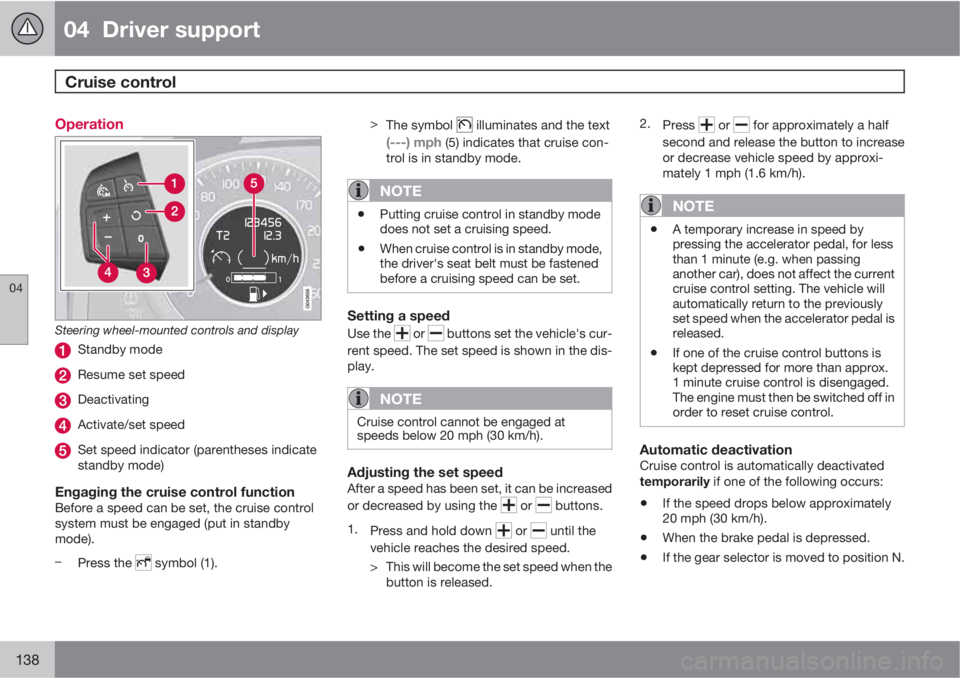
Steering wheel-mounted controls and display
Standby mode
Resume set speed
Deactivating
Activate/set speed
Set speed indicator (parentheses indicate
standby mode)
Engaging the cruise control functionBefore a speed can be set, the cruise control
system must be engaged (put in standby
mode).
–
Press the
symbol (1).>
The symbol
illuminates and the text
(---) mph (5) indicates that cruise con-
trol is in standby mode.
NOTE
•Putting cruise control in standby mode
does not set a cruising speed.
•When cruise control is in standby mode,
the driver's seat belt must be fastened
before a cruising speed can be set.
Setting a speed
Use the or buttons set the vehicle's cur-
rent speed. The set speed is shown in the dis-
play.
NOTE
Cruise control cannot be engaged at
speeds below 20 mph (30 km/h).
Adjusting the set speedAfter a speed has been set, it can be increased
or decreased by using the
or buttons.
1.
Press and hold down
or until the
vehicle reaches the desired speed.
> This will become the set speed when the
button is released.2.
Press
or for approximately a half
second and release the button to increase
or decrease vehicle speed by approxi-
mately 1 mph (1.6 km/h).
NOTE
•A temporary increase in speed by
pressing the accelerator pedal, for less
than 1 minute (e.g. when passing
another car), does not affect the current
cruise control setting. The vehicle will
automatically return to the previously
set speed when the accelerator pedal is
released.
•If one of the cruise control buttons is
kept depressed for more than approx.
1 minute cruise control is disengaged.
The engine must then be switched off in
order to reset cruise control.
Automatic deactivationCruise control is automatically deactivated
temporarily if one of the following occurs:
•If the speed drops below approximately
20 mph (30 km/h).
•When the brake pedal is depressed.
•If the gear selector is moved to position N.
Page 142 of 382

04 Driver support
Adaptive Cruise Control (ACC)*
04
140* Option/accessory, for more information, see Introduction.
Introduction
Adaptive Cruise Control (ACC) is an optional
system designed to assist the driver by main-
taining a set speed or a set time interval to the
vehicle ahead. It is primarily intended for use
on long straight roads in steady traffic, such as
on highways and other main roads.
When the driver has set the desired speed and
the time interval to the vehicle ahead, ACC
functions as follows:
•If there are no other vehicles in the lane
ahead of you, your vehicle will travel at the
set speed.
•If ACC's radar sensor detects a slower
moving vehicle in the lane ahead, the sys-
tem will adapt your vehicle's speed to help
maintain the set time interval to the vehicle
ahead. When there are no longer slower
moving vehicles ahead, your vehicle will
accelerate to resume the set speed.
If ACC is switched off completely or in standby
mode and your vehicle comes too close to
another vehicle ahead, the driver will be
warned by the Distance Alert system (see
page 151).
WARNING
•Adaptive Cruise Control cannot cover
all driving situations and traffic, weather
and road conditions. The "Function"
section provides information about lim-
itations that the driver must be aware of
before using this feature.
•This system is designed to be a supple-
mentary driving aid. It is not, however,
intended to replace the driver's atten-
tion and judgement. The driver is
responsible for maintaining a safe dis-
tance and speed and must intervene if
Adaptive Cruise Control does not main-
tain a suitable speed or suitable dis-
tance to the vehicle ahead.
•Maintenance of ACC components may
only be performed by a trained and
qualified Volvo technician.
Function
Function overview1
Warning light, braking by driver required
Controls in steering wheel
Radar sensor in front grille
Adaptive Cruise Control consists of:
•A cruise control system to maintain a set
speed
•A system to maintain a set distance to the
vehicle ahead, which is expressed as a
time interval. For example, you can choose
to remain approximately 2 seconds behind
the vehicle ahead. The actual distance
required to maintain a 2-second interval
will vary according the speed of the vehi-
cles.
1The illustration is schematic; details will vary, depending on the model
Page 144 of 382

04 Driver support
Adaptive Cruise Control (ACC)*
04
142* Option/accessory, for more information, see Introduction.
WARNING
Adaptive Cruise Control only warns of vehi-
cles detected by the radar sensor, see
page 146. In some cases there may be no
warning or the warning may be delayed. The
driver should always apply the brakes when
necessary.
Steep inclines and/or heavy loadsACC is primarily intended for use on fairly level
roads. The system may have difficulty main-
taining the correct distance to a vehicle ahead
on steep inclines, if the vehicle is carrying a
heavy load or is towing a trailer. In these situa-
tions, the driver should always be prepared to
apply the brakes if necessary.
Operation
Controls and display
Resume previous settings, increase speed
(each additional press increases speed by
1 mph (approximately 2 km/h).
Standby mode on/off
Set time interval
Put in active mode and set a speed
Set speed (parentheses indicate standby
mode)
Time interval while it is being set
Time interval after it has been set
Putting ACC in standby modeBefore ACC can be used to regulate speed
and/or the distance to a vehicle ahead, it must
first be put in standby mode.
To do so:
Press
.
The
symbol appears in the display and
parentheses (---) indicate that ACC is in
standby mode.
NOTE
The driver's door must be closed and the
driver's seat belt must be fastened before
ACC can be put in active mode. If the driv-
er's seat belt is taken off or if the driver's
door is opened, ACC will return to standby
mode.
Setting a speedOnce ACC has been put in standby mode, use
the
or buttons to store (set) the vehicle's
current speed. This puts the system in active
mode. The set speed, for example 55 mph, is
shown in the display.
Page 153 of 382

04 Driver support
Distance Alert*
04
* Option/accessory, for more information, see Introduction.151 Introduction
Distance Alert is part of Adaptive Cruise Con-
trol and is a function that provides information
about the time interval to the vehicle ahead.
Distance Alert is active at speeds above
approximately 18 mph (30 km/h). Time interval
information is only given for a vehicle that is
driving ahead of your vehicle in the same direc-
tion. No information is provided for vehicles
driving toward you, moving very slowly, or at a
standstill.
Amber warning light1.
An amber warning light in the windshield glows
steadily if your vehicle is closer to the one
ahead than the set time interval.
NOTE
Distance Alert only monitors distance to the
vehicle ahead while Adaptive Cruise Control
is in standby mode or off.
WARNING
Distance Alert only indicates the distance to
the vehicle ahead. It does not affect the
speed of your vehicle.
Operation
Press the button in the center instrument panel
to switch this function on or off. The indicator
light in the button illuminates when the function
is on.Depending on the optional equipment
selected, there may not be room for a Distance
Alert button in the center console. In this case,
the function is controlled through the menu
system. Press MY CAR and go to Settings
Car settingsDistance alertOn/Off.
Setting a time interval
Controls and display
Time interval: Increase/decrease
Time interval: On, while it is being set
Time interval: On, after it has been set
Press
to increase the interval or to
decrease it.
1The illustration is schematic - certain details may vary from model to model
Page 183 of 382

04 Driver support
Rear Park Assist Camera (PAC)*
04
* Option/accessory, for more information, see Introduction.181
image is shown on the center console dis-
play.
•When backing up, two solid lines are pro-
jected on the screen to show the path that
the vehicle's rear wheels will take. These
lines are affected by movements of the
steering wheel. The vehicle's approximate
outer dimension are shown by two dashed
lines.
•The graphic lines will not be displayed
when backing up with a trailer that is con-
nected to the vehicle's electrical system.
•Objects on the ground that are closer than
1 ft (30 centimeters) cannot be detected by
the camera.
•The camera is active for approx.
5 seconds after the gear selector is moved
to R or until the vehicle's speed exceeds
6 mph (10 km/h).
•The optional Park Assist sensors and the
parking camera work together and infor-
mation from the sensors is shown graphi-
cally on the display.
•The graphic lines shown on the screen
when the vehicle backs up can be disabled
in the settings menu.
•Manual zoom can be selected in the MY
CAR menu.
•The system can be switched off by press-
ing CAM. By default, the system is acti-
vated when the gear selector is moved toR. This setting can be changed in the MY
CAR menu.
•If there are two cameras installed on the
vehicle*, to switch between cameras, turn
TUNE (at least one of the cameras has to
be active), press CAM repeatedly or use
the center console controls. If the front
camera is on, it overrides the optional park
assist system's visual indicator but there
will still be an audible signal.
Limitations
Even if a fairly small section of the screen image
appears to be obstructed, this may mean that
a relatively large area behind the vehicle is hid-
den and objects there may not be detected
until they are very near the vehicle.
NOTE
Bicycle carriers or other accessories moun-
ted on the tailgate may obstruct the cam-
era's field of view.
Keep in mind
•Keep the camera's lens free of dirt, ice and
snow. Remove ice and snow carefully to
avoid scratching the lens.
•Clean the lens regularly with warm water
and a suitable car washing detergent.