2013 VOLVO V60 maintenance
[x] Cancel search: maintenancePage 170 of 422
04 Driver support
City Safety™
04
168* Option/accessory, for more information, see Introduction.
General
City Safety™ is a function for helping the driver
to avoid a collision when driving in queues,
amongst other things, when changes in the
traffic ahead, combined with a lapse in atten-
tion, could lead to an incident.
The function is active at speeds
under50 km/h and it helps the driver by auto-
matically braking the car in the event of immi-
nent risk of collision with vehicles in front,
should the driver not react in time by braking
and/or steering away.
City Safety™ is activated in situations where
the driver should have started braking earlier,
which is why it cannot help the driver in every
situation.
City Safety™ is designed to be activated as
late as possible in order to avoid unnecessary
intervention.
City Safety™ must not be used as an excuse
for the driver to change his/her driving style. If
the driver solely relies on City Safety™ to do
the braking, there will be a collision sooner or
later.
The driver or passengers normally only notice
City Safety™ if a situation arises where the car
is extremely close to being in a collision.If the car is also equipped with a Collision
Warning function with Auto Brake*, these two
systems complement each other. For more
information on Collision Warning function with
Auto Brake, see page 173.
IMPORTANT
Maintenance and replacement of City
Safety™ components must only be per-
formed by a workshop - an authorised Volvo
workshop is recommended.
WARNING
City Safety™ does not engage in all driving
situations or traffic, weather or road condi-
tions.
City Safety™ does not react to vehicles
driving in a different direction from the car,
to small vehicles, motorcycles and bicycles
or to humans and animals.
City Safety™ can prevent collision at a
speed difference of less than 15 km/h - at a
higher speed difference, it is only possible
to reduce collision speed. In order to obtain
full brake function, the driver must depress
the brake pedal.
Never wait for City Safety™ to engage. The
driver always bears responsibility for main-
taining the proper distance and speed.
Function
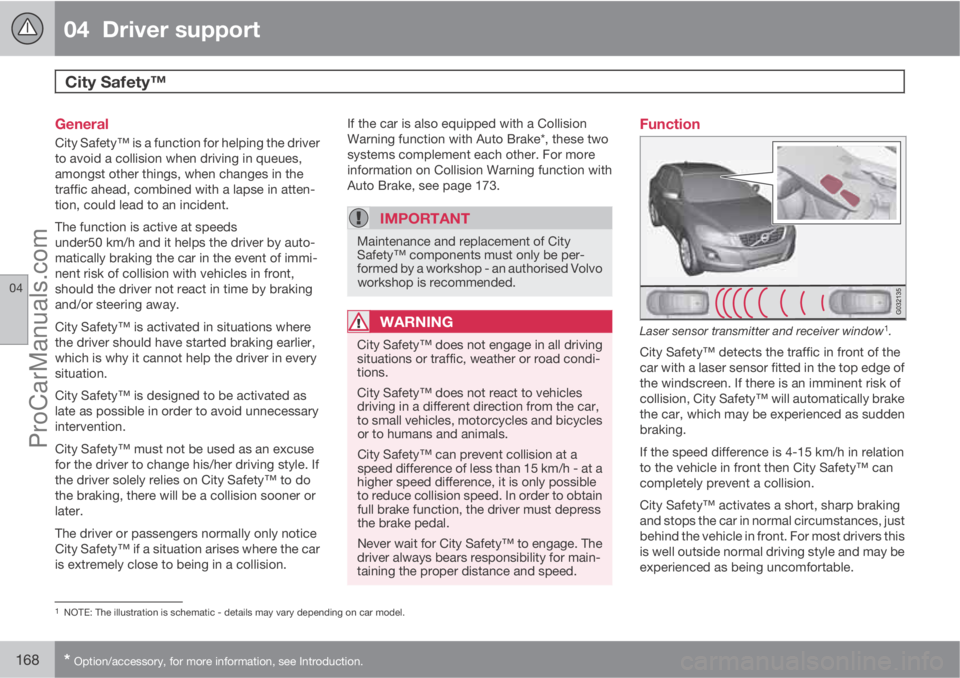
Laser sensor transmitter and receiver window1.
City Safety™ detects the traffic in front of the
car with a laser sensor fitted in the top edge of
the windscreen. If there is an imminent risk of
collision, City Safety™ will automatically brake
the car, which may be experienced as sudden
braking.
If the speed difference is 4-15 km/h in relation
to the vehicle in front then City Safety™ can
completely prevent a collision.
City Safety™ activates a short, sharp braking
and stops the car in normal circumstances, just
behind the vehicle in front. For most drivers this
is well outside normal driving style and may be
experienced as being uncomfortable.
1NOTE: The illustration is schematic - details may vary depending on car model.
ProCarManuals.com
Page 175 of 422
04 Driver support
Collision Warning with Auto Brake & Pedestrian Protection*
04
* Option/accessory, for more information, see Introduction.173 General
"Collision Warning with Auto Brake & Pedes-
trian Detection" is an aid to assist the driver
when there is a risk of colliding with a pedes-
trian or vehicle in front that is stationary or
moving in the same direction.
Collision Warning with Auto Brake & Pedestrian
Detection is activated in situations where the
driver should have started braking earlier,
which is why it cannot help the driver in every
situation.
Collision Warning with Auto Brake & Pedestrian
Detection is designed to be activated as late as
possible in order to avoid unnecessary inter-
vention.
Collision Warning with Auto Brake & Pedestrian
Detection may prevent a collision or reduce the
collision speed.
Collision Warning with Auto Brake & Pedestrian
Detection must not be used as an excuse for
the driver to change his/her driving style. If the
driver solely relies on Collision Warning with
Auto Brake to do the braking, there will be a
collision sooner or later.
Two system levelsDepending on how the car equipped, the Col-
lision Warning with Auto Brake & Pedestrian
Detection function may appear in two variants:
Level 1 and Level 2.
Level 1The driver is merely warned of occurring obsta-
cles by means of visual and acoustic signals -
no automatic braking intervenes, the driver
must himself brake.
Level 2The driver is warned of occurring obstacles by
means of visual and acoustic signals - the car
is braked automatically if the driver himself
does not act within a reasonable time.
IMPORTANT
Maintenance of components included in
Collision Warning with Auto Brake & Pedes-
trian Detection must only be carried out in a
workshop - an authorised Volvo workshop
is recommended.
Function
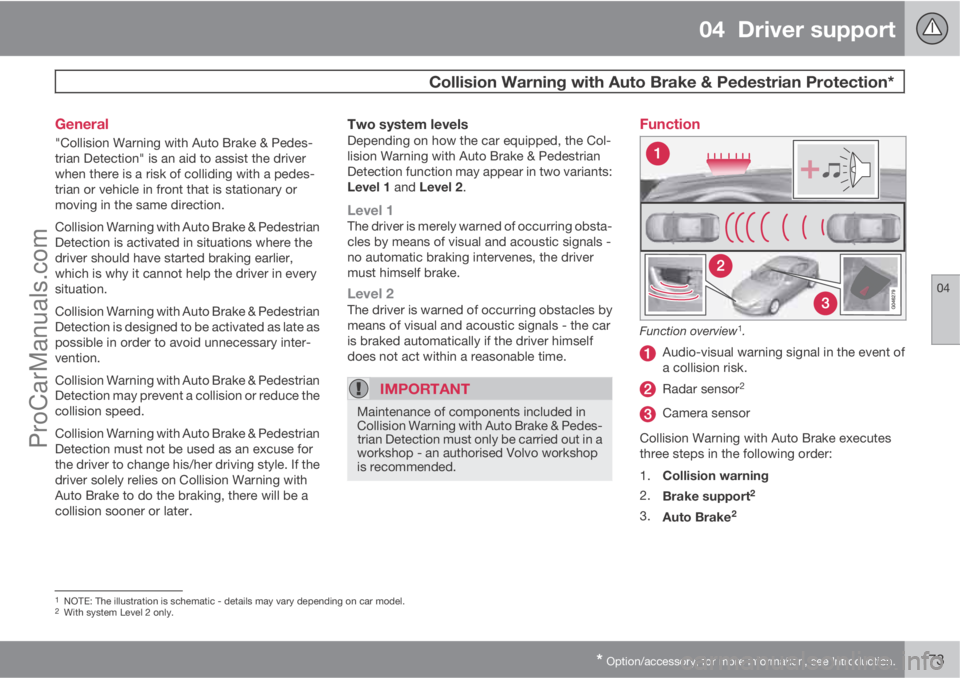
Function overview1.
Audio-visual warning signal in the event of
a collision risk.
Radar sensor2
Camera sensor
Collision Warning with Auto Brake executes
three steps in the following order:
1.
Collision warning
2.
Brake support
2
3.
Auto Brake2
1NOTE: The illustration is schematic - details may vary depending on car model.2With system Level 2 only.
ProCarManuals.com
Page 178 of 422

04 Driver support
Collision Warning with Auto Brake & Pedestrian Protection*
04
176* Option/accessory, for more information, see Introduction.
Activating/deactivating warning signalsThe warning lamp (no. [1] in the illustration on
page 173) is activated automatically when the
engine is started if Collision Warning is ena-
bled.
The warning sound can be activated/deacti-
vated separately:
•Select On or Off in the menu system MY
CAR under Settings
Car settings
Driver support systemsCollision
Warning
Warning sound.
Set warning distanceThe warning distance regulates the distance at
which the visual and acoustic warnings are
deployed.
•Select one of the options from Long,Normal or Short in the menu system MY
CAR under Settings
Car settings
Driver support systemsCollision
Warning
Warning distance.
The warning distance determines the system's
sensitivity. Warning distance
Long provides an
earlier warning. First test with Long and if this
setting produces too many warnings, which
could be perceived as irritating in certain sit-uations, then change to warning distance
Normal.
Only use warning distance
Short in excep-
tional cases, e.g. for dynamic driving.
NOTE
When the adaptive cruise control is in use
the warning lamp and warning sound will be
used by the cruise control even if the colli-
sion warning system is switched off.
The collision warning system warns the
driver in the event of a risk of a collision, but
the function cannot shorten driver reaction
time.
In order for the collision warning system to
be effective, always drive with the Distance
Alert set at time interval 4 – 5. see
page 165.
NOTE
Even if the warning distance has been set toLong warnings could be perceived as being
late in certain situations, e.g. when there are
large differences in speed or if vehicles in
front brake heavily.
WARNING
No automatic system can guarantee
100 % correct function in all situations.
Therefore, never test the Auto Brake system
by driving at people or vehicles - this may
cause severe damage and injury and risk
lives.
Checking settingsThe settings required can be controlled on the
centre console display screen. Search with the
menu system MY CAR under Settings
Car
settings
Driver support systems
Collision Warning, see page 202.
Maintenance
Camera and radar sensor3.
3NOTE: The illustration is schematic - details may vary depending on car model.
ProCarManuals.com
Page 203 of 422
05 Comfort and driving pleasure
Menus and messages
05
201
NOTE
If a warning message appears while you are
using the trip computer, the message must
be read (press OK) before the previous
activity can be resumed.
MessageSpecification
Stop safelyAStop and switch off the
engine. Serious risk of
damage - consult a
workshop
B.
Stop engineAStop and switch off the
engine. Serious risk of
damage - consult a
workshop
B.
Service urgentAContact a workshopB to
check the car immedi-
ately.
Service
requiredAContact a workshopB to
check the car as soon
as possible.
See manualARead the owner's man-
ual.
Book time for
maintenanceTime to book regular
service - contact a
workshop
B.
MessageSpecification
Time for regular
maintenanceTime for regular service
- contact a workshopB.
The timing is deter-
mined by the number of
kilometres driven, num-
ber of months since the
last service, engine run-
ning time and oil grade.
Maintenance
overdueIf the service intervals
are not followed then
the warranty does not
cover any damaged
parts - contact a work-
shop
B.
Transmission
oil Change nee-
dedContact a workshopB to
check the car as soon
as possible.
Transmission
performance
lowThe gearbox cannot
handle full capacity.
Drive carefully until the
message clears
C.
If shown repeatedly -
contact a workshop
B.
MessageSpecification
Transmission
hot Reduce
speedDrive more smoothly or
stop the car in a safe
manner. Disengage the
gear and run the engine
at idling speed until the
message clears
C.
Transmission
hot Stop safelyCritical fault. Stop the
car immediately in a
safe manner and con-
tact a workshop
B.
Temporarily
OFFAA function has been
temporarily switched
off and is reset auto-
matically while driving
or after starting again.
Low battery
Power save
modeThe audio system is
switched off to save
energy. Charge the bat-
tery.
APart of message, shown together with information on where
the problem has arisen.
BAn authorised Volvo workshop is recommended.CFor more messages concerning automatic transmission, see
page 125.
ProCarManuals.com
Page 313 of 422
08 Wheels and tyres
General
08
* Option/accessory, for more information, see Introduction.311
Wear and maintenanceThe correct tyre pressure results in more even
wear, see page 317. Driving style, tyre pres-
sure, climate and road condition affect how
quickly your tyres age and wear. To avoid dif-
ferences in tread depth and to prevent wear
patterns arising, the front and rear wheels can
be switched with each other. A suitable dis-
tance for the first change is approx. 5000 km
and then at 10 000 km intervals. Volvo recom-
mends that you contact an authorised Volvo
workshop for checking if you are uncertain
about tread depth. If significant differences in
wear (>1 mm difference in tread depth)
between tyres have already occurred, the least
worn tyres must always be placed on the rear.
Understeer is normally easier to correct than
oversteer, and leads to the car continuing for-
wards in a straight line rather than having the
rear end skidding to one side, resulting in pos-
sible complete loss of control over the car. This
is why it is important for the rear wheels never
to lose grip before the front wheels.
Wheels should be stored lying down or hanging
up - and not standing up.
WARNING
A damaged tyre can lead to loss of control
of the car.
Tyres with tread wear indicators
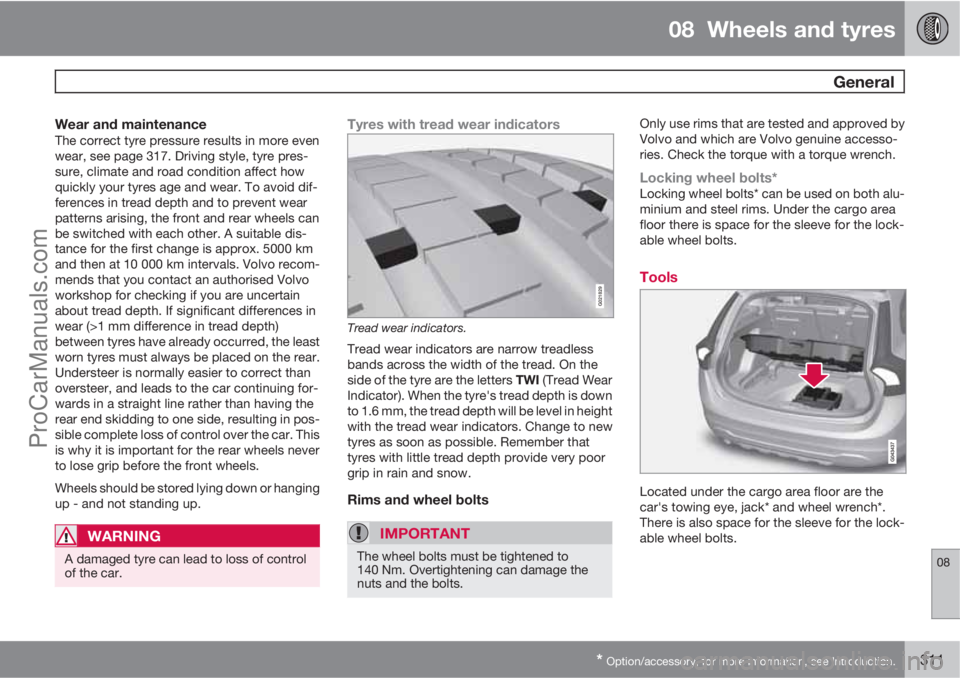
G021829
Tread wear indicators.
Tread wear indicators are narrow treadless
bands across the width of the tread. On the
side of the tyre are the letters TWI (Tread Wear
Indicator). When the tyre's tread depth is down
to 1.6 mm, the tread depth will be level in height
with the tread wear indicators. Change to new
tyres as soon as possible. Remember that
tyres with little tread depth provide very poor
grip in rain and snow.
Rims and wheel bolts
IMPORTANT
The wheel bolts must be tightened to
140 Nm. Overtightening can damage the
nuts and the bolts.
Only use rims that are tested and approved by
Volvo and which are Volvo genuine accesso-
ries. Check the torque with a torque wrench.
Locking wheel bolts*Locking wheel bolts* can be used on both alu-
minium and steel rims. Under the cargo area
floor there is space for the sleeve for the lock-
able wheel bolts.
Tools
Located under the cargo area floor are the
car's towing eye, jack* and wheel wrench*.
There is also space for the sleeve for the lock-
able wheel bolts.
ProCarManuals.com
Page 329 of 422
MAINTENANCE AND SERVICE
ProCarManuals.com
Page 330 of 422

09 Maintenance and service
Engine compartment 09
328
General
Volvo service programmeTo keep the car as safe and reliable as possi-
ble, follow the Volvo service programme as
specified in the Service and Warranty Booklet.
Volvo recommends engaging an authorised
Volvo workshop to perform the service and
maintenance work. Volvo workshops have the
personnel, special tools and service literature
to guarantee the highest quality of service.
IMPORTANT
For the Volvo warranty to apply, check and
follow the instructions in the Service and
Warranty Booklet.
Check regularlyCheck the following oils and fluids at regular
intervals, e.g. when refuelling:
•Coolant
•Engine oil
•Power steering fluid
•Washer fluid
WARNING
Remember that the radiator fan (located at
the front of the engine compartment, behind
the radiator) may start automatically some
after the engine has been switched off.
Always have the engine cleaned by a work-
shop. There is a risk of fire if the engine is
hot.
Raising the car
NOTE
Volvo recommends only using the jack that
belongs to the car model in question. If a
jack is selected other than the one recom-
mended by Volvo, follow the instructions for
use supplied with the equipment.
If the car is raised with a workshop jack; posi-
tion the jack against the front edge on the
engine's subframe.
Do not damage the splashguard under the
engine. Ensure that the workshop jack is posi-
tioned so that the car cannot slide off the jack.
Always use axle stands or similar.
If you raise the car using a two-pillar workshop
lift, ensure that the front and rear lift arms are
fixed under the lifting points. See preceding
illustration.
Opening and closing the bonnet
The handle for bonnet opening is always on the
left-hand side.
ProCarManuals.com
Page 331 of 422

09 Maintenance and service
Engine compartment09
329
Turn the handle about 20-25 degrees
clockwise. You will hear when the catch
releases.
Move the catch to the left and open the
bonnet. (The catch hook is located
between the headlamp and grille, see illus-
tration.)
WARNING
Check that the bonnet locks properly when
closed.
Engine compartment, overview
The appearance of the engine compartment may
vary depending on engine variant.
Coolant expansion tank
Power steering fluid reservoir
Engine oil dipstick1
Radiator
Filling engine oil
Reservoir for brake and clutch fluid
(located on the driver's side)
Battery
Relay and fuse box
Filling washer fluid
Air filter
WARNING
The ignition system has very high voltage
and output. The voltage in the ignition sys-
tem is highly dangerous. The remote control
key must always be in 0 position when work
is being done in the engine compartment,
see page 78.
Do not touch the spark plugs or ignition coil
when the remote control key is in II position
or when the engine is hot.
Checking the engine oil
1Engines with electronic oil level sensor have no dipstick (5-cyl. diesel).
ProCarManuals.com