2013 VOLVO C30 steering
[x] Cancel search: steeringPage 78 of 300

02 Instruments and controls
Right-side steering wheel lever
02
76
•Intermittent wiping: Press in the upper sec-
tion of the button.
•Normal wiper speed: Press in the lower
section of the button.
•Neutral position: The wiper function is
switched off.
NOTE
The rear wiper is equipped with cut-off func-
tion, which means that it will not operate if
its electric motor overheats. The wiper will
function again after a cool-down period
(30 seconds or longer, depending on the
heat of the motor and ambient temperature
conditions).
Liftgate wiper and reverse gear
•If the front wipers are on and the transmis-
sion is put into reverse gear, the liftgate
wiper will be activated.
•If the transmission is in reverse and the
manual windshield wiper function is used
(the lever is pushed upward), the liftgate
wiper will also be activated for as long the
lever is held up.
•If the liftgate wiper is already in normal wip-
ing function, the normal wiping function will
continue.
Page 79 of 300

02 Instruments and controls
Steering wheel adjustment, Hazard warning flashers
02
77 Steering wheel adjustment
G027308
Both the height and the reach of the steering
wheel can be adjusted to a comfortable posi-
tion for the driver.
1. Pull down the lever on the steering column
to release the steering wheel.
2. Adjust the steering wheel to a suitable
position.
3. Press the lever back into place to lock the
steering wheel in the new position. If nec-
essary, press the steering wheel slightly
while pressing the lever into the locked
position.Check that the steering wheel is locked in the
new position.
WARNING
Never adjust the steering wheel while driv-
ing.
Hazard warning flashers
G020144
The four-way flasher should be used to indi-
cate that the vehicle has become a traffic haz-
ard.
1. Press the triangular button in the center
dash.2. Press the button again to turn off the flash-
ers.
NOTE
•Regulations regarding the use of the
hazard warning flasher may vary,
depending on where you live.
•The hazard warning flashers will be acti-
vated automatically if an airbag
deploys.
Page 87 of 300

02 Instruments and controls
Personal settings
02
* Option/accessory, for more information, see Introduction.85
•Global (All doors) – unlocks all doors and
the liftgate with one press on the remote
key.
•Two Step (Two-stage unlocking) – This
alternative unlocks the driver's door with
one press on the remote key. A second
press unlocks the passenger's door and
the liftgate.
Automatically folding the door mirrorsThe setting makes it possible to automatically
fold the door mirrors in or out when the vehicle
is locked or unlocked. See page 80.
Operating side windowsThe following alternative can be selected for
opening the door windows at the same time by
pressing and holding the Unlock switch in
either of the front doors (see page 135 for
additional information)
1
NOTE
The ignition key must be in position I or
higher (see page 149) before the door win-
dows can be opened using the switches in
the doors.
•Auto open all windows On/Off
Temporarily turning off the alarm
sensor(s)
The alarm sensors can be temporarily turned
off (if, for example, a person or a pet remains
in the vehicle when the doors are locked from
outside with the remote key). There are two
alternatives:
Activate once and Ask on exit,
see page 126 and 137.
Approach lightingThis alternative determines the length of time
for which the car's lights will remain on when
the Approach light button on the central lock-
ing system's remote key is pressed. Intervals
of 30/60/90 seconds may be selected, see the
section "Remote key functions" for more infor-
mation.
Home safe lightingThis alternative determines the length of time
for which the car's lights will remain on when
the high beam lever on the steering column is
pulled toward the wheel with the ignition
switched off. Intervals of 30/60/90 seconds
may be selected, see page 68 for information
on using this function.
Information
•VIN number – The VIN (Vehicle Identifica-
tion Number) is the car's unique identity
number.
•Number of Keys – the number of keys reg-
istered for the car is displayed here.
Climate functions
•Blower speed in AUTO mode – the blower
speed can be set to AUTO mode in models
equipped with ECC. Choose between
"Low", "Normal" and "High".
•Timer for recirculation – when the timer is
active, the air recirculates in the car for
3–12 minutes depending on the ambient
temperature. Select On/Off depending on
whether the recirculation timer is to be
active or not.
Keyless locking and unlocking*The following alternatives can be selected for
locking and unlocking the doors and liftgate:
•All doors – all doors are locked or unlocked
at the same time.
•Doors on the same side – front and rear
doors on the same side are unlocked
together.
1This menu alternative also makes it possible to open both door windows by pressing and holding the Unlock button on the remote key for several seconds.
Page 144 of 300

06 Starting and driving
General information
06
142
Economical driving conserves natural
resources
Better driving economy may be obtained by
thinking ahead, avoiding rapid starts and stops
and adjusting the speed of your vehicle to
immediate traffic conditions.
Observe the following rules:
•Bring the engine to normal operating tem-
perature as soon as possible by driving
with a light foot on the accelerator pedal for
the first few minutes of operation. A cold
engine uses more fuel and is subject to
increased wear.
•Whenever possible, avoid using the vehicle
for driving short distances. This does not
allow the engine to reach normal operating
temperature.
•Drive carefully and avoid rapid acceleration
and hard braking.
•Use the transmission's Drive (D) position
as often as possible and avoid using kick-
down.
•On models with a manual transmission,
use the highest gear possible, depending
on the vehicle's speed.
•Do not exceed posted speed limits.
•Avoid carrying unnecessary items (extra
load) in the vehicle.
•Maintain correct tire pressure. Check tire
pressure regularly (when tires are cold).
•Remove snow tires when threat of snow or
ice has ended.
•Note that roof racks, ski racks, etc,
increase air resistance and also fuel con-
sumption.
•At highway driving speeds, fuel consump-
tion will be lower with the air conditioning
on and the windows closed than with the
air conditioning off and the windows open.
•Using the onboard trip computer's fuel
consumption modes can help you learn
how to drive more economically.
Other factors that decrease gas mileage
are:
•Dirty air cleaner
•Dirty engine oil and clogged oil filter
•Dragging brakes
•Incorrect front end alignment
Some of the above mentioned items and others
are checked at the standard maintenance
intervals.
WARNING
Driving with the liftgate open: Driving with
the liftgate open could lead to poisonous
exhaust gases entering the passenger com-
partment. If the liftgate must be kept open
for any reason, proceed as follows:
1. Close the windows.
2. Set the ventilation system control to air
flow to floor, windshield and side win-
dows and the blower control to its high-
est setting.
Weight distribution affects handling
At the specified curb weight your vehicle has a
tendency to understeer, which means that the
steering wheel has to be turned more than
might seem appropriate for the curvature of a
bend. This ensures good stability and reduces
the risk of rear wheel skid. Remember that
these properties can alter with the vehicle load.
The heavier the load in the cargo area, the less
the tendency to understeer.
Page 147 of 300

06 Starting and driving
General information
06
145
•Check state of the battery's charge.
•Examine tires carefully (the spare tire as
well), and replace those that are worn.
Check tire pressures.
•The brakes, front wheel alignment, and
steering gear should be checked by your
Volvo retailer only.
•Check all lights, including high beams.
•Reflective warning triangles are legally
required in some states/provinces.
•Have a word with your Volvo retailer if you
intend to drive in countries where it may be
difficult to obtain the correct fuel.
•Consider your destination. If you will be
driving through an area where snow or ice
are likely to occur, consider snow tires.
Page 151 of 300
06 Starting and driving
Ignition switch
06
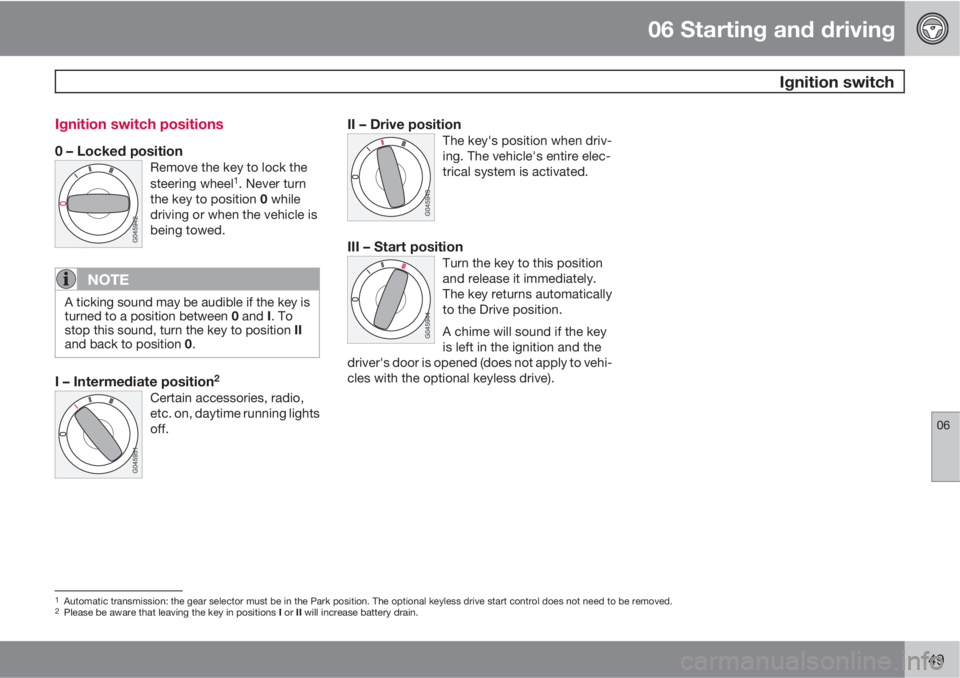
149 Ignition switch positions
0 – Locked positionRemove the key to lock the
steering wheel1. Never turn
the key to position 0 while
driving or when the vehicle is
being towed.
NOTE
A ticking sound may be audible if the key is
turned to a position between 0 and I. To
stop this sound, turn the key to position II
and back to position 0.
I – Intermediate position2
Certain accessories, radio,
etc. on, daytime running lights
off.
II – Drive positionThe key's position when driv-
ing. The vehicle's entire elec-
trical system is activated.
III – Start positionTurn the key to this position
and release it immediately.
The key returns automatically
to the Drive position.
A chime will sound if the key
is left in the ignition and the
driver's door is opened (does not apply to vehi-
cles with the optional keyless drive).
1Automatic transmission: the gear selector must be in the Park position. The optional keyless drive start control does not need to be removed.2Please be aware that leaving the key in positions I or II will increase battery drain.
Page 152 of 300

06 Starting and driving
Starting the vehicle
06
150
To start the engine
WARNING
Before starting, check that the seat, steering
wheel and mirrors are adjusted properly.
Make sure the brake pedal can be
depressed completely. Adjust the seat if
necessary.
1. Fasten the seat belt.
2. Apply the parking brake if not already set.
The gear selector should be locked in the
Park (P) position (Shiftlock). See also page
158.
Manual transmission: The clutch must be
fully depressed.
NOTE
After a cold start, idle speed may be notice-
ably higher than normal for a short period.
This is done to help bring components in the
emission control system to their normal
operating temperature as quickly as possi-
ble, which enables them to control emis-
sions and help reduce the vehicle's impact
on the environment.
3. The vehicle is equipped with an autostart
feature. Without touching the throttle
pedal, turn the key to position III and
release it. The starter motor will then oper-
ate automatically (for up to ten seconds)
until the engine starts. If the engine fails to
start, repeat this step.
CAUTION
If the engine does not start after the third try,
wait for approximately 3 minutes before try-
ing to start it again to give the battery time
to recover its starting capacity.
4. To release the gear selector from the Park
(P) position, the engine must be running (or
the ignition key must be in position II) and
the brake pedal must be depressed.
5. Select the desired gear. On models with an
automatic transmission, the gear engages
after a very slight delay, which is especially
noticeable when selecting R.
WARNING
•Never use more than one floor mat at a
time on the driver's floor. An extra mat
on the driver's floor can cause the
accelerator and/or brake pedal to
catch. Check that the movement of
these pedals is not impeded.
•Volvo's floor mats are specially manu-
factured for your car. They must be
firmly secured in the clips on the floor so
that they cannot slide and become trap-
ped under the pedals on the driver's
side.
Page 162 of 300

06 Starting and driving
Brake system
06
160
A warning light in the instrument panel will light
up to warn the driver that a fault has occurred.
If this light comes on while driving or braking,
stop immediately and check the brake fluid
level in the reservoir.
NOTE
Press the brake pedal hard and maintain
pressure on the pedal – do not pump the
brakes.
WARNING
If the fluid level is below the MIN mark in the
reservoir or if a brake system message is
shown in the information display, DO NOT
DRIVE. Have the vehicle towed to a Volvo
retailer and have the brake system inspec-
ted.
Power brakes function only when the
engine is running
The power brakes utilize vacuum pressure
which is only created when the engine is run-
ning. Never let the vehicle roll to a stop with the
engine switched off.
If the power brakes are not working, consider-
ably higher pressure will be required on the
brake pedal to compensate for the lack of
power assistance. This can happen for exam-ple when towing your vehicle or if the engine is
switched off when the vehicle is rolling. The
brake pedal feels harder than usual.
Water on brake discs and brake pads
affects braking
Driving in rain and slush or passing through an
automatic car wash can cause water to collect
on the brake discs and pads. This will cause a
delay in braking effect when the pedal is
depressed. To avoid such a delay when the
brakes are needed, depress the pedal occa-
sionally when driving through rain, slush, etc.
This will remove the water from the brakes.
Check that brake application feels normal. This
should also be done after washing or starting
in very damp or cold weather.
Severe strain on the brake system
The brakes will be subject to severe strain
when driving in mountains or hilly areas, or
when towing a trailer. Vehicle speed is usually
slower, which means that the cooling of the
brakes is less efficient than when driving on
level roads. To reduce the strain on the brakes,
shift into a lower gear and let the engine help
with the braking. Do not forget that if you are
towing a trailer, the brakes will be subjected to
a greater than normal load.
Anti-lock brakes (ABS)
The Anti-lock Braking System (ABS) helps to
improve vehicle control (stopping and steering)
during severe braking conditions by limiting
brake lockup. When the system "senses"
impending lockup, braking pressure is auto-
matically modulated in order to help prevent
lockup that could lead to a skid.
The system performs a self-diagnostic test
when the engine is started and when the
vehicle first reaches a speed of approxi-
mately 12 mph (20 km/h). The brake pedal will
pulsate several times and a sound may be
audible from the ABS control module. This is
normal.
For optimal ABS braking effect:1. Press down on the brake pedal with full
force. The pedal will pulsate.
2. Steer the vehicle in the direction of travel
and keep the brake pedal depressed.
Electronic Brake Force Distribution
(EBD)
EBD is an integrated part of the ABS system.
EBD regulates the hydraulic pressure to the
rear brakes to help provide optimal braking
capacity.
The switching of the ABS modulator will be
audible and the brake pedal will pulsate during