2013 VOLVO C30 brake
[x] Cancel search: brakePage 61 of 300

02 Instruments and controls
Symbols – instrument panel
02
59 Symbols – right side
G026438
1. Turn signal indicator for trailer (not
C30)
2. Parking brake applied
This light is on when the parking
brake (hand brake) is applied. The
parking brake lever is situated
between the front seats, see
page 162 for more information.
NOTE
Canadian models are equipped with the
second symbol.
3. SRS system warning lightIf this light comes on while the car
is being driven, or remains on for
longer than approximately 10 sec-
onds after the car has been
started, the SRS system's diag-
nostic functions have detected a fault in a seat
belt lock or pretensioner, a front airbag, side
impact airbag, and/or an inflatable curtain.
Have the system(s) inspected by a trained and
qualified Volvo service technician as soon as
possible.
4. Oil pressure warning light1
If the light comes on while driving,
the car, stop the engine immedi-
ately, and check the engine oil
level. If the oil level is normal and
the light stays on after restart, have
the car towed to the nearest trained and quali-
fied Volvo service technician. After hard driv-
ing, the light may come on occasionally when
the engine is idling. This is normal, provided it
goes off when the engine speed is increased.
5. Seat belt reminderThis symbol (and the seat belt
reminder light above the rear view
mirror) will light up if either front
seat occupant has not buckled his/
her seat belt. If the car is not mov-
ing, the symbols will go out after approximately
6 seconds.
6. Generator warning lightIf the light comes on while the
engine is running, have the charg-
ing system checked by an author-
ized Volvo workshop.
7. Brake failure warning lightIf this light comes on while driving
or braking, stop the car as quickly
as possible in a safe place, open
the hood, and check the brake fluid
level in the reservoir, see
page 220 for the location of the
reservoir.
NOTE
Canadian models are equipped with the
second symbol.
1On certain engines, this symbol is not used to indicate low oil pressure. Instead, a text warning is provided in the information display, see also page 221.
Page 62 of 300

02 Instruments and controls
Symbols – instrument panel
02
60
WARNING
If the fluid level is below the MIN mark in the
reservoir or if a BRAKE FAILURE STOP
SAFELY message is displayed in the infor-
mation display: DO NOT DRIVE. Have the
car towed to a trained and qualified Volvo
service technician and have the brake sys-
tem inspected.
If the BRAKES and ABS warning lights come
on at the same time, this could indicate a fault
in the brake system.
In this case:
1. Stop the car in a suitable place and switch
off the engine.
2. Restart the engine.
3. If both warning lights go off, no further
action is required and the car can be
driven.
4. If both lights remain on after the engine has
been restarted, switch off the engine again
and check the brake fluid level, see
page 220 for the location of the reservoir.
Door open warning
The driver will be alerted if one of the doors, the
hood or the liftgate are open or ajar.
At low speedsIf the car is moving at a speed of
less than approximately 3 mph
(5 km/h), the Information symbol in
the instrument panel will light up
and a message will be shown in the
information display indicating which door(s),
etc is not completely closed.
At higher speedsIf the car is moving at a speed
above approximately 6 mph
(10 km/h), the Warning symbol in
the instrument panel will light up
and a message will be shown in the
information display indicating which door(s),
etc is not completely closed.
Hood and liftgateIf the hood and/or liftgate is not
completely closed, the Information
symbol in the instrument panel will
light up and a message will be dis-
played, regardless of the vehicle's
speed.
Page 68 of 300
02 Instruments and controls
Lighting panel
02
66* Option/accessory, for more information, see Introduction.
tions. A light sensor then monitors the ambient
lighting conditions and automatically switches
from LED DRL to the low beam headlights in
weaker ambient light (and will switch back to
DRL when the ambient light becomes brighter).
The LED DRLs will also switch off automatically
(and the low beams will switch on) if:
•The rear fog light is switched on
•The windshield wipers are switched on for
more than 10 seconds
WARNING
•DRL is a driving aid designed to help
conserve electrical current. This system
cannot always determine if the ambient
lighting conditions are sufficient for
switching from low beams to DRL (or
vice versa). It is always the driver's
responsibility to visually determine if the
low beam headlights should be used.
•As the driver, you have full responsibility
for operating the vehicle in a safe man-
ner.
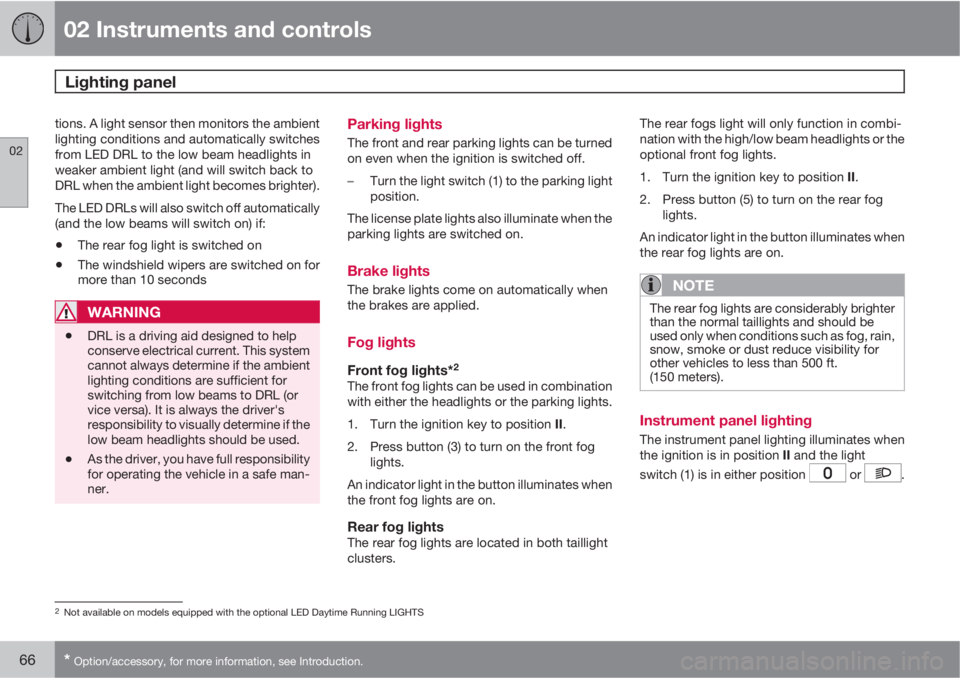
Parking lights
The front and rear parking lights can be turned
on even when the ignition is switched off.
–Turn the light switch (1) to the parking light
position.
The license plate lights also illuminate when the
parking lights are switched on.
Brake lights
The brake lights come on automatically when
the brakes are applied.
Fog lights
Front fog lights*2
The front fog lights can be used in combination
with either the headlights or the parking lights.
1.
Turn the ignition key to position II.
2. Press button (3) to turn on the front fog
lights.
An indicator light in the button illuminates when
the front fog lights are on.
Rear fog lightsThe rear fog lights are located in both taillight
clusters.The rear fogs light will only function in combi-
nation with the high/low beam headlights or the
optional front fog lights.
1.
Turn the ignition key to position II.
2. Press button (5) to turn on the rear fog
lights.
An indicator light in the button illuminates when
the rear fog lights are on.
NOTE
The rear fog lights are considerably brighter
than the normal taillights and should be
used only when conditions such as fog, rain,
snow, smoke or dust reduce visibility for
other vehicles to less than 500 ft.
(150 meters).
Instrument panel lighting
The instrument panel lighting illuminates when
the ignition is in position II and the light
switch (1) is in either position
or .
2Not available on models equipped with the optional LED Daytime Running LIGHTS
Page 74 of 300

02 Instruments and controls
Cruise control*
02
72* Option/accessory, for more information, see Introduction.
Engaging the cruise control function
G020141
The cruise control buttons are located on the
left side of the steering wheel hub.
NOTE
This does not set the vehicle's speed.
1.
Press the CRUISE button. CRUISE will
appear in the function display in the center
of the instrument panel.
2.
Press + or – to set the current speed.
CRUISE-ONwill be displayed.
Increasing or decreasing speed
G031667
Use + or – in the following ways to increase or
decrease the vehicle's speed:
1.
Press and hold down + or – until the vehicle
reaches the desired speed. This will
become the set speed when the button is
released.
2.
Press + or – for approximately a half sec-
ond and release the button to increase or
decrease vehicle speed by approximately
1 mph (1.6 km/h).
NOTE
•Cruise control will not function at
speeds below 20 mph (30 km/h).
•Momentary acceleration, for less than
1 minute (e.g. when passing another
car), does not affect cruise control oper-
ation. The car will automatically return
to the previously set speed when the
accelerator pedal is released.
Temporarily disengaging the cruise
control
•Press 0 to temporarily disengage cruise
control.
CRUISEwill appear in the function display. The
currently set speed is stored in the system's
memory.
Cruise control is also automatically
disengaged:
•If the speed drops below approximately
20 mph (30 km/h) when driving uphill.
•When the brake or clutch pedal is
depressed.
•If the gear selector is moved to position N.
Page 108 of 300

04 Interior
Front seats
04
106
Manual seat adjustment
The driver's and passenger's seats can be
adjusted in a number of ways to provide a
comfortable driving and sitting position.
Forward-rearward: Pull the lever up and
slide the seat to the position of your choice.
Use this control to raise or lower (pump up
or down) the front edge of the seat cushion.
Use this control to raise or lower (pump up
or down) the rear edge of the seat cushion.
Turn this knob (optional on some passeng-
er's seats) to adjust the firmness of the
lumbar support
1.
Turn this knob to adjust the backrest tilt.
Control panel for the optional power seats.
NOTE
Both front seats are equipped with head
restraints that can be adjusted vertically to
suit the height of the passenger. The upper
edge of the head restraint should be at least
on a level with the upper-most point of the
seat occupant's ear (see the section
"Adjusting the front seat head restraints" on
page 111).
WARNING
•Do not adjust the seat while driving.
•Adjust the driver’s seat and seat belt
(see page 20) before driving. The seat
should be adjusted so that the brake
pedal can be depressed fully.
•Position the seat as far rearward as
comfort and control allow.
Accessing the rear seat
Seat access buttons (power seat shown)
Seat adjustment handle
Seat adjustment button
1Also applies to the optional power seat.
Page 113 of 300

04 Interior
Front seats
04
111
NOTE
The memory function in the remote key
operates independently the memory func-
tion in the seat.
WARNING
•Because the driver's seat can be
adjusted with the ignition off, children
should never be left unattended in the
car.
•Movement of the seat can be STOPPED
at any time by pressing any button on
the power seat control panel.
•Do not adjust the seat while driving. The
seat should be adjusted so that the
brake pedal can be depressed fully. In
addition, position the seat as far rear-
ward as comfort and control allow.
•The seat rails on the floor must not be
obstructed in any way when the seat is
in motion.
Adjusting the front seat head restraints
The front seat head restraints are designed so
that they can be adjusted to two different
height positions.
NOTE
•When the vehicle leaves the factory, the
front seat head restraints will be in the
lower position.
•It is advisable to have the front seat
head restraints in the lower position if
you wish to fold down the seat's back-
rest.
The head restraints should be put in the upper
or lower position according to the height of the
occupant of the seat.
The upper edge of the head restraint should be
at least on a level with the upper-most point of
the seat occupant's ear (see illustration).
To raise or lower a head restraint:
Raising or lowering a head restraint1. Release the head restraint by pressing the
button underneath its left side, at the base
of the support (see the illustration).
2. Move the head restraint until it clicks
(locks) into the upper or lower position.
Page 142 of 300

140* Option/accessory, for more information, see Introduction.
General information............................................................................... 142
Fuel requirements................................................................................. 146
Ignition switch....................................................................................... 149
Starting the vehicle............................................................................... 150
Starting the vehicle with keyless drive*................................................. 152
Manual transmission, 6-speed*............................................................ 154
Automatic transmission........................................................................ 155
Shiftlock override.................................................................................. 158
Brake system........................................................................................ 159
Parking brake........................................................................................ 162
Stability system..................................................................................... 163
Towing.................................................................................................. 165
Jump starting........................................................................................ 168
Transporting loads................................................................................ 169
Blind Spot Information System (BLIS)*................................................. 170
Rear park assist*................................................................................... 174
Page 144 of 300

06 Starting and driving
General information
06
142
Economical driving conserves natural
resources
Better driving economy may be obtained by
thinking ahead, avoiding rapid starts and stops
and adjusting the speed of your vehicle to
immediate traffic conditions.
Observe the following rules:
•Bring the engine to normal operating tem-
perature as soon as possible by driving
with a light foot on the accelerator pedal for
the first few minutes of operation. A cold
engine uses more fuel and is subject to
increased wear.
•Whenever possible, avoid using the vehicle
for driving short distances. This does not
allow the engine to reach normal operating
temperature.
•Drive carefully and avoid rapid acceleration
and hard braking.
•Use the transmission's Drive (D) position
as often as possible and avoid using kick-
down.
•On models with a manual transmission,
use the highest gear possible, depending
on the vehicle's speed.
•Do not exceed posted speed limits.
•Avoid carrying unnecessary items (extra
load) in the vehicle.
•Maintain correct tire pressure. Check tire
pressure regularly (when tires are cold).
•Remove snow tires when threat of snow or
ice has ended.
•Note that roof racks, ski racks, etc,
increase air resistance and also fuel con-
sumption.
•At highway driving speeds, fuel consump-
tion will be lower with the air conditioning
on and the windows closed than with the
air conditioning off and the windows open.
•Using the onboard trip computer's fuel
consumption modes can help you learn
how to drive more economically.
Other factors that decrease gas mileage
are:
•Dirty air cleaner
•Dirty engine oil and clogged oil filter
•Dragging brakes
•Incorrect front end alignment
Some of the above mentioned items and others
are checked at the standard maintenance
intervals.
WARNING
Driving with the liftgate open: Driving with
the liftgate open could lead to poisonous
exhaust gases entering the passenger com-
partment. If the liftgate must be kept open
for any reason, proceed as follows:
1. Close the windows.
2. Set the ventilation system control to air
flow to floor, windshield and side win-
dows and the blower control to its high-
est setting.
Weight distribution affects handling
At the specified curb weight your vehicle has a
tendency to understeer, which means that the
steering wheel has to be turned more than
might seem appropriate for the curvature of a
bend. This ensures good stability and reduces
the risk of rear wheel skid. Remember that
these properties can alter with the vehicle load.
The heavier the load in the cargo area, the less
the tendency to understeer.