2013 VOLKSWAGEN TRANSPORTER seat
[x] Cancel search: seatPage 158 of 486

Removing the central table
The central table can be removed more easily by two people than by one person.
• Remove front protective covers from the central seat rails.
• Turn the single seats so that they face the di-rection of travel.
• Adjust the back rest of single seats to an upright position.
• Fold up the armrests of the single seats.
• Pull the handle @ up and hold the central table with the handle and the handle recess@.
• Push the central table forwards to the point where it can be lifted out of the slots in the seat rails.
• Lift the central table out.
• Put down the central table carefully so that the rollers and feet are not soiled or damaged.
• Place the removed covers on the open slots in the seat rails.
Fitting the central table
The central table can be installed more easily by two people than by one person.
• Remove front protective covers from the central seat rails.
• Turn the single seats so that they face the di-rection of travel.
Cool box
c:cn Introduction
This chapter contains information on the following subjects:
Fitting and removing the cool box
Switching the cool box on and off 159 161
The cool box may be used while the vehicle is in motion only if it is fitted to the adapter plate.
Power for the cool box can be supplied by any of the 12-volt sockets in the vehicle. The power con-sumption is approx. 33 watts. The cool box has a capacity of 32 litres.
Follow instructions provided for the installation and use of the cool box and keep it in the vehicle wal-let.
As far as possible, keep food and drinks in the cool box in leak-proof containers. Do not overfill the cool box such that air circulation is impaired.
158 Before the journey
• Adjust the backrest of single seats to an upright position.
• Fold up the armrests of the single seats.
• Pull the handle @ up and hold the central table with the handle and the handle recess®.
• Insert the central table guides into the recesses in the seat rails.
• Insert the central table into the seat rails and push them back, so that the removed covers can be placed on the open slots in the seat rails.
• Fold the handle@ back to engage the central table in the seat rails.
• Check that the central table is locked securely. it should now no longer be possible to move the central table.
• Do not raise the table module when the cen-tral table Is located between the single seats. This could cause damage to the table.
The vehicle battery will be drained if the cool box is used when the engine is switched off. For this rea-son, the cool box is fitted with a battery monitor. The battery monitor will switch the cool box off if the vehicle battery has a low charge level. The bat-tery monitor will switch the cool box on again as soon as the battery has reached a suitable charge level, for example, after a long journey.
Additional information and warnings:
• Seat functions, front =>page 69
• Seat functions, rear =>page 72
• Seat functions, rear, Business =>page 182
• Seat functions, rear, California =>page 193
• Electrical sockets =>page 163
• Battery =>page 350
Page 159 of 486
• Cleaning and caring for the interior =:>page 380
• Accessories. modifications, repairs and renewal of parts =:>page 380
A WARNING
Objects that are not secured, or are secured Incorrectly, can cause serious Injuries In the event of a sudden driving or braking manoeu-vre or accident
• The cool box may be transported only if it Is fitted to the adapter plate.
• Make sure that the adapter plate is proper-ly fitted In the seat rails.
• The cool box lid must always be closed and latched when the vehicle Is In motion.
• Never use the cool box as a table or stow-age compartment when the vehicle Is In mo-tlon.
A WARNING
If the ambient temperature In the vehicle is too low, the temperature in the cool box could fall below +2•c (+35°F) degrees. This could cause the contents of the cool box to freeze and bottles and other containers to burst, potentially causing injuries.
• Do not use the cool box when the ambient temperature is too low.
CD
This could damage the cool box if the bed ex-tension is fitted (multi-flex board).
Fitting and removing the cool box
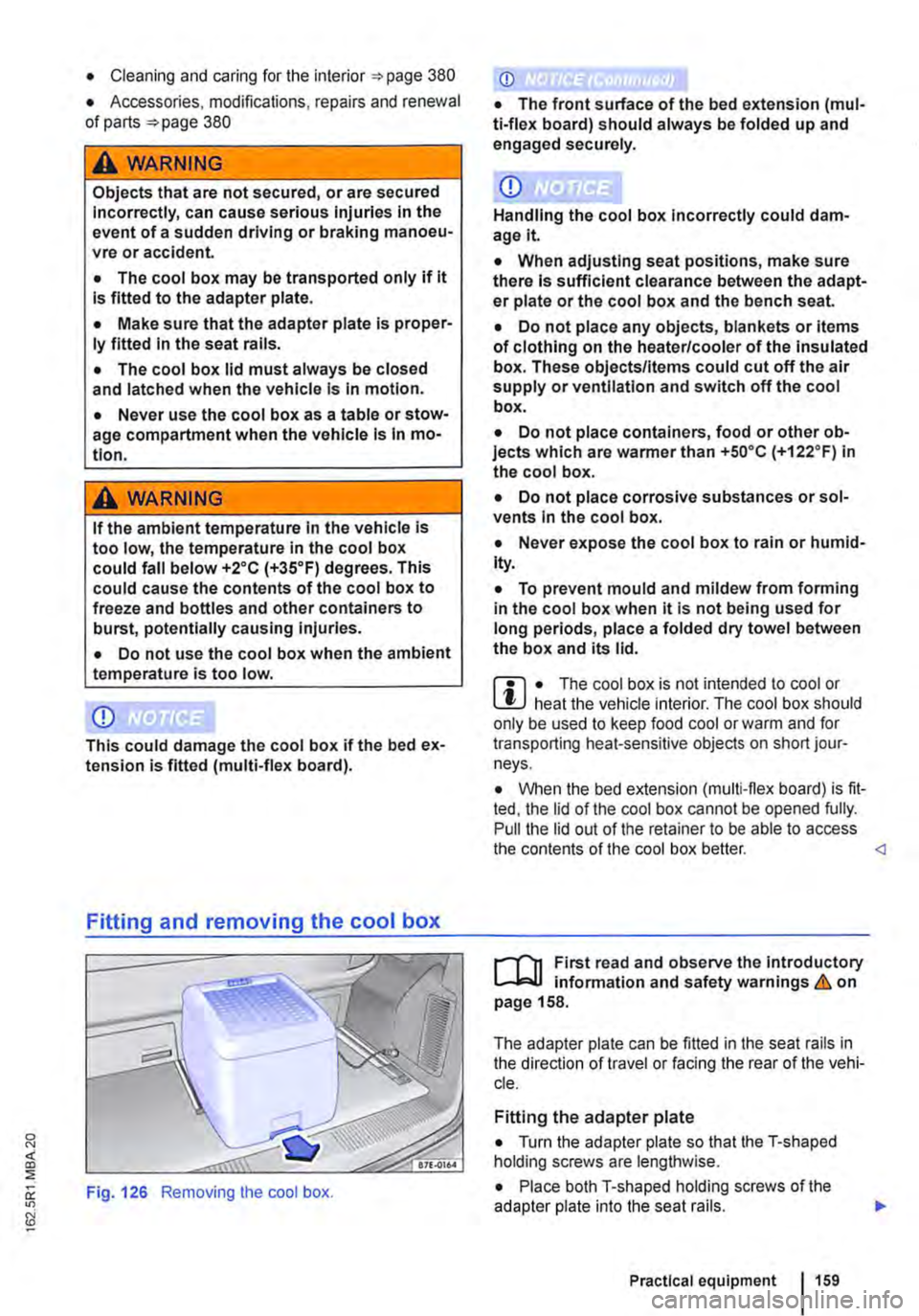
Fig. 126 Removing the cool box.
CD
• The front surface of the bed extension (mul-ti-flex board) should always be folded up and engaged securely.
CD
Handling the cool box Incorrectly could dam-age it
• When adjusting seat positions, make sure there Is sufficient clearance between the adapt-er plate or the cool box and the bench seat.
• Do not place any objects, blankets or items of clothing on the heater/cooler of the Insulated box. These objects/Items could cut off the air supply or ventilation and switch off the cool box.
• Do not place containers, food or other ob-jects which are warmer than +so•c (+122.F) in the cool box.
• Do not place corrosive substances or sol-vents In the cool box.
• Never expose the cool box to rain or humid-Ity.
• To prevent mould and mildew from forming in the cool box when it is not being used for long periods, place a folded dry towel between the box and its lid.
m • The cool box is not intended to cool or L!J heat the vehicle interior. The cool box should only be used to keep food cool or warm and for transporting heat-sensitive objects on short jour-neys.
• When the bed extension (multi-flex board) is fit-ted, the lid of the cool box cannot be opened fully. Pull the lid out of the retainer to be able to access the contents of the cool box better.
,...--("n First read and observe the Introductory L--J,:.U information and safety warnings & on page 158.
The adapter plate can be fitted in the seat rails in the direction of travel or facing the rear of the vehi-cle.
Fitting the adapter plate
• Turn the adapter plate so that the T-shaped holding screws are lengthwise.
• Place both T-shaped holding screws of the adapter plate into the seat rails.
Practical equipment 1159
Page 160 of 486
• Push both handles down.
• Turn both handles through go• so that the T-shaped holding screws are across the seat rails
• Tighten both the thumb wheels firmly.
• When fitting the adapter plate ensure sufficient clearance between the adapter plate or the cool box and the bench seat
Fitting the cool box
• Fit the adapter plate.
• Pull out the handle on the adapter plate.
• Place the cool box on the adapter plate.
• Make sure that all holding screws on the cool box are fully engaged in the corresponding holes on the adapter plate &..
• Pull the handle on the adapter plate right out.
• When fitting the cool box ensure sufficient clearance between the adapter plate or the cool box and the bench seat
Removing the cool box
• Pull out the handle on the adapter plate in the direction of the arrow 126 to unlock the cool box.
• Lift up the cool box to remove it.
• Pull the handle on the adapter plate right out.
Removing the adapter plate
• Remove the cool box.
• Turn the adapter plate so that the T-shaped holding screws are lengthwise.
• Lift up the adapter plate to remove it.
A WARNING
Objects that are not secured, or are secured incorrectly, can cause serious Injuries in the event of a sudden driving or braking manoeu-vre or accident.
160 I Before the journey
A WARNING (Continued)
• Make sure that the T-shaped holding screws In the seat rails are at right-angles (90°) to the adapter plate and correctly engag-ed.
• The T-shaped holding screws should nev-er be Inserted In the seat rails near the re-movable covers.
• Make sure that the cool box Is properly fit-ted In on the adapter plate.
CD
Handling the cool box Incorrectly could dam-agelt.
• When adjusting seat positions, make sure there Is sufficient clearance between the adapt-er plate or the cool box and the bench seat.
• Do not place any objects, blankets or Items of clothing on the heater/cooler of the Insulated box. These objects/Items could cut off the air supply or ventilation and switch off the cool box.
• Do not place containers, food or other ob-jects which are wanner than +5o•c (+122.F) In the cool box.
• Do not place corrosive substances or sol-vents In the cool box.
• Never expose the cool box to rain or humid-ity.
• To prevent mould and mildew from fonnlng In the cool box when it Is not being used for long periods, place a folded dry towel between the box and Its lid.
Page 164 of 486
CD
• In order to avoid damage due to voltage fluctuation, always switch any electrical con-sumers connected to the 12-volt sockets off be-fore switching the ignition or the engine on or off. When the start/stop system automatically switches off and restarts the engine, it Is not necessary to switch off any connected electri-cal consumers.
• Never connect electrical devices requiring more electrical power to a 12-volt socket. The vehicle's electrical system can be damaged If the maximum power output Is exceeded.
• Never feed electricity Into the socket.
Sockets in the vehicle
rT'n First read and observe the Introductory L-lo:J.I information and safety warnings&. on page 163.
There are two separate power circuits in the vehi-cle depending on the equipment:
• 12-volt DC circuit
• 230-volt AC circuit
Maximum power rating
Electrical Maximum power rating socket
12-volt 120 watts
230-volt 2500 watts
Do not exceed the maximum power rating. This al-so applies to the total power consumption of all connected devices if you connect several devices at the same time Introduction on page 163. The power rating of each device is stated on its type plate.
12-volt socket
Electrical equipment can be connected to the 12-volt sockets in the vehicle.
Using electrical appliances with the engine switch-ed off and the ignition switched on will drain the battery. Electrical consumers should therefore only be plugged into the sockets when the engine is running.
To prevent damage due to voltage fluctuation, switch off any connected devices before switching the ignition or engine on or off.
In the vehicle, there are 12-volt sockets in the fol-lowing locations, among others:
164 I Before the journey
Do not leave the engine running when the ve-l?1S hicle is stationary.
m Using electrical appliances with the engine L!..J switched off and the ignition switched on will drain the battery.
m Unshielded devices can cause interference L!..J with radio reception and vehicle electronics.
m Functional problems may occur with some L!..J devices when they are connected to the 230-volt socket due to the lower power output (wat-tage).
• In the stowage compartment on the dash panel under a small cover.
• In the stowage compartment in the dash panel.
• In the side trim panels in the passenger com-partment
• In the luggage compartment.
• In the roof frame of the pop-up roof.
230-volt grounded safety socket
The 230-volt grounded safety socket is supplied via electrical feed from the external socket 192.
The following electrical consumers are supplied from the 230-volt power supply via the external socket:
• Battery charger
• Depending on the vehicle equipment, the 230-volt grounded safety socket is located in the side trim panel behind the left front seat or on the side of the kitchen unit 192.
230-volt Euro socket
The 230-volt Euro socket is supplied via additional batteries or via an inverter and is located in the side trim panel behind the left front seat 192.
A DANGER !
High voltage In the electrical system!
• Never pour any liquid over the socket.
• Do not Insert any Items which will conduct electricity, such as knitting needles, Into the contacts of the 230-volt socket. .,.
Page 165 of 486
A DANGER (Continued)
• 230-volt socket with inverter switch:
CD
-Do not plug adapters or extension ca-bles into the 230-volt socket. Otherwise the built-in child lock will disengage and power will be supplied to the socket.
• Observe the operating instructions for any device that you plug into the socket.
• Never exceed the maximum power rating as this could damage the whole vehicle electrical system.
• Only use accessories that have been ap-proved in accordance with valid guidelines concerning electromagnetic compatibility.
CD
• Never feed electricity Into the socket.
• Do not plug any heavy devices or connec-tions, such as mains adapters, directly Into the socket.
• Only connect devices to the socket with a voltage that matches the voltage of the socket.
• 230-volt socket with inverter switch:
-Do not connect any lights which use neon tubes.
-With electrical devices that require a high level of current In the start phase, the built-In excess current switch will prevent the de-vice from being switched on. If this hap-pens, disconnect the device from the power supply and reconnect after waiting approxi-mately 10 seconds.
m Unshielded devices can cause interference W with radio reception and vehicle electronics.
[Q) Introduction
This chapter contains information on the following subjects:
Components ......... .
Folding the LCD screen out and in
DVD player ..
Controls on the LCD screen ...
Remote control ..
Settings on the LCD screen Settings on the DVD player
Care and protection
166
167 167
168
169
170 171
Use a suitable screen cleaner for cleaning the screen Be careful not to scratch the screen when cleaning it.
A WARNING
Improper use of the rear seat entertainment system could cause short-circuits, fire and serious Injuries.
• Protect the rear seat entertainment system against moisture and damp.
A WARNING
Objects that are loosely placed in the vehicle or not properly secured could be flung through the interior and cause injuries during a sudden driving or braking manoeuvre, or in the event of an accident.
• Always stow the remote control units and headsets securely In the stowage compart-ments.
A WARNING
Accidents and Injuries can occur If the driver Is distracted.
• Never allow use of the rear seat entertain-ment system to distract you from what Is happening on the road.
• Comply with legal regulations .
• Select volume settings that allow signals from outside the vehicle (such as emergency services sirens) to be easily heard at all times.
Practical equipment 165
Page 166 of 486
A WARNING
LCD screens contain liquid crystal, which can escape if the screen is broken. The fluid could cause irritation to the skin, eyes and respiratory organs.
• The escaping fluid could cause irritation to the skin, eyes and respiratory organs, es-pecially in people who suffer from asthma or similar illnesses. Immediately ensure that there is a sufficient supply of fresh air and get out of the vehicle. If this is not possible, open all of the windows and doors.
• If fluid gets Into your eyes or onto your skin, Immediately wash the affected area with lots of water for at least 15 minutes and con-suit a doctor.
• If fluid gets onto shoes or clothing, wash immediately with lots of water for at least 15 minutes. Clean shoes and clothes thoroughly before wearing them again.
• If fluid is swallowed, Immediately rinse the mouth out with lots of water for at least 15 minutes. Do not Induce vomiting unless In· structed to do so by a doctor. Seek medical assistance immediately.
A WARNING
Opening a DVD player's housing can lead to injuries from invisible laser radiation.
Components
,...-('n First read and observe the introductory L-Wl Information and safety warnings & on page 165.
The rear seat entertainment system is made up of the following components:
1661 Before the journey
A WARNING (Continued)
• DVD players should only be repaired by a qualified workshop.
CD
The LCD screen can be damaged If it is not handled properly.
• Always fold the LCD screen completely open or shut.
• The LCD screen Is not a "touchscreen". Do not touch or press the surface of the LCD screen.
• Do not expose the LCD screen to direct sun-light or intensive ultraviolet light for long peri-ods. This could damage the screen.
CD
Cleaning agents containing solvents can dam-age the LCD screen.
• Use cleaning agents that do not contain sol-vents such as petrol or turpentine to clean the LCD screen.
r:(jh The LCD screen contains mercury. Dispose I!!S of the LCD screen in accordance with legal requirements.
m The rear seat entertainment system only W works if the temperature inside the vehicle is between -1s•c (+S.F) and +so•c (+140.F). At temperatures outside this range, you will not be able to switch the rear seat entertainment system on. If switched on, it will switch off automatically.
• Infrared remote control unit '*page 169.
m Two sets of infrared headphones are deliv-l!J ered with the rear seat entertainment system.
Page 175 of 486
Equipment, Multivan
Darkening the interior of the vehicle, Multivan
n:n Introduction
This chapter contains information on the following subjects:
Components of the opaque shades kit . . . 175
Assembling opaque shades for the windscreen and the rear window . . . . . . . 176
Fitting opaque shades for the windscreen and the rear window . . . . . . . . . . . . . . . . . . . . . . . . . 177
Fitting the opaque shades to the side windows . . . . . . . . . . . . . . . . . . . . . . . . . . . . . 178
Removing and stowing the opaque shades . . 179
Darkening the interior of the vehicle
The opaque shades kit is supplied in a zippered storage bag, which can be securely stowed in a drawer underneath the 3-seat bench.
Additional information and warnings:
• Windows 36
• Seat functions, front 61
Components of the opaque shades kit
CD
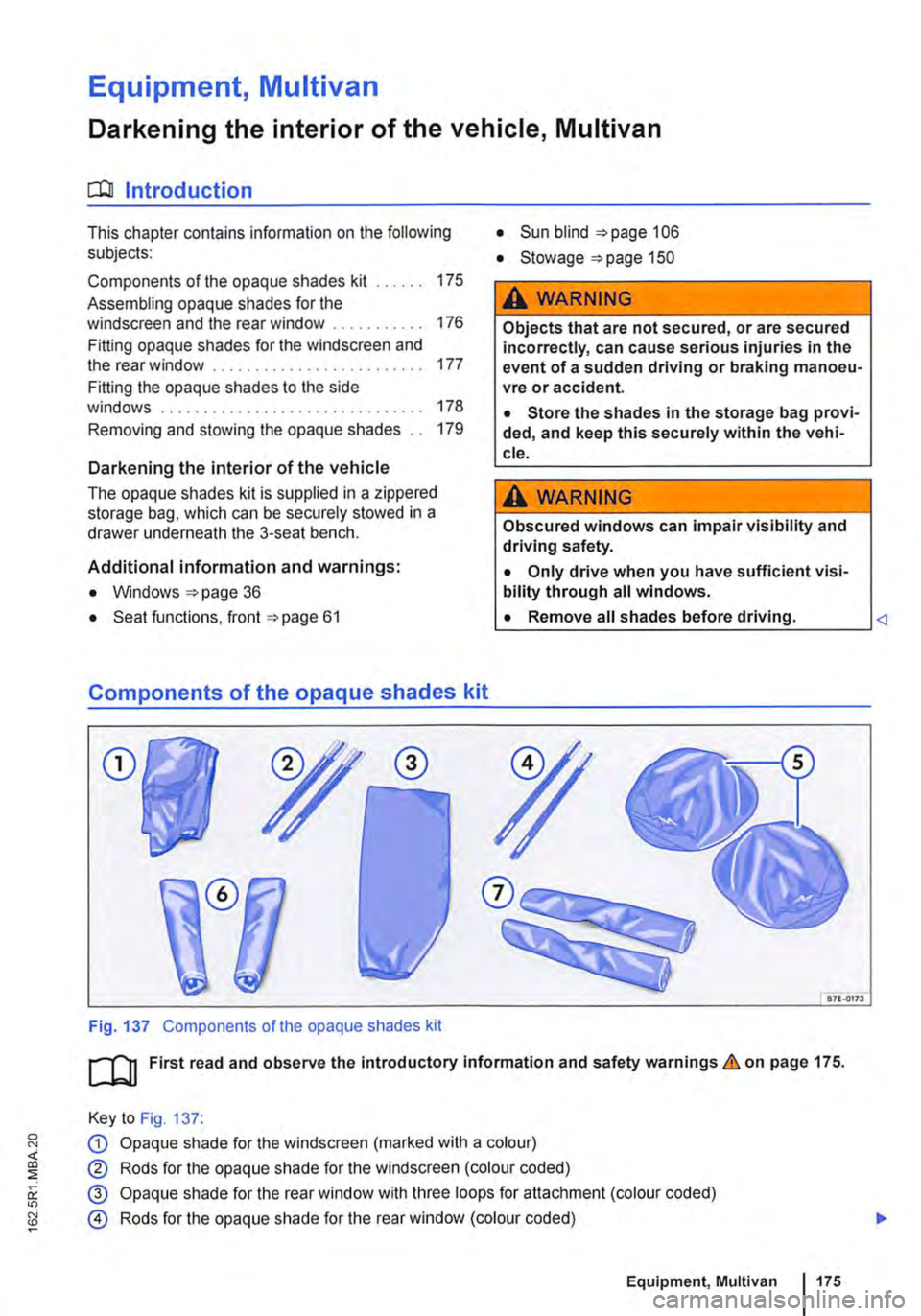
Fig. 137 Components of the opaque shades kit
• Sun blind 106
• Stowage "'page 150
A WARNING
Objects that are not secured, or are secured incorrectly, can cause serious injuries in the event of a sudden driving or braking manoeu-vre or accident.
• Store the shades in the storage bag provi-ded, and keep this securely within the vehi-cle.
A WARNING
Obscured windows can impair visibility and driving safety.
• Only drive when you have sufficient visi-bility through all windows.
L• ___
&71.0173
[QJ First read and observe the introductory information and safety warnings.&. on page 175.
Key to Fig. 137:
G) Opaque shade for the windscreen (marked with a colour)
® Rods for the opaque shade for the windscreen (colour coded)
@ Opaque shade for the rear window with three loops for attachment (colour coded)
@ Rods for the opaque shade for the rear window (colour coded)
Equipment, Multivan 1175
Page 180 of 486
Equipment, Business
Vehicle overview, Business
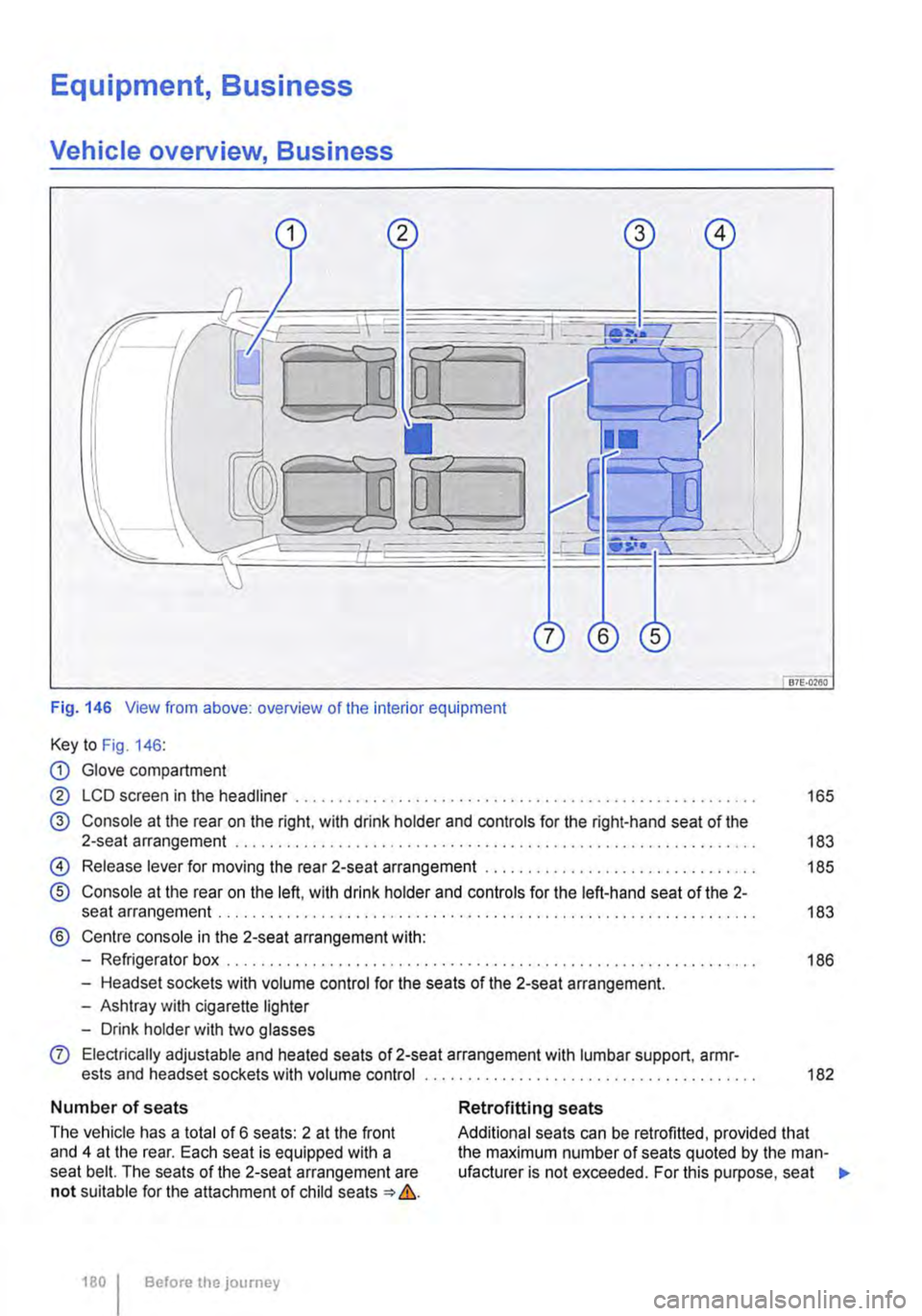
Fig. 146 View from above: overview of the interior equipment
Key to Fig. 146:
CD Glove compartment
@ LCD screen in the headliner . . . . . ............ , . . . . . . . . . . . . . . . . . . . . . . 165
@ Console at the rear on the right, with drink holder and controls for the right-hand seat of the 2-seat arrangement . . . . . . . . . . . . . . . . . . . . . . . . . . . . . . . . . . . . . . . . . . . . . . . . . . . 183
@) Release lever for moving the rear 2-seat arrangement . . . . . . . . . . . . . . . . . 185
® Console at the rear on the left, with drink holder and controls for the left-hand seat of the 2-seat arrangement . . . . . . . . . . . . . . . . . . . . . . .... , .. , , , , , , , , . , , . , . . . . . . . . . . . . 183
® Centre console in the 2-seat arrangement with:
-Refrigerator box . . . . . . . . . . . . . . . . . . . . . . . . . . . . . . . . . . . . . . . . . . . . . . . . . . . . . . . . . . . 186
-Headset sockets with volume control for the seats of the 2-seat arrangement.
-Ashtray with cigarette lighter
-Drink holder with two glasses
0 Electrically adjustable and heated seats of 2-seat arrangement with lumbar support, armr-ests and headset sockets with volume control ............................ , . . . . . . . . . . 182
Number of seats
The vehicle has a total of 6 seats: 2 at the front and 4 at the rear. Each seat is equipped with a seat belt. The seats of the 2-seat arrangement are not suitable for the attachment of child seats => &.
180 I Before the journey
Retrofitting seats
Additional seats can be retrofitted, provided that the maximum number of seats quoted by the man-ufacturer is not exceeded. For this purpose, seat .,.