Page 2 of 321
Front view
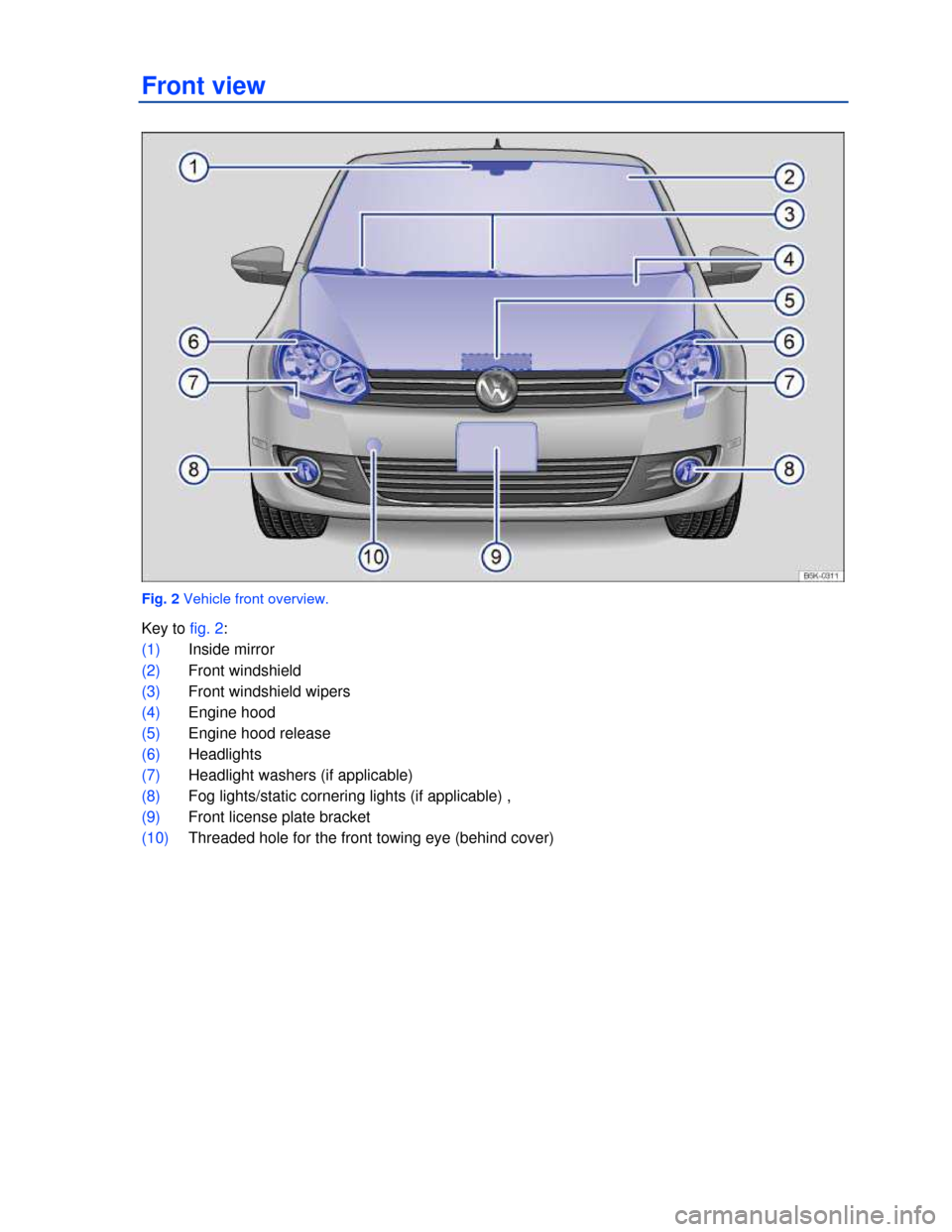
Fig. 2 Vehicle front overview.
Key to fig. 2:
(1) Inside mirror
(2) Front windshield
(3) Front windshield wipers
(4) Engine hood
(5) Engine hood release
(6) Headlights
(7) Headlight washers (if applicable)
(8) Fog lights/static cornering lights (if applicable) ,
(9) Front license plate bracket
(10) Threaded hole for the front towing eye (behind cover)
Page 3 of 321
Rear view
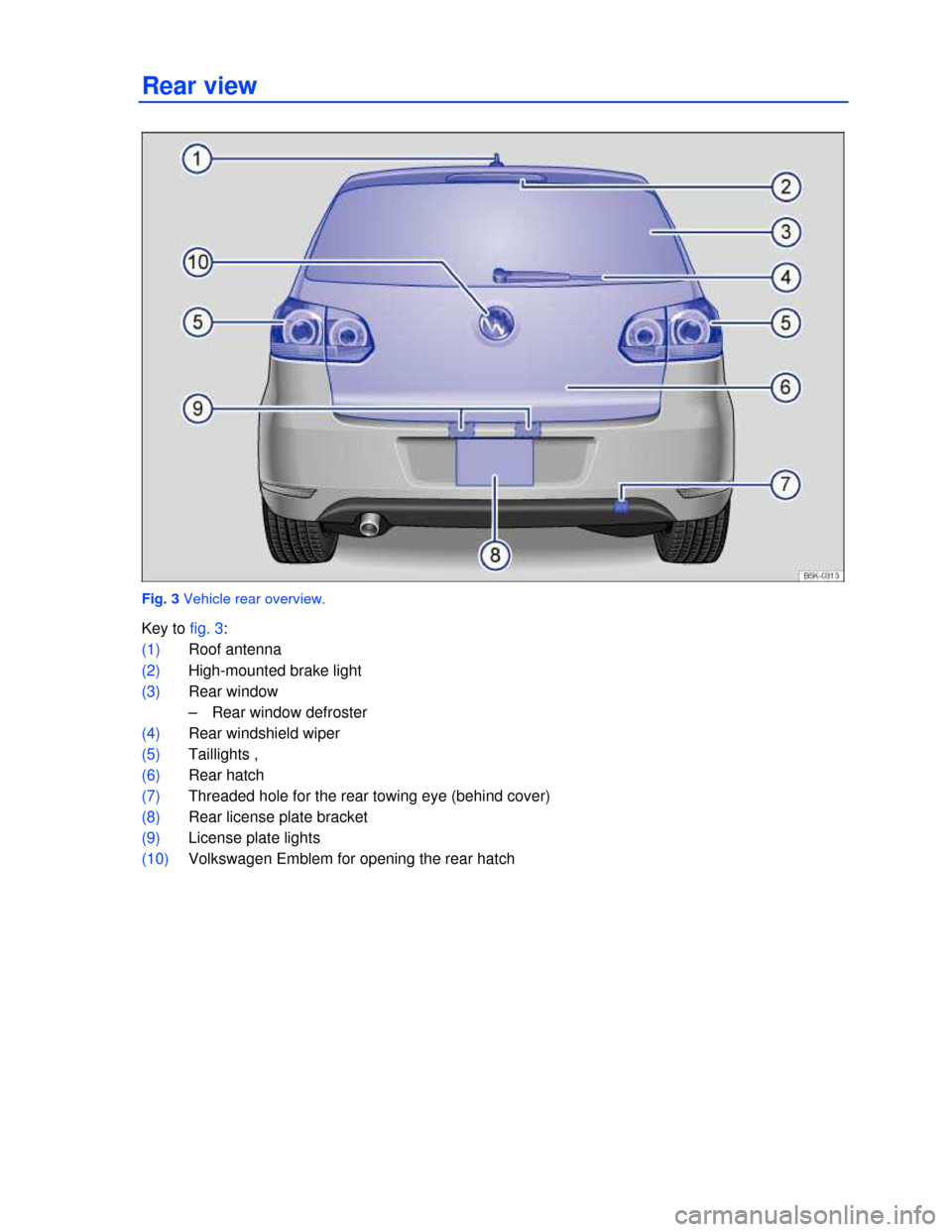
Fig. 3 Vehicle rear overview.
Key to fig. 3:
(1) Roof antenna
(2) High-mounted brake light
(3) Rear window
– Rear window defroster
(4) Rear windshield wiper
(5) Taillights ,
(6) Rear hatch
(7) Threaded hole for the rear towing eye (behind cover)
(8) Rear license plate bracket
(9) License plate lights
(10) Volkswagen Emblem for opening the rear hatch
Page 10 of 321
Symbols on the roof console
Symbol Meaning
* � / s � Interior and reading lights
g c h ¯ Power sunroof
a
/ Three-button module ⇒ Booklet Mobile Phone Package.
Page 19 of 321
Both mirrors
– Factory setting
– Back
▪ Lights & Vision
– Footwell light
– Conv. turn sig. (convenience turn signal)
– Factory setting
– Back
▪ Time
– Hours
– Minutes
– 24 hr. mode
– Daylight save
– Back
▪ Snow tires (winter tires)
– On
– + 5 mph (10 km/h)
– - 5 mph (10 km/h)
– Back
▪ Units
– Temperature
– Consump./dist.
– Back
▪ Alt. speed dis. (alternative speed display On / Off)
▪ Service
– Info
– Reset
– Back
▪ Factory setting
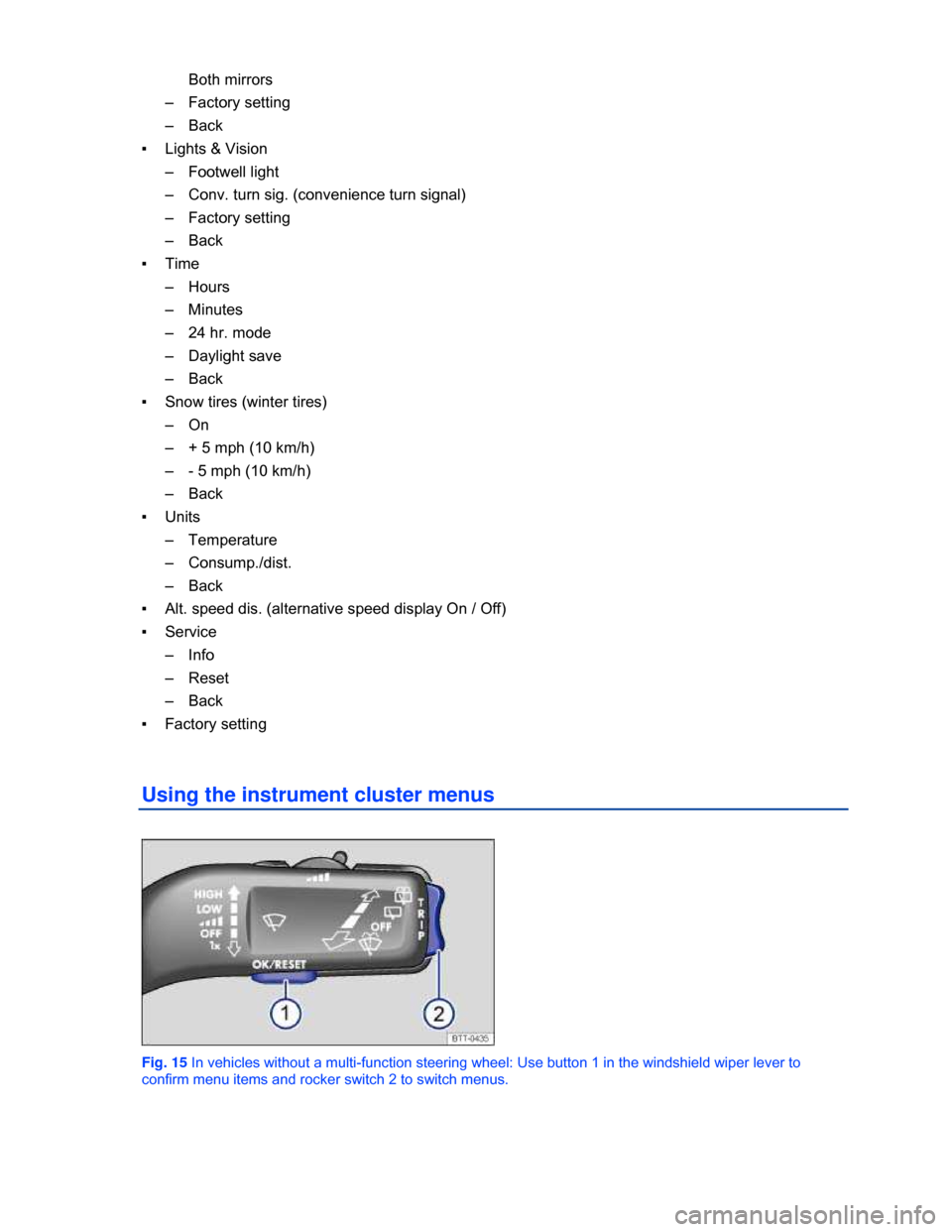
Using the instrument cluster menus
Fig. 15 In vehicles without a multi-function steering wheel: Use button 1 in the windshield wiper lever to
confirm menu items and rocker switch 2 to switch menus.
Page 21 of 321
Menu Function See
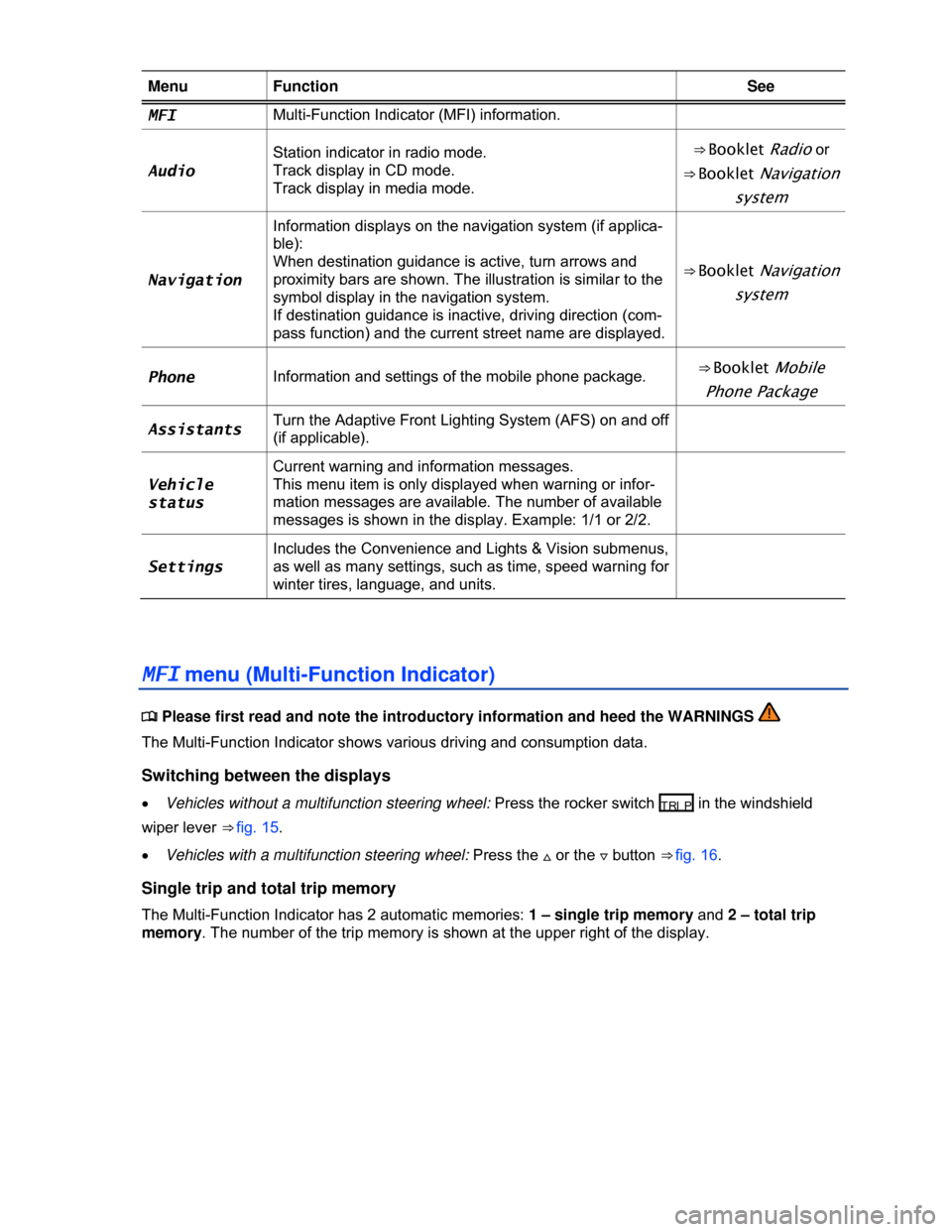
MFI Multi-Function Indicator (MFI) information.
Audio
Station indicator in radio mode.
Track display in CD mode.
Track display in media mode.
⇒ Booklet Radio or
⇒ Booklet Navigation
system
Navigation
Information displays on the navigation system (if applica-
ble):
When destination guidance is active, turn arrows and
proximity bars are shown. The illustration is similar to the
symbol display in the navigation system.
If destination guidance is inactive, driving direction (com-
pass function) and the current street name are displayed.
⇒ Booklet Navigation
system
Phone Information and settings of the mobile phone package. ⇒ Booklet Mobile
Phone Package
Assistants Turn the Adaptive Front Lighting System (AFS) on and off
(if applicable).
Vehicle
status
Current warning and information messages.
This menu item is only displayed when warning or infor-
mation messages are available. The number of available
messages is shown in the display. Example: 1/1 or 2/2.
Settings
Includes the Convenience and Lights & Vision submenus,
as well as many settings, such as time, speed warning for
winter tires, language, and units.
MFI menu (Multi-Function Indicator)
Page 25 of 321
Convenience
menu Function
Driver
Manual unlocking: The driver window opens when the key is
held in the unlocking position.
Manual locking: All windows close when the key is held in the
locking position.
Keyless Access: All windows close when the locking sensor
on the door handle is pressed and held .
Back The display switches back to the Convenience menu.
Mirror adjust
IndividuallyBoth outside mirrors are adjusted separately.
Both mirrorsThe front passenger outside mirror is adjusted at the same
time as the driver outside mirror.
Back The display switches back to the Convenience menu.
Factory
setting Resets the features in the Convenience submenu back to the factory settings.
Back The display returns to the Settings menu.
Lights & Vision submenu
Page 48 of 321
Lights up Possible cause Proper response
OR
icon
appears in
the display
When the ignition is switched on, several warning and indicator lights come on briefly for a function
check. They go out after a few seconds.
If the rear hatch is not closed properly, the red ² warning light comes on in the instrument cluster or
the vehicle icon appears in the instrument cluster display showing an open rear hatch.
Depending on your vehicle's equipment and options, the red warning light or icon may still be
displayed even after the ignition is switched off as long as the key has not been taken out of the
ignition. The icon in the instrument cluster display goes out about 15 seconds after the vehicle has
been locked.
WARNING
If the rear hatch is not closed properly, it may open suddenly when the vehicle is moving and
cause severe injuries.
x Stop immediately and close the rear hatch.
x Always make sure the rear hatch is securely latched after you close it.
Opening the rear hatch
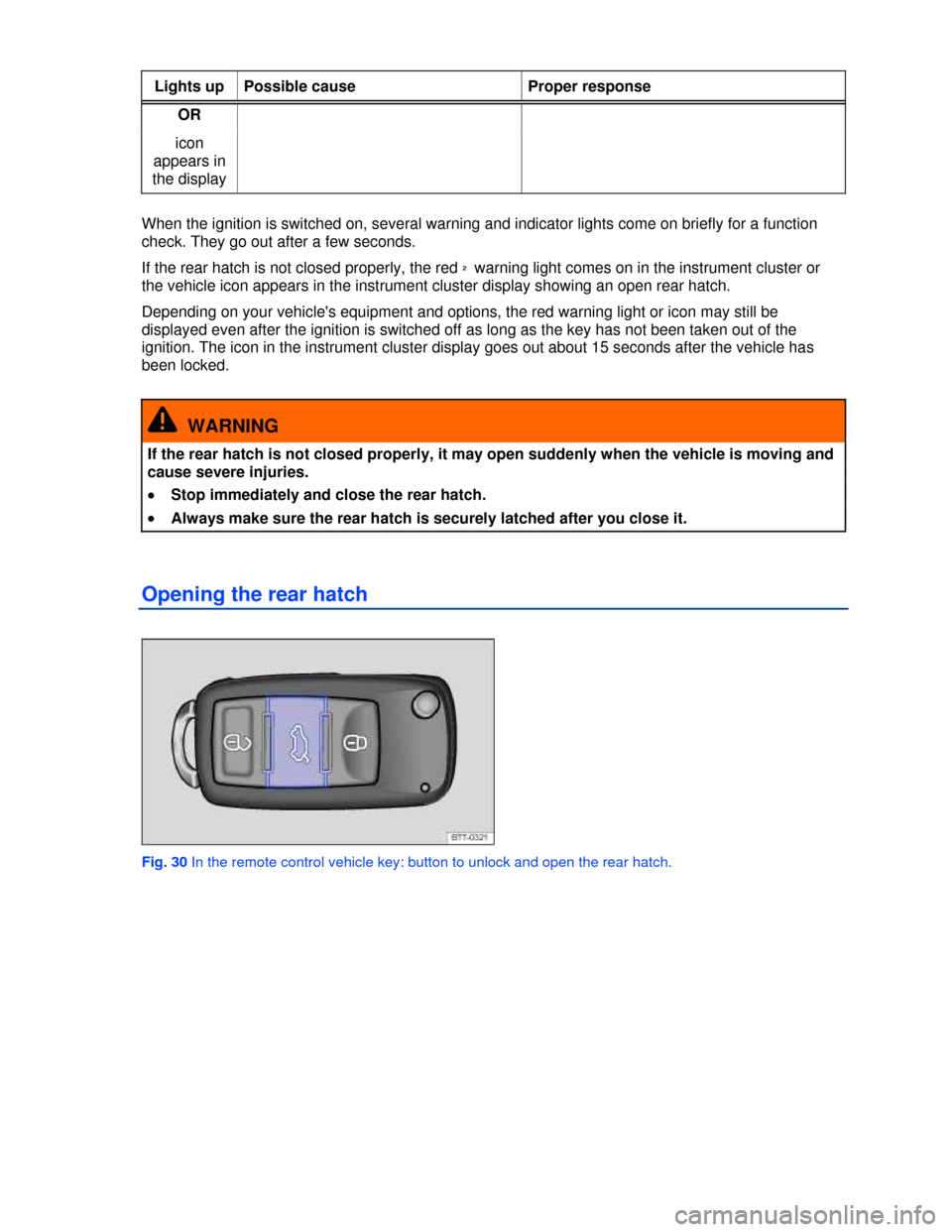
Fig. 30 In the remote control vehicle key: button to unlock and open the rear hatch.
Page 71 of 321
x If the outside temperature or the temperature inside the passenger compartment is 77 °F (25 °C) or
more.
Function Action for seat heating ⇒fig.46
Switch on: Press the Aor ebutton. Seat heating is
switched on to maximum.
Adjust the heating level: Press the A or ebutton repeatedly until the
desired heating level is set.
Switch off: Press the A or ebutton repeatedly until all
indicator lights in the button are off.
Special seat heating features
On the driver and the passenger side, the seat heating will resume at the setting that was set when the
ignition was switched off. However, this feature only works if the key is not taken out of the ignition
switch, or, for vehicles with Keyless Access, the driver door is not opened or the vehicle is not locked.
People suffering from a low level of perceived pain or a lowered awareness of pain as from
medication, paralysis, or chronic illness (e.g. diabetes) should NEVER use the seat heating feature
⇒ !
The use of seat heating by persons with these conditions could result in burns to the back, buttocks,
and legs that may take a long time to heal and may never heal completely. If you have any of these
conditions, you should take regular breaks and get out of the vehicle, particularly on long trips. Consult
your doctor for advice regarding your specific condition.
WARNING
Certain medical conditions, such as paralysis and diabetes, and certain medications can
increase the risk of serious burns when the seat heating feature is switched on.
x Vehicle occupants who have a low level of perceived pain or a lowered awareness of pain
can receive serious burns to the back, buttocks, and legs that take a long time to heal or may
never heal completely.
x Never use the seat heating feature if you or your passengers are at risk of being burned
because of a medical condition. Take regular breaks and get out of the vehicle, particularly
on long trips. Consult your doctor for advice regarding your specific condition.
x Never let exposed skin remain in contact with the seat upholstery when the seat heating is
being used.
WARNING
A wet seat can cause the seat heating to malfunction and increase the risk of serious burns.
x Always make sure the seats are dry before using the seat heating.
x Never sit on the seat with wet clothes.
x Never put damp or wet things including clothes on the seat.
x Never spill liquids on the seats.
NOTICE
x To help prevent damage to electrical and other parts in the seat, do not kneel on the front
seats or apply concentrated pressure to a small area of the seat or backrest.