Page 34 of 400
34
1-2. Opening, closing and locking the doors
Side doors
The vehicle can be locked and unlocked using the key, wireless
remote control or door lock switch.
■Wireless remote control (if equipped)
P. 3 1
■ Key
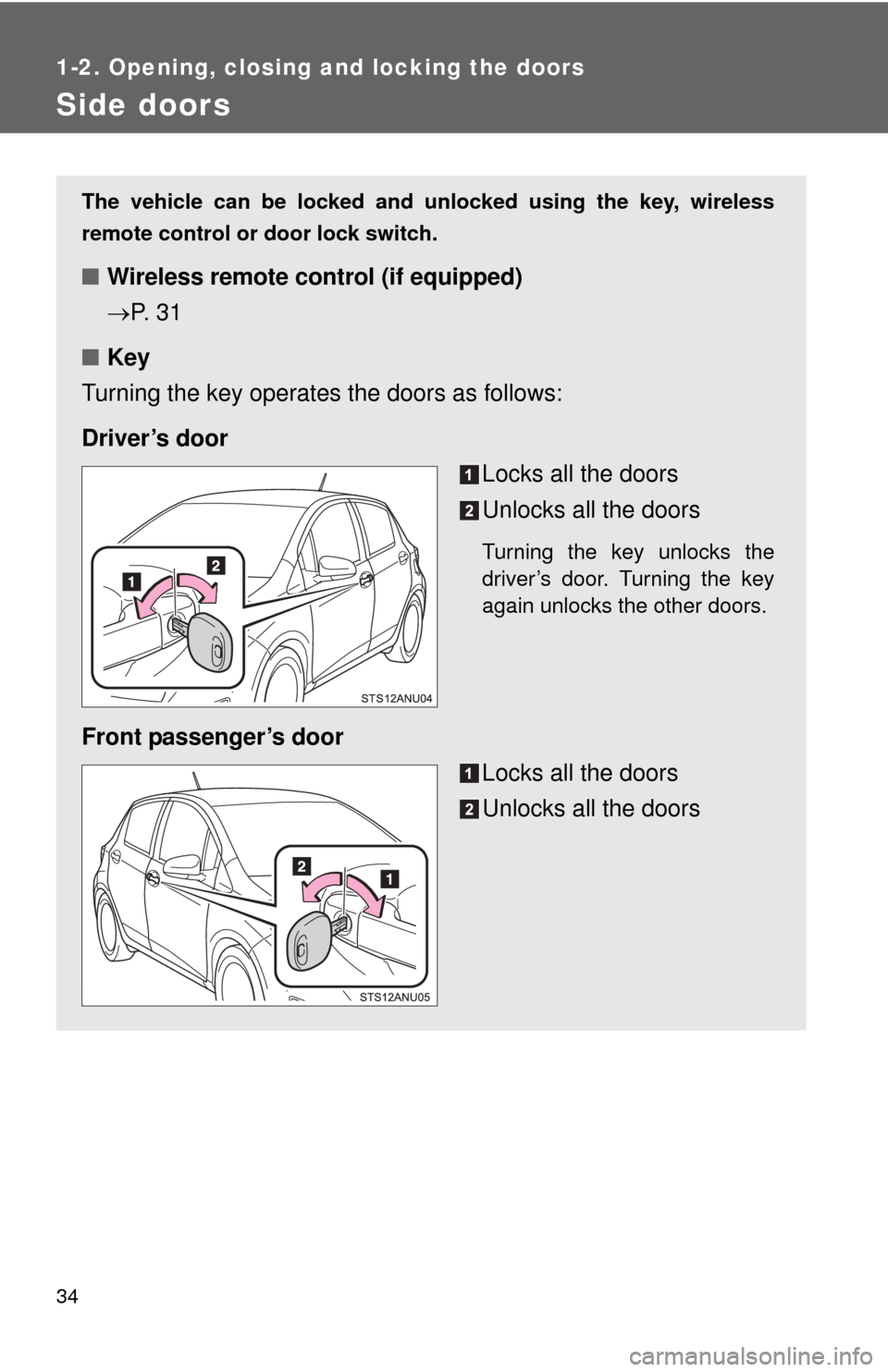
Turning the key operates the doors as follows:
Driver’s door Locks all the doors
Unlocks all the doors
Turning the key unlocks the
driver’s door. Turning the key
again unlocks the other doors.
Front passenger’s door
Locks all the doors
Unlocks all the doors
Page 38 of 400
38
1-2. Opening, closing and locking the doors
Back door
The back door can be locked/unlocked and opened by the following
procedures.
■Locking and unlocking the back door
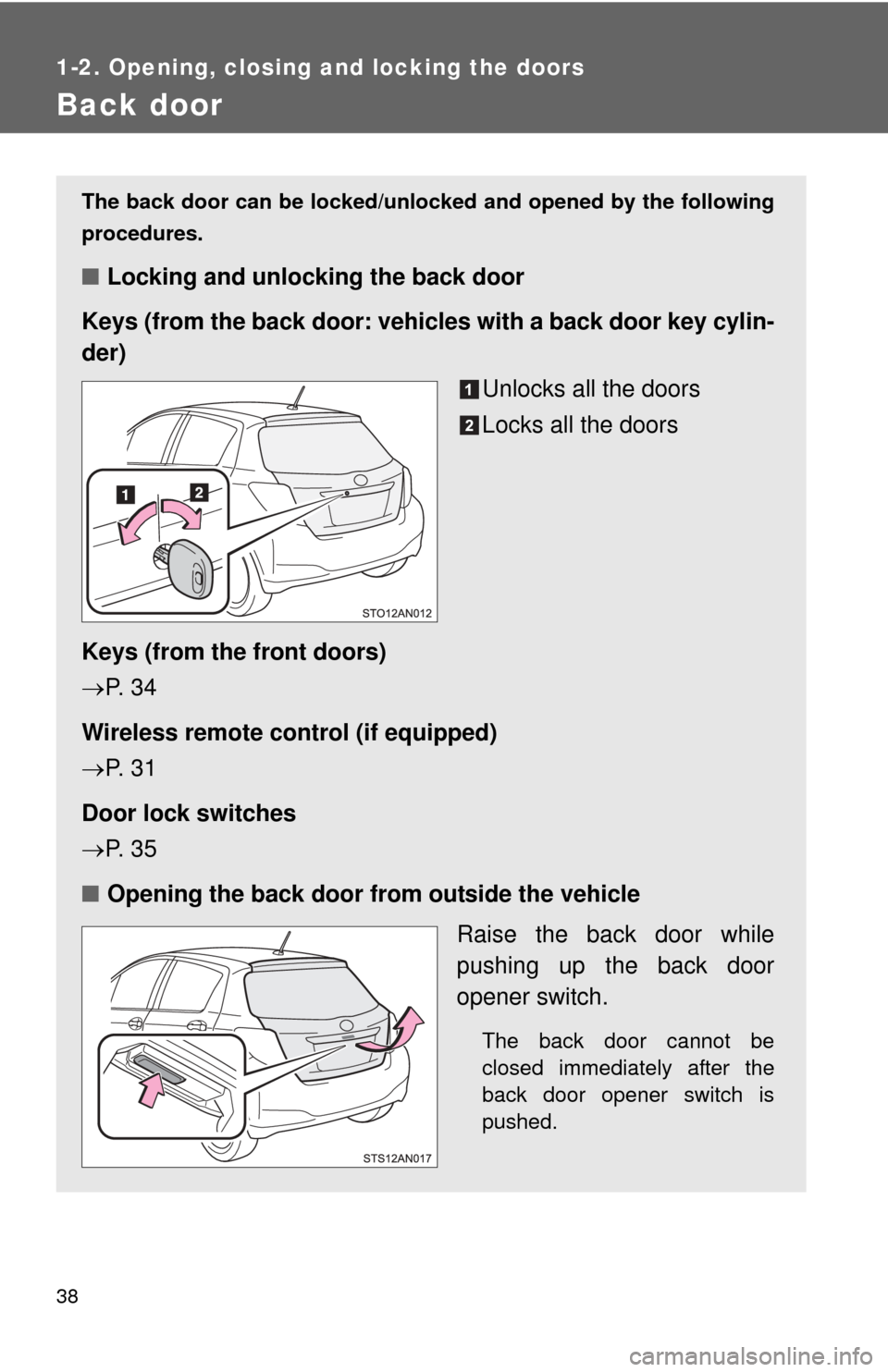
Keys (from the back door: vehicles with a back door key cylin-
der)
Unlocks all the doors
Locks all the doors
Keys (from the front doors)
P. 3 4
Wireless remote control (if equipped)
P. 3 1
Door lock switches
P. 3 5
■ Opening the back door from outside the vehicle
Raise the back door while
pushing up the back door
opener switch.
The back door cannot be
closed immediately after the
back door opener switch is
pushed.
Page 74 of 400
74
1-6. Theft deterrent system
Alarm (Puerto Rico)
The system sounds the alarm and flashes the lights when forced
entry is detected.
■ Triggering of the alarm
The alarm is triggered in the fo llowing situations when the alarm
is set:
● A locked door is unlocked or opened in any way other than
using a key or wireless remote control. (The doors will lock
again automatically.)
● The hood is opened.
● The battery is reconnected.
■ Setting the alarm system
Close the doors and hood,
and lock all the doors. The
system will be set automati-
cally after 30 seconds.
The indicator light changes
from being on to flashing when
the system is set.
■Deactivating or stopping the alarm
Do one of the following to deactivate or stop the alarm:
●Unlock the doors.
● Turn the engine switch to the “ACC” or “ON” position, or start
the engine. (The alarm will be deactivated or stopped after a
few seconds.)
Page 271 of 400
271
4-3. Do-it-yourself maintenance
4
Maintenance and care
Wireless remote control batter y
: If equipped
Replace the battery with a new one if it is depleted.
■You will need the following items:
●Flathead screwdriver
● Lithium battery CR2016
■ Replacing the battery
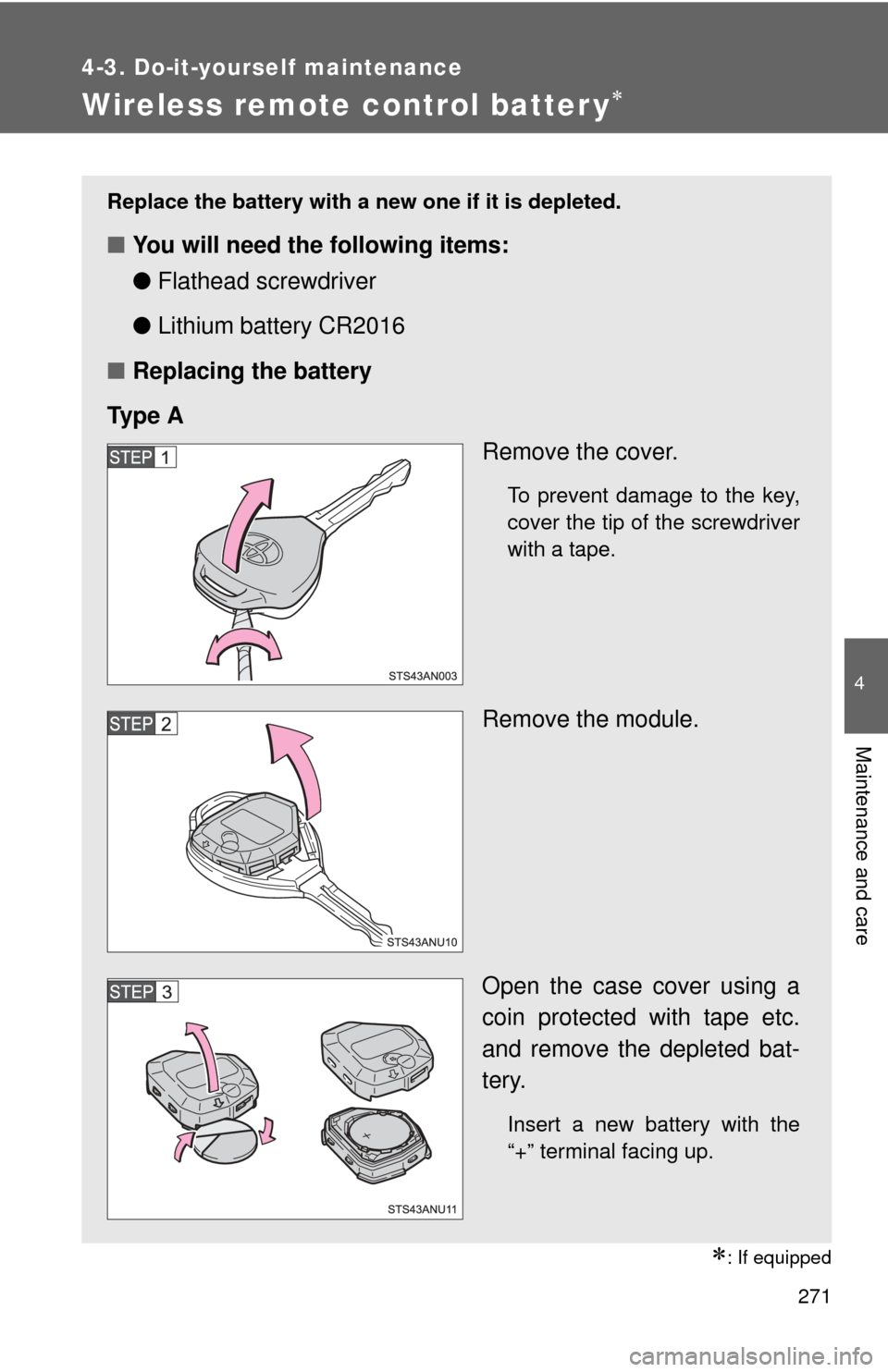
Ty p e A Remove the cover.
To prevent damage to the key,
cover the tip of the screwdriver
with a tape.
Remove the module.
Open the case cover using a
coin protected with tape etc.
and remove the depleted bat-
tery.
Insert a new battery with the
“+” terminal facing up.
Page 273 of 400
273
4-3. Do-it-yourself maintenance
4
Maintenance and care
■
Use a CR2016 lithium battery
●Batteries can be purchased at your Toyota dealer, local electrical appli-
ance shops or camera stores.
● Replace only with the same or equivalent type recommended by the
manufacturer.
● Dispose of used batteries according to local laws.
■ If the key battery is depleted
The following symptoms may occur:
●The wireless remote control will not function properly.
● The operational range will be reduced.
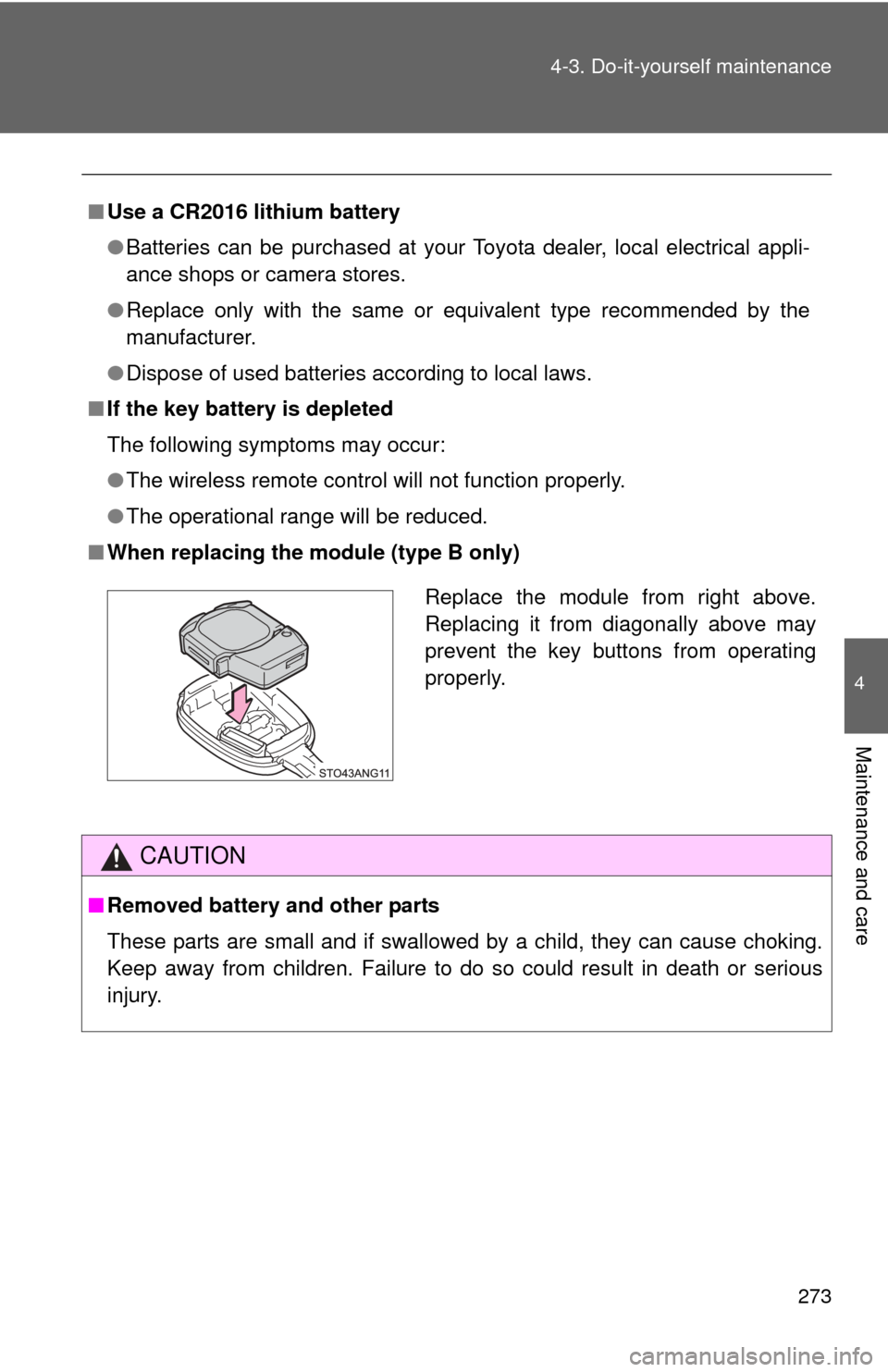
■ When replacing the module (type B only)
CAUTION
■Removed battery and other parts
These parts are small and if swallowed by a child, they can cause choking.
Keep away from children. Failure to do so could result in death or serious
injury.
Replace the module from right above.
Replacing it from diagonally above may
prevent the key buttons from operating
properly.
Page 368 of 400
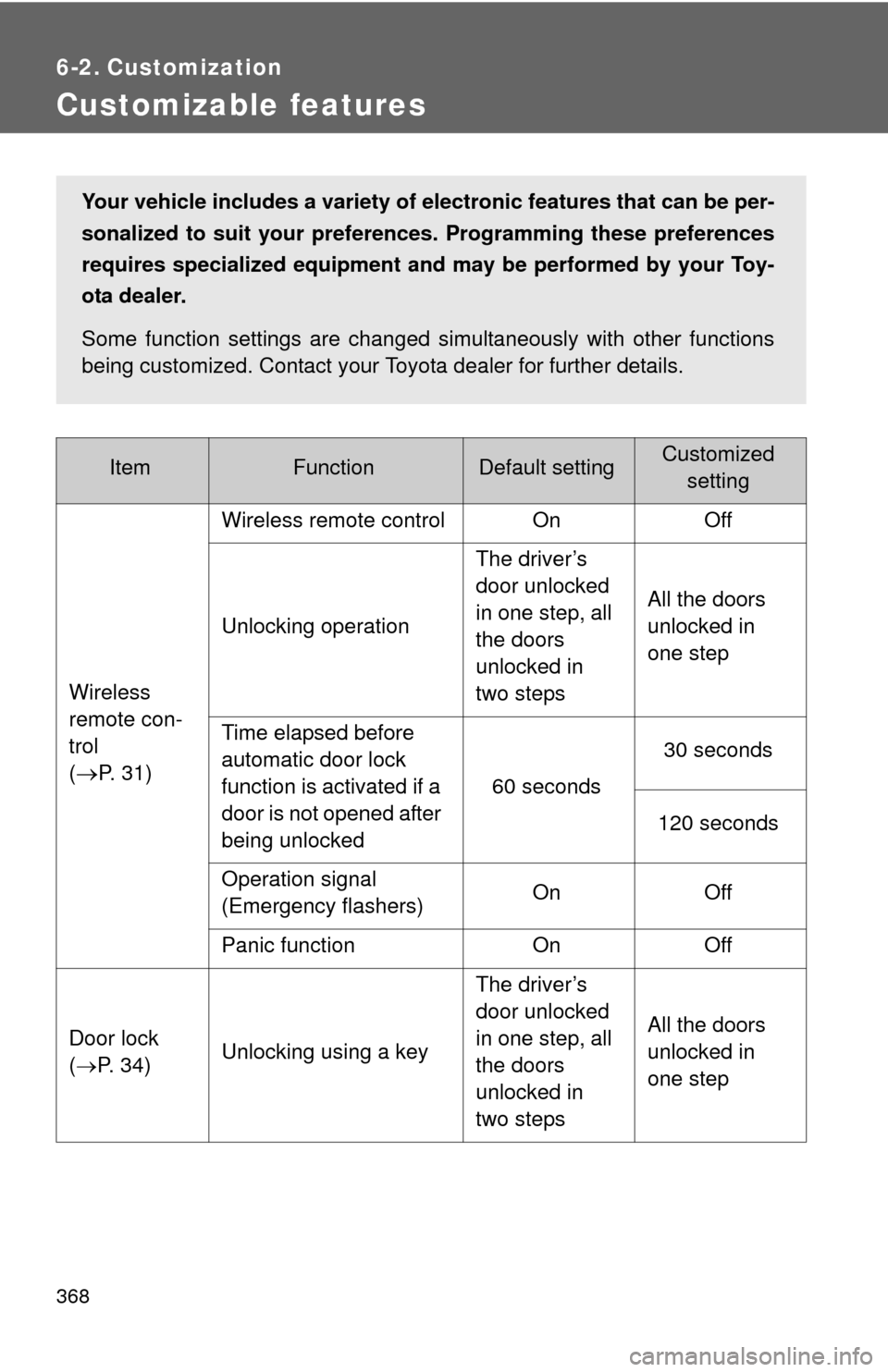
368
6-2. Customization
Customizable features
ItemFunctionDefault settingCustomized setting
Wireless
remote con-
trol
(
P. 31) Wireless remote control On
Off
Unlocking operation The driver’s
door unlocked
in one step, all
the doors
unlocked in
two stepsAll the doors
unlocked in
one step
Time elapsed before
automatic door lock
function is activated if a
door is not opened after
being unlocked 60 seconds
30 seconds
120 seconds
Operation signal
(Emergency flashers) On
Off
Panic function OnOff
Door lock
( P. 34) Unlocking using a key The driver’s
door unlocked
in one step, all
the doors
unlocked in
two stepsAll the doors
unlocked in
one step
Your vehicle includes a variety of electronic features that can be per-
sonalized to suit your prefer
ences. Programming these preferences
requires specialized equipment and may be performed by your Toy-
ota dealer.
Some function settings are changed simultaneously with other functions
being customized. Contact your Toyota dealer for further details.
Page 390 of 400

390 Alphabetical index
Front side marker lightsReplacing light bulbs ............. 287
Switch.................................... 145
Wattage ................................. 352
Front turn signal lights
Indicator ................................ 136
Lever ..................................... 130
Replacing light bulbs ............. 287
Switch.................................... 130
Wattage ................................. 352
Fuel
Capacity ................................ 346
Fuel pump shut off system .... 304
Gas station information ......... 400
Gauge ................................... 133
Indicator ................................ 136
Information ............................ 353
Refueling .................................69
Type ...................................... 346
Fuel door.....................................69
Fuel filler door ............................69
Fuel gauge ................................ 133
Fuel pump shut off system ..... 304
Fuses......................................... 275
Gas station information........... 400
Gauges ...................................... 133
Glove box.................................. 205
Hazard lights
Switch.................................... 296
Head restraints Adjusting ................................51
Headlights Indicator ................................ 136
Replacing light bulbs ............. 287
Switch.................................... 145
Wattage ................................. 352
Hood .......................................... 238
Horn........................................... 132 I/M test ...................................... 234
Identification
Engine ................................... 344
Tire ........................................ 356
Vehicle .................................. 343
Ignition switch.......................... 124
Illuminated entry system......... 202
Immobilizer system ................... 72
Indicator lights ......................... 136
Initialization Items to initialize ................... 370
Inside rear view mirror .............. 63
Interior light Switch ................................... 203
Wattage................................. 352
Jack Positioning a floor jack .......... 240
Vehicle-equipped jack ........... 315
Jack handle .............................. 315
Keys Engine switch ........................ 124
If you lose your keys ............. 329
Ignition switch ....................... 124
Key battery ............................ 271
Key number plate .................... 28
Keys ........................................ 28
Wireless remote control .......... 31
G
H
I
J
K
Page 395 of 400
395
Alphabetical index
Washer
Checking .............................. 253
Preparing and checking
before winter ...................... 172
Switch ........................... 150, 153
Warning light ........................ 307
Washing and waxing............... 222
Weight Cargo capacity ..................... 167
Load limits ............................ 171
Weight .................................. 342
Wheels...................................... 266
Window glasses ............ 67, 199, 222, 225
Window lock switch .................. 67
Windows Cleaning and
protecting ................... 222, 225
Power windows ...................... 67
Rear window defogger ......... 199
Washer ......................... 150, 153
Windshield wipers................... 150
Wireless remote control key Replacing the key battery ..... 271
Wireless remote control.......... 31