Page 172 of 552
172 2-1. Driving procedures
VERSO-S_EE
CAUTION
When starting the engine
Always start the engine while sitting in the driver’s seat. Do not depress the
accelerator pedal while starting the engine under any circumstances.
Doing so may cause an accident resulting in death or serious injury.
Caution while driving
If engine failure occurs while the vehicle is moving, do not lock or open the
doors until the vehicle reaches a safe and complete stop. Activation of the
steering lock in this circumstance may lead to an accident, resulting in death
or serious injury.
Stopping the engine in an emergency
If you want to stop the engine in an emergency while driving the vehicle,
press and hold the “ENGINE START STOP” switch for more than 3 seconds,
or press it briefly 3 times or more in succession.
However, do not touch the “ENGINE START STOP” switch while driving
except in an emergency. Turning the engine off while driving will not cause
loss of steering or braking control, but the power assist to these systems will
be lost. This will make it more difficult to steer and brake, so you should pull
over and stop the vehicle as soon as it is safe to do so.
Page 175 of 552
175 2-1. Driving procedures
2
When driving
VERSO-S_EE
Vehicles with a manual transmission (diesel engine)
Check that the parking brake is set.
Check that the shift lever is set in N.
Firmly depress the clutch pedal.
Turn the engine switch to the “ON” position.
The indicator turns on.
After the indicator light goes out, turn the engine
switch to the “START” position to start the engine.
Changing the engine switch positions
“LOCK”
The steering wheel is locked
and the key can be removed.
(Vehicles with a Multidrive: The
key can be removed only when
the shift lever is in P.)
“ACC”
Some electrical components
such as the audio system can
be used.
“ON”
All electrical components can
be used.
“START”
For starting the engine.
STEP1
STEP2
STEP3
STEP4
STEP5
Page 176 of 552
176 2-1. Driving procedures
VERSO-S_EE
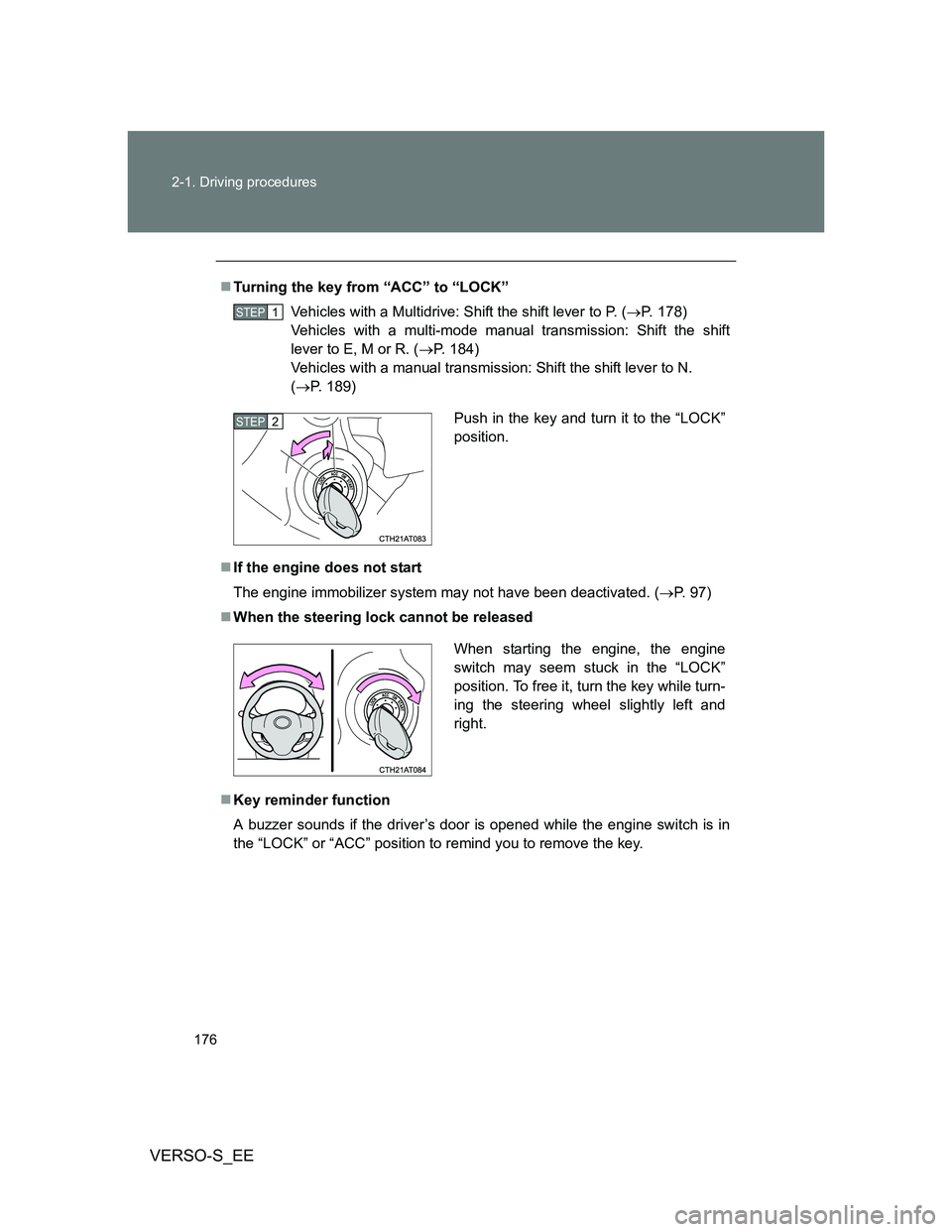
Turning the key from “ACC” to “LOCK”
Vehicles with a Multidrive: Shift the shift lever to P. (P. 178)
Vehicles with a multi-mode manual transmission: Shift the shift
lever to E, M or R. (P. 184)
Vehicles with a manual transmission: Shift the shift lever to N.
(P. 189)
If the engine does not start
The engine immobilizer system may not have been deactivated. (P. 97)
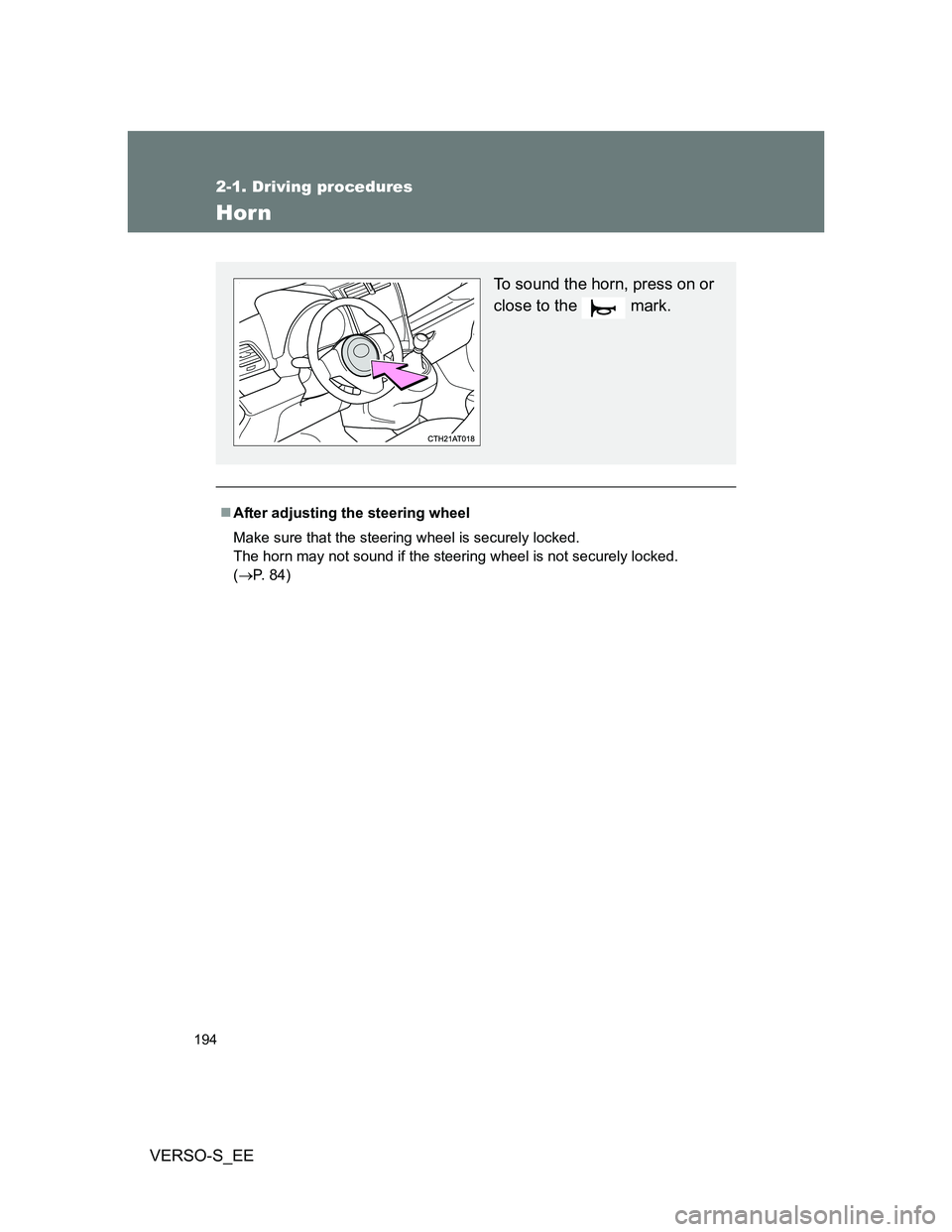
When the steering lock cannot be released
Key reminder function
A buzzer sounds if the driver’s door is opened while the engine switch is in
the “LOCK” or “ACC” position to remind you to remove the key.
STEP1
Push in the key and turn it to the “LOCK”
position.STEP2
When starting the engine, the engine
switch may seem stuck in the “LOCK”
position. To free it, turn the key while turn-
ing the steering wheel slightly left and
right.
Page 177 of 552
177 2-1. Driving procedures
2
When driving
VERSO-S_EE
CAUTION
When starting the engine
Always start the engine while sitting in the driver’s seat. Do not depress the
accelerator pedal while starting the engine under any circumstances.
Doing so may cause an accident resulting in death or serious injury.
Caution when driving
Do not turn the engine switch to the “LOCK” position while driving. If, in an
emergency, you must turn the engine off while the vehicle is moving, turn the
engine switch only to the “ACC” position to stop the engine. An accident may
result if the engine is stopped while driving.
NOTICE
To prevent battery discharge
Do not leave the engine switch in the “ACC” or “ON” position for long periods
of time without the engine running.
When starting the engine
Do not crank the engine for more than 30 seconds at a time. This may
overheat the starter and wiring system.
Do not race a cold engine.
If the engine becomes difficult to start or stalls frequently, have the engine
checked immediately.
Page 187 of 552
187 2-1. Driving procedures
2
When driving
VERSO-S_EE
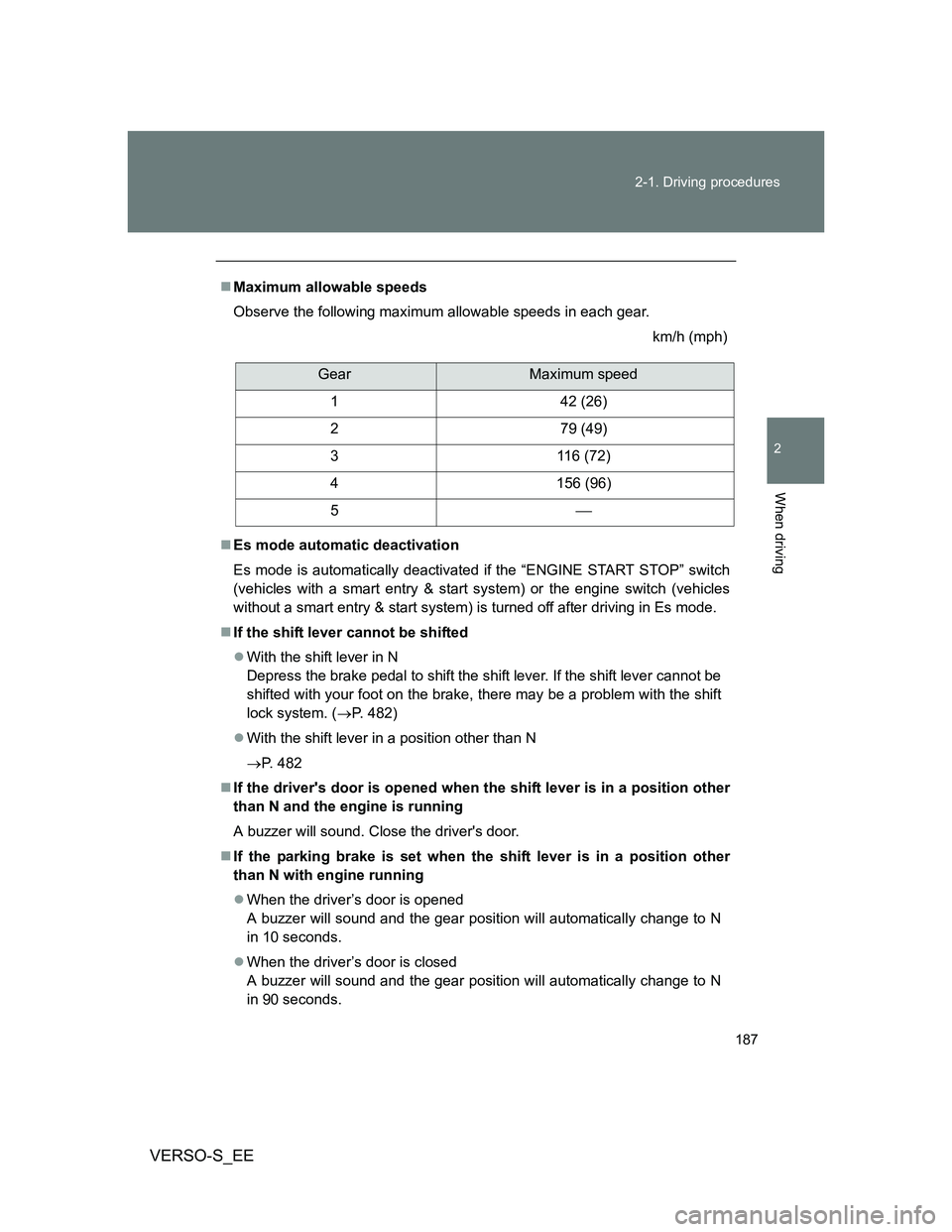
Maximum allowable speeds
Observe the following maximum allowable speeds in each gear.
km/h (mph)
Es mode automatic deactivation
Es mode is automatically deactivated if the “ENGINE START STOP” switch
(vehicles with a smart entry & start system) or the engine switch (vehicles
without a smart entry & start system) is turned off after driving in Es mode.
If the shift lever cannot be shifted
With the shift lever in N
Depress the brake pedal to shift the shift lever. If the shift lever cannot be
shifted with your foot on the brake, there may be a problem with the shift
lock system. (P. 482)
With the shift lever in a position other than N
P. 482
If the driver's door is opened when the shift lever is in a position other
than N and the engine is running
A buzzer will sound. Close the driver's door.
If the parking brake is set when the shift lever is in a position other
than N with engine running
When the driver’s door is opened
A buzzer will sound and the gear position will automatically change to N
in 10 seconds.
When the driver’s door is closed
A buzzer will sound and the gear position will automatically change to N
in 90 seconds.
GearMaximum speed
1 42 (26)
2 79 (49)
3 116 (72)
4 156 (96)
5
Page 194 of 552
194
2-1. Driving procedures
VERSO-S_EE
Horn
After adjusting the steering wheel
Make sure that the steering wheel is securely locked.
The horn may not sound if the steering wheel is not securely locked.
(P. 84)
To sound the horn, press on or
close to the mark.
Page 195 of 552
195
2
When driving
VERSO-S_EE
2-2. Instrument cluster
Gauges and meters
Tachometer
Displays the engine speed in revolutions per minute.
Speedometer
Displays the vehicle speed.
Outside temperature display
P. 332
Fuel gauge
Displays the quantity of fuel remaining in the tank.
Display change button
P. 196
Odometer, trip meter, Stop & Start system operation time, Stop &
Start system total operation time, meter light control and multi-
information display
P. 196, 207
Clock
P. 331
Clock adjusting buttons
P. 331
Page 196 of 552
196 2-2. Instrument cluster
VERSO-S_EE
Changing the display
Items displayed can be switched
by pressing the display change
button.
Odometer
Tr ip m eter
Stop & Start system operation time (if equipped)
Displays the total distance the vehicle has been
driven.
Displays the distance the vehicle has been driven
since the meter was last reset. Trip meters A and
B can be used to record and display different dis-
tances independently.
Pressing and holding the display change button will
reset the trip meter that is currently displayed.
Displays the total amount of time the Stop & Start
system has operated (total engine stop time due to
the Stop & Start system) from the engine switch
being turned to “ON” until it is turned to “LOCK”
(vehicles without smart entry & start system) or from
the “ENGINE START STOP” switch being changed
to IGNITION ON mode until it is changed to off (vehi-
cles with a smart entry & start system).