Page 437 of 752
437
3-5. Using the hand
s-free phone system (for cellular phone)
3
Interior and exterior features
■Automatic volume adjustment
When vehicle speed is 50 mph (80 km/h) or more, the volume automatically
increases. The volume returns to the previous volume setting when vehicle
speed drops to 43 mph (70 km/h) or less.
■ When using a voice command
For numbers, say a combination of single digits from zero to nine, # (pound),
(star), and + (plus).
Say a command correctly and clearly.
■ The system may not recognize your voice in the following situations:
●When driving on a rough road
● When driving at high speeds
● When air is blowing out of the vents onto the microphone
● When the air conditioning fan emits a loud noise
■ Operations that cannot be performed while driving
●Operating the system with
● Registering a cellular phone to the system
■ Changing the passkey
P. 445
Page 442 of 752
442
3-5. Using the hands-free phone system (for cellular phone)
Setting a cellular phone
Registering a cellular phoneSelect “Pair Phone” by using a voice command or , and do the
procedure for registering a cellular phone. ( P. 432)
Registering a cellular phone in the hands-free phone system allows
the system to function. The followin g functions can be used for reg-
istered cellular phones:
■ Functions and operation procedures
To enter the menu for each function, follow the steps below by
using a voice command or :
●Registering a cellular phone
1. “Setup” 2. “Phone Setup” 3. “Pair Phone”
● Selecting the cellular phone to be used
1. “Setup” 2. “Phone Setup” 3. “Select Phone”
● Changing a registered name
1. “Setup” 2. “Phone Setup” 3. “Change Name”
● Listing the registered cellular phones
1. “Setup” 2. “Phone Setup” 3. “List Phones”
● Deleting a cellular phone
1. “Setup” 2. “Phone Setup” 3. “Delete Phone”
● Changing the passkey
1. “Setup” 2. “Phone Setup” 3. “Set Passkey”
● Turning the hands-free phone automatic connection on/off
1. “Setup” 2. “Phone Setup” 3. “Hands-free power”
Page 445 of 752
445
3-5. Using the hand
s-free phone system (for cellular phone)
3
Interior and exterior features
Changing the passkey
Select “Set Passkey” by using a voice command or .
Press the talk switch, say a 4 to 8-digit number, and select
“Confirm” by using a voice command or .
The number should be input 1 digit at a time.
When the entire number to be registered as a passkey has
been input, press again.
Turning the hands-free phone automatic connection on/off■ Turning off the automatic connection
Select “Handsfree Power” by using a voice command or
.
Select “Turn off” by using a voice command or .
■ Turning on the automatic connection
Select “Handsfree Power” by using a voice command or
.
Select “Turn on” by using a voice command or .
■ The number of cellular phones that can be registered
Up to 6 cellular phones can be registered in the system.
Page 463 of 752
463
3-7. Using the
storage features
3
Interior and exterior features
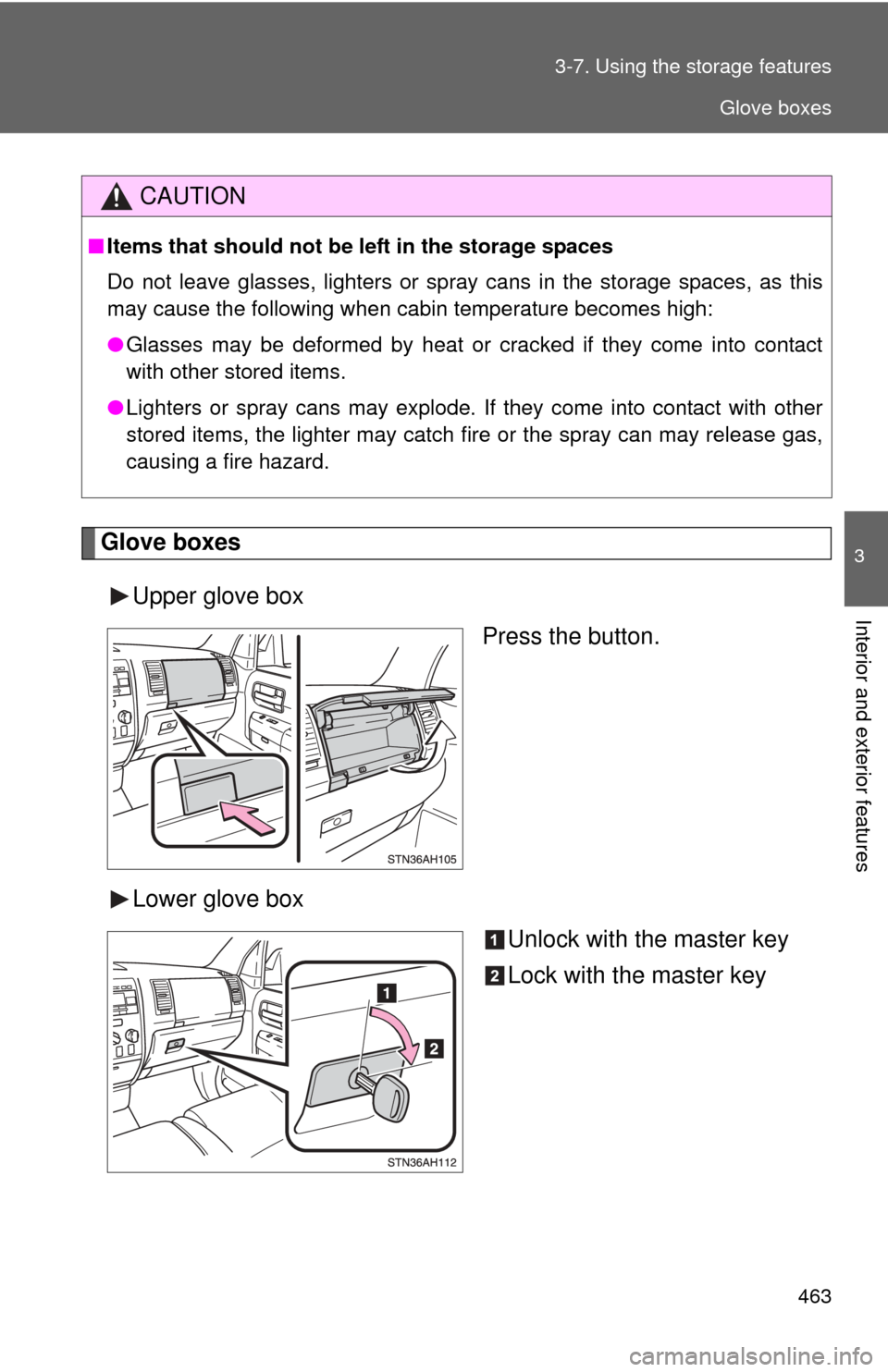
Glove boxes
Upper glove box Press the button.
Lower glove box Unlock with the master key
Lock with the master key
CAUTION
■Items that should not be left in the storage spaces
Do not leave glasses, lighters or spray cans in the storage spaces, as this
may cause the following when cabin temperature becomes high:
● Glasses may be deformed by heat or cracked if they come into contact
with other stored items.
● Lighters or spray cans may explode. If they come into contact with other
stored items, the lighter may catch fire or the spray can may release gas,
causing a fire hazard.
Glove boxes
Page 601 of 752
When trouble arises5
601
5-1. Essential informationEmergency flashers ......... 602
If your vehicle needs to be towed ........................ 603
If you think something is wrong ............................. 609
Fuel pump shut off system ........................... 610
5-2. Steps to take in an emergency
If a warning light turns on or a warning buzzer
sounds... ....................... 611
If a warning message is displayed (vehicles
with multi-information
display) .......................... 622
If you have a flat tire......... 626
If the engine will not start ................................ 644
If the shift lever cannot be shifted from P............ 646
If you lose your keys ........ 649
If the vehicle battery is discharged .................... 650
If your vehicle overheats ....................... 654
If the vehicle becomes stuck .............................. 657
If your vehicle has to be stopped in
an emergency ................ 658
Page 607 of 752
5
When trouble arises
607
5-1. Essential information
4WD models
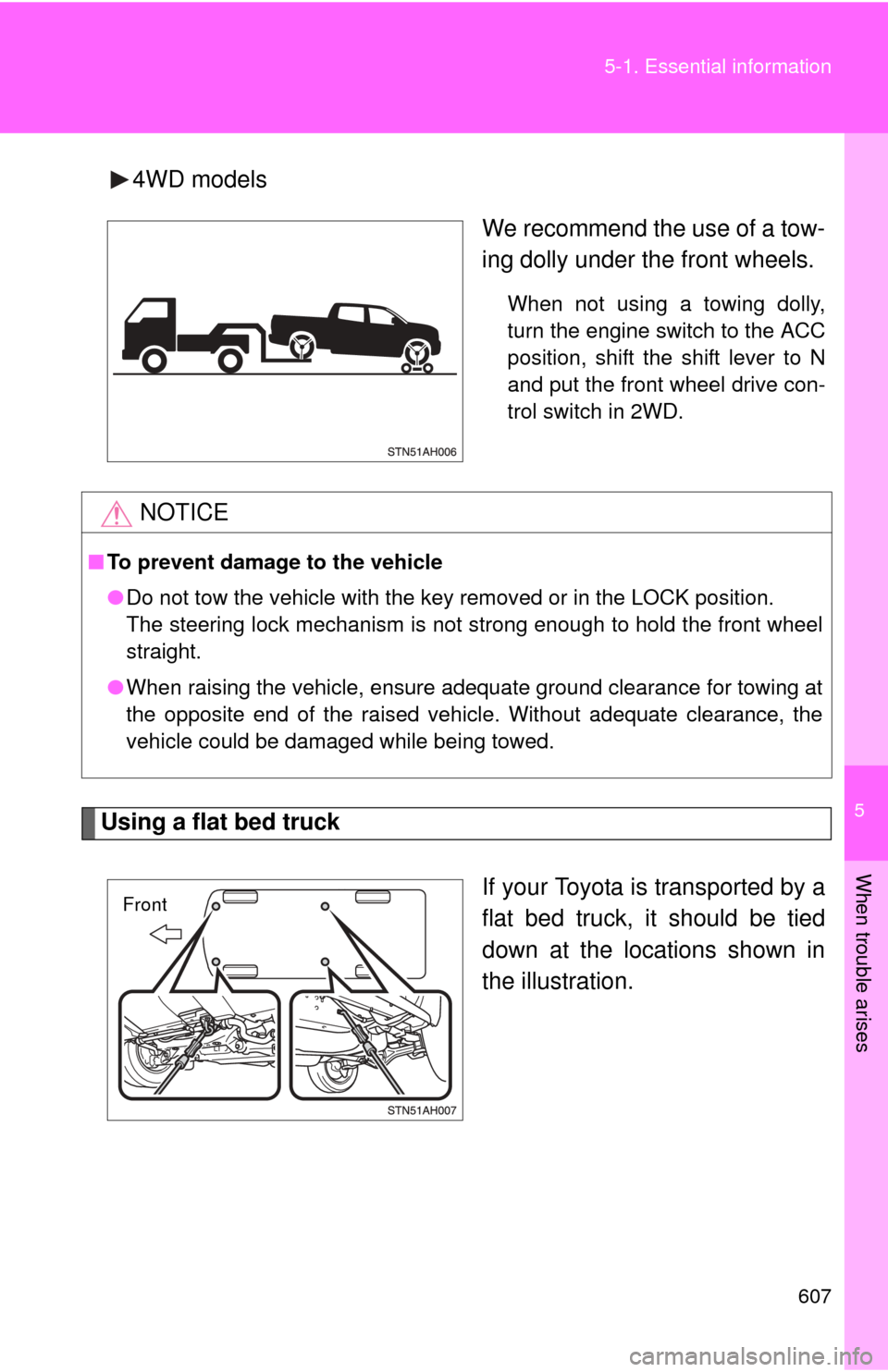
We recommend the use of a tow-
ing dolly under the front wheels.
When not using a towing dolly,
turn the engine switch to the ACC
position, shift the shift lever to N
and put the front wheel drive con-
trol switch in 2WD.
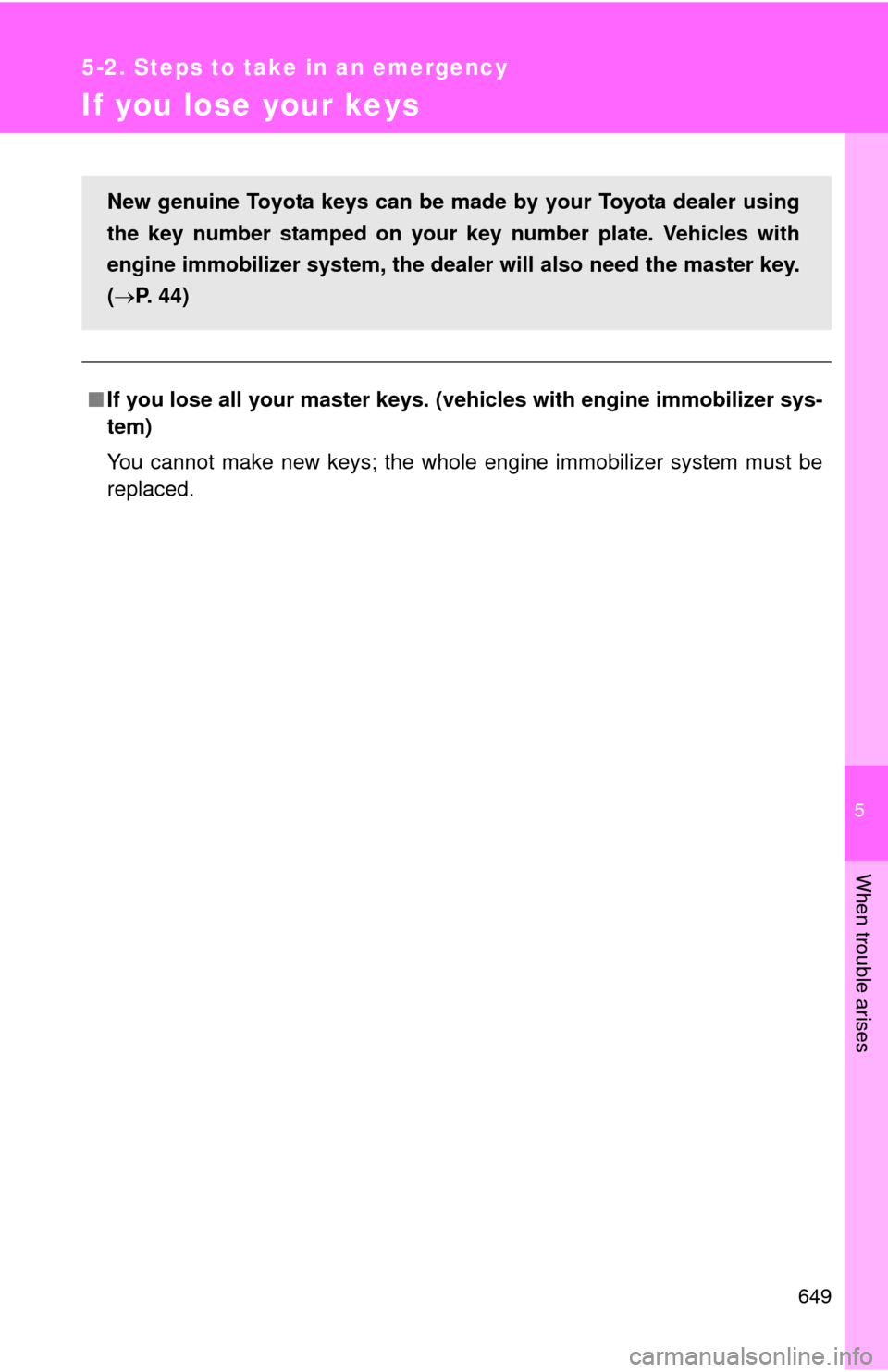
Using a flat bed truck
If your Toyota is transported by a
flat bed truck, it should be tied
down at the locations shown in
the illustration.
NOTICE
■To prevent damage to the vehicle
●Do not tow the vehicle with the key removed or in the LOCK position.
The steering lock mechanism is not strong enough to hold the front wheel
straight.
● When raising the vehicle, ensure adequate ground clearance for towing at
the opposite end of the raised vehicle. Without adequate clearance, the
vehicle could be damaged while being towed.
Front
Page 617 of 752

5
When trouble arises
617
5-2. Steps to take in an emergency
■
Four-wheel drive system warning buzzer
The buzzer indicated that the transfer mode is not selected correctly.
■ Key reminder buzzer
The buzzer indicates that the key has not been removed (with the engine
switch in the ACC or LOCK position and the driver’s door opened).
■ Open moon roof reminder buzzer
The buzzer indicate that the moon roof is still opened (with the engine switch
in the ACC or LOCK position and the driver’s door opened).
■ If the malfunction indicator lamp comes on while driving
First check the following:
● Is your vehicle low on gas?
If it is, refuel the vehicle immediately.
● Is the fuel tank cap loose?
If it is, tighten it securely.
The light will go off after taking several driving trips.
If the light does not go off even after several trips, contact your Toyota dealer
as soon as possible.
■ Front passenger detection sensor and passenger seat belt reminder
If luggage or other load is placed on the right front passenger seat, depend-
ing on its weight, the reminder light to flash and buzzer to sound.
■
When the tire pressure warning light comes on
Check the tire inflation pressure and adjust to the appropriate level.
Pushing the tire pressure warning reset switch does not turn off the tire
pressure warning light.
■The tire pressure warning light may turn on due to natural causes
The tire pressure warning light may turn on due to natural causes such
as natural air leaks or tire inflation pressure changes caused by temper-
ature. In this case, adjusting the ti re inflation pressure will turn off the
warning light (after several minutes).
Page 649 of 752
5
When trouble arises
649
5-2. Steps to take in an emergency
If you lose your keys
■If you lose all your master keys. ( vehicles with engine immobilizer sys-
tem)
You cannot make new keys; the whole engine immobilizer system must be
replaced.
New genuine Toyota keys can be made by your Toyota dealer using
the key number stamped on your key number plate. Vehicles with
engine immobilizer system, the dealer will also need the master key.
( P. 44)