Page 413 of 740
413
3-4. Using the rear seat entertainment system
3
Interior features
■
Searching for a title or chapter
Select “Page 2” or “Settings”.
Select “Title Search” or “Chapter Search”.
Input the title number or chapter
number,
and select “OK”.
■ Changing the angle
The angle can be changed for discs that are multi-angle compati-
ble when the angle mark appears on the screen.
Select “Page 2” or “Settings”.
Select “Angle”. Each time “Angle” is selected,
the angle changes.
Page 414 of 740
414 3-4. Using the rear seat entertainment system
■Changing the subtitle language
The subtitle language can be chang ed for discs with multiple subti-
tle languages.
Select “Page 2” or “Settings”.
Select “Subtitle”. Each time “Subtitle” is selected,
another language available on
the disc is selected.
“Hide”: Subtitle can be hidden
“Style” (BD video only): Subtitle
style can be changed
■Changing the audio language
The audio language can be changed for discs with multiple audio
languages.
Select “Page 2” or “Settings”.
Select “Audio”.
Each time “Audio” is selected,
another language available on
the disc is selected.
Page 415 of 740
415
3-4. Using the rear seat entertainment system
3
Interior features
■
Changing the audio channel (BDAV)
The audio channel can be changed for discs with multiple audio
channels.
Select “Settings”.
Each time “MAIN/SUB” is
selected, the
mode changes in
the following order:
“MAIN”: Main audio channel
“SUB”: Sub audio channel
“MAIN/SUB”: Both the main and
sub audio channels
■ Changing the playback mode (BDAV)
The playback mode can be changed to program mode or playlist
mode. Playlist mode cannot be select ed if a playlist is not stored on
the disc.
Select “Settings”.
Select “Playback Mode”.
Each time “Playback Mode” is
selected, the mode changes.
Program mode: Playback the disc
in order of program number
Playlist mode: Playback the disc
in order of playlist number
Page 416 of 740
416 3-4. Using the rear seat entertainment system
■Displaying the secondary video (Picture-in-picture) (BD video)
Picture-in-picture is a secondary video that plays embedded in the
primary video. The secondary video can be played from a disc
compatible with the picture-in-picture function.
Select “Page 3”.
Select “PinP”. The secondary video is dis-
played on the screen.
Each time “PinP” is selected,
another secondary video avail-
able on the disc is selected.
“Hide”: Secondary video can be
hidden
■Changing the secondary audio (BD video)
The secondary audio that for the secondary video can be changed.
Select “Page 3”.
Select “PinP Audio”.
Each time “PinP Audio” is
selected, another secondary audio
stored on the
disc is selected.
“OFF”: Secondary audio can be
turned off
Page 422 of 740
422 3-4. Using the rear seat entertainment system
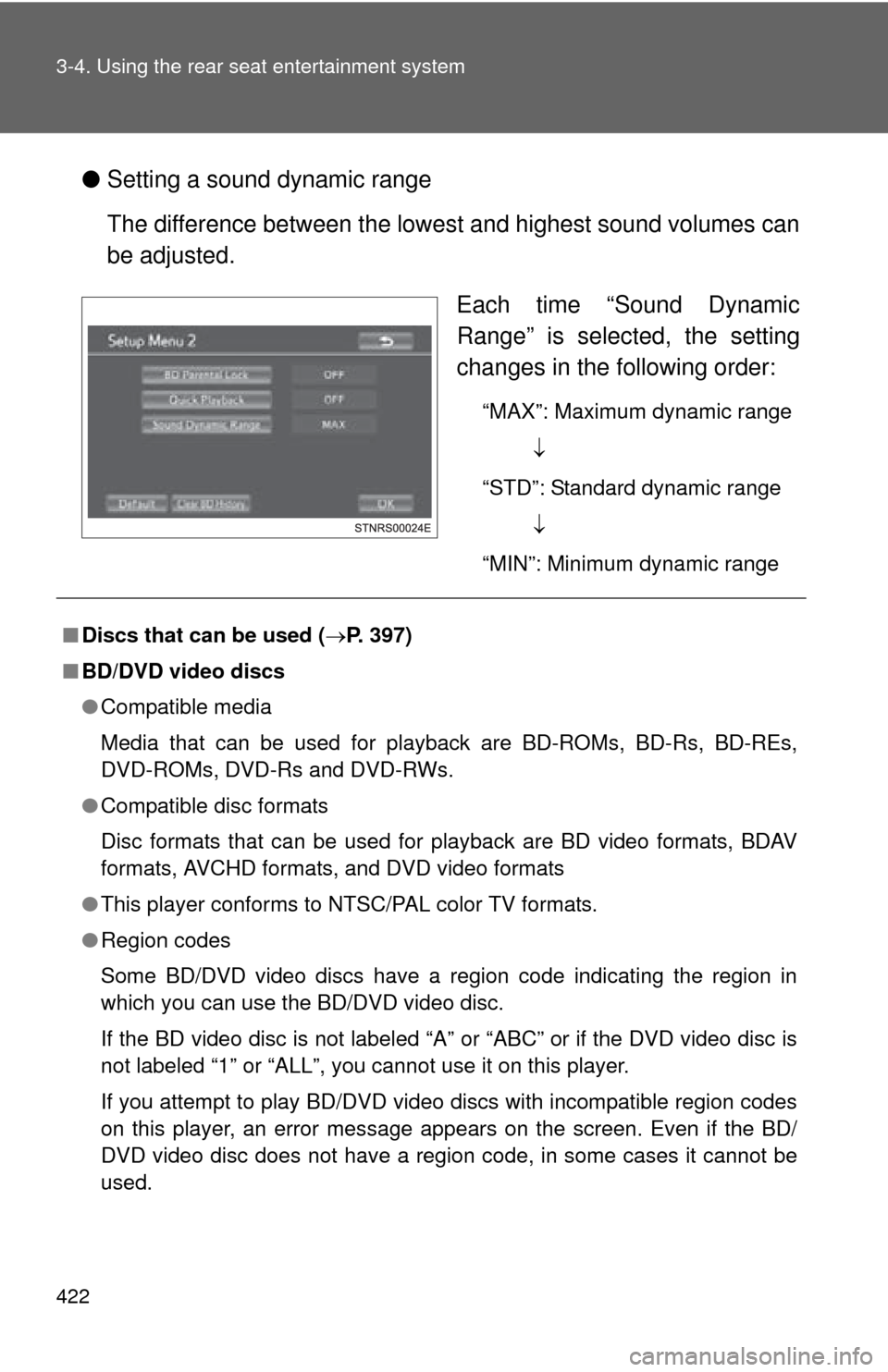
●Setting a sound dynamic range
The difference between the lowest and highest sound volumes can
be adjusted.
Each time “Sound Dynamic
Range” is selected, the setting
changes in the following order:
“MAX”: Maximum dynamic range
“STD”: Standard dynamic range
“MIN”: Minimum dynamic range
■ Discs that can be used ( P. 397)
■ BD/DVD video discs
●Compatible media
Media that can be used for playback are BD-ROMs, BD-Rs, BD-REs,
DVD-ROMs, DVD-Rs and DVD-RWs.
● Compatible disc formats
Disc formats that can be used for playback are BD video formats, BDAV
formats, AVCHD formats, and DVD video formats
● This player conforms to NTSC/PAL color TV formats.
● Region codes
Some BD/DVD video discs have a region code indicating the region in
which you can use the BD/DVD video disc.
If the BD video disc is not labeled “A” or “ABC” or if the DVD video disc is
not labeled “1” or “ALL”, you cannot use it on this player.
If you attempt to play BD/DVD video discs with incompatible region codes
on this player, an error message appears on the screen. Even if the BD/
DVD video disc does not have a region code, in some cases it cannot be
used.
Page 433 of 740
433
3-4. Using the rear seat entertainment system
3
Interior features
Turning on the audio CD and MP3/WMA mode
Insert a disc or Press the “DIS C” button with a disc inserted.
The player will start to play the disc automatically.
Selecting a track/file
Press or until the desired track/file number appears.
Fast forwarding or rewinding a track/filePress and hold or .
Selecting a folder (MP3/WMA)Press “ ” or “ ” on the “FOLDER” button until the desired folder num-
ber appears.
Press and hold “ ” on the “FOLDER” button, the top file stored in the top
folder in the disc will be selected.
Repeat play
Each time “RPT” is selected , the mode changes as follow:
Audio CD
“RPT” (track repeat) Off
MP3/WMA
“RPT” (file repeat) “FLD.RPT” (folder repeat) Off
Page 434 of 740

434 3-4. Using the rear seat entertainment system
Random playbackEach time “RAND” is selected , the mode changes as follow:
Audio CD
“RAND” (random) Off
MP3/WMA
“RAND” (1 folder random) “FLD.RAND” (1 disc random) Off
■Discs that can be used ( P. 397)
■ Displaying the title and artist name
If a CD-TEXT disc is inserted, the titles of the disc and track will be dis-
played.
■ MP3 and WMA files
MP3 (MPEG Audio LAYER3) is a standard audio compression format.
Files can be compressed to approximately 1/10 of their original size by using
MP3 compression.
WMA (Windows Media Audio) is a Microsoft audio compression format.
This format compresses audio data to a size smaller than that of the MP3
format.
There is a limit to the MP3 and WMA file standards and to the media/formats
recorded by them that can be used.
●MP3 file compatibility
• Compatible standards
MP3 (MPEG1 LAYER3, MPEG2 LSF LAYER3)
• Compatible sampling frequencies MPEG1 LAYER3: 32, 44.1, 48 (kHz)
MPEG2 LSF LAYER3: 16, 22.05, 24 (kHz)
• Compatible bit rates (compatible with VBR) MPEG1 LAYER3: 64, 80, 96, 112, 128, 160, 192, 224, 256, 320 (kbps)
MPEG2 LSF LAYER3: 64, 80, 96, 112, 128, 144, 160 (kbps)
• Compatible channel modes: stereo, joint stereo, dual channel and mono
Page 442 of 740
442 3-4. Using the rear seat entertainment system
●Slideshow settings
Select “Setup”.
The slideshow settings can be changed. After the settings are
changed, select “OK”. Selects slideshow interval
time (seconds)
5 10 15 30 60
Selects slideshow effect
“Fade” “Slide” “Wipe1”
“Wipe2” “Dissolve” “Zoom”
“OFF”
Selects on/off to repeat slide-
show
Restores default settings
Playing AVCHD video
You can play AVCHD videos that are stored in an SD card. Select “Video”.


