2013 TOYOTA RAV4 CD player
[x] Cancel search: CD playerPage 357 of 624

RAV4_OM_OM42809U_(U)
3575-2. Using the audio system
5
Interior features
*: Bluetooth is a registered trademark of Bluetooth SIG, Inc.
Menu list of the Bluetooth® audio/phone
First menuSecond menuThird menuOperation details
“Bluetooth*”
“BT pairing”-Registering a
Bluetooth® device
“List phone”
-Listing the registered
cellular phones
“List audio”
-Listing the registered
portable players
“Passkey”
-Changing the pass-
key
“BT power”
-Setting automatic
connection of the
device on or off
“Bluetooth
* info” “Device name”
“Device address” Displaying the device
status
“Display setting” - Setting the auto-
matic connection
confirmation display
to on or off
“Initialize” - Initializing the set-
tings
Page 359 of 624
359
RAV4_OM_OM42809U_(U)
5-2. Using the audio system
5
Interior features
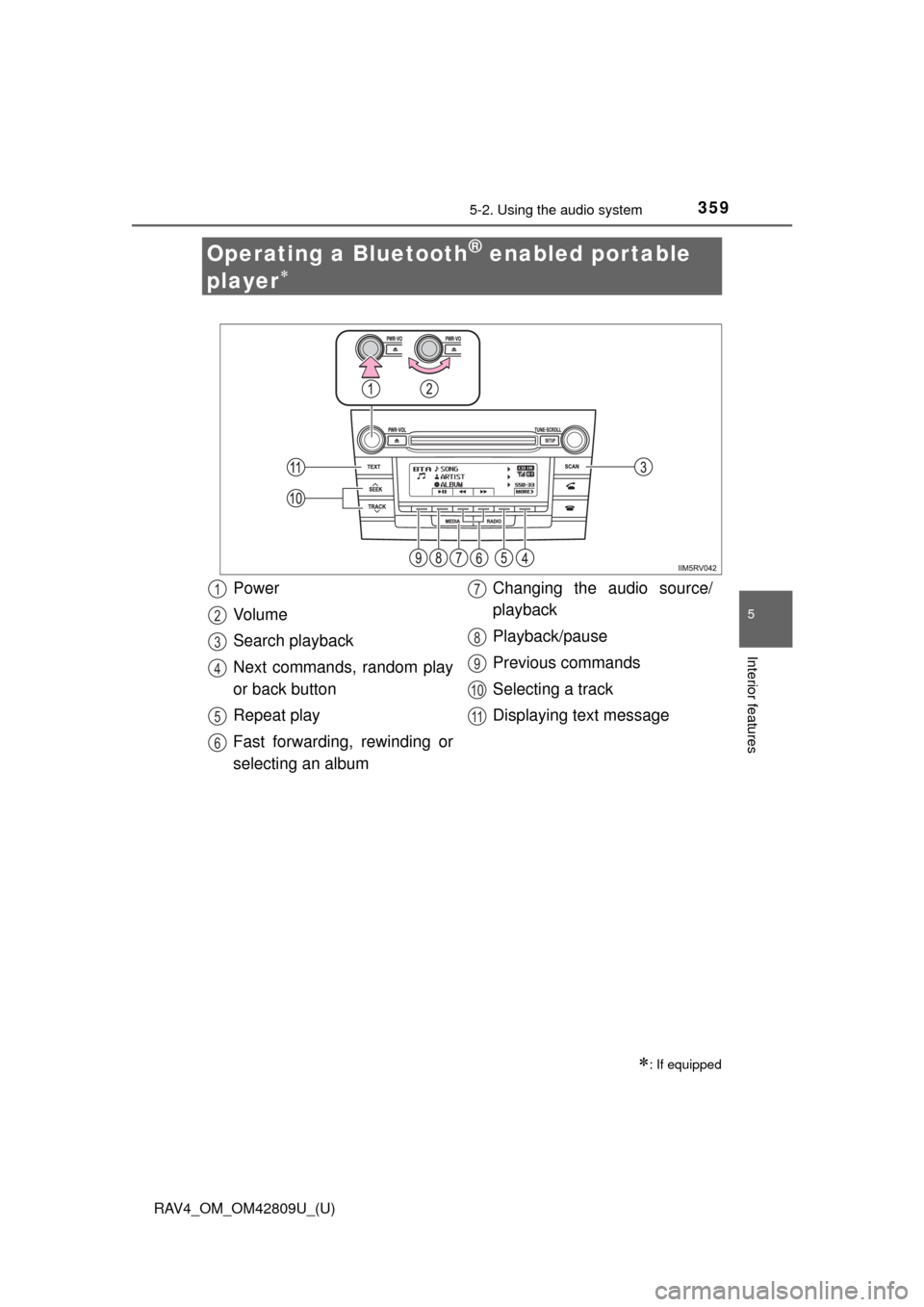
Operating a Bluetooth® enabled portable
player
: If equipped
Power
Vo l u m e
Search playback
Next commands, random play
or back button
Repeat play
Fast forwarding, rewinding or
selecting an album Changing the audio source/
playback
Playback/pause
Previous commands
Selecting a track
Displaying text message1
2
3
4
5
6
7
8
9
10
11
Page 361 of 624

RAV4_OM_OM42809U_(U)
3615-2. Using the audio system
5
Interior features
Press ( ).
Press (
If there are following texts, is displayed.
Press and hold the button to display the remaining texts.
■Bluetooth® audio system functions
Depending on the portable player that is connected to the system, certain
functions may not be available.
■ Display
P. 317
Playing and pausing tracks
Switching the display
Page 367 of 624

367
RAV4_OM_OM42809U_(U)
5-2. Using the audio system
5
Interior features
Using the “SETUP” menu (“Bluetooth*”
menu)
■Functions and operation proceduresPress the “SETUP” button and select “Bluetooth
*” using the
“TUNE•SCROLL” knob.
Press the knob and select one of the following functions using
the knob.
● Registering a Bluetooth
® device
“BT pairing”
● Listing the registered cellular phones
“List phone”
● Listing the registered portable players
“List audio”
● Changing the passkey
“Passkey”
● Setting automatic connection of the device on or off
“BT power”
● Displaying the device status
“Bluetooth
* info”
● Setting the automatic connection confirmation display to on or off
“Display setting”
● Initialization
“Initialize”
*: Bluetooth is a registered trademark of Bluetooth SIG, Inc.
: If equipped
Registering a Bluetooth® device in the system allows the system
to function. The following functi ons can be used for registered
devices:
1
2
Page 369 of 624

RAV4_OM_OM42809U_(U)
3695-2. Using the audio system
5
Interior features
Select “List audio” using the “TUNE•SCROLL” knob. The list of regis-
tered portable players will be displayed.
●Connecting the registered portab le player to the audio system
Select the name of the portable player to be connected using the
“TUNE•SCROLL” knob.
Select “Select” using the knob.
● Deleting the registered portable player
Select the name of the portable player to be deleted using the
“TUNE•SCROLL” knob.
Select “Delete” using the knob.
Press (YES).
● Disconnecting the registered portable player from the audio system
Select the name of the portable player to be disconnected using
the “TUNE•SCROLL” knob.
Select “Disconnect” using the knob.
Press (YES).
● Selecting the connection method
Select the name of the desired portable player using the
“TUNE•SCROLL” knob.
Select “Connection Method” using the knob.
Select “From vehicle” or “From audio” using the knob.
Listing the registered portable players
1
2
1
2
3
1
2
3
1
2
3
Page 371 of 624

RAV4_OM_OM42809U_(U)
3715-2. Using the audio system
5
Interior features
If the “Display setting” is set to on, the portable player connection sta-
tus will be displayed when the engine sw itch is turned to the “ACC” or
“ON” position (vehicles without a smart key system) or ACCESSORY
or IGNITION ON mode (vehicl es with a smart key system).
Select “Display setting” us ing the “TUNE•SCROLL” knob.
Select “ON” or “OFF” using the knob.
Select “Initialize” using the “TUNE•SCROLL” knob.
● Initializing the sound settings
Select “Sound setting” using the “TUNE•SCROLL” knob and press
(YES).
For details about sound settings: P. 372
●Initializing the device information
Select “Car device info” using the “TUNE•SCROLL” knob and press
(YES).
Automatic connection of a portable device, automatic connection confirma-
tion display and the passkey will be initialized.
● Initializing all the settings
Select “All initialize” using the “TUNE•SCROLL” knob and press
(YES).
■The number of Bluetooth® device that can be registered
Up to 5 Bluetooth
® device can be registered in the system.
■ Bluetooth
® audio/phone system functions
Certain functions may not be available during driving.
Setting the automatic connection confirmation display to on or
off
Initialization
1
2
Page 609 of 624

609Alphabetical index
RAV4_OM_OM42809U_(U)
Alphabetical index
A/C .................................... 288, 295Air conditioning filter ............. 460
Automatic air conditioning
system ......... ....................... 295
Manual air conditioning
system ......... ....................... 288
ABS (Anti-lock Brake System) .................................. 260
Function ................................ 260
Warning light ......................... 504
Air conditioning filter .............. 460
Air conditioning
system ............................ 288, 295Air conditioning filter ............. 460
Automatic air conditioning
system ......... ....................... 295
Manual air conditioning
system ......... ....................... 288
Airbags ....................................... 38 Airbag operating conditions .... 46
Airbag precautions for
your child .............................. 41
Airbag warning light .............. 504
Correct driving posture ........... 28
Curtain shield airbag
operating conditions ............. 46
Curtain shield airbag
precautions ........................... 43
Front passenger occupant classification syst em............. 51
General airbag precautions .... 41
Locations of airbags................ 38
Modification and disposal of airbags.............................. 45 Side airbag operating
conditions ............................. 46
Side airbag precautions .......... 43
Side and curtain shield airbags operating
conditions ............................. 46
Side and curtain shield airbags precautions .............. 43
SRS airbag instructions for Canadian owners ............... 593
SRS airbags ........................... 38
All-wheel drive system............ 259
Anchor brackets ........................ 64
Antennas (smart key system) .................................. 102
Anti-lock brake system (ABS) ...................................... 260
Function ................................ 260
Warning light......................... 504
Armrest..................................... 400
Assist grips .............................. 402
Audio input .............................. 345
Audio system ........................... 308
Audio input............................ 345
AUX port/USB port............. 327, 335, 345
Bluetooth
® audio .................. 349
CD player.............................. 315
iPod ...................................... 327
MP3/WMA disc ..................... 320
Optimal use .......................... 343
Portable music player ........... 345
Radio .................................... 312
Steering wheel audio switch ................................. 346
USB memory ........................ 335
AUTO LSD ................................ 261
Automatic air conditioning system
Air conditioning filter ............. 460
Automatic air conditioning system .......... ...................... 295
A
Page 610 of 624

610Alphabetical index
RAV4_OM_OM42809U_(U)
Automatic High Beam ............. 221
Automatic light control system .................................... 219
Automatic transmission.......... 207 If the shift lever cannot be
shifted from P ..................... 538
S mode ................................. 210
AUX port ................................... 345
Back door
Back door.............................. 125
Wireless remote control ........ 113
Back-up lights
Replacing light bulbs............. 487
Wattage ................................ 562
Battery ...................................... 438
Battery checking ................... 438
If the vehicle battery is discharged ...................... 542
Preparing and checking before winter....................... 276
Warning light ......................... 504
Bluetooth
®
Audio system ................. ....... 349
Hands-free system (for cellular phone) ............. 349
Bottle holders .......................... 384
Brake Fluid ...................................... 436
Parking brake........................ 215
Warning light ......................... 503
Brake assist ............................. 260
Break-in tips ............................. 166
Brightness control Instrument panel light
control................................... 88
BSM (Blind Spot Monitor) ....... 266 Blind Spot Monitor
function ............................... 270
Rear Cross Traffic Alert function ............................... 273 Care .................................. 404, 408
Aluminum wheels ................. 406
Exterior ................................. 404
Interior .................................. 408
Seat belts.............................. 409
Cargo capacity......................... 552
Cargo hooks ............................ 385
CD player.................................. 315
Chains ...................................... 276
Child restraint system............... 59 Booster seats, definition ......... 59
Booster seats, installation....... 70
Convertible seats, definition ............................... 59
Convertible seats, installation ............................ 66
Front passenger occupant
classification syst em ............ 51
Infant seats, definition............. 59
Infant seats, installation .......... 66
Installing CRS with LATCH anchors.................... 64
Installing CRS with seat
belts...................................... 66
Installing CRS with top tether strap ........................... 71
B
C