Page 316 of 568
316
3-5. Other interior features
PRIUS v_OM_OM47820U_(U)
Clock
■The clock is displayed when
The “POWER” switch is in ON mode.
■ After turning the “P OWER” switch off
Even after the “POWER” switch has been turned off, the time will continue to
be displayed for approximately 30 seconds or until a door is locked.
■ When the 12-volt battery is disconnected
The time display will automatically be set to 1:00.
Adjusts the hours
Adjusts the minutes
Rounds to the nearest
hour
*
*
: e.g. 1:00 to 1:29 1:00
1:30 to 1:59 2:00
Page 377 of 568

377
4-3. Do-it-yourself maintenance
PRIUS v_OM_OM47820U_(U)
4
Maintenance and care
Make sure to check the oil type and prepare the items needed before
adding oil.
Remove the oil filler cap by turning it counterclockwise.
Add engine oil slowly, checking the dipstick.
Install the oil filler cap by turning it clockwise.
Engine oil selectionP. 502
Oil quantity
(Low Full) 1.6 qt. (1.5 L, 1.3 Imp.qt.)
Items Clean funnel
■ Engine oil consumption
A certain amount of engine oil will be consumed while driving. In the follow-
ing situations, oil consumption may increase, and engine oil may need to be
refilled in between oil maintenance intervals.
● When the engine is new, for example directly after purchasing the vehicle
or after replacing the engine
● If low quality oil or oil of an inappropriate viscosity is used
● When driving at high engine speeds or with a heavy load, or when driving
while accelerating or decelerating frequently
● When leaving the engine idling for a long time, or when driving frequently
through heavy traffic
STEP 1
STEP 2
STEP 3
Page 419 of 568
419
4-3. Do-it-yourself maintenance
PRIUS v_OM_OM47820U_(U)
4
Maintenance and care
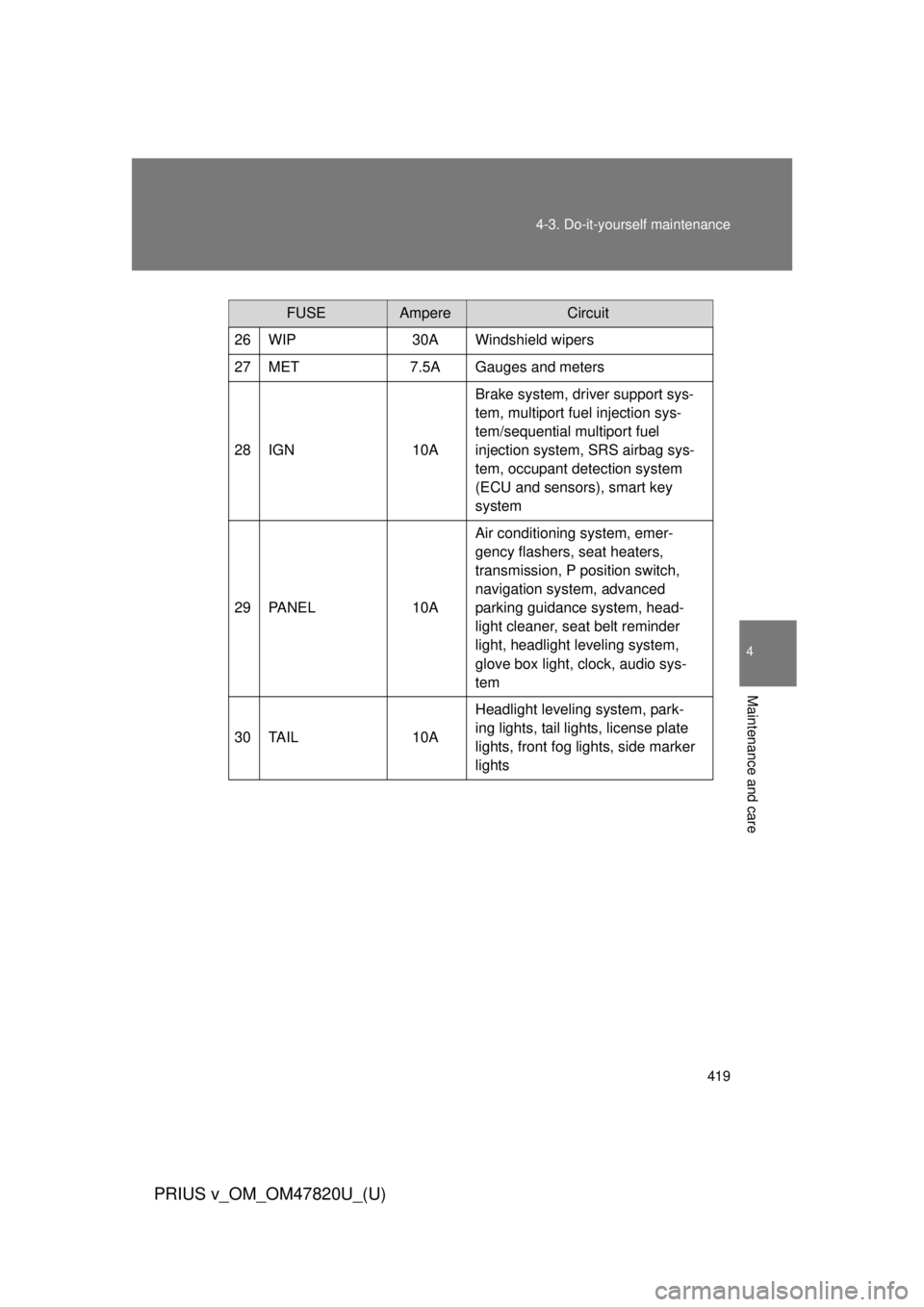
FUSEAmpereCircuit
26 WIP 30A Windshield wipers
27 MET 7.5A Gauges and meters
28 IGN 10ABrake system, driver support sys-
tem, multiport fuel injection sys-
tem/sequential multiport fuel
injection system, SRS airbag sys-
tem, occupant detection system
(ECU and sensors), smart key
system
29 PANEL 10AAir conditioning system, emer-
gency flashers, seat heaters,
transmission, P position switch,
navigation system, advanced
parking guidance system, head-
light cleaner, seat belt reminder
light, headlight leveling system,
glove box light, clock, audio sys-
tem
30 TAIL 10AHeadlight leveling system, park-
ing lights, tail lights, license plate
lights, front fog lights, side marker
lights
Page 424 of 568
424 4-3. Do-it-yourself maintenance
PRIUS v_OM_OM47820U_(U)
Replacing light bulbs■ Headlight low beams (halogen headlights)
Turn the bulb base counterclock-
wise.
Unplug the connector while
pressing the lock release.
Replace the light bulb, and install
the bulb base.
Align the 3 tabs on the light bulb
with the mounting, and insert.
STEP 1
STEP 2
STEP 3
Page 425 of 568
425
4-3. Do-it-yourself maintenance
PRIUS v_OM_OM47820U_(U)
4
Maintenance and care
Turn and secure the bulb base.
Shake the bulb base gently to
check that it is not loose, turn the
headlights on once and visually
confirm that no light is leaking
through the mounting.
■
Daytime running lights and headlight high beams
Turn the bulb base counterclockwise.
Vehicles with halogen headlights
Vehicles with LED headlights
STEP 4
STEP 1
Page 427 of 568
427
4-3. Do-it-yourself maintenance
PRIUS v_OM_OM47820U_(U)
4
Maintenance and care
■
Parking lights
Turn the bulb base counterclockwise.
Vehicles with halogen headlights
Vehicles with LED headlights
Remove the light bulb.
When installing, reverse the steps listed.
STEP 1
STEP 2
STEP 3
Page 428 of 568
428 4-3. Do-it-yourself maintenance
PRIUS v_OM_OM47820U_(U)
■Front side marker lights
Turn the bulb base counterclockwise.
Vehicles with halogen headlights
Vehicles with LED headlights
Remove the light bulb.
When installing, reverse the steps listed.
STEP 1
STEP 2
STEP 3
Page 430 of 568
430 4-3. Do-it-yourself maintenance
PRIUS v_OM_OM47820U_(U)
Turn the bulb base counterclock-
wise.
When installing, reverse the steps listed.STEP 3
STEP 4