Page 272 of 704
246
2-1. Driving procedures
PRIUS PHV_OM_OM47787U_(U)
Shift position indicator
The position of the frame on the shift position indicator changes in
accordance with the current shift position.
When any shift position other than D or B is selected, the arrow toward
B and B position indicator disappear from the shift position indicator.
When selecting the shift position, make sure that the shift position has
been changed to the desired position by checking the shift position indica-
tor provided on the instrument cluster.
■Shift position purpose
*:For good fuel economy and noise reduction, the D position should usu-
ally be used.
Shift positionFunction
PParking the vehicle/starting the hybrid system
RReversing
NNeutral
DNormal driving*
BApplying moderate engine braking when driving
down hills or on steep slopes
Page 274 of 704
248
2-1. Driving procedures
PRIUS PHV_OM_OM47787U_(U)
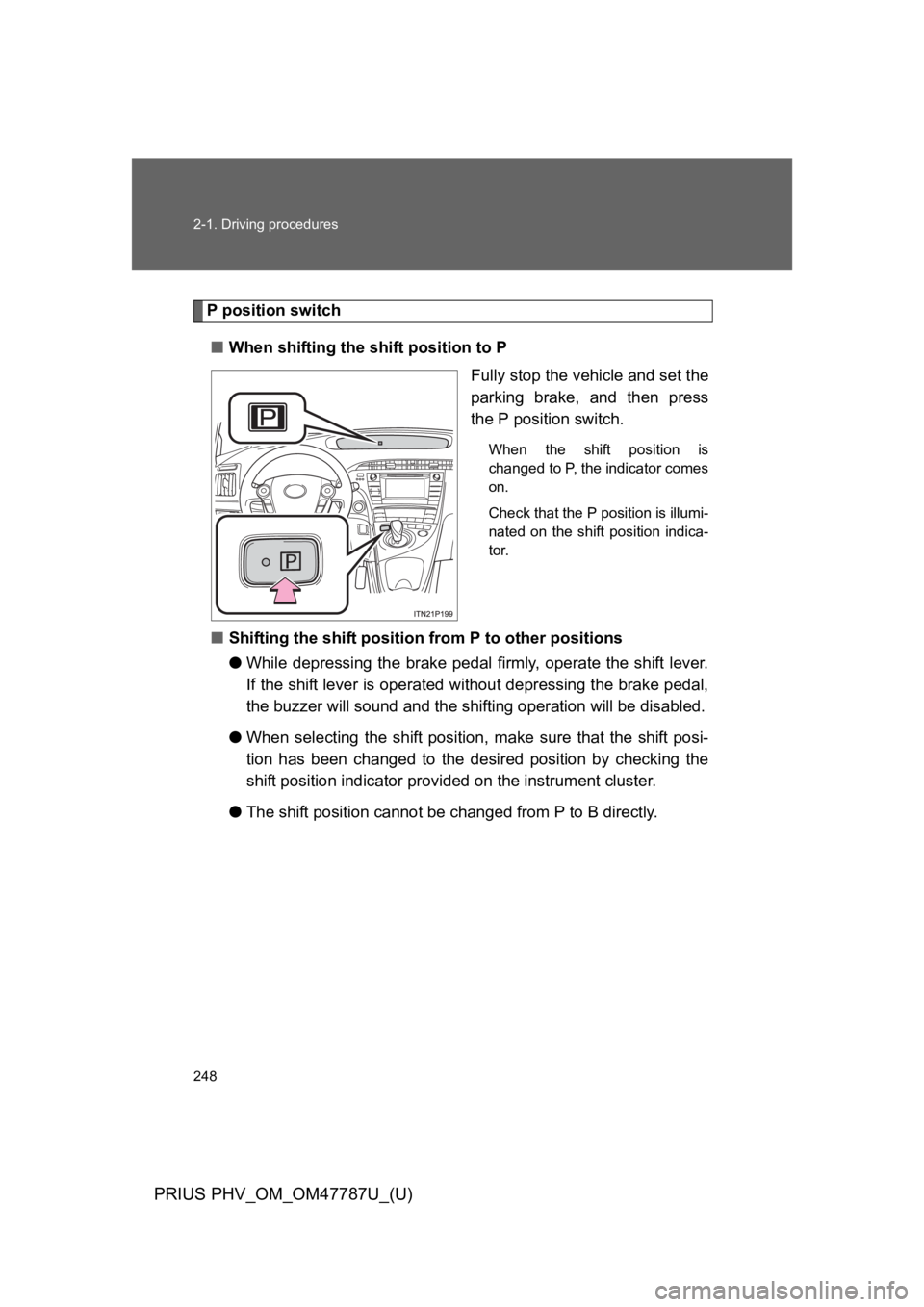
P position switch
■When shifting the shift position to P
Fully stop the vehicle and set the
parking brake, and then press
the P position switch.
When the shift position is
changed to P, the indicator comes
on.
Check that the P position is illumi-
nated on the shift position indica-
tor.
■Shifting the shift position from P to other positions
●While depressing the brake pedal firmly, operate the shift lever.
If the shift lever is operated without depressing the brake pedal,
the buzzer will sound and the shifting operation will be disabled.
●When selecting the shift position, make sure that the shift posi-
tion has been changed to the desired position by checking the
shift position indicator provided on the instrument cluster.
●The shift position cannot be changed from P to B directly.
Page 279 of 704

253
2-1. Driving procedures
PRIUS PHV_OM_OM47787U_(U)
2
When driving
NOTICE
■Hybrid battery (traction battery) charge
If the shift position is in N, the hybrid battery (traction battery) will not be
charged. To help prevent the battery from discharging, avoid leaving the N
position selected for an extended period of time.
■Situations where P position control system malfunctions are possible
If any of the following situations occurs, P position control system malfunc-
tions are possible.
Immediately stop the vehicle in a safe place on level ground, apply the park-
ing brake, and then contact your Toyota dealer.
●When the “P LOCK MALFUNCTION” warning message appears on the
multi-information display. (→P. 5 4 8 )
●When the shift position indicator remains off.
■Notes regarding shift lever and P position switch operation
Avoid repeatedly operating the shift lever and P position switch in quick suc-
cession.
The system protection function may activate and it will temporarily not be
possible to shift the shift position other than P. If this happens, please wait
for a while before attempting to change the shift position again.
Page 281 of 704
255
2-1. Driving procedures
PRIUS PHV_OM_OM47787U_(U)
2
When driving
Par king brake
■Parking brake engaged warning buzzer
→P. 5 3 3
■Usage in winter time
→P. 3 4 9
NOTICE
■Before driving
Fully release the parking brake.
Driving the vehicle with the parking brake set will lead to brake components
overheating, which may affect braking performance and increase brake
wear.
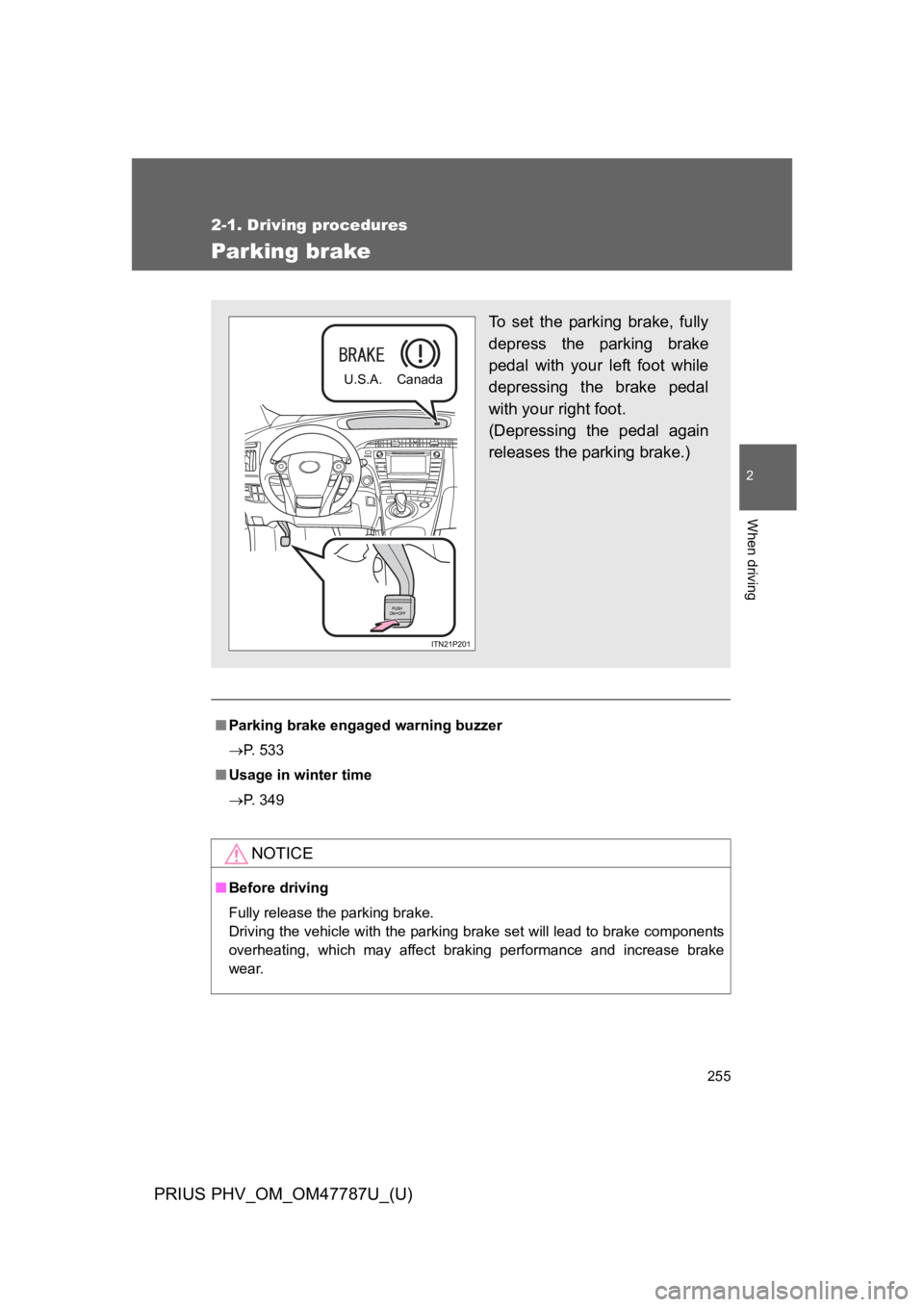
To s e t t h e p a r k i n g b r a k e , f u l l y
depress the parking brake
pedal with your left foot while
depressing the brake pedal
with your right foot.
(Depressing the pedal again
releases the parking brake.)
U.S.A. Canada
Page 318 of 704
292
PRIUS PHV_OM_OM47787U_(U)
2-3. Operating the lights and windshield wipers
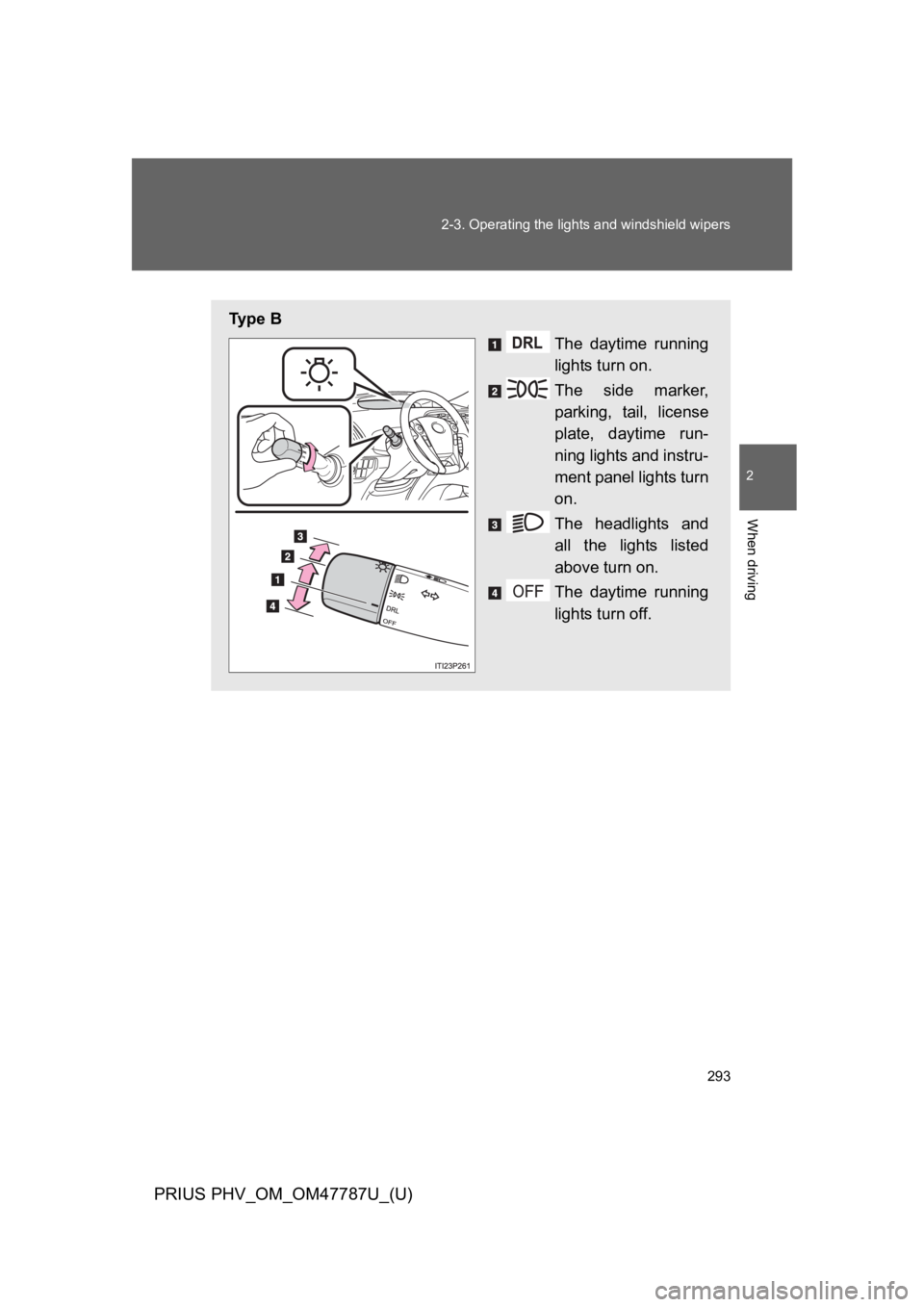
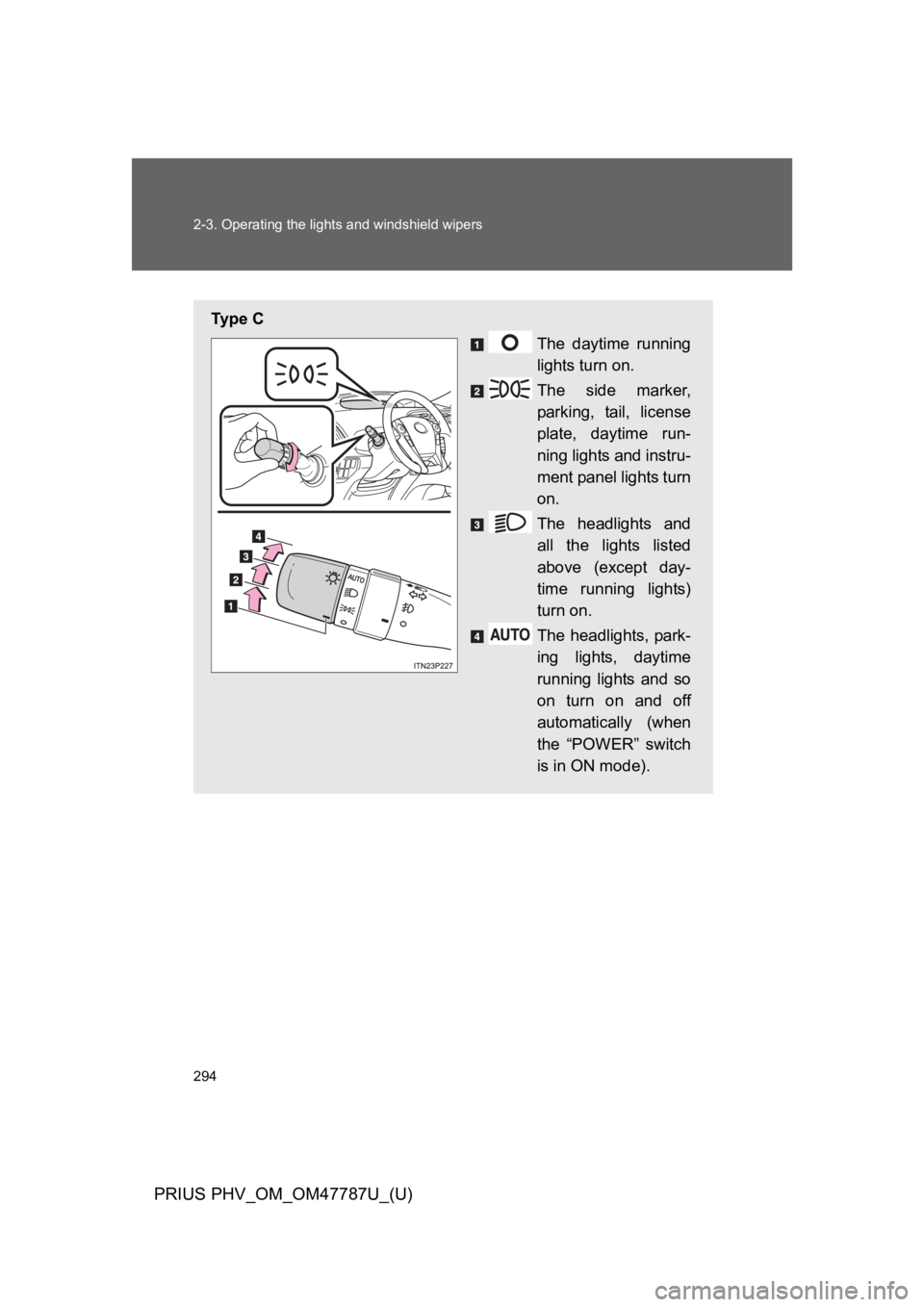
Headlight switch
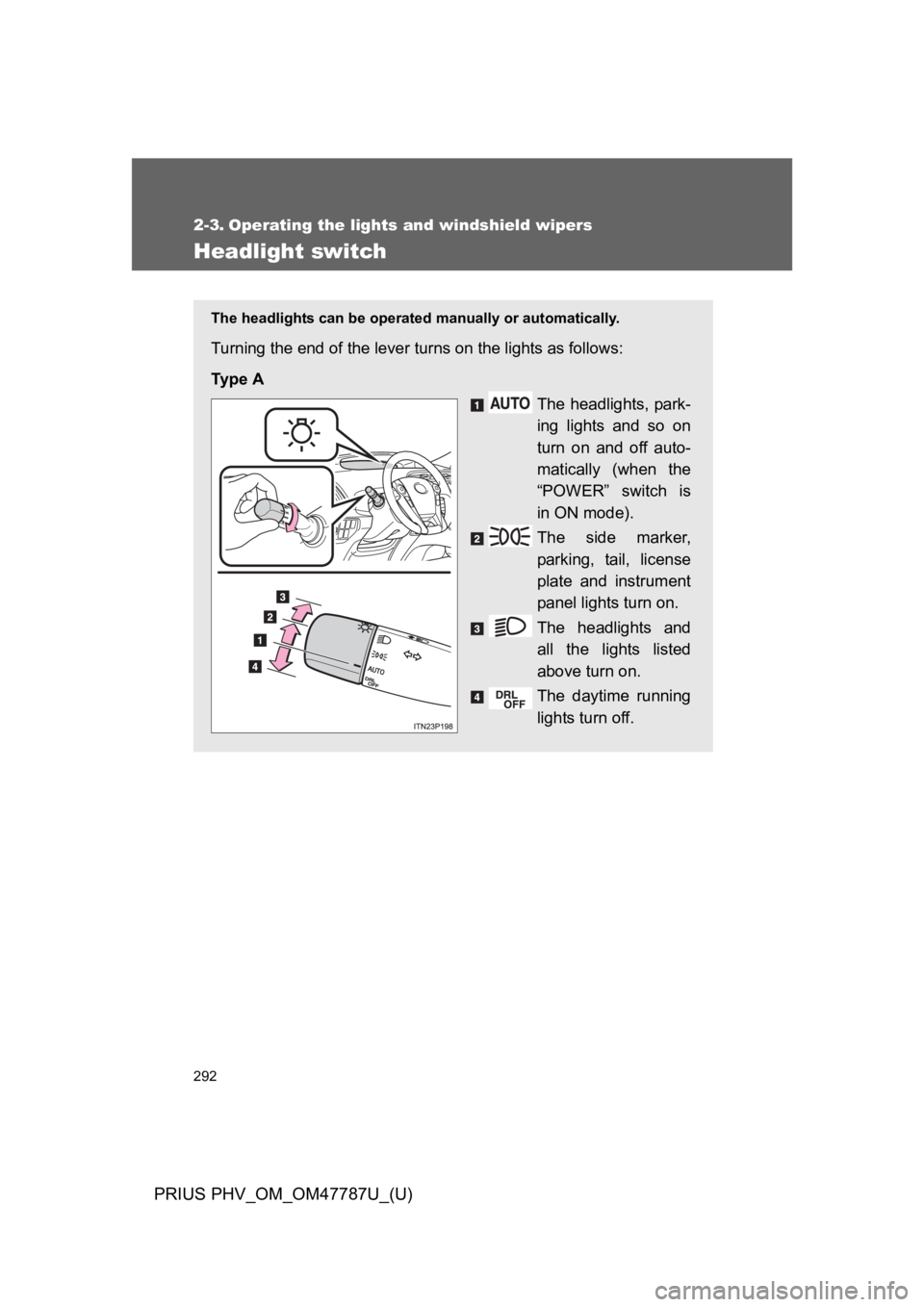
The headlights can be operated manually or automatically.
Turning the end of the lever turns on the lights as follows:
Ty p e A
The headlights, park-
ing lights and so on
turn on and off auto-
matically (when the
“POWER” switch is
in ON mode).
The side marker,
parking, tail, license
plate and instrument
panel lights turn on.
The headlights and
all the lights listed
above turn on.
The daytime running
lights turn off.
Page 319 of 704
293
2-3. Operating the lights and windshield wipers
PRIUS PHV_OM_OM47787U_(U)
2
When driving
Ty p e B
The daytime running
lights turn on.
The side marker,
parking, tail, license
plate, daytime run-
ning lights and instru-
ment panel lights turn
on.
The headlights and
all the lights listed
above turn on.
The daytime running
lights turn off.
Page 320 of 704
294
2-3. Operating the lights and windshield wipers
PRIUS PHV_OM_OM47787U_(U)
Ty p e C
The daytime running
lights turn on.
The side marker,
parking, tail, license
plate, daytime run-
ning lights and instru-
ment panel lights turn
on.
The headlights and
all the lights listed
above (except day-
time running lights)
turn on.
The headlights, park-
ing lights, daytime
running lights and so
on turn on and off
automatically (when
the “POWER” switch
is in ON mode).
Page 321 of 704
295
2-3. Operating the lights and windshield wipers
PRIUS PHV_OM_OM47787U_(U)
2
When driving
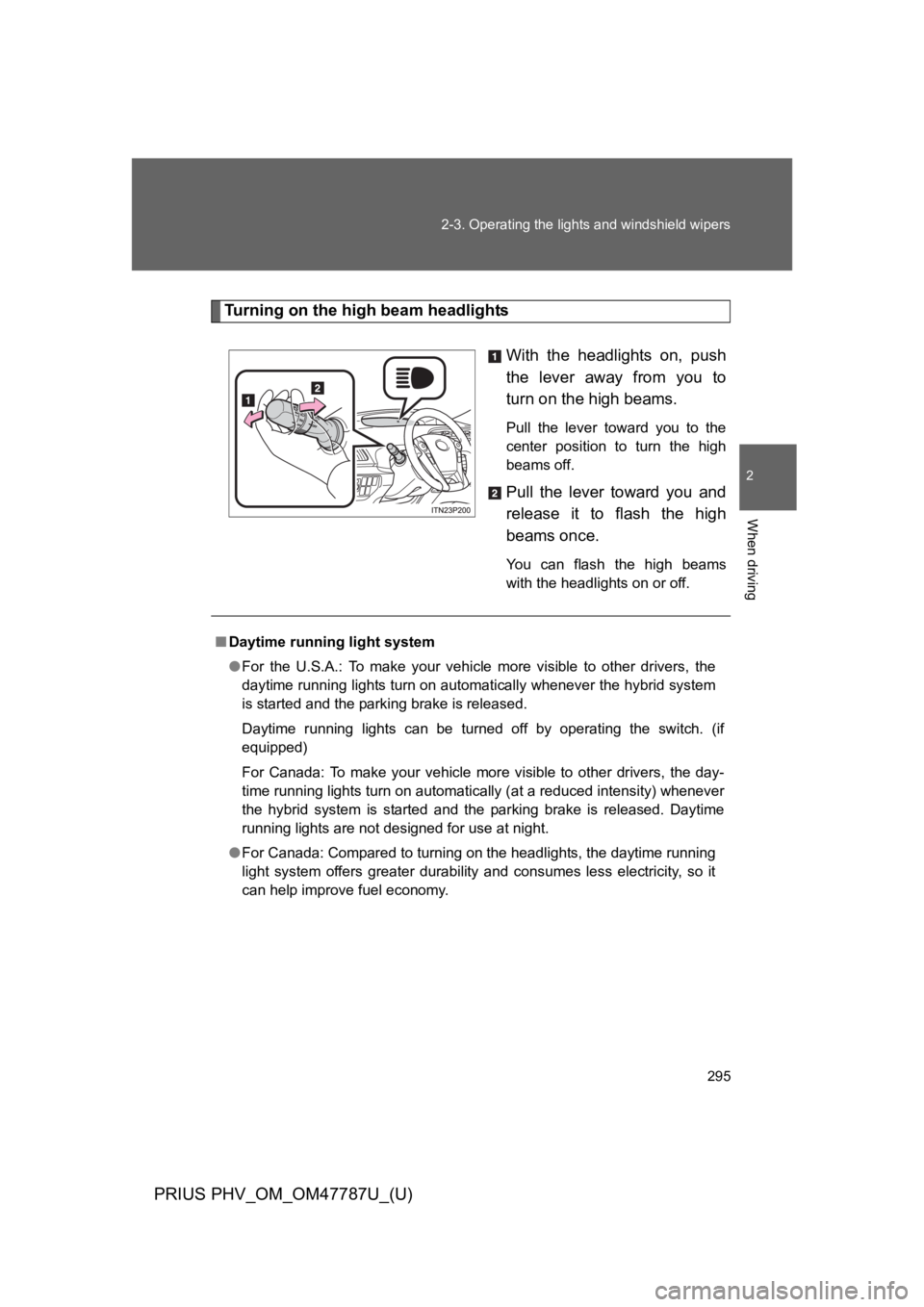
Tu r n i n g o n t h e h i g h b e a m h e a d l i g h ts
With the headlights on, push
the lever away from you to
turn on the high beams.
Pull the lever toward you to the
center position to turn the high
beams off.
Pull the lever toward you and
release it to flash the high
beams once.
Yo u c a n f l a s h t h e h i g h b e a m s
with the headlights on or off.
■Daytime running light system
●For the U.S.A.: To make your vehicle more visible to other drivers, the
daytime running lights turn on automatically whenever the hybrid system
is started and the parking brake is released.
Daytime running lights can be turned off by operating the switch. (if
equipped)
For Canada: To make your vehicle more visible to other drivers, the day-
time running lights turn on automatically (at a reduced intensity) whenever
the hybrid system is started and the parking brake is released. Daytime
running lights are not designed for use at night.
●For Canada: Compared to turning on the headlights, the daytime running
light system offers greater durability and consumes less electricity, so it
can help improve fuel economy.