Page 64 of 640
64 1-3. Opening, closing and locking the doors
PRIUS_OM_OM47791U_(U)
Unlocking and locking the doorsFront door handles (including front passenger door handle if
equipped with entry function) Grip the driver’s door handle to
unlock the door. Grip the passen-
ger’s door handle to unlock all
the doors.
*
Make sure to touch the sensor on
the back of the handle.
The doors cannot be unlocked for
3 seconds after the doors are
locked.
*: The door unlock settings can bechanged. ( P. 72)
Touch the lock sensor (the
indentation on the upper part of
the door handle) to lock the
doors.
Page 78 of 640

78 1-3. Opening, closing and locking the doors
PRIUS_OM_OM47791U_(U)
■If the smart key system does not operate properly
● Locking and unlocking the doors: Use the mechanical key. ( P. 548)
● Starting the hybrid system: P. 549
■ Electronic key battery depletion
● The standard battery life is 1 to 2 years.
● If the battery becomes low, an alarm will sound in the cabin when the
hybrid system stops. ( P. 69)
● As the electronic key always receives radio waves, the battery will
become depleted even if the electronic key is not used. The following
symptoms indicate that the electronic key battery may be depleted.
Replace the battery when necessary. ( P. 460)
• The smart key system or the wireless remote control does not operate.
• The detection area becomes smaller.
• The LED indicator on the key surface does not turn on.
● To avoid serious deterioration, do not leave the electronic key within 3 ft.
(1 m) of the following electrical appliances that produce a magnetic field:
•TVs
• Personal computers
• Cellular phones, cordless phones and battery chargers
• Recharging cellular phones or cordless phones
• Induction cookers
• Table lamps
■ When the electronic key battery is fully depleted
P. 460
■ Customization
Settings (e.g. smart key system) can be changed.
(Customizable features P. 596)
Page 85 of 640

85
1-3. Opening, closing and locking the doors
1
Before driving
PRIUS_OM_OM47791U_(U)
*1: A message will be shown on the multi-information display in the instru-
ment cluster.
*2: If the hybrid system does not start when the electronic key is inside thevehicle, the electronic key battery may be depleted or there may be dif-
ficulties receiving signal from the key. ( P. 548)
■ If the electronic key do es not operate properly
P. 548
■ When the electronic key battery is fully depleted
P. 460
■ Customization
Settings (e.g. smart key system) can be changed.
(Customizable features P. 596)
AlarmSituationCorrection procedure
Interior alarm
pings once
*1
The electronic key has a
low battery Replace the electronic
key battery
An attempt was made to
start the hybrid system
without the electronic key
being present, or the elec-
tronic key was not func-
tioning normally Start the hybrid sys-
tem with the elec-
tronic key present
*2
Interior alarm
pings once and
exterior alarm
sounds 3 times
*1
The driver’s door was
closed after the key was
carried outside the vehicle,
and the “POWER” switch
was not turned OFF
Turn the “POWER”
switch off and close
the driver’s door again
An occupant carried the
electronic key outside the
vehicle and closed the
door while the “POWER”
switch was not OFF Bring the electronic
key back into the vehi-
cle
Page 88 of 640
88 1-3. Opening, closing and locking the doors
PRIUS_OM_OM47791U_(U)
■Panic mode
■ Security feature
P. 7 2
■ Conditions affecting operation
P. 7 4
■ If the wireless remote cont rol does not operate properly
Locking and unlocking the doors: Use the mechanical key. ( P. 548)
■ Electronic key battery depletion
P. 7 8
■ When the electronic key battery is fully depleted
P. 460
■ Customization
Settings (e.g. door unlocking function) can be changed.
(Customizable features P. 596)
When is pressed for longer than
about one second, an alarm will sound
intermittently and the vehicle lights will
flash to deter any person from trying to
break into or damage your vehicle.
To stop the alarm, press any button on
the electronic key.
Page 93 of 640
93
1-3. Opening, closing and locking the doors
1
Before driving
PRIUS_OM_OM47791U_(U)
■
Using the mechanical key
The doors can also be locked and unlocked with the mechanical key.
(P. 548)
■ If a wrong key is used
The key cylinder rotates freely to isolate inside mechanism.
■ Customization
Settings (e.g. unlocking function using a key) can be changed.
(Customizable features P. 596)
Page 211 of 640
211
2-1. Driving procedures
PRIUS_OM_OM47791U_(U)
2
When driving
■
Customization
Settings (e.g. Reverse warning buzzer) can be changed.
(Customizable features P. 596)
CAUTION
■When driving on slippery road surfaces
Do not accelerate or shift the shift position suddenly.
Sudden changes in engine braking may cause the vehicle to spin or skid,
resulting in an accident.
■ For the shift lever
Do not remove the shift lever knob or use anything but a genuine Toyota shift
lever knob. Also, do not hang anything on the shift lever.
Doing so could prevent the shift lever from returning to position, causing
unexpected accidents to occur when the vehicle is in motion.
■ P position switch
Do not press the P position switch while the vehicle is moving.
If the P position switch is pressed when driving at very low speeds (for
example, directly before stopping the vehicle), the vehicle may stop sud-
denly when the shift position switches to P, which could lead to an accident.
Page 232 of 640
232 2-2. Instrument cluster
PRIUS_OM_OM47791U_(U)
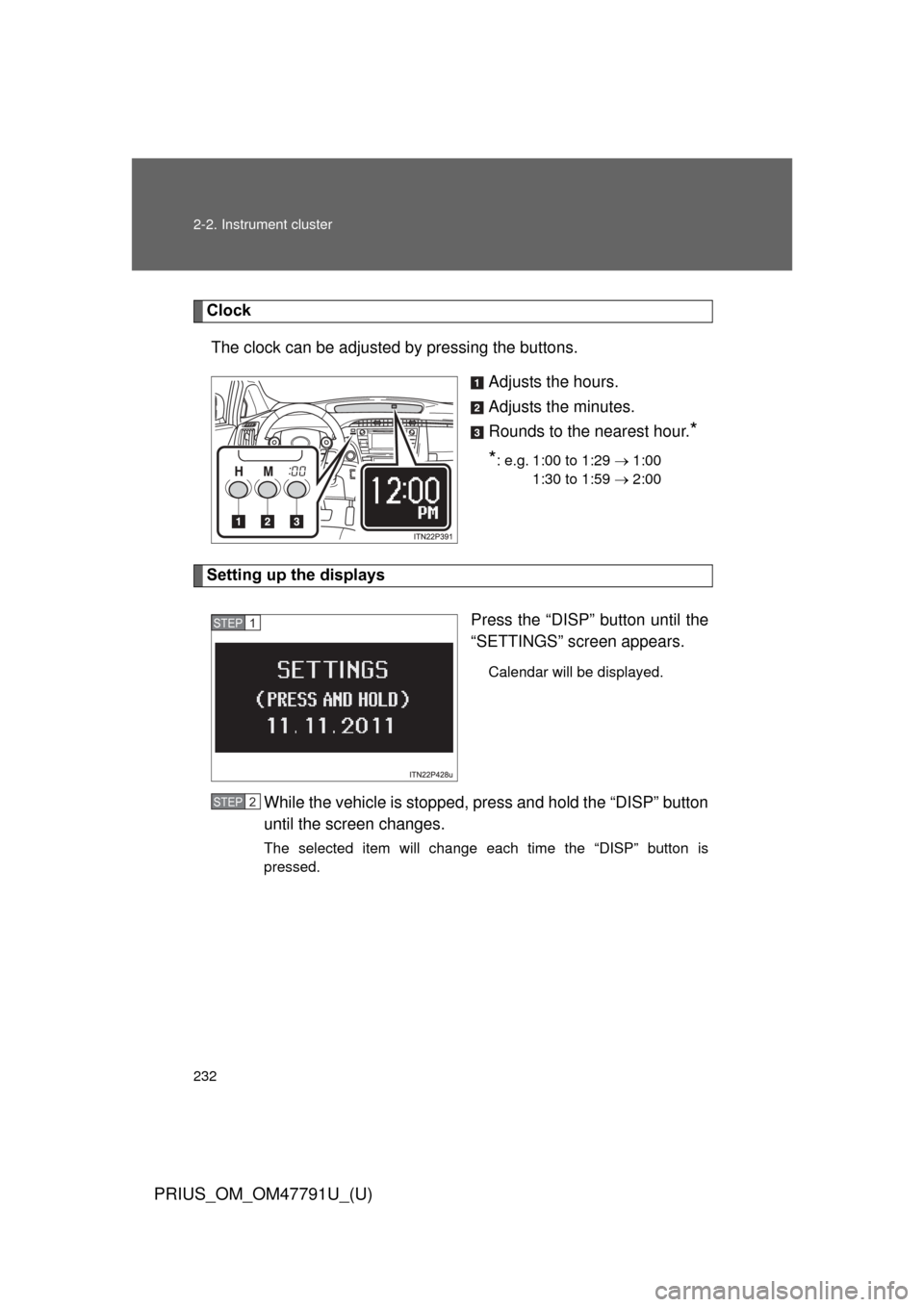
ClockThe clock can be adjusted by pressing the buttons. Adjusts the hours.
Adjusts the minutes.
Rounds to the nearest hour.
*
*
: e.g. 1:00 to 1:29 1:00
1:30 to 1:59 2:00
Setting up the displays
Press the “DISP” button until the
“SETTINGS” screen appears.
Calendar will be displayed.
While the vehicle is stopped, press and hold the “DISP” button
until the screen changes.
The selected item will change each time the “DISP” button is
pressed.
STEP 1
STEP 2
Page 241 of 640
241
2-2. Instrument cluster
PRIUS_OM_OM47791U_(U)
2
When driving
■
Turning off the multi-information display
Select “SCREEN OFF”.
Press and hold the “DISP” button
to enter the setting mode.
Select “OFF”.
Press and hold the “DISP” button
to turn off the multi-information
display.
To re-display the multi-information
display, press the “DISP” button
to display the “SETTINGS”
screen and follow the same pro-
cedure, selecting “ON” instead of
“OFF”.
■Returning to the previous screen
Select “EXIT” and press and
hold the “DISP” button.
The screen will revert to the
“SETTINGS” screen.
STEP 1
STEP 2