Page 549 of 640

5
When trouble arises
549
5-2. Steps to take in an emergency
PRIUS_OM_OM47791U_(U)
Starting the hybrid system
Depress the brake pedal. Touch the Toyota emblem side of
the electronic key to the
“POWER” switch.
If any of the doors is opened or
closed while the key is being
touched to the switch, an alarm
will sound to indicate that the start
function cannot detect the elec-
tronic key.
Press the “POWER” switch within 10 seconds of the buzzer
sounding, keeping the brake pedal depressed.
In the event that the hybrid system still cannot be operated, contact
your Toyota dealer.
STEP 1
STEP 2
■ Stopping the hybrid system
Set the parking brake, shift the shift position to P and press the “POWER”
switch as you normally do when stopping the hybrid system.
■ Replacing the key battery
As the above procedure is a temporary measure, it is recommended that the
electronic key battery be replaced immediately when the battery is depleted.
(P. 460)
■ Changing “POWER” switch modes
Within 10 seconds of the buzzer sounding, release the brake pedal and
press the “POWER” switch.
The hybrid system does not start and modes will be changed each time the
switch is pressed. ( P. 196)
STEP 3
Page 553 of 640

5
When trouble arises
553
5-2. Steps to take in an emergency
PRIUS_OM_OM47791U_(U)
■
Starting the hybrid system when the 12-volt battery is discharged
The hybrid system cannot be started by push-starting.
■ To prevent 12-volt battery discharge
● Turn off the headlights and the audio system while the hybrid system is
off.
● Turn off any unnecessary electrical components when the vehicle is run-
ning at a low speed for an extended period, such as in heavy traffic.
■ When the 12-volt battery is removed or discharged
● The hybrid system may not start. ( P. 439)
● If the 12-volt battery is depleted with the shift position in P, it will not be
possible to shift the shift position other than P. In this case, the vehicle
cannot be towed without lifting both front wheels because the front
wheels are locked by the parking lock. ( P. 491)
● When the 12-volt battery is reconnected, start the hybrid system, depress
the brake pedal, and confirm that it is possible to shift into each shift posi-
tion.
■ Charging the 12-volt battery
The electricity stored in the 12-volt battery will discharge gradually even
when the vehicle is not in use, due to natural discharge and the draining
effects of certain electrical appliances. If the vehicle is left for a long time, the
12-volt battery may discharge, and the hybrid system may be unable to start.
(The 12-volt battery recharges automatically while the hybrid system is oper-
ating.)
Page 561 of 640

5
When trouble arises
561
5-2. Steps to take in an emergency
PRIUS_OM_OM47791U_(U)
If the vehicle becomes stuck
CAUTION
■When attempting to free a stuck vehicle
If you choose to push the vehicle back and forth to free it, make sure the sur-
rounding area is clear to avoid striki ng other vehicles, objects or people. The
vehicle may also lunge forward or lu nge back suddenly as it becomes free.
Use extreme caution.
■ When changing the shift position
Be careful not to change the shift position with the accelerator pedal
depressed.
Changing the shift position to any positions other than P or N may cause the
vehicle to accelerate abruptly, causing an accident and resulting in death or
serious injury.
Carry out the following procedures if the tires spin or the vehicle
becomes stuck in mud, dirt or snow:
Set the parking brake and shift the shift position to P. Stop
the hybrid system.
Remove the mud, snow or sand from around the stuck tire.
Place wood, stones or some other material under the tires
to help provide traction.
Restart the hybrid system.
Shift the shift position to D or R, release the parking brake
and carefully apply the accelerator to free the vehicle.STEP 1
STEP 2
STEP 3
STEP 4
STEP 5
Page 563 of 640

5
When trouble arises
563
5-2. Steps to take in an emergency
PRIUS_OM_OM47791U_(U)
If your vehicle has to be stopped in an emergency
Only in an emergency, such as if it becomes impossible to stop the
vehicle in the normal way, stop the vehicle using the following pro-
cedure:
Steadily step on the brake pedal with both feet and firmly
depress it.
Do not pump the brake pedal repeatedly as this will increase the
effort required to slow the vehicle.
Shift the shift position to N.
If the shift position is shifted to N After slowing down, stop the vehi cle in a safe place by the
road.
Stop the hybrid system.
If the shift position cannot be shifted to N Keep depressing the brake pedal with both feet to reduce
vehicle speed as much as possible.
To stop the hybrid system,
press and hold the “POWER”
switch for 2 consecutive sec-
onds or more, or press it
briefly for 3 times or more in
succession.
Stop the vehicle in a safe place by the road.
STEP 1
STEP 2
STEP 3
STEP 4
STEP 3
STEP 4
Press and hold for 2 seconds or more, or press briefly for 3 times or more
STEP 5
Page 573 of 640
573
6-1. Specifications
6
Vehicle specifications
PRIUS_OM_OM47791U_(U)
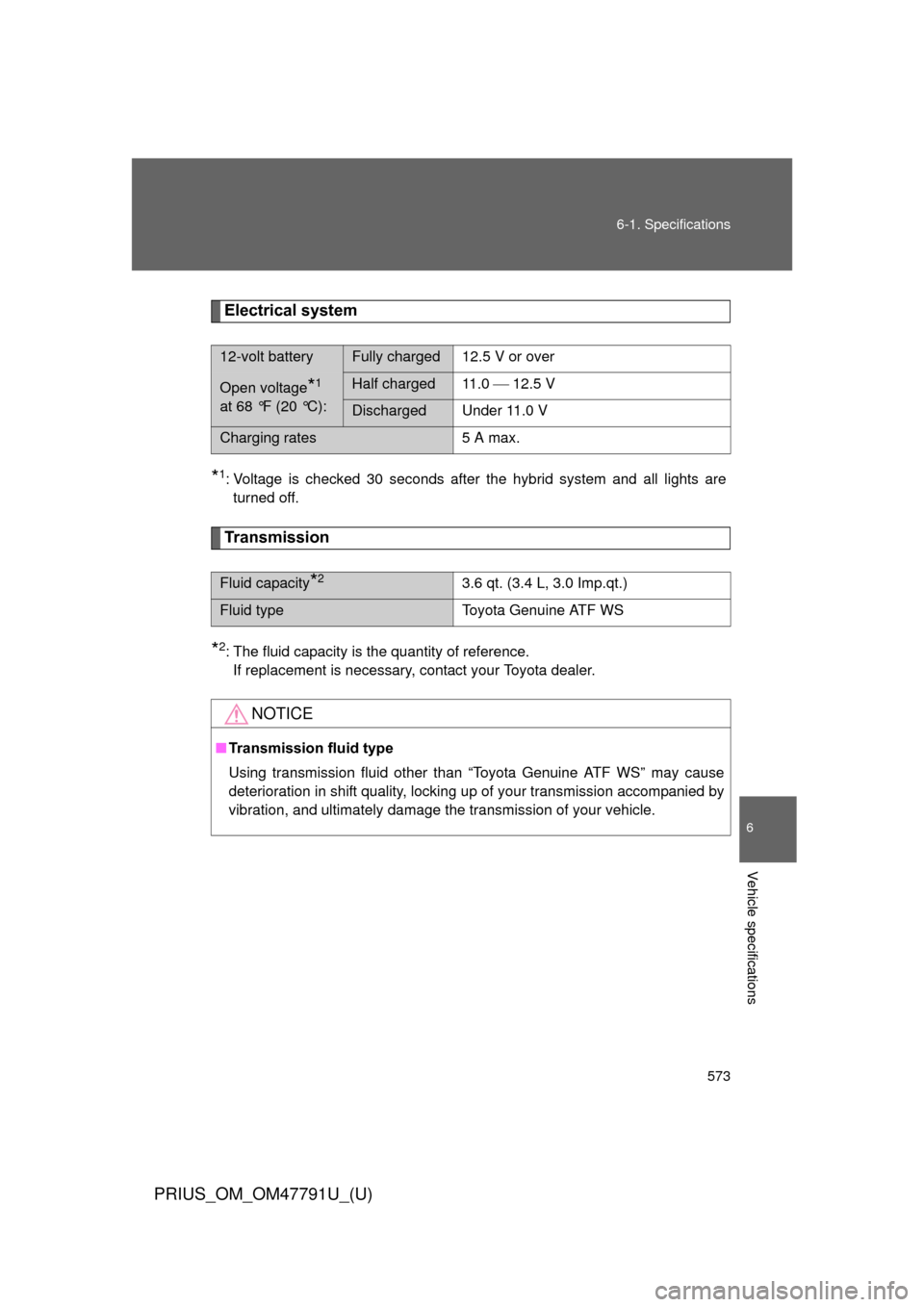
Electrical system
*1: Voltage is checked 30 seconds after the hybrid system and all lights are
turned off.
Transmission
*2: The fluid capacity is the quantity of reference.If replacement is necessary, contact your Toyota dealer.
12-volt batteryFully charged12.5 V or over
Open voltage*1
at 68 °F (20 °C):Half charged 11.0 12.5 V
Discharged Under 11.0 V
Charging rates 5 A max.
Fluid capacity*23.6 qt. (3.4 L, 3.0 Imp.qt.)
Fluid type Toyota Genuine ATF WS
NOTICE
■Transmission fluid type
Using transmission fluid other than “Toyota Genuine ATF WS” may cause
deterioration in shift quality, locking up of your transmission accompanied by
vibration, and ultimately damage the transmission of your vehicle.
Page 599 of 640
599
6-2. Customization
6
Vehicle specifications
PRIUS_OM_OM47791U_(U)
*: This function cannot be customized for vehicles sold in Canada.
ItemFunctionDefault set-
tingCustom-ized
setting
Door lock
( P. 89,
548) Unlocking using
a key
Driver’s
door
unlocked in 1-step, all doors
unlocked in 2-step All doors
unlocked in 1-step –OO
Speed-detecting
automatic door
lock function OFF ON OOO
Shifting the shift
position to any
position other
than P locks all
doors ON OFF OOO
Shifting the shift
position to P
unlocks all doors ON OFF OOO
Opening driver’s
door unlocks all
doors OFF ON – O O
Automatic
light control
system
( P. 252) Light sensor
sensitivity
Level 3Levels 1 to
5 OOO
Time elapsed
before head-
lights automati-
cally turn off after
doors are closed 30 seconds
0 seconds
OOO
60 seconds
90 seconds
Daytime running
lights
*ON OFF OOO
Page 602 of 640
602 6-2. Customization
PRIUS_OM_OM47791U_(U)
Multi-information display (P. 225)
ItemFunctionDefault set-
tingCustom-ized
setting
Remote Air
Condition-
ing System
( P. 346) Operation using
the
“A/C” button on
the wireless
remote control
Push and
hold for 0.8 seconds Push once
––O
Push twice
Push and
hold for 2.4 seconds
OFF
Stopping the
operation using
the “A/C” button
on the wireless
remote control Push twicePush once
––O
Push and
hold for 0.8 seconds
Push and
hold for 2.4 seconds
OFF
Reverse
warning
buzzer
( P. 209) Operation sig-
nals (Buzzer)
when shifting
into R
Beeps
repeatedly Beeps
once ––O
Seat belt
reminder
( P. 506) Vehicle speed
linked seat belt
reminder buzzer
ON OFF – – O
Available languagesEnglish, French and Spanish
Page 629 of 640

629
Alphabetical index
PRIUS_OM_OM47791U_(U)
I/M test ...................................... 415
Identification
Engine .................................. 568
Vehicle.................................. 567
Ignition switch ......................... 194
Illuminated entry system ........ 357
Immobilizer system ................. 138
Indicator lights ........................ 221
Initialization Items to initialize ................... 603
Inside rear view mirror............ 120
Instrument panel light control.................................... 219
Interior lights Interior lights ................. 358, 359
Switch ........................... 358, 359
Wattage ................................ 576
Jack Positioning a floor jack ......... 422
Vehicle-equipped jack .......... 530
Jack handle.............................. 530
Keyless entry ............................. 87
Keys Electronic key ......................... 60
If the electronic key does not
operate properly ................. 548
If you lose your keys............. 547
Key number ............................ 60
Keyless entry .......................... 87
Keys ....................................... 60
Mechanical key....................... 60
“POWER” switch .................. 194
Wireless remote
control key............................ 87
Knee airbag.............................. 142 Lane-Keeping Assist ...............289
Language ..................................240
License plate lights
Replacing light bulbs .............473
Wattage .................................576
Light bulbs
Replacing ..............................473
Wattage .................................576
Lights
Emergency flasher switch .....490
Fog light switch .....................258
Foot lights..............................357
Hazard light switch ................490
Headlight switch ....................252
Interior lights..................358, 359
Personal lights.......................359
Replacing light bulbs .............473
Shift lever lighting ..................357
Turn signal lever....................213
Turn signal light switch ..........213
Vanity lights ...........................369
Wattage .................................576
LKA (Lane-Keeping Assist).....289
Load capacity ...........................320
Luggage compartment light Switch......................................96
Wattage .................................576
Luggage cover .........................382I
J
K
L
*: Refer to “Display Audio System Owner’s Manual” or “Navigation System Owner’s Manual”.