Page 227 of 640
227
2-2. Instrument cluster
PRIUS_OM_OM47791U_(U)
2
When driving
■
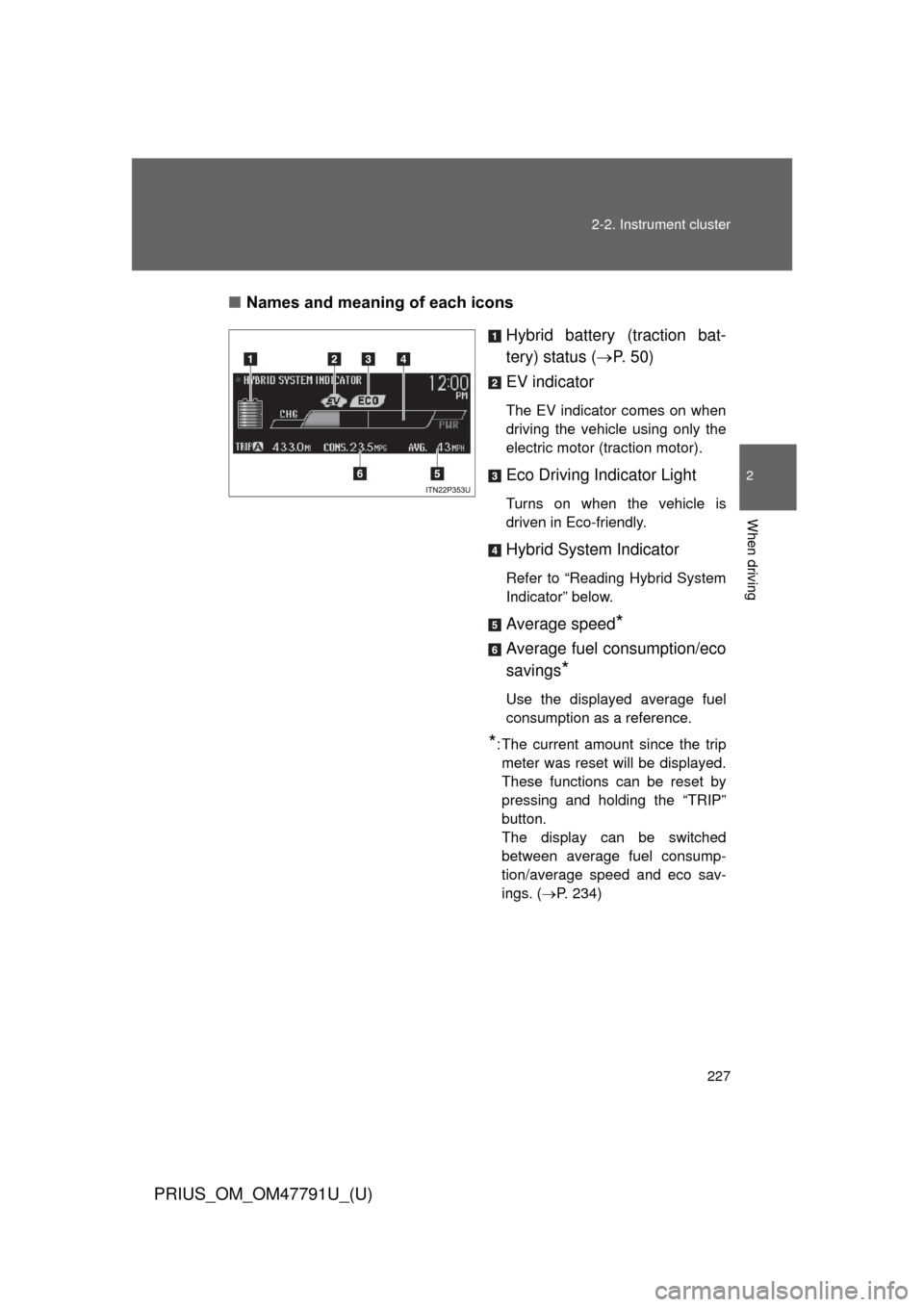
Names and meaning of each icons
Hybrid battery (traction bat-
tery) status (P. 5 0 )
EV indicator
The EV indicator comes on when
driving the vehicle using only the
electric motor (traction motor).
Eco Driving Indicator Light
Turns on when the vehicle is
driven in Eco-friendly.
Hybrid System Indicator
Refer to “Reading Hybrid System
Indicator” below.
Average speed*
Average fuel consumption/eco
savings
*
Use the displayed average fuel
consumption as a reference.
*: The current amount since the trip meter was reset will be displayed.
These functions can be reset by
pressing and holding the “TRIP”
button.
The display can be switched
between average fuel consump-
tion/average speed and eco sav-
ings. ( P. 234)
Page 231 of 640
231
2-2. Instrument cluster
PRIUS_OM_OM47791U_(U)
2
When driving
■
Display items
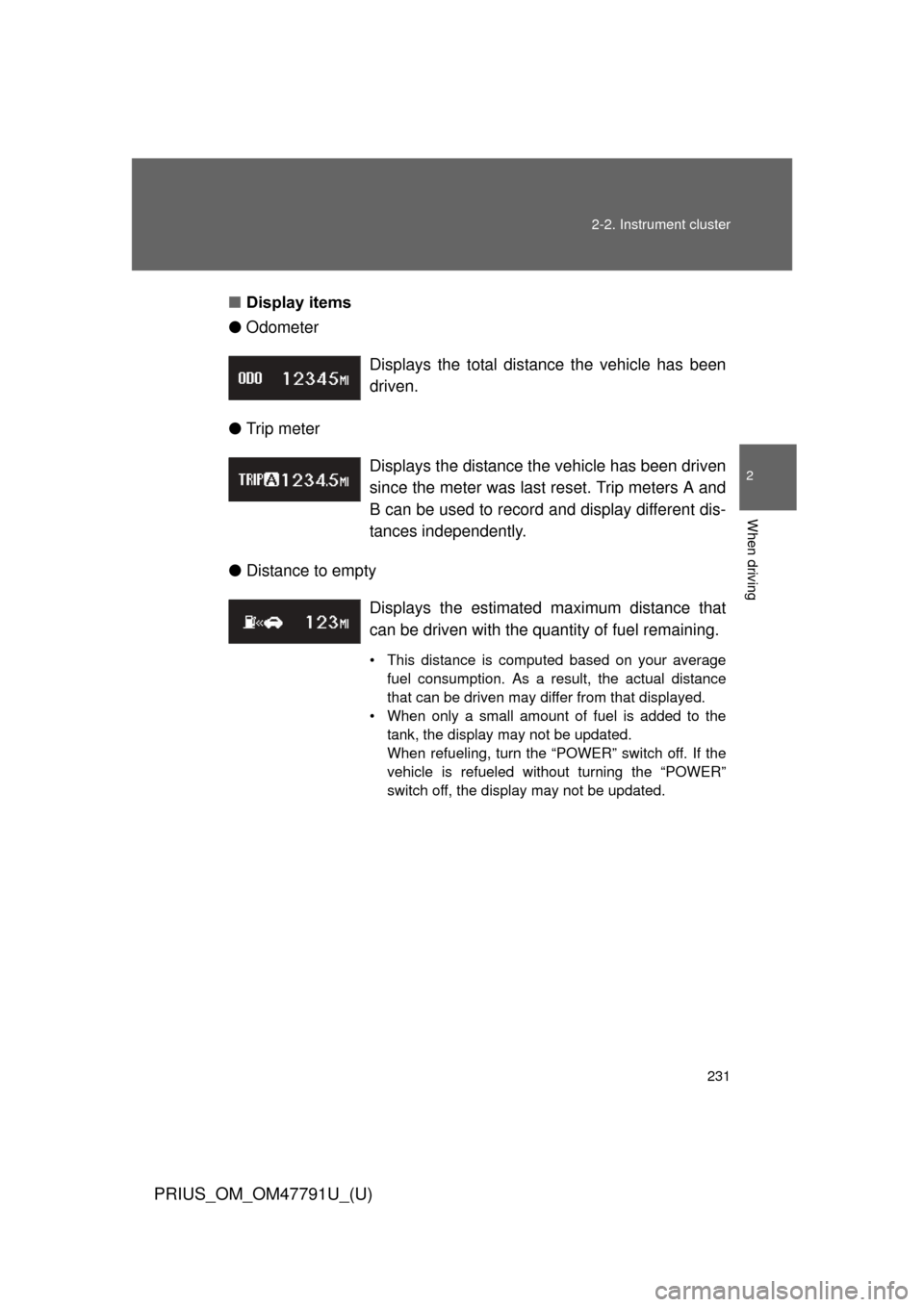
● Odometer
● Trip meter
● Distance to empty Displays the total distance the vehicle has been
driven.
Displays the distance the vehicle has been driven
since the meter was last reset. Trip meters A and
B can be used to record and display different dis-
tances independently.
Displays the estimate
d maximum distance that
can be driven with the quantity of fuel remaining.
• This distance is computed based on your average fuel consumption. As a result, the actual distance
that can be driven may differ from that displayed.
• When only a small amount of fuel is added to the tank, the display may not be updated.
When refueling, turn the “POWER” switch off. If the
vehicle is refueled without turning the “POWER”
switch off, the display may not be updated.
Page 234 of 640
234 2-2. Instrument cluster
PRIUS_OM_OM47791U_(U)
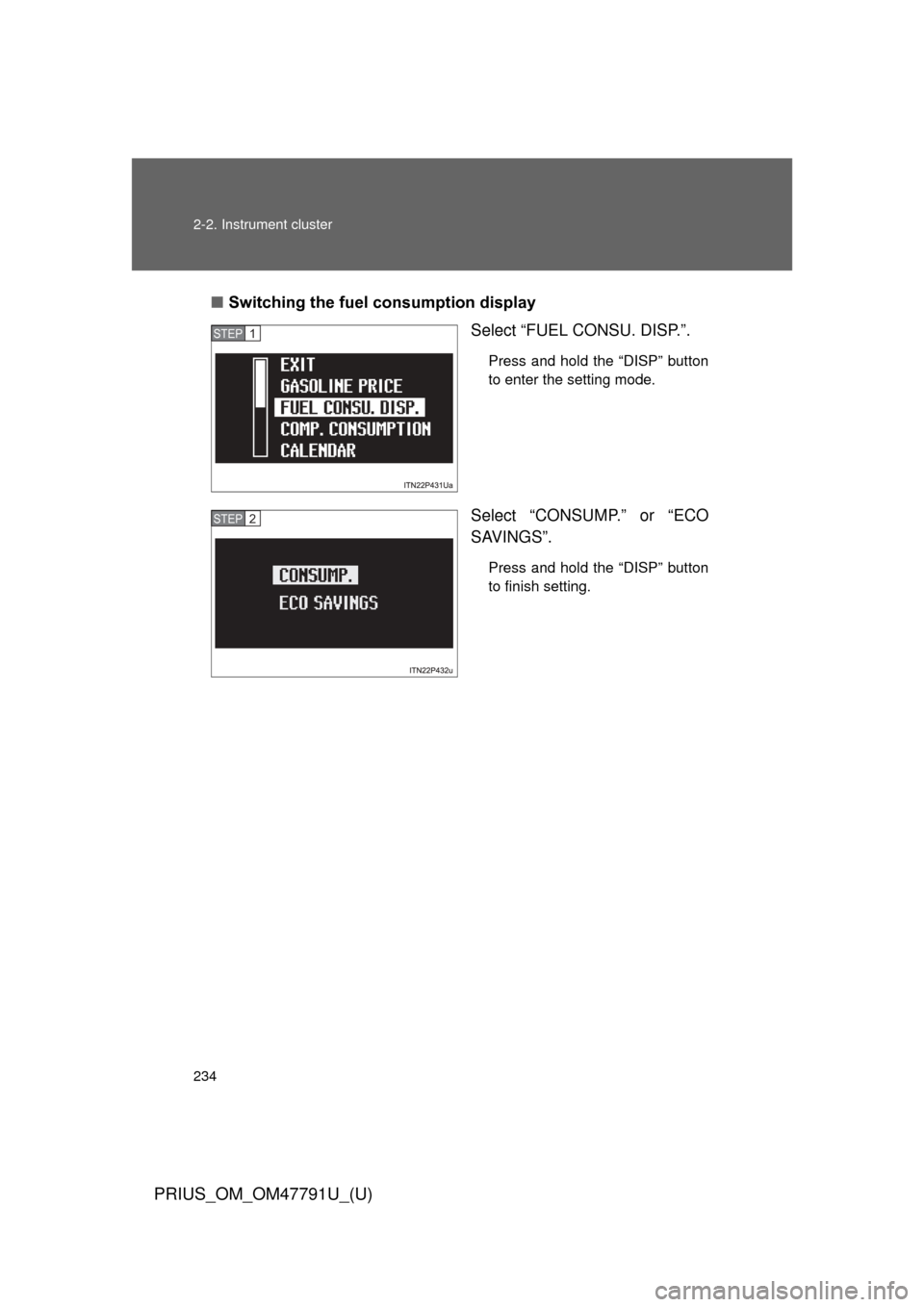
■Switching the fuel consumption display
Select “FUEL CONSU. DISP.”.
Press and hold the “DISP” button
to enter the setting mode.
Select “CONSUMP.” or “ECO
SAVINGS”.
Press and hold the “DISP” button
to finish setting.
STEP 1
STEP 2
Page 242 of 640
242 2-2. Instrument cluster
PRIUS_OM_OM47791U_(U)
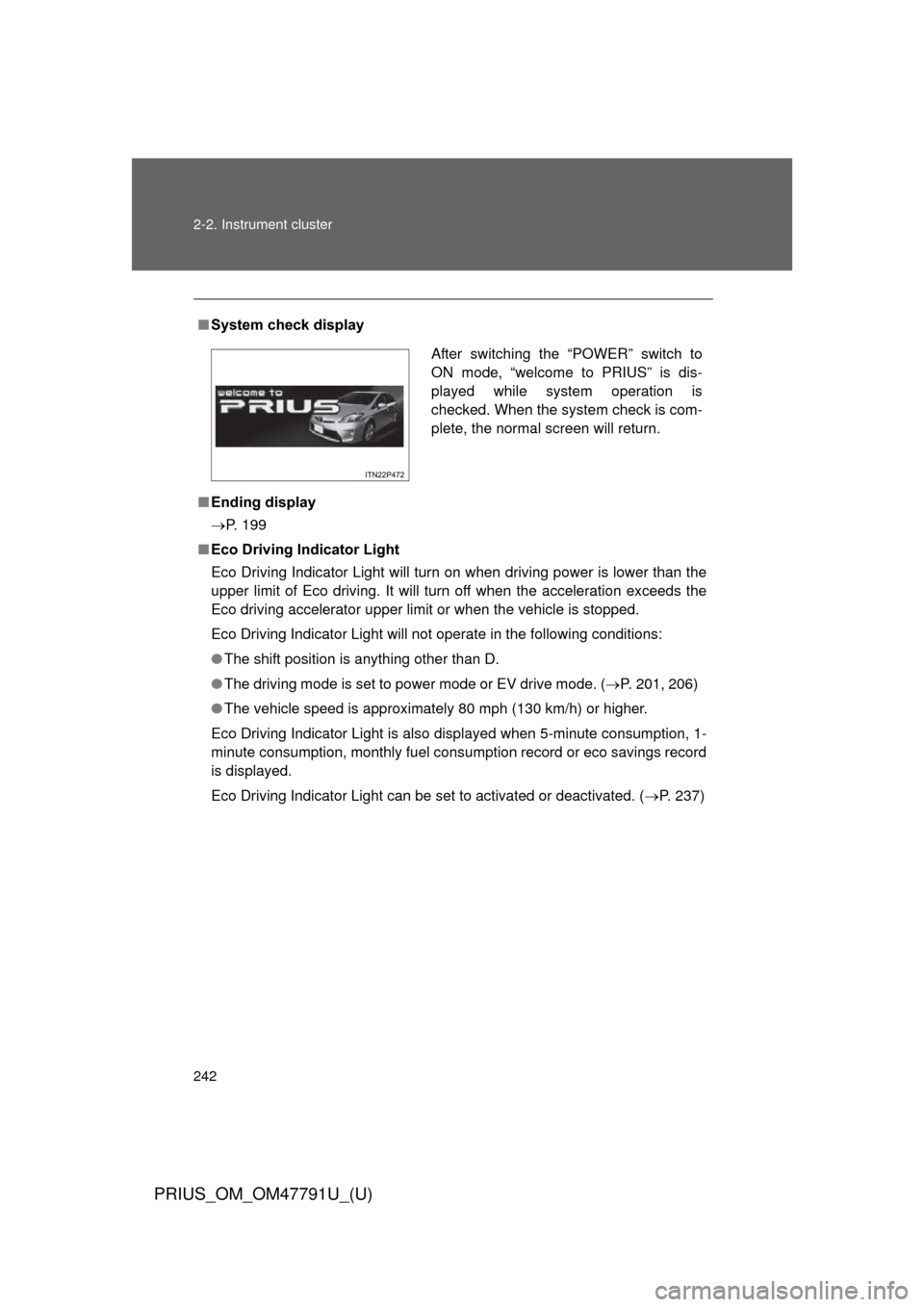
■System check display
■ Ending display
P. 199
■ Eco Driving Indicator Light
Eco Driving Indicator Light will turn on when driving power is lower than the
upper limit of Eco driving. It will turn off when the acceleration exceeds the
Eco driving accelerator upper limit or when the vehicle is stopped.
Eco Driving Indicator Light will not operate in the following conditions:
● The shift position is anything other than D.
● The driving mode is set to power mode or EV drive mode. ( P. 201, 206)
● The vehicle speed is approximately 80 mph (130 km/h) or higher.
Eco Driving Indicator Light is also displayed when 5-minute consumption, 1-
minute consumption, monthly fuel cons umption record or eco savings record
is displayed.
Eco Driving Indicator Light can be set to activated or deactivated. ( P. 237)
After switching the “POWER” switch to
ON mode, “welcome to PRIUS” is dis-
played while system operation is
checked. When the system check is com-
plete, the normal screen will return.
Page 243 of 640

243
2-2. Instrument cluster
PRIUS_OM_OM47791U_(U)
2
When driving
■
Driving in Eco drive mode
The multi-information display will automatically switch the display to Hybrid
System Indicator, regardless of which display is currently being shown.
(P. 226)
■ Touch tracer display (if equipped)
● The touch tracer display can be set to not display even if the steering
switches are touched.
● Only the circular, rubber-covered switches have a built-in touch sensor.
Touching any of the other switches will not display the touch tracer dis-
play.
■ Display settings can be changed when
The vehicle speed is less than approximately 5 mph (8 km/h).
■ Engine speed
On hybrid vehicles, engine speed is precisely controlled in order to help
improve fuel efficiency and reduce exhaust emissions etc. There are times
when the engine speed that is displayed may differ even when vehicle oper-
ation and driving conditions are the same.
■ When the 12-volt battery is disconnected
The following data will be reset.
● Average fuel consumption
● Distance to empty
● Average vehicle speed
● Clock
● Display settings
● Trip meter
Page 255 of 640

255
2-3. Operating the lights and windshield wipers
PRIUS_OM_OM47791U_(U)
2
When driving
Turning on the high beam headlights
With the headlights on, push
the lever away from you to
turn on the high beams.
Pull the lever toward you to the
center position to turn the high
beams off.
Pull the lever toward you and
release it to flash the high
beams once.
You can flash the high beams
with the headlights on or off.
■Daytime running light system
● For the U.S.A.: To make your vehicle more visible to other drivers, the
daytime running lights turn on automatically whenever the hybrid system
is started and the parking brake is released.
Daytime running lights can be turned off by operating the switch. (if
equipped)
For Canada: To make your vehicle more visible to other drivers, the day-
time running lights turn on automatically (at a reduced intensity) whenever
the hybrid system is started and the parking brake is released. Daytime
running lights are not designed for use at night.
● For Canada: Compared to turning on the headlights, the daytime running
light system offers greater durability and consumes less electricity, so it
can help improve fuel economy.
Page 315 of 640
315
PRIUS_OM_OM47791U_(U)
2
When driving
2-5. Driving information
Cargo and luggage
Take notice of the following information about storage precau-
tions, cargo capacity and load:
●Stow cargo and luggage in the luggage compartment whenever
possible.
● Be sure all items are secured in place.
● To maintain vehicle balance while driving, position luggage
evenly within the luggage compartment.
● For better fuel economy, do no t carry unnecessary weight.
Page 337 of 640

337
3-1. Using the air conditioning system
and defogger
PRIUS_OM_OM47791U_(U)
3
Interior features
■Using the automatic mode
Fan speed is adjusted automatically in accordance with the temperature set-
ting and ambient conditions. As a result, the following may occur.
● Immediately after
is pressed, the fan may stop for a while until
warm or cool air is ready to flow.
● Cool air may flow to the area around the upper body when the heater is
on.
■ Switching between outside air and recirculated air modes
Recirculated air mode or outside air mode may be automatically switched to
in accordance with under these condition, such as temperature setting and
inside temperature.
Also, outside air mode may be automatically switched to when the outside
temperature is low.
■ When the outside temperature exceeds 75
F (24C) and the air condi-
tioning system is on
● In order to reduce the air conditioning power consumption, the air condi-
tioning system may switch to recirculated air mode automatically. This
may also reduce fuel consumption.
● Recirculated air mode is selected as a default mode when the “POWER”
switch is turned to ON mode.
● It is possible to switch to outside air mode at any time by pressing
.
■ Using the system in recirculated air mode
The windows will fog up more easily if the recirculated air mode is used.
■ Window defogger feature
● Recirculated air mode may automatically switch to outside air mode in
situations where the windows need to be defogged.
● When the outside air temperature is low, it may take a while for the con-
densation to clear from the windshield.