Page 181 of 640

When driving2
181
PRIUS_OM_OM47791U_(U)
2-1. Driving proceduresDriving the vehicle............ 182
Power (ignition) switch ..... 194
EV drive mode ................. 201
Hybrid transmission ......... 204
Turn signal lever .............. 213
Parking brake ................... 214
Horn ................................. 215
2-2. Instrument cluster Gauges and meters ......... 216
Indicators and warning lights .............................. 221
Multi-information display............................ 225
Head-up display ............... 245 2-3. Operating the lights
and windshield wipers
Headlight switch ............... 252
Fog light switch ................ 258
Windshield wipers and washer .................... 260
Rear window wiper and washer .................... 264
Headlight cleaner switch ............................. 267
2-4. Using other driving systems Cruise control ................... 268
Dynamic radar cruise control ............................ 272
LKA (Lane-Keeping Assist) ............................ 289
Driving assist systems ..... 300
Hill-start assist control ...... 305
PCS (Pre-Collision System) .......................... 307
2-5. Driving information Cargo and luggage .......... 315
Vehicle load limits ............ 320
Winter driving tips ............ 321
Trailer towing ................... 326
Dinghy towing .................. 327
Page 194 of 640
194
2-1. Driving procedures
PRIUS_OM_OM47791U_(U)
Power (ignition) switch
Performing the following operations when carrying the electronic
key on your person starts the hybr id system or changes “POWER”
switch modes.
■ Starting the hybrid system
Check that the parking brake is set.
Firmly depress the brake pedal.
Check that the “POWER” switch indicator turns green. If the indi-
cator does not turn green, the hybrid system cannot be started.
When the shift position is N, the hybrid system cannot start. Shift
the shift position to P when starting the hybrid system. ( P. 207)
Press the “POWER” switch.
The hybrid system can be
started from any “POWER”
switch mode.
Continue depressing the brake
pedal until the hybrid system is
completely started.
STEP 1
STEP 2
STEP 3
Page 196 of 640
196 2-1. Driving procedures
PRIUS_OM_OM47791U_(U)
■Changing “POWER” switch modes
Modes can be changed by pressing the “POWER” switch with the
brake pedal released. (The mode changes each time the switch is
pressed.)
Off
The emergency flashers can
be used.
ACCESSORY mode
Some electrical components
such as the audio system can
be used.
The “POWER” switch indicator
turns amber.
ON mode
All electrical components can
be used.
The “POWER” switch indicator
turns amber.
Page 197 of 640

197
2-1. Driving procedures
PRIUS_OM_OM47791U_(U)
2
When driving
■
Auto power off function
If the vehicle is left in ACCESSORY mode for more than 20 minutes or ON
mode (the hybrid system is not operating) for more than an hour with the
shift position in P, the “POWER” switch will automatically turn off. However,
this function cannot entirely prevent the 12-volt battery from discharging. Do
not leave the vehicle with the “POWER” switch in ACCESSORY or ON mode
for long periods of time when the hybrid system is not operating.
■ Sounds and vibrations specific to a hybrid vehicle
P. 3 6
■ Electronic key battery depletion
P. 7 8
■ When the ambient temperature is low, such as during winter driving
conditions
The “READY” indicator may flash for a long time when the hybrid system\
is
starting. Driving will become possible once the “READY” indicator has illumi-
nated. Wait until the “READY” indicator has illuminated.
■ Conditions aff ecting operation
P. 7 4
■ Notes for the entry function
P. 7 5
■ If the hybrid system does not start
The immobilizer system may not have been deactivated. ( P. 138)
Contact your Toyota dealer.
Page 198 of 640

198 2-1. Driving procedures
PRIUS_OM_OM47791U_(U)
■When the “POWER” switch in dicator flashes in amber
The system may be malfunctioning. Have the vehicle inspected by your
Toyota dealer immediately.
■ If the “READY” indicator does not come on
If the “READY” indicator does not come on when you press the “POWER”
switch with the shift position in P and the brake pedal depressed, contact
your Toyota dealer immediately.
■ If the hybrid system is malfunctioning
P. 501
■ If the electronic key battery is depleted
P. 460
■ Operation of the “POWER” switch
● When operating the “POWER” switch, one short, firm press is enough. If
the switch is pressed improperly, the hybrid system may not start or the
“POWER” switch mode may not change. It is not necessary to press and
hold the switch.
● If attempting to restart the hybrid system immediately after turning the
“POWER” switch off, the hybrid system may not start in some cases.
After turning the “POWER” switch off, please wait a few seconds before
restarting the hybrid system.
■ Automatically P position selection function
P. 209
Page 200 of 640
200 2-1. Driving procedures
PRIUS_OM_OM47791U_(U)
NOTICE
■To prevent 12-volt battery discharge
● Do not leave the “POWER” switch in ACCESSORY or ON mode for long
periods of time without the hybrid system on.
● If the hybrid system is off, but the indicator on the “POWER” switch is illu-
minated, this indicates that the “POWER” switch is still turned on. When
exiting the vehicle, always check that the “POWER” switch is off.
■ Symptoms indicating a malfunct ion with the “POWER” switch
If the “POWER” switch seems to be operating somewhat differently than
usual, such as the switch sticking slightly, there may be a malfunction. Con-
tact your Toyota dealer immediately.
Page 201 of 640
201
2-1. Driving procedures
PRIUS_OM_OM47791U_(U)
2
When driving
EV drive mode
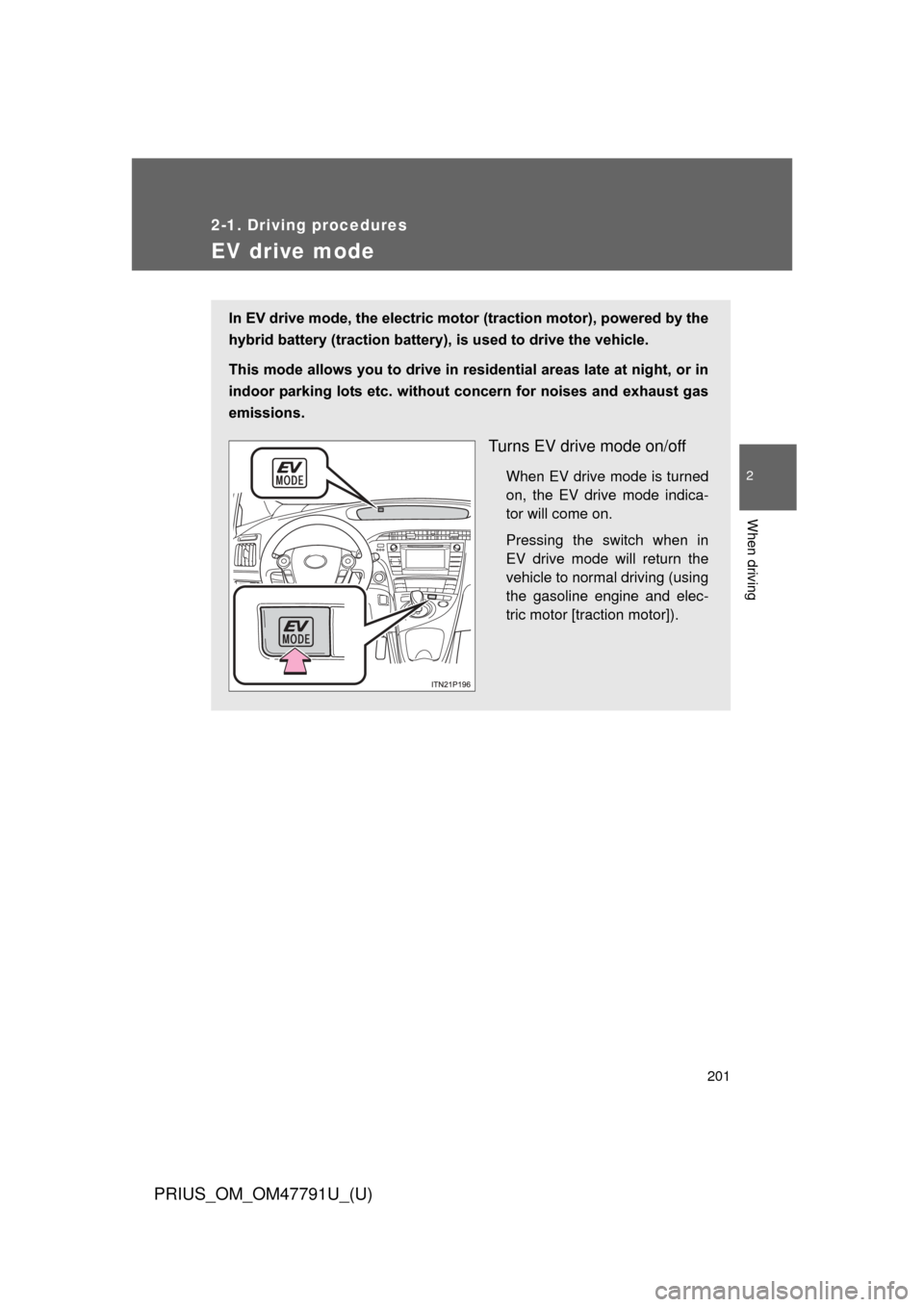
In EV drive mode, the electric motor (traction motor), powered by the
hybrid battery (traction battery), is used to drive the vehicle.
This mode allows you to drive in residential areas late at night, or in
indoor parking lots etc. without concern for noises and exhaust gas
emissions.
Turns EV drive mode on/off
When EV drive mode is turned
on, the EV drive mode indica-
tor will come on.
Pressing the switch when in
EV drive mode will return the
vehicle to normal driving (using
the gasoline engine and elec-
tric motor [traction motor]).
Page 202 of 640

202 2-1. Driving procedures
PRIUS_OM_OM47791U_(U)
■Situations in which EV drive mode cannot be turned on
It may not be possible to turn EV drive mode on in the following situations.
*
If it cannot be turned on, a buzzer will sound and a message will be shown
on the multi-information display.
● The temperature of the hybrid system is high.
The vehicle has been left in the sun, driven on a hill, driven at high
speeds, etc.
● The temperature of the hybrid system is low.
The vehicle has been left in temperatures lower than about 32
F (0C)
for a long period of time etc.
● The gasoline engine is warming up.
● The hybrid battery (traction battery) is low.
When the amount of remaining hybrid battery (traction battery) charge
displayed on the meter is low. ( P. 44)
● Vehicle speed is high.
● The accelerator pedal is depressed firmly or the vehicle is on a hill etc.
● The windshield defogger is in use.
*: Depending on the circumstances, EV drive mode may also not be
switched to in situations other than those above.
■ Switching to EV drive mode when the gasoline engine is cold
If the hybrid system is started while the gasoline engine is cold, the gasoline
engine will start automatically after a short period of time in order to warm
up. In this case, you will become unable to switch to EV drive mode.
After the hybrid system has started and the “READY” indicator has illumi-
nated, press the EV drive mode switch before the gasoline engine starts to
switch to EV drive mode.