Page 222 of 556

222
2-4. Using other driving systems
Hill-start assist control
■Hill-start assist control operating conditions
●The system operates in the following situations:
• The shift lever is in a position other than P.
• The parking brake is not applied.
• The accelerator pedal is not depressed.
● Hill-start assist control cannot be operated while the slip indicator light is
illuminated.
■ Hill-start assist control
●While hill-start assist control is operating, the brakes remain automati-
cally applied after the driver releases the brake pedal. The stop lights and
the high mounted stoplight turn on.
● Hill-start assist control operates for about 2 seconds after the brake pedal
is released.
● If the slip indicator does not flash and the buzzer does not sound when
the brake pedal is further depressed, slightly reduce the pressure on the
brake pedal (do not allow the vehicl e to roll backward) and then firmly
depress it again. If the system still does not operate, check that the oper-
ating conditions explained above have been met.
Assists with starting off and tem porarily maintains braking power
even if the foot is re moved from the brake peda l when starting off on
an incline or a slippery slope.
To engage hill-start assist con-
trol, further depress the brake
pedal when the vehicle is
stopped completely.
A buzzer will sound once to
indicate the system is acti-
vated. The slip indicator will
also start flashing.
Page 235 of 556

Interior features3
235
3-1. Using the air conditioning system and defogger
Automatic air conditioning system ........................... 236
Rear window and outside rear view
mirror defoggers ............ 245
3-2. Using the audio system Audio system types .......... 246
Using the radio ................. 252
Using the CD player ......... 254
Playing back MP3 and WMA discs ..................... 259
Operating an iPod ............ 266
Operating a USB memory .......................... 274
Optimal use of the audio system.................. 282
Using the AUX port .......... 285
Using the steering wheel audio switches ............... 286
3-3. Using the Bluetooth
®
audio system
Bluetooth
® audio/
phone ............................. 289
Using the Bluetooth
®
audio/phone ................... 293
Operating a Bluetooth
®
enabled portable
player ............................. 298
Making a phone call ......... 301 Using the “SET UP”
menu (“Bluetooth”
menu)............................. 306
Using the “SET UP” menu (“Phone” menu).............. 312
3-4. Using the interior lights Interior lights list ............... 319
• Interior lights/personal lights................ 320
3-5. Using the storage features
List of storage features .... 322
• Glove box....................... 323
• Console box ................... 323
• Auxiliary boxes ............... 325
• Cup holders ................... 327
• Bottle holders ................. 328
3-6. Other interior features Sun visors ........................ 330
Vanity mirrors ................... 331
Outside temperature display............................ 332
Power outlet ..................... 334
Seat heaters..................... 335
Coat hooks ....................... 337
Assist grips....................... 338
Floor mat .......................... 339
Luggage cover ................. 341
Page 319 of 556
319
3
Interior features
3-4. Using the interior lights
Interior lights list
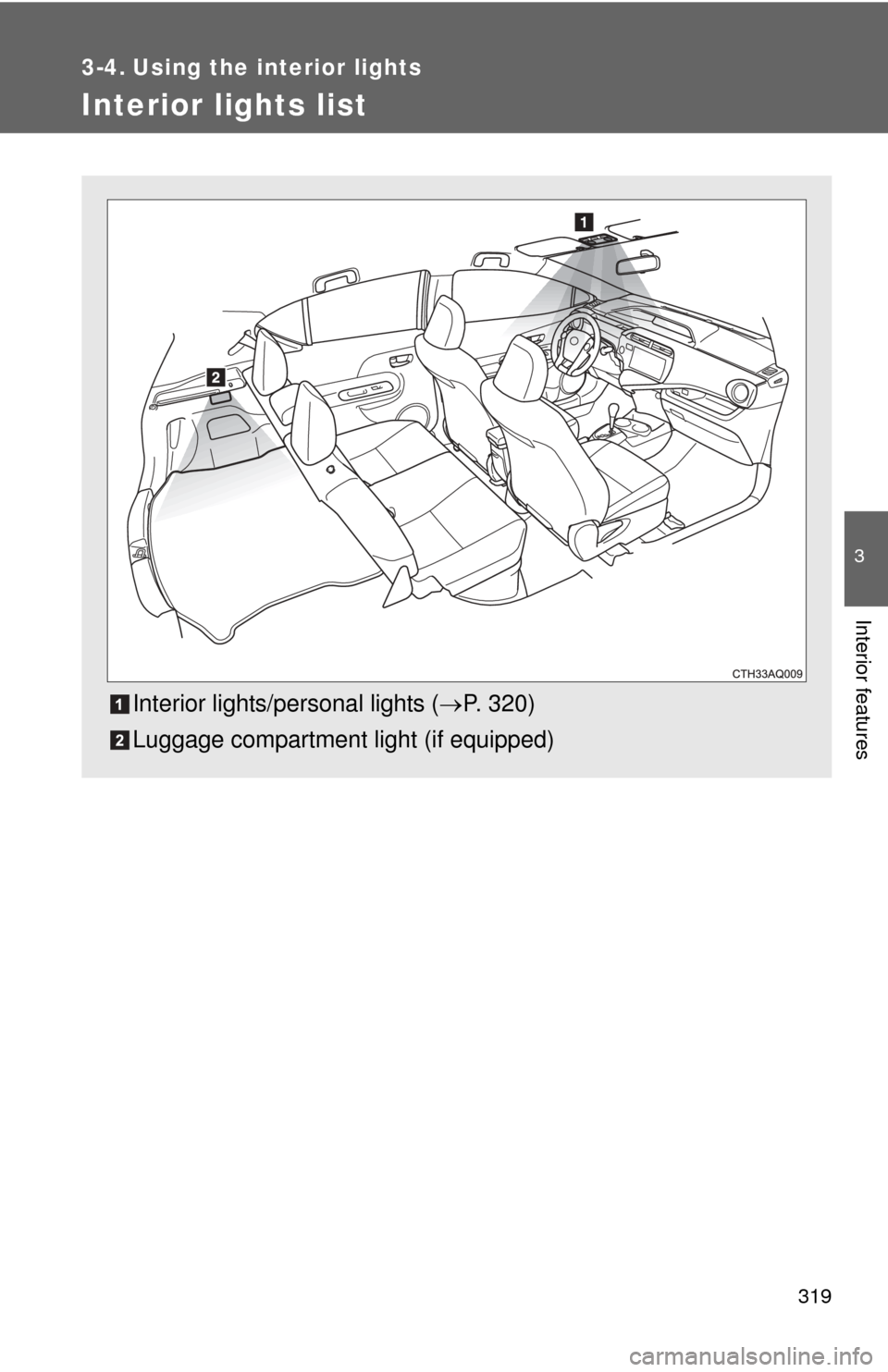
Interior lights/personal lights (P. 320)
Luggage compartment light (if equipped)
Page 320 of 556
320 3-4. Using the interior lights
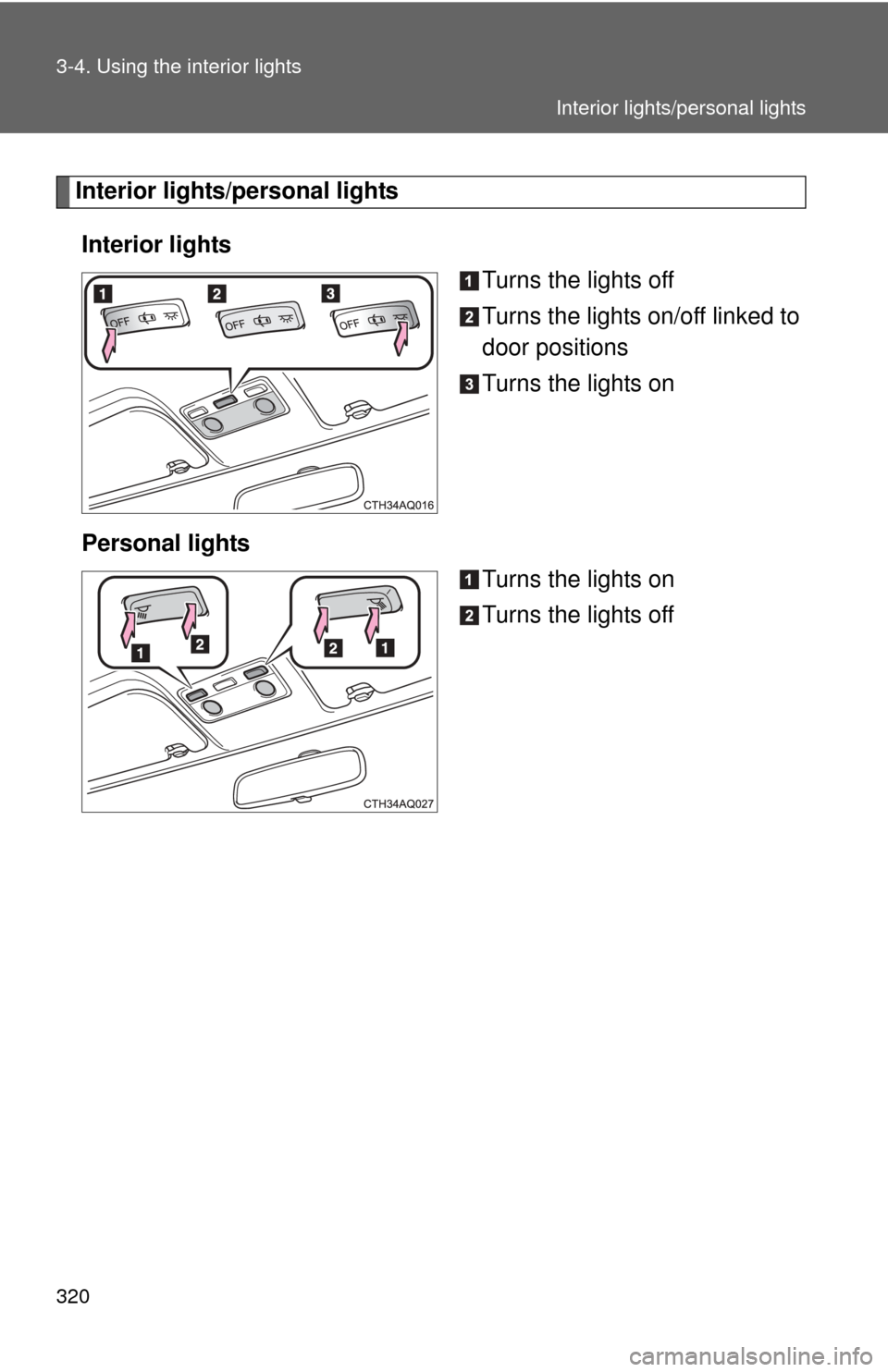
Interior lights/personal lightsInterior lights Turns the lights off
Turns the lights on/off linked to
door positions
Turns the lights on
Personal lights Turns the lights on
Turns the lights off
Interior lights/personal lights
Page 321 of 556
321
3-4. Using the interior lights
3
Interior features
■
Illuminated entry system
Vehicles without a smart key system
When the interior lights switch is in the “DOOR” position, the interior lights
automatically turn on/off according to the engine switch position, whether the
doors are locked/unlocked, and whether the doors are open/closed.
Vehicles with a smart key system
When the interior lights switch is in the “DOOR” position, the interior lights
automatically turn on/off according to “POWER” switch mode, the presence
of the electronic key, whether the doors are locked/unlocked, and whether
the doors are open/closed.
■ To prevent 12-volt battery discharge
Vehicles without a smart key system
If the interior lights, personal lights or luggage compartment light remain on
when the engine switch is “LOCK” position, the lights will go off automatically
after 20 minutes.
Vehicles with a smart key system
If the interior lights, personal lights or luggage compartment light remain on
when the “POWER” switch is off, the lights will go off automatically after 20
minutes.
■ Customization that can be co nfigured at Toyota dealer
Settings (e.g. the time elapsed before lights turn off) can be changed.
(Customizable features P. 518)
NOTICE
■To prevent 12-volt battery discharge
Do not leave the lights on longer than necessary when the hybrid system is
off.
Interior lights/personal lights
Page 346 of 556

346 4-1. Maintenance and care
NOTICE
■To prevent paint deterioration and corrosion on the body and compo-
nents (aluminum wheels etc.)
● Wash the vehicle immediately in the following cases:
• After driving near the sea coast
• After driving on salted roads
• If coal tar or tree sap is present on the paint surface
• If dead insects, insect droppings or bird droppings are present on the
paint surface
• After driving in an area contaminated with soot, oily smoke, mine dust, iron powder or chemical substances
• If the vehicle becomes heavily soiled with dust or mud
• If liquids such as benzene and gasoline are spilled on the paint surface
● If the paint is chipped or scratched, have it repaired immediately.
● To prevent the wheels from corroding, remove any dirt and store in a place
with low humidity when storing the wheels.
■ Cleaning the exterior lights
●Wash carefully. Do not use organic substances or scrub with a hard brush.
This may damage the surfaces of the lights.
● Do not apply wax to the surfaces of the lights.
Wax may cause damage to the lenses.
■ To prevent damage to the antenna
Remove the antenna in the following situations:
●When the antenna will touch the ceiling of a garage or other such places
● When a car cover is to be used to cover the vehicle
■ Antenna installation and removal precautions
●Before driving, ensure that the antenna is installed.
● When the antenna is removed, such as before entering an automatic car
wash, make sure to store it in a suitable place so as not to lose it. Also,
before driving, make sure to reinstall the antenna in its original position.
Page 354 of 556
354 4-2. Maintenance
Vehicle interior
ItemsCheck points
12-volt battery Check the connections. ( P. 377)
Accelerator pedal • The accelerator pedal should
move smoothly (without uneven
pedal effort or catching).
Brake pedal • Does the brake pedal move
smoothly?
• Does the brake pedal have appro- priate clearance from the floor?
(P. 499)
• Does the brake pedal have the correct amount of free play?
(P. 499)
Brakes • The vehicle should not pull to one
side when the brakes are applied.
• The brakes should work effec- tively.
• The brake pedal should not feel spongy.
• The brake pedal should not get too close to the floor when the
brakes are applied.
Head restraints
(Adjustable type) • Do the head restraints move
smoothly and lock securely?
Hybrid transmission “Park” mech-
anism • When parked on a slope and the
parking brake is on, is the vehicle
securely stopped?
Indicators/buzzers • Do the indicators and buzzers
function properly?
Lights • Do all the lights come on?
Page 407 of 556
407
4-3. Do-it-yourself maintenance
4
Maintenance and care
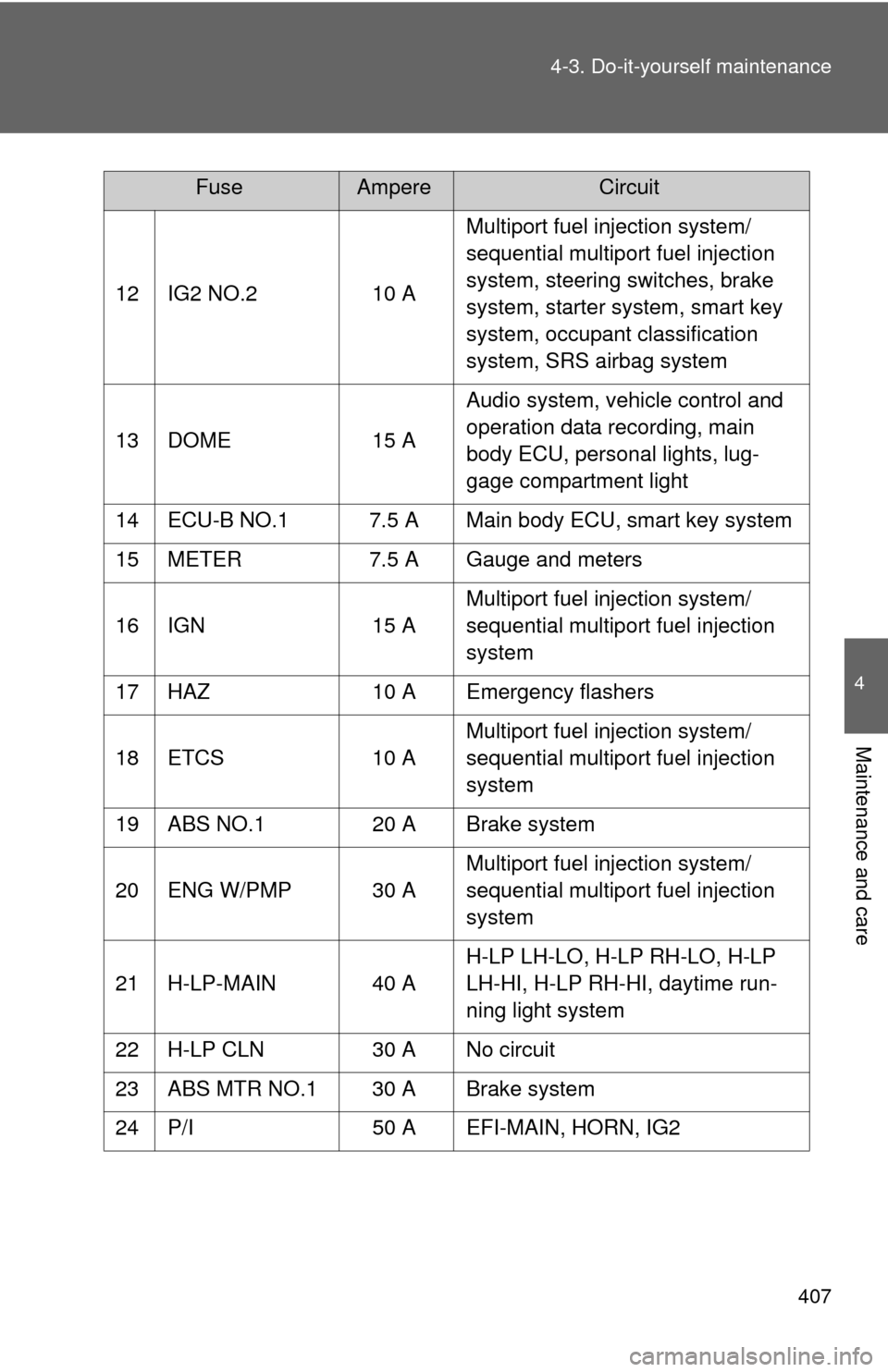
12 IG2 NO.2
10 AMultiport fuel injection system/
sequential multiport fuel injection
system, steering switches, brake
system, starter system, smart key
system, occupant classification
system, SRS airbag system
13 DOME 15 AAudio system, vehicle control and
operation data recording, main
body ECU, personal lights, lug-
gage compartment light
14 ECU-B NO.1 7.5 A Main body ECU, smart key system
15 METER 7.5 A Gauge and meters
16 IGN 15 AMultiport fuel injection system/
sequential multiport fuel injection
system
17 HAZ 10 A Emergency flashers
18 ETCS 10 AMultiport fuel injection system/
sequential multiport fuel injection
system
19 ABS NO.1 20 A Brake system
20 ENG W/PMP 30 A Multiport fuel injection system/
sequential multiport fuel injection
system
21 H-LP-MAIN 40 A H-LP LH-LO, H-LP RH-LO, H-LP
LH-HI, H-LP RH-HI, daytime run-
ning light system
22 H-LP CLN 30 A No circuit
23 ABS MTR NO.1 30 A Brake system
24 P/I 50 A EFI-MAIN, HORN, IG2
FuseAmpereCircuit