Page 101 of 556
101
1
1-5. Opening and closing the windows and moon roof
Before driving
Moon roof
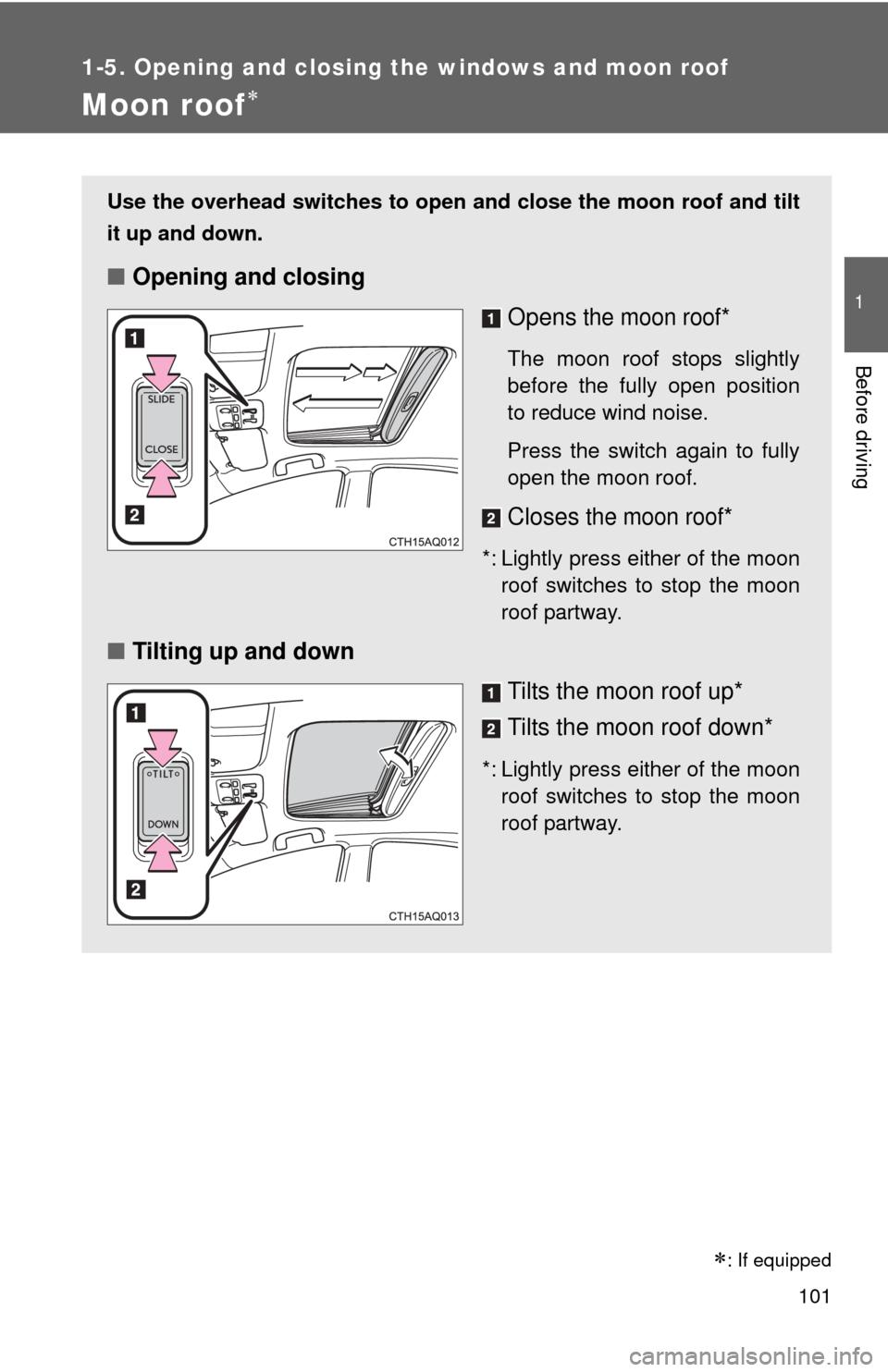
Use the overhead switches to open and close the moon roof and tilt
it up and down.
■Opening and closing
Opens
the moon roof*
The moon roof stops slightly
before the fully open position
to reduce wind noise.
Press the switch again to fully
open the moon roof.
Closes the moon roof*
*: Lightly press either of the moonroof switches to stop the moon
roof partway.
■ Tilting up and down
Tilts the moon roof up*
Tilts the moon roof down*
*: Lightly press either of the moonroof switches to stop the moon
roof partway.
: If equipped
Page 102 of 556
102 1-5. Opening and closing the windows and moon roof
■The moon roof can be operated when
The “POWER” switch is in ON mode.
■ Operating the moon roof after turning the hybrid system off
The moon roof can be operated for approximately 45 seconds after the
“POWER” switch is turned to ACCESSORY mode or turned off. It cannot,
however, be operated once either front door is opened.
■ Jam protection function
If an object is detected between the moon roof and the frame while the moon
roof is closing or tilting down, travel is stopped and the moon roof opens
slightly.
■ Sunshade
The sunshade can be opened and closed manually. However, the sunshade
will open automatically when the moon roof is opened.
Page 103 of 556

103
1-5. Opening and closing the windows and moon roof
1
Before driving
■
When the moon roof does not close normally
Perform the following procedure:
●If the moon roof closes but then re-opens slightly
Stop the vehicle.
Press and hold the “CLOSE” switch.*
1
The moon roof will close, re -open and pause for approximately 10
seconds.*2 Then it will close again, tilt up and pause for approxi-
mately 1 second. Finally, it will tilt down, open and close.
Check to make sure that the moon roof is completely closed and
then release the switch.
● If the moon roof tilts down but then tilts back up
Stop the vehicle.
Press and hold the “TILT” switch*
1 until the moon roof moves into
the tilt up position and stops.
Release the “TILT” switch once and then press and hold the “TILT”
switch again.*
1
The moon roof will pause for approximately 10 seconds in the tilt up
position.*2 Then it will adjust slightly and pause for approximately 1
second. Finally, it will tilt down, open and close.
Check to make sure that the moon roof is completely closed and
then release the switch.
*
1: If the switch is released at the incorrect time, the procedure will have to be performed again from the beginning.
*
2: If the switch is released after the above mentioned 10 second pause, automatic operation will be disabled. In that case, press and hold the
“CLOSE” or “TILT” switch, and the moon roof will tilt up and pause for
approximately 1 second. Then it will tilt down, open and close. Check to
make sure that the moon roof is completely closed and then release the
switch.
If the moon roof does not fully close even after performing the above proce-
dure correctly, have the vehicle inspected by your Toyota dealer.
STEP1
STEP2
STEP3
STEP1
STEP2
STEP3
STEP4
Page 106 of 556
106 1-6. Refueling
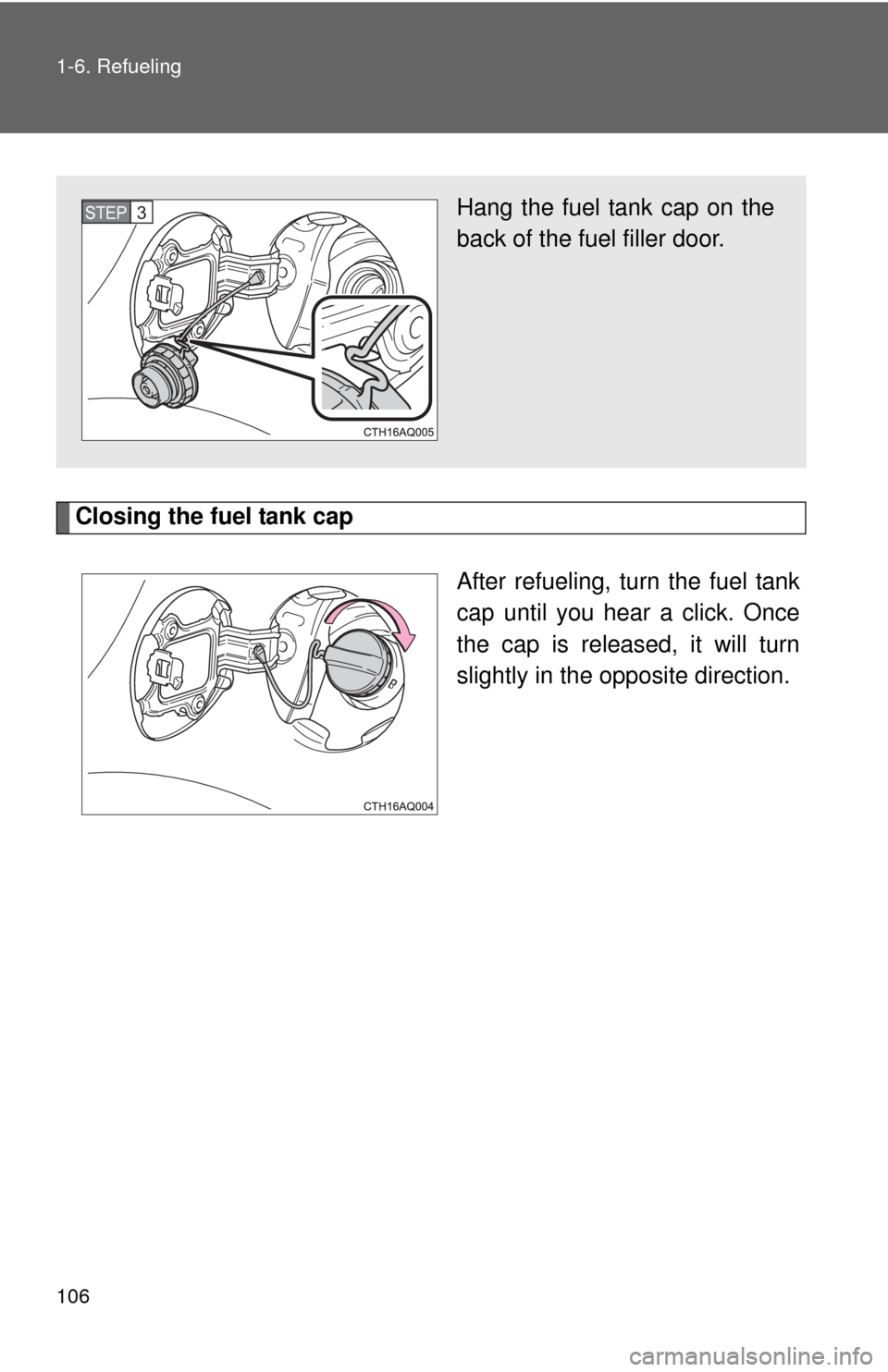
Closing the fuel tank capAfter refueling, turn the fuel tank
cap until you hear a click. Once
the cap is released, it will turn
slightly in the opposite direction.
Hang the fuel tank cap on the
back of the fuel filler door.STEP3
Page 110 of 556
110
1-7. Theft deterrent system
Immobilizer system
: If equipped
The vehicle’s keys have built-in transponder chips that prevent the
hybrid system from starting if a key has not been previously regis-
tered in the vehicle’s on-board computer.
Never leave the keys inside the vehicle when you leave the vehicle.
Vehicles without a smart
key system
The indicator light flashes after
the key has been removed
from the engine switch to indi-
cate that the system is operat-
ing.
The indicator light stops flash-
ing after the registered key
has been inserted into the
engine switch to indicate that
the system has been can-
celed.
Vehicles with a smart key
system
The indicator light flashes after
the “POWER” switch has been
turned off to indicate that the
system is operating.
The indicator light stops flash-
ing after the “POWER” switch
has been turned to ACCES-
SORY or ON mode to indicate
that the system has been can-
celed.
Page 117 of 556
117
1-8. Safety information
1
Before driving
SRS airbag system components
Curtain shield airbags
SRS warning light and “AIR
BAG ON” and “AIR BAG
OFF” indicator lights
Side airbags
Side impact sensors (rear)
Front passenger’s seat
cushion airbag
Front passenger’s seat belt
buckle switch
Driver airbag
Driver’s seat belt buckle
switch Driver’s seat cushion airbag
Side impact sensors (front)
Seat belt pretensioners and
force limiters
Side impact sensors (front
door)
Driver’s knee airbag
Front passenger occupant
classification system (ECU
and sensors)
Airbag sensor assembly
Front impact sensors
Front passenger airbag
Page 118 of 556

118 1-8. Safety information
Your vehicle is equipped with ADVANCED AIRBAGS designed based
on the US motor vehicle safety standards (FMVSS208). The airbag
sensor assembly (ECU) controls ai rbag deployment based on infor-
mation obtained from the sensors etc. shown in the system compo-
nents diagram above. This inform ation includes crash severity and
occupant information. As the air bags deploy, a chemical reaction in
the inflators quickly fills the airbag s with non-toxic gas to help restrain
the motion of the occupants.
■ If the SRS airbags deploy (inflate)
●Bruising and slight abrasions may result from contact with a deploying
(inflating) SRS airbag.
● A loud noise and white powder will be emitted.
● Parts of the airbag module (steering wheel hub, airbag cover and inflator)
as well as the front seats, parts of the front and rear pillars, and roof side
rails, may be hot for several minutes. The airbag itself may also be hot.
● The windshield may crack.
■ SRS airbag deployment conditions (SRS front airbags/SRS seat cush-
ion airbags)
● The SRS front airbags and SRS seat cushion airbags will deploy in the
event of an impact that exceeds the set threshold level (the level of force
corresponding to an approximately 12 - 18 mph [20 - 30 km/h] frontal col-
lision with a fixed wall that does not move or deform).
However, this threshold velocity will be considerably higher in the following
situations:
• If the vehicle strikes an object, such as a parked vehicle or sigh pole,
which can move or deform on impact
• If the vehicle is involved in an underride collision, such as a collision in which the front of the vehicle “underrides”, or goes under, the bed of a
truck
Page 123 of 556

123
1-8. Safety information
1
Before driving
CAUTION
■
SRS airbag precautions
Observe the following precautions regarding the SRS airbags.
Failure to do so may cause death or serious injury.
●The driver and all passengers in the vehicle must wear their seat belts
properly.
The SRS airbags are supplemental devices to be used with the seat belts.
● The SRS driver airbag deploys with considerable force, and can cause
death or serious injury especially if the driver is very close to the airbag.
The National Highway Traffic Safety Administration (NHTSA) advises:
Since the risk zone for the driver’s airbag is the first 2 - 3 in. (50 - 75 mm)
of inflation, placing yourself 10 in. (250 mm) from your driver airbag pro-
vides you with a clear margin of safety. This distance is measured from the
center of the steering wheel to your breastbone. If you sit less than 10 in.
(250 mm) away now, you can change your driving position in several
ways:
• Move your seat to the rear as far as you can while still reaching the pedals comfortably.
• Slightly recline the back of the seat. Although vehicle designs vary, many drivers can achieve the 10 in. (250 mm) distance, even with the
driver seat all the way forward, simply by reclining the back of the seat
somewhat. If reclining the back of your seat makes it hard to see the
road, raise yourself by using a firm, non-slippery cushion, or raise the
seat if your vehicle has that feature.
• If your steering wheel is adjustable, tilt it downward. This points the air- bag toward your chest instead of your head and neck.
The seat should be adjusted as recommended by NHTSA above, while
still maintaining control of the foot pedals, steering wheel, and your view of
the instrument panel controls.