Page 38 of 556
38 1-1. Hybrid system
Trip Information screen (Display Audio system)Press “CAR”. ( P. 3 5 )
If the “Energy Monitor” screen is displayed, touch “Trip Information”.
Fuel consumption in the past
15 minutes
Displays the average vehicle
speed since the hybrid system
was started.
Displays the driving time since
the hybrid system was started.
Cruising range
Regenerated energy in the
past 15 minutes
One symbol indicates 50 Wh.
Up to 5 symbols are shown.
The image is example only, and may vary slightly from actual conditions.
Page 39 of 556
39
1-1. Hybrid system
1
Before driving
Fuel consumption screen (M
ulti-information display)
There are 2 menu items available for the fuel consumption screen.
After pressing the “DISP” switch, select one of the menu items below
and the system will change to the details screen.
The “5min Consumption”, “Past Re cord” and “ECO Savings Record”
( P. 194) screens are set to off (initialized settings) at the time of
shipping. ( P. 4 1 )
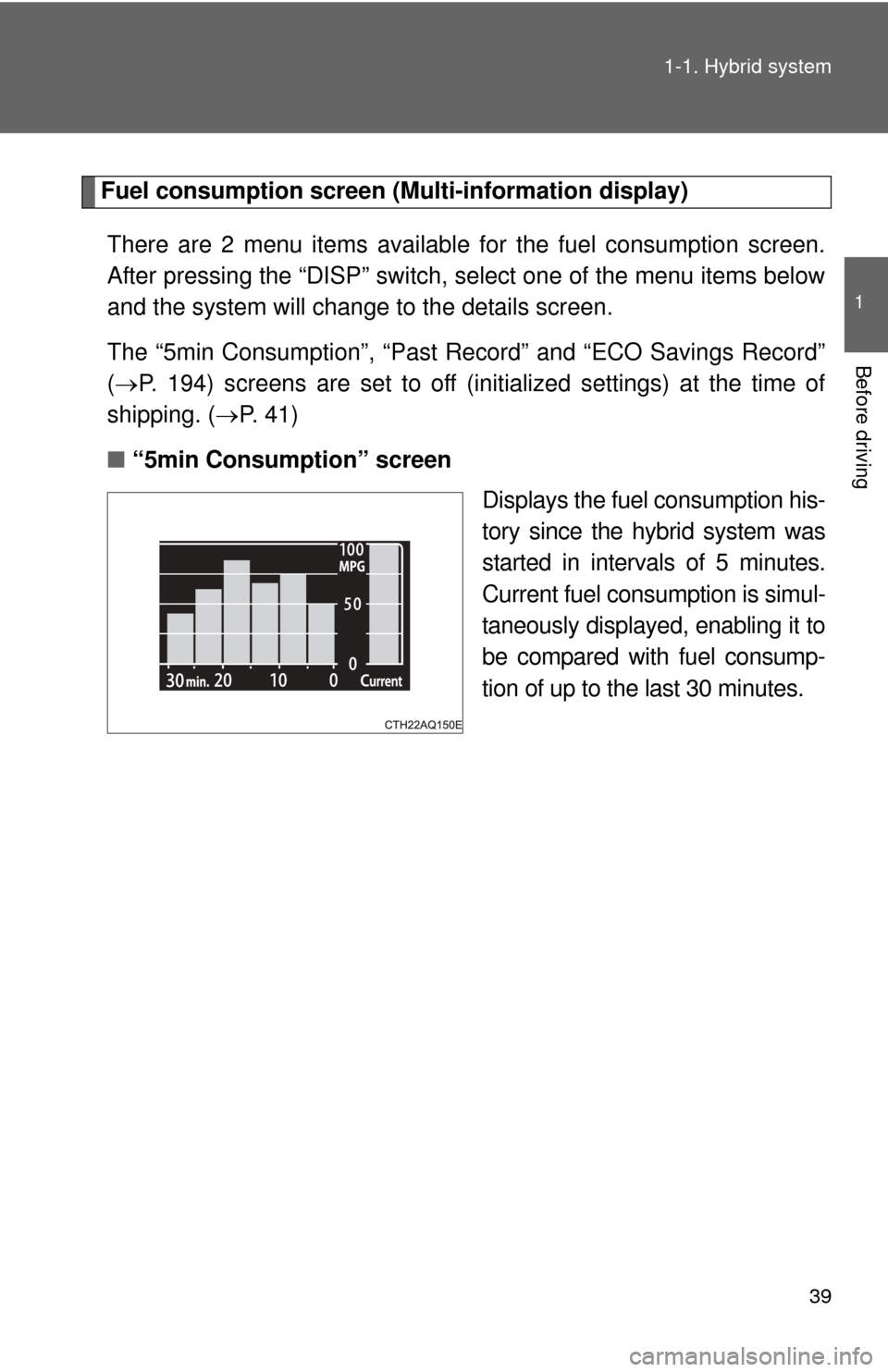
■ “5min Consumption” screen
Displays the fuel consumption his-
tory since the hybrid system was
started in intervals of 5 minutes.
Current fuel consumption is simul-
taneously displayed, enabling it to
be compared with fuel consump-
tion of up to the last 30 minutes.
Page 41 of 556

41
1-1. Hybrid system
1
Before driving
■
Remaining hybrid battery (tract ion battery) charge display
The charge amount of the hybrid battery (traction battery) is automatically
controlled by the hybrid system. For this reason, even if electricity is recov-
ered via the regenerative braking, or electricity is generated via the gasoline
engine, the displayed hybrid battery (traction battery) charge amount may
not reach the highest level (level 8). However, this does not indicate a mal-
function.
■ Resetting the consumption data (Display Audio System)
Selecting “Clear” on the “Trip Information” screen will reset the fuel con-
sumption and the regenerated energy for the past 15 minutes. Selecting
“Yes” on the following screen will confirm resetting of all the data.
■ Menu screen selection (Multi-information display)
Press the “DISP” switch and select “Set-
tings & Screen Off”. Press and hold the
“DISP” switch while the cursor is on
“Menu Screen Selection” to change to the
settings screen.
The following screen changes and set-
tings can be performed:
• The eco savings record screen can be
switched on or off. ( P. 185)
• The 5 minute fuel consumption screen can be switched on or off.
• Past record can be reset.
• The past record screen can be switched between off, monthly aver-
age and personal best.
Page 42 of 556

42
1-1. Hybrid system
Hybrid vehicle driving tips
For economical and ecological driving, pay attention to the following
points:
■ Using Eco drive mode
P. 174
■Use of Hybrid System Indicator
By keeping Hybrid System Indicator within Eco area, more Eco-friendly
driving may be possible. ( P. 195)
■When braking the vehicle
Make sure to operate the brakes gently and in good time. A greater
amount of electrical energy can be retained when slowing down.
■Delays
Repeated acceleration and deceleration, as well as long waits at traffic
lights, will lead to bad fuel consumption. Check traffic reports before
leaving and avoid delays as much as possible. When encountering a
delay, gently release the brake pedal to allow the vehicle to move for-
ward slightly while avoiding overuse of the accelerator pedal. Doing so
can help control excessive gasoline consumption.
■Highway driving
Control your speed and keep at a constant speed. Also, before stop-
ping at a toll booth or similar, allow plenty of time to release the acceler-
ator and gently apply the brakes. A greater amount of electrical energy
can be retained when slowing down.
■Air conditioning
Use the air conditioning only when necessary. Doing so can help con-
trol excessive gasoline consumption.
In summer: In high temperatures, use the recirculated air mode. Doing
so will help to reduce the burden on the air conditioning and reduce fuel
consumption as well.
In winter: Because the gasoline engine will not automatically cut out
until the gasoline engine and the interior of the vehicle are warm, it will
consume fuel. Also, fuel consumption can be improved by avoiding
overuse of the heater.
Page 43 of 556
43
1-1. Hybrid system
1
Before driving
■
Checking tire inflation pressure
Make sure to check the tire inflation pressure frequently. Improper tire
inflation pressure can cause poor fuel consumption.
Also, as snow tires can cause large amounts of friction, their use on dry
roads can lead to poor fuel consumption. Use a tire that is appropriate
for the season.
■Luggage
Carrying heavy luggage can lead to poor fuel consumption. Avoid car-
rying unnecessary luggage. Installing a large roof rack can also cause
poor fuel consumption.
■Warming up before driving
Since the gasoline engine starts up and cuts out automatically when
cold, warming up the engine is unnecessary. Moreover, frequently driv-
ing short distances will cause the engine to repeatedly warm up, which
can lead to poor fuel consumption.
Page 45 of 556
45
1-2. Key information
1
Before driving
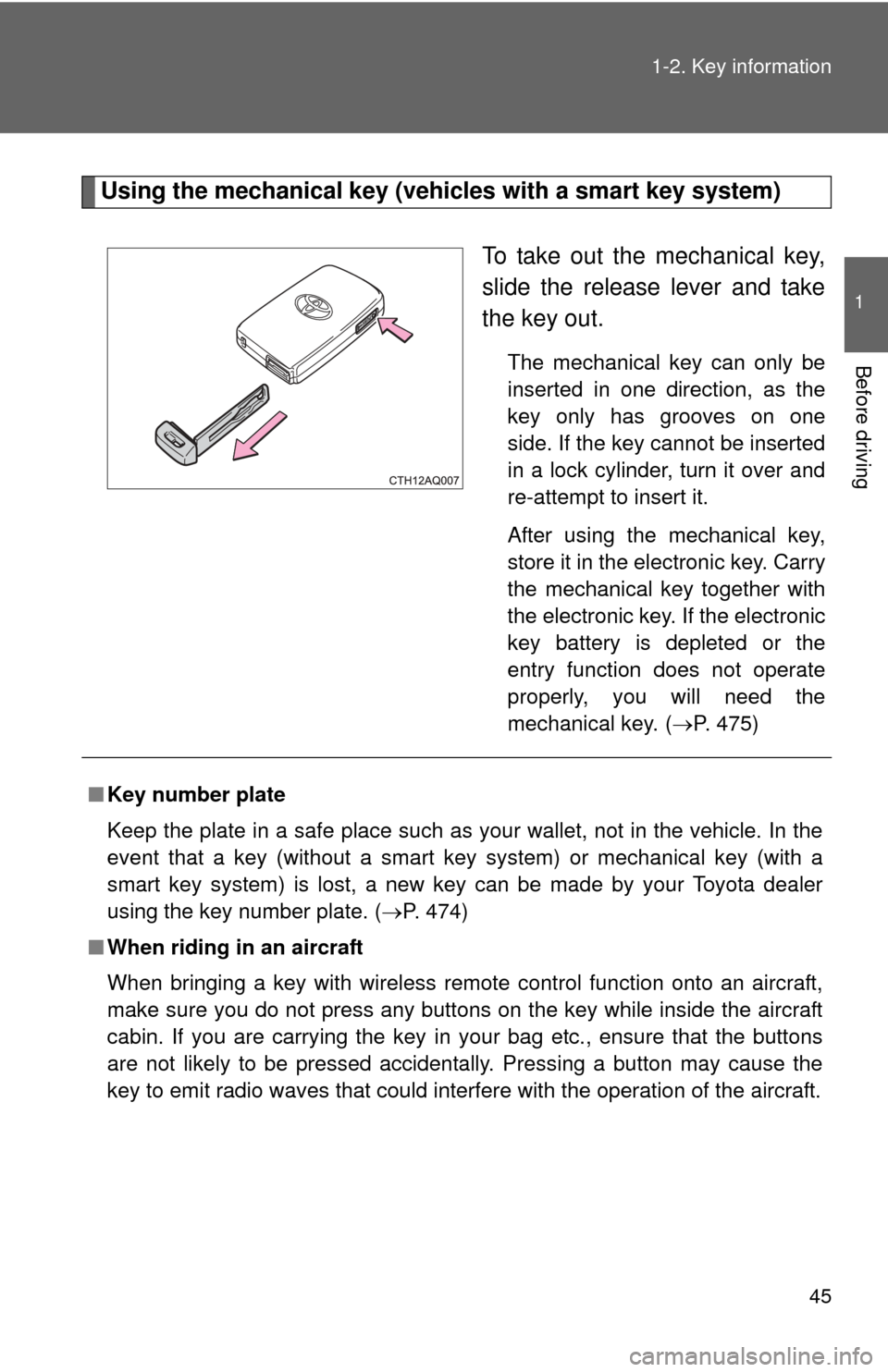
Using the mechanical key (vehicles with a smart key system)
To take out the mechanical key,
slide the release lever and take
the key out.
The mechanical key can only be
inserted in one direction, as the
key only has grooves on one
side. If the key cannot be inserted
in a lock cylinder, turn it over and
re-attempt to insert it.
After using the mechanical key,
store it in the electronic key. Carry
the mechanical key together with
the electronic key. If the electronic
key battery is depleted or the
entry function does not operate
properly, you will need the
mechanical key.
(P. 475)
■ Key number plate
Keep the plate in a safe place such as your wallet, not in the vehicle. In the
event that a key (without a smart key system) or mechanical key (with a
smart key system) is lost, a new key can be made by your Toyota dealer
using the key number plate. ( P. 474)
■ When riding in an aircraft
When bringing a key with wireless remote control function onto an aircra\
ft,
make sure you do not press any buttons on the key while inside the aircraft
cabin. If you are carrying the key in your bag etc., ensure that the buttons
are not likely to be pressed accidentally. Pressing a button may cause the
key to emit radio waves that could interfere with the operation of the a\
ircraft.
Page 47 of 556
47
1
Before driving
1-3. Opening, closing and locking the doors
Smart key system
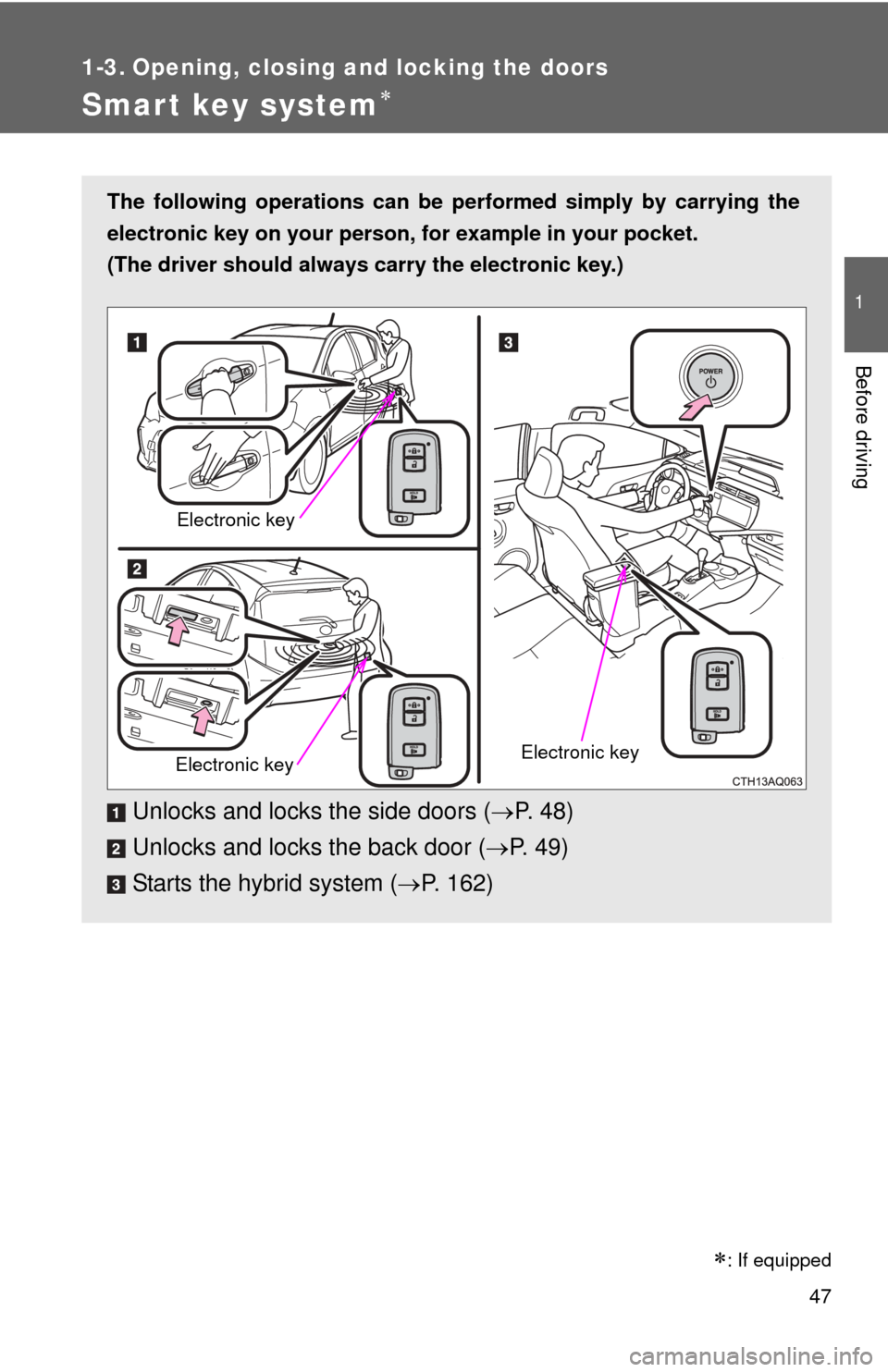
The following operations can be performed simply by carrying the
electronic key on your person, for example in your pocket.
(The driver should always carry the electronic key.)
Unlocks and locks the side doors ( P. 4 8 )
Unlocks and locks the back door ( P. 49)
Starts the hybrid system ( P. 162)
Electronic key
Electronic keyElectronic key
: If equipped
Page 49 of 556
49
1-3. Opening, closing and locking the doors
1
Before driving
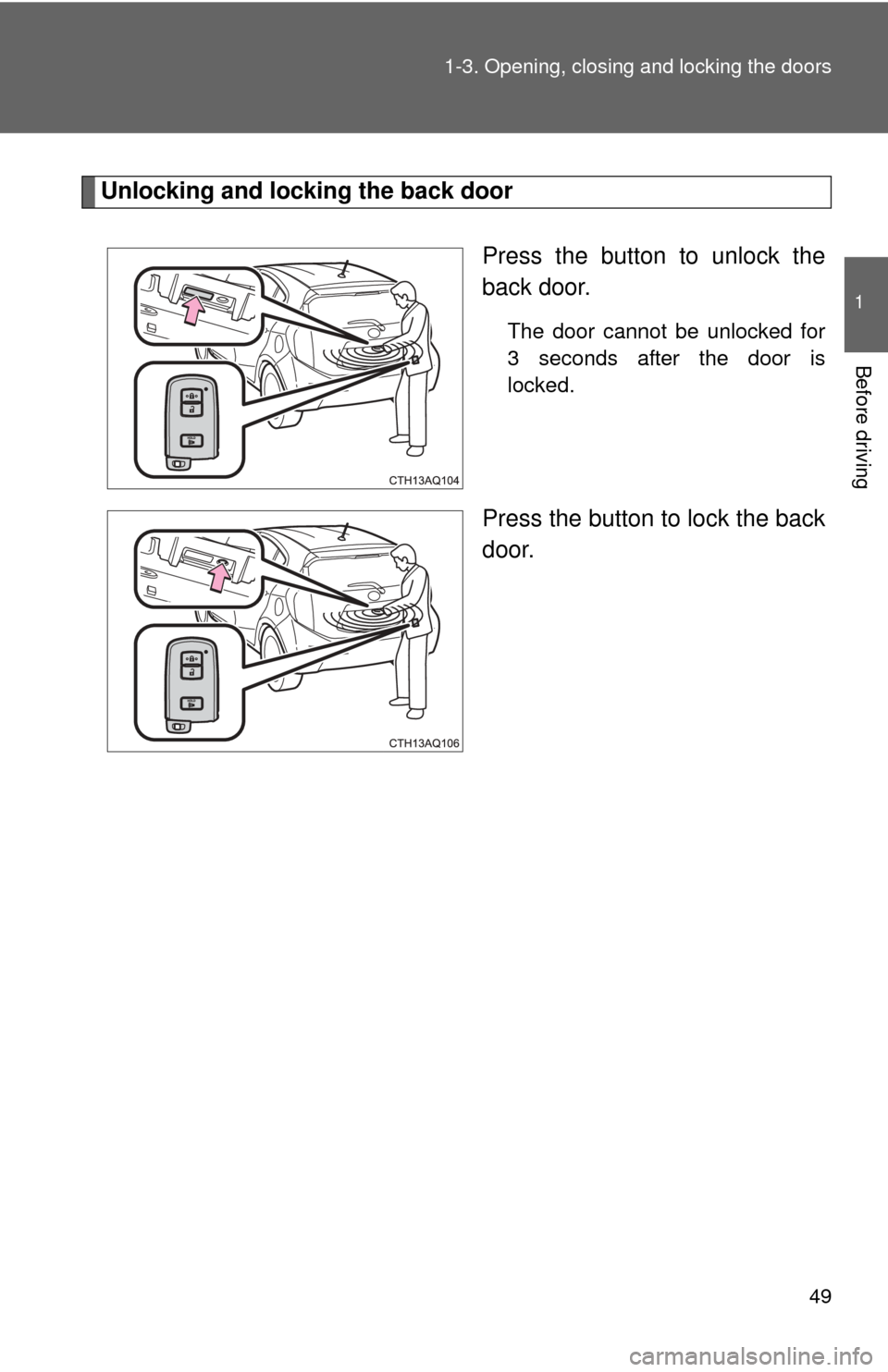
Unlocking and locking the back door
Press the button to unlock the
back door.
The door cannot be unlocked for
3 seconds after the door is
locked.
Press the button to lock the back
door.