2013 TOYOTA LAND CRUISER service
[x] Cancel search: servicePage 3 of 27

2
The Quick Reference Guide is designed to provide information on the basic operation and
key features of the navigation system and Entune
™ (apps and data services). The Quick
Reference Guide is not intended as a substitute for the Navigation Owner’s Manual. We strongly
encourage you to review the Navigation Owner’s Manual, the quick reference guide and visit
www.toyota.com/entune so you will have a better understanding of all your v\
ehicles features and
controls.
OVERVIEW
MAP/VOICE Button
Repeat the last voice guidance prompt,
cancel the map scrolling feature, or
display the current position.
DESTINATION Button
Input the destination by one of several
methods.
INFO Button
Access apps, fuel consumption, traffic,
fuel prices, sports, stocks, weather and
map data.
SETUP Button
Adjust preferences for: general settings,
voice, navigation, vehicle maintenance,
phone,Bluetooth and audio. AUDIO Button
Set the radio station presets, adjust the
balance and tone controls.
ZOOM IN/ZOOM OUT Icons
Touch to magnify or reduce the map
scale.
CURRENT VEHICLE POSITION Mark
Indicates the current position of the
vehicle and its directional heading.
NORTH-UP OR COMPASS MODE Icon
Touch to change the map display between
North-up or Head-up perspectives.1
2
3
4
5
6
7
8
LIMITATIONS OF THE QUICK REFERENCE GUIDE
BASIC OPERATION
2
5
6
4
1
3
87
Page 20 of 27
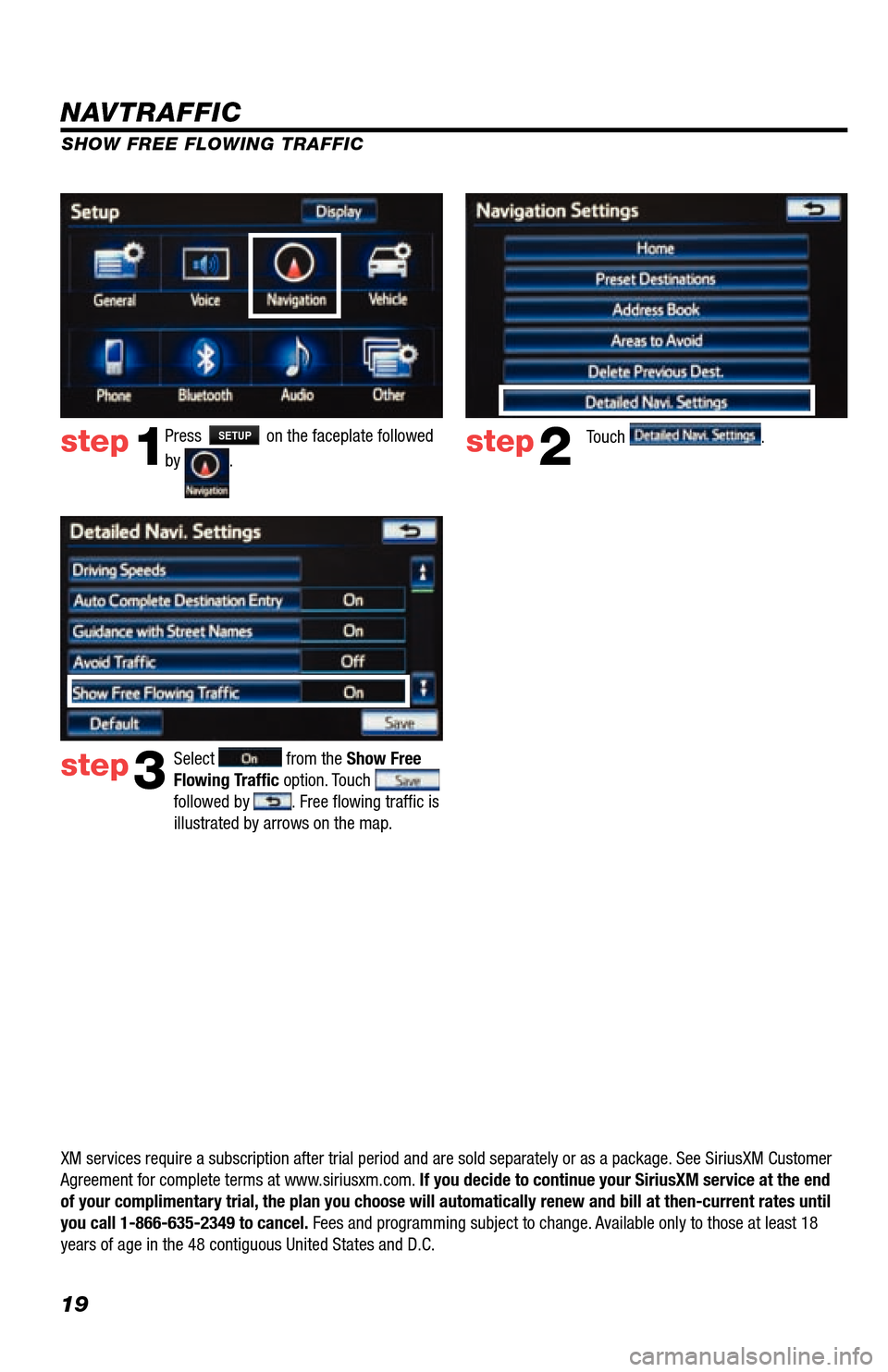
19
Press SETUP on the faceplate followed
by
. step1step2Touch .
SHOW FREE FLOWING TRAFFIC
step3
Select from the Show Free
Flowing Traffic option. Touch
followed by . Free flowing traffic is
illustrated by arrows on the map.
NAVTRAFFIC
XM services require a subscription after trial period and are sold separately or as a package. See SiriusXM Customer
Agreement for complete terms at www.siriusxm.com. If you decide to continue your SiriusXM service at the end
of your complimentary trial, the plan you choose will automatically renew and bill at then-current r\
ates until
you call 1-866-635-2349 to cancel. Fees and programming subject to change. Available only to those at least 18
years of age in the 48 contiguous United States and D.C.
Page 21 of 27

20
NAVWEATHER
Get driver-friendly weather information for your area and along your route. See storms and severe weather, keep track
of weather warnings and see the current conditions and 3-day forecasts. For details visit siriusxm.com/navweather
INFOAPPS > >
SPORTS
See the schedules and scores of your favorite sports teams as they happen, and get reminders of where and when to
catch the game on satellite radio.
· You will need to add your desired teams to the navigation system before you can receive any available team data.
· You can save up to five teams in the system, and you can change your saved teams at any time.
INFOAPPS > > >
STOCKS*
Track prices and movements of up to ten stocks that you’ve selected from around 9,000 actively reported securities
traded on NYSE
®, AMEX® and NASDAQ®.
· You will need to add your desired stocks to the navigation system before you can receive any available data.
· You can save up to ten stocks in the system, and you can change your saved stocks at any time.
· You must know the symbol of the stock you wish to enter.
INFOAPPS > > >
FUEL
View up-to-date fuel prices for regular, mid-grade and premium gas in your area. Sort the results by price, distance or
brand. View station addresses and phone numbers. Select a station and navigate to it using the on-board navigation
system.
INFOAPPS >
New Land Cruiser owners with factory-installed navigation receive a 36-month complimentary
trial subscription to NavTraffic, NavWeather, Sports, Stocks and Fuel from SiriusXM.
Press INFOAPPS on the faceplate, followed by the desired
application.
NAVWEATHER, SPORTS, STOCKS AND FUEL
* This service is delayed approximately 20 minutes.
INFOAPPS
Page 22 of 27

21
- INTRODUCTION
STOPPLEASE READ
WHAT IS ENTUNE?
The available Entune
™ system is a collection of popular mobile
applications and data services integrated with select 2013 Toyota
vehicles. Entune
™ includes three years of complimentary access to
apps and services delivered via most smartphones and some feature
phones (after three years, access charges will apply; excluding
Pandora
®).
Once the phone is connected to the vehicle using Bluetooth
®
wireless technology, Entune
™'s features are operated using the
vehicle's controls or, for some services, by voice recognition.
Entune
™ is scheduled to have mobile apps for Bing™, iHeartRadio,
MovieTickets.com, OpenTable
® and Pandora®.
See www.toyota.com/entune for availability of apps and services.
In order to access Entune applications from your vehicle’s touch
screen, an Entune capable phone is required and you must use a
computer to register for Entune. Visit www.toyota.com/entune to learn
all about Entune features and use the link to register. After you register,
use your cell phone to download the Entune app from the appropriate
app store.
For additional information on Entune and to check phone compatibility,
visit www.toyota.com/connect or call the Toyota Customer Experience
Center at 1-800-331-4331.
ENTUNE
*
Page 23 of 27

22
An Entune capable phone is required to use apps and data services.
Check phone compatibility by any one of the following methods:
•Visit: www.toyota.com/connect
•Snap and send the ToyoTag
(message and data rates may apply)
•Call the Toyota Customer Experience
Center at 1-800-331-4331
Note: You do not need an Entune
capable phone to use Bluetooth
®
hands-free, Bluetooth audio or the
navigation system. To connect a
Bluetooth Phone, refer to page 3. PHONE COMPATIBILITY
*Be sure to obey traffic regulations and maintain awareness of road and traffic
conditions. Select Entune™ apps use a large amount of data and you are responsible
for all data charges. Apps and services vary by phone and carrier. Not all apps and
data services are available initially. Apps indentified by "™" or "®" are trademarks
or registered trademarks of their respective companies and cannot be use\
d without
permission. See toyota.com/entune for the latest information regarding apps and
services.
- INTRODUCTION
ToyoTag
Page 24 of 27

23
BASIC OVERVIEW
- HOW TO GET STARTED
StepReference
53
4
Account
Creation2
Connect the phone to your
vehicle, and experience
Entune. Register on
www.toyota.com/entune
and create a personal
Entune account using your
computer.
Download the Entune app to
your phone.
Launch the Entune app on
your phone and sign in. Go to "ACCOUNT CREATION"
on page 24.
Using your cell phone, fi nd
the Entune app in the Apple
App Store, Blackberry
® App
WorldTM or Android Market.
The Entune app must be
running on the mobile
device in order to use the
internet services.
Go to "CONNECT A
BLUETOOTH PHONE"
on page 3.
Download
App
Launch
App and
Login
Connect
Step 1: Register Your Account
Please provide all required information below.Once you click "register," you will receive
an e-mail to verify your e-mail address.
Click on the link embedded in the email to
activate your account.
Terms of Service | Privacy Policy
© 2011 Toyota Motor Sales, U.S.A., Inc. All information applies to U.\
S. vehicles only.
User Name: Password
1
Confi rm that your phone is
able to run the Entune app. Go to "PHONE COMPATIBILITY"
on page 22.Phone
Compatibility
Page 25 of 27

24
- NEW CUSTOMER REGISTRATION
ACCESSING ENTUNE APPS
The Entune app contains the only individual apps that will work with your vehicle. Other apps downloaded on your
phone are not available through Entune.Touch the desired application.
step2
Click on "How Do I Use Entune?"step4
DOWNLOADING ENTUNE APP TO YOUR PHONE
Using your cell phone, connect to your app store (Apple App store, Blackberry® App WorldTM, Android Market), search
for Entune and download. ACCOUNT CREATION
From a computer, access
www.toyota.com/entune
step1step2
Click on the "Quick Start Guide" tab
located on the top of the page.
step3
Press INFOAPPS on the faceplate followed
by .step1
Follow the directions to create your
account.step5
Quick Tip - The Entune app
must be running on the mobile
device in order to use the
internet services. Determine your audio system and select
"Click Here."
CONNECT PHONE
See page 3 for instructions.
In order to view the Entune apps on your vehicle display, some phones may require an additional step after they have
been connected. After signing in, select Options on your phone to ensure the phone is connected and liste\
ning.
LAUNCH APP