Page 5 of 644

1
2
3
4
5
6
5
HILUX_OM_OM0K134E_(EE)
3-4. Using the interior lights
Interior lights list .................. 438
• Personal lights .................. 439
• Interior light ....................... 439
3-5. Using the storage features
List of storage features ....... 440
• Glove box ......................... 442
• Console box...................... 443
• Cup holders ...................... 444
• Bottle holders.................... 446
• Auxiliary boxes ................. 447
3-6. Other interior features
Sun visors ........................... 449
Vanity mirror ....................... 450
Clock ................................... 451
Ashtray................................ 452
Cigarette lighter .................. 453
Power outlet ........................ 454
Seat heaters ....................... 455
Floor mat............................. 457
Compass............................. 459
Deck hooks ......................... 4654-1. Maintenance and care
Cleaning and protecting
the vehicle exterior ........... 468
Cleaning and protecting
the vehicle interior ............ 472
4-2. Maintenance
Maintenance
requirements .................... 476
4-3. Do-it-yourself maintenance
Do-it-yourself service
precautions ...................... 480
Hood................................... 484
Engine compartment .......... 486
Tires ................................... 503
Tire inflation pressure......... 507
Wheels ............................... 509
Air conditioning filter ........... 511
Wireless remote control
battery .............................. 513
Checking and replacing
fuses ................................ 516
Light bulbs .......................... 532
4Maintenance and care
Page 15 of 644
15
HILUX_OM_OM0K134E_(EE)
A
Anti-glare inside rear view mirror
P. 86
Sun visors
Vanity mirrors
P. 449
P. 450
SRS curtain shield airbags P. 109
Personal lights
Auxiliary box
P. 439
P. 447
Interior light P. 439
: If equipped
Page 26 of 644
26
HILUX_OM_OM0K134E_(EE)
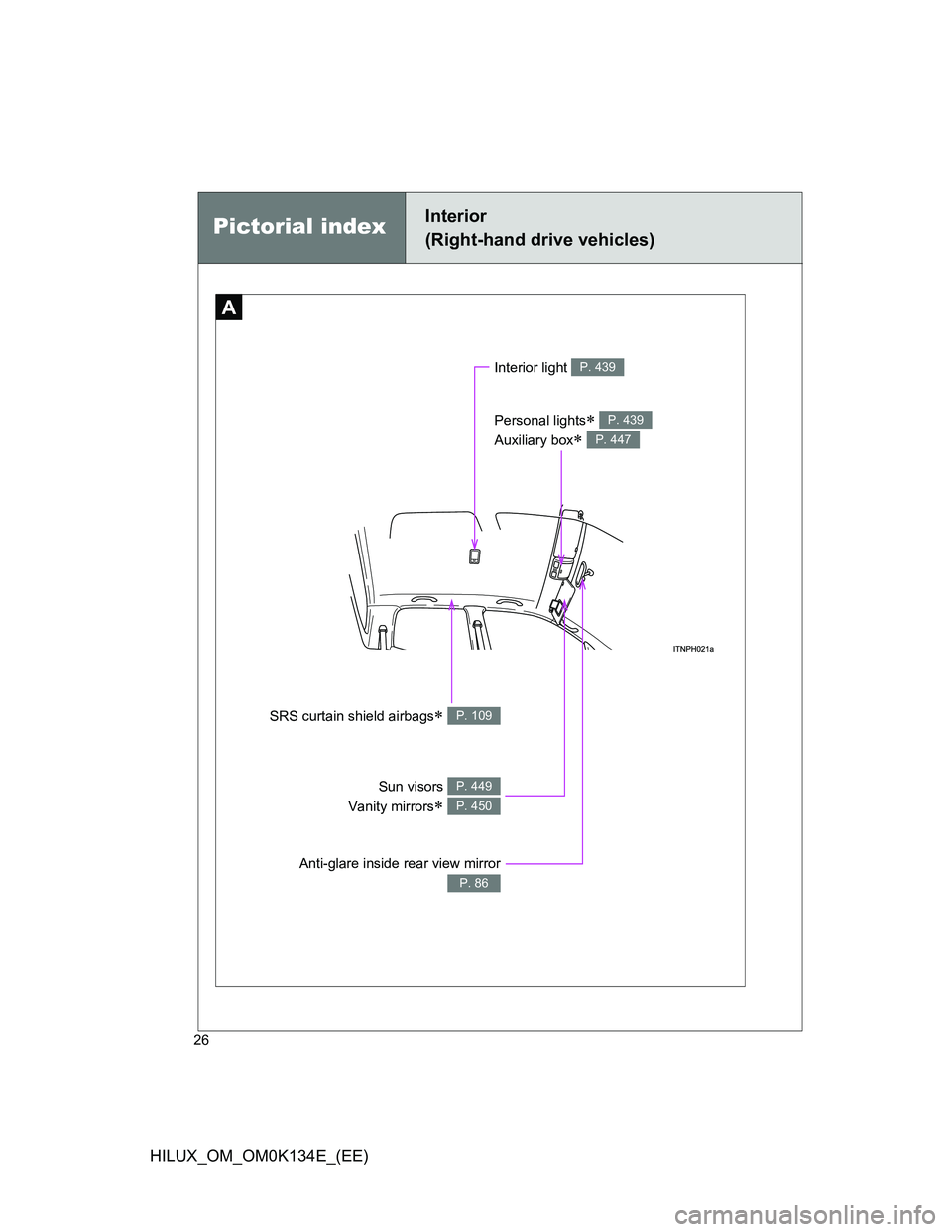
Pictorial indexInterior
(Right-hand drive vehicles)
A
Anti-glare inside rear view mirror
P. 86
Sun visors
Vanity mirrors
P. 449
P. 450
SRS curtain shield airbags P. 109
Personal lights
Auxiliary box
P. 439
P. 447
Interior light P. 439
Page 251 of 644

3Interior features
251
HILUX_OM_OM0K134E_(EE)
3-3. Using the “touch screen”
Touch screen .................... 317
Setup menu ...................... 319
Audio system .................... 327
Using the radio ................. 331
Using the CD player ......... 336
Playing an audio CD and
MP3/WMA discs ............. 337
Listening to an iPod .......... 350
Listening to a USB
memory........................... 360
Using the AUX port ........... 369
Listening to Bluetooth
®
audio ............................... 370
Using the steering wheel
audio switches ................ 384
Hands-free system
(for cellular phone).......... 387
Using the Bluetooth
®
phone ............................. 395
Setting the hands-free
system ............................ 411
Bluetooth
® settings ........... 4283-4. Using the interior lights
Interior lights list ................ 438
• Personal lights ................ 439
• Interior light ..................... 439
3-5. Using the storage features
List of storage features ..... 440
• Glove box ....................... 442
• Console box.................... 443
• Cup holders .................... 444
• Bottle holders.................. 446
• Auxiliary boxes ............... 447
3-6. Other interior features
Sun visors ......................... 449
Vanity mirror ..................... 450
Clock ................................. 451
Ashtray.............................. 452
Cigarette lighter ................ 453
Power outlet ...................... 454
Seat heaters ..................... 455
Floor mat........................... 457
Compass........................... 459
Deck hooks ....................... 465
Page 323 of 644
323 3-3. Using the “touch screen”
3
Interior features
HILUX_OM_OM0K134E_(EE)Changing between day mode and night mode
When the headlights are turned on, the screen dims.
However, the screen can be switched to day mode by touching
“Day mode”.
The screen will stay in day mode when the headlights are turned on until
“Day mode” is touched again.
Adjusting the screen contrast/brightness
Touch “General” or “Camera” on the “Display settings” screen.
Adjust the display as desired
using “+” or “-”.
Select “Contrast” or “Brightness”
using the “<<” or “>>”.
Touch “OK”.
STEP1
STEP2
“-”“+”
“Contrast”WeakerStronger
“Brightness”DarkerBrighter
STEP3
Page 438 of 644
438
HILUX_OM_OM0K134E_(EE)
3-4. Using the interior lights
Interior lights list
Interior light (P. 439)
Personal lights (if equipped) (P. 439)
Engine switch light (if equipped)
Page 439 of 644
439 3-4. Using the interior lights
3
Interior features
HILUX_OM_OM0K134E_(EE)
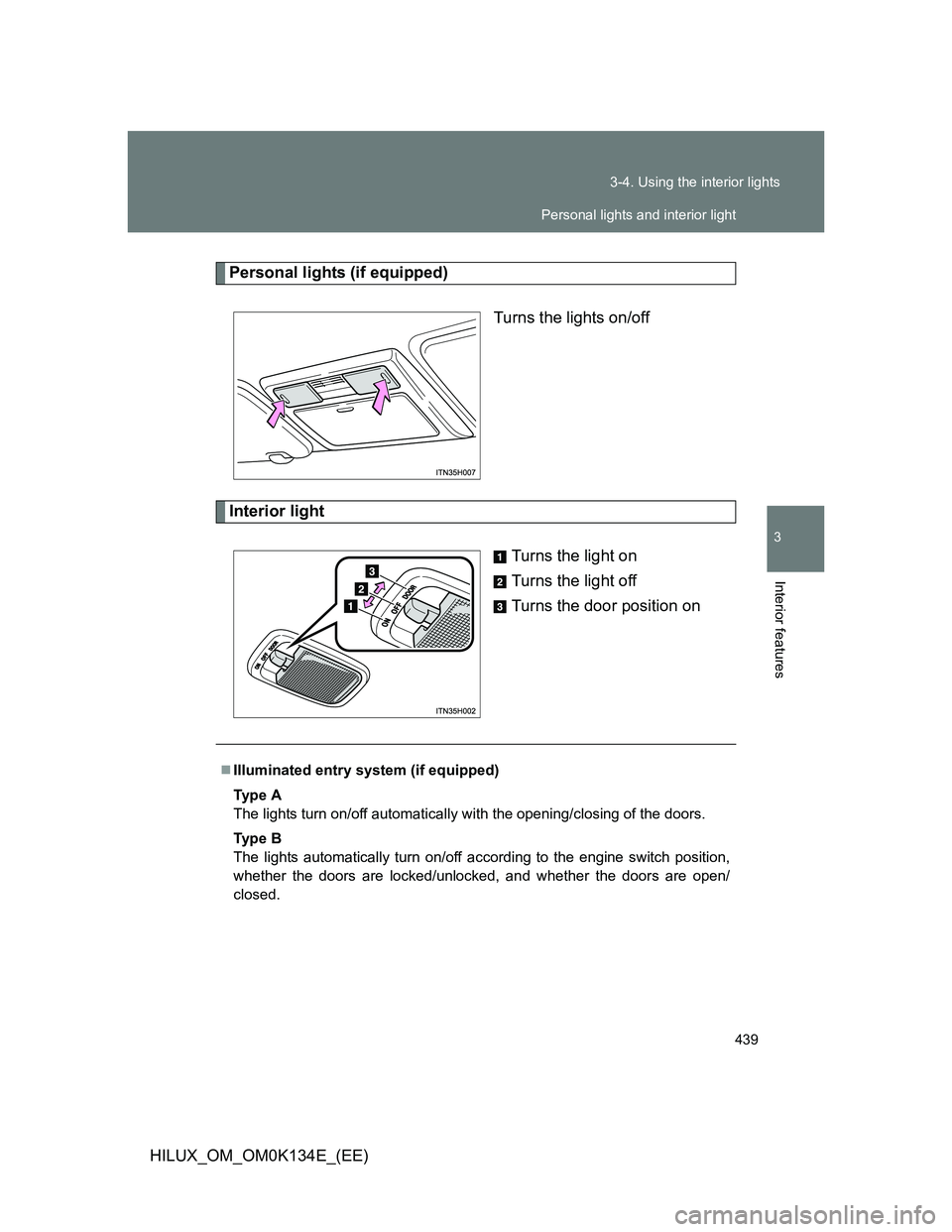
Personal lights (if equipped)
Turns the lights on/off
Interior light
Turns the light on
Turns the light off
Turns the door position on
Illuminated entry system (if equipped)
Ty p e A
The lights turn on/off automatically with the opening/closing of the doors.
Ty p e B
The lights automatically turn on/off according to the engine switch position,
whether the doors are locked/unlocked, and whether the doors are open/
closed.
Personal lights and interior light
Page 525 of 644
525 4-3. Do-it-yourself maintenance
4
Maintenance and care
HILUX_OM_OM0K134E_(EE)
FuseAmpereCircuit
24ECU-B10 A
Door courtesy switches, power
door lock system, wireless remote
control system, steering sensor
and headlights
25RAD15 AAudio system
26DOME7.5 A
Interior lights, engine switch light,
personal light, gauges and meters,
clock, multi-information display,
wireless remote control system,
daytime running light system and
fog light
27A/F20 AEmission control system
28ALT-S7.5 ACharging system
29TURN-HAZ15 AEmergency flashers and turn signal
lights
30ECU-B No.27.5 AAir conditioning system
31DCC30 AECU-B, DOME and RAD fuses