Page 188 of 684
188
2-2. Instrument cluster
Indicators and warning lights
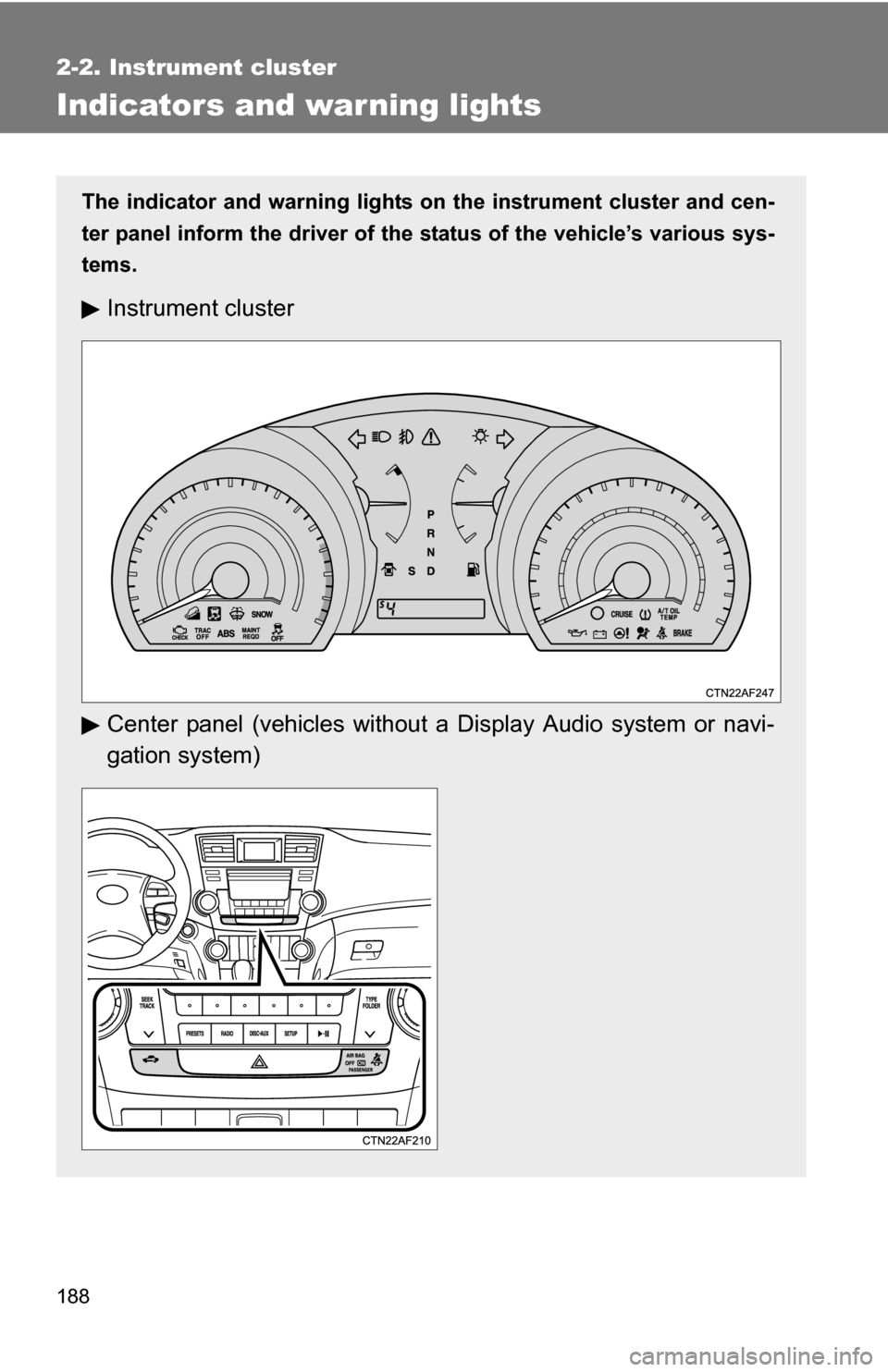
The indicator and warning lights on the instrument cluster and cen-
ter panel inform the driver of the status of the vehicle’s various sys-
tems.
Instrument cluster
Center panel (vehicles without a Display Audio system or navi-
gation system)
Page 191 of 684
191
2-2. Instrument cluster
2
When driving
*1: These lights turn on when the engine switch is turned to the “ON”
position (vehicles without smart key system) or the “ENGINE
START STOP” switch is turned to IGNITION ON mode (vehicles
with smart key system) to indicate that a system check is being per-
formed. They will turn off after the engine is started, or after a few
seconds. There may be a malfunction in a system if a light does not
come on, or if the lights do not turn off. Have the vehicle inspected
by your Toyota dealer for details.
*2: The light flashes to indicate that the system is operating.
■ Warning lights
Warning lights inform the driver of malfunctions in any of the
vehicle’s systems. ( P. 573)
(U.S.A.)(Canada)(U.S.A.)(Canada)(U.S.A.)
(Canada)(U.S.A.)
(if equipped)
*1*1*1*1, 2*1*1*1*1
*1*1, 2*1*1*1, 2*1, 2
*4*5*3*1*6
Page 192 of 684

192 2-2. Instrument cluster
CAUTION
■If a safety system warning light does not come on
Should a safety system light such as the ABS and SRS airbag warning light
not come on when you start the engine, this could mean that these systems
are not available to help protect you in an accident, which could result in
death or serious injury. Have the vehicle inspected by your Toyota dealer
immediately if this occurs.
*1: These lights turn on when the engine switch is turned to the “ON”
position (vehicles without smart key system) or the “ENGINE
START STOP” switch is turned to IGNITION ON mode (vehicles
with smart key system) to indicate that a system check is being per-
formed. They will turn off after the engine is started, or after a few
seconds. There may be a malfunction in a system if a light does not
come on, or if the lights do not turn off. Have the vehicle inspected
by your Toyota dealer for details.
*2: Vehicles without multi-information display
*3: Vehicles with multi-information display
*4: Vehicles without a navigation system
*5: Vehicles with a navigation system
*6: The light flashes to indicate a malfunction.
Page 194 of 684
194 2-2. Instrument cluster
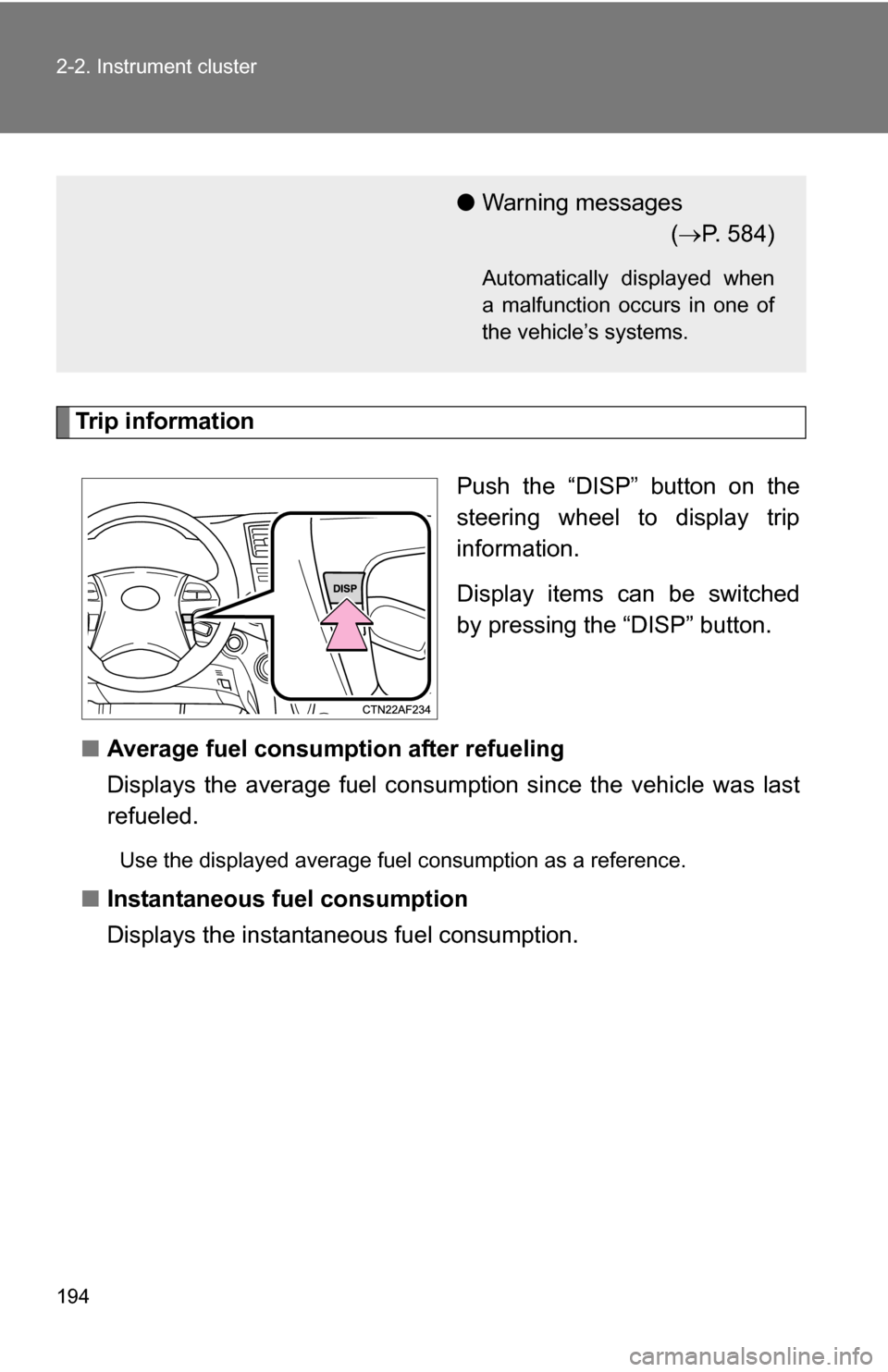
Trip informationPush the “DISP” button on the
steering wheel to display trip
information.
Display items can be switched
by pressing the “DISP” button.
■ Average fuel consumption after refueling
Displays the average fuel consumption since the vehicle was last
refueled.
Use the displayed average fuel consumption as a reference.
■Instantaneous fuel consumption
Displays the instantan eous fuel consumption.
●Warning messages
( P. 584)
Automatically displayed when
a malfunction occurs in one of
the vehicle’s systems.
Page 251 of 684
251
2-5. Driving information
2
When driving
NOTICE
■
Repairing or replacing snow tires
Request repairs of and obtain replacement snow tires from Toyota dealers or
legitimate tire retailers.
This is because the removal and attachment of snow tires affects the opera-
tion of the tire pressure warning valves and transmitters.
■ Fitting tire chains
The tire pressure warning valves and transmitters may not function correctly
when tire chains are fitted.
Page 304 of 684

304 3-2. Using the audio system
CAUTION
■Certifications
●Part 15 of the FCC Rules
FCC Warning:
Any unauthorized changes or modifications to this equipment will void the
user’s authority to operate this device.
● Laser products
• Do not take this unit apart or attempt to make any changes yourself.
This is an intricate unit that uses a laser pickup to retrieve information
from the surface of compact discs. The laser is carefully shielded so
that its rays remain inside the cabinet. Therefore, never try to disas-
semble the player or alter any of its parts since you may be exposed to
laser rays and dangerous voltages.
• This product utilizes a laser. Use of controls or adjustments or performance of procedures other
than those specified herein may result in hazardous radiation expo-
sure.
■ Certifications for the Bluetooth
® (with Display Audio system)
FCC ID: ACJ932CQ-US70G0
This device complies with Part 15 of FCC Rules.
Operation is subject to the following two conditions:
(1) this device may not cause interference, and
(2) this device must accept any interference, including interference that may cause undesired operation of this device.
The antenna for Bluetooth
® cannot be removed (or replaced) by user.
Page 305 of 684
305
3-2. Using the audio system
3
Interior features
CAUTION
FCC Warning:
Changes or modifications not expressly approved by the party responsible
for compliance could void the user’s authority to operate the equipment.
This device complies with Part 15 of the FCC Rules. Operation is subject to
the following two conditions: (1) this device may not cause harmful interfer-
ence, and (2) this device must accept any interference received, including
interference that may cause undesired operation.
This equipment complies with FCC radiation exposure limits set forth for an
uncontrolled environment and meets
the FCC radio frequency (RF) Expo-
sure Guidelines in Supplement C to OET65. This equipment has very low
levels of RF energy that it deemed to comply without maximum permissive
exposure evaluation (MPE). But it is desirable that it should be installed and
operated keeping the radiator at least 20cm or more away from person’s
body (excluding extremities: hands, wrists, feet and ankles).
NOTE: This equipment has been tested and found to comply with the limits
for a Class B digital device, pursuant to Part 15 of the FCC Rules. These lim-
its are designed to provide reasonable protection against harmful interfer-
ence in a residential installation. This equipment generates, uses and can
radiate radio frequency energy and, if not installed and used in accordance
with the instructions, may cause harmful interference to radio communica-
tions. However, there is no guarantee that interference will not occur in a
particular installation.
If this equipment does cause harmful interference to radio or television
reception, which can be determined by turning the equipment off and on, the
user is encouraged to try to correct the interference by one or more of the
following measures:
- Reorient or relocate the receiving antenna.
- Increase the separation between the equipment and receiver.
- Connect the equipment into an outlet on a circuit different from that to which the receiver is connected.
- Consult the dealer or an experienced radio/TV technician for help.
This transmitter must not be co-located or operated in conjunction with any
other antenna or transmitter.
Page 359 of 684

359
3-3. Using the Bluetooth
® audio system
3
Interior features
■
Certification for the Bluetooth® audio system
FCC ID: ACJ932C5ZZZ035
IC ID: 216J-C5ZZZ035
MADE IN JAPAN
This device complies with Part 15 of the FCC Rules and RSS-Gen of IC
Rules. Operation is subject to the following two conditions: (1) this device
may not cause harmful interference, and (2) this device must accept an\
y
interference received, including interference that may cause undesired oper-
ation.
CAUTION
■ FCC WARNING
Changes or modifications not expressly approved by the party responsible
for compliance could void the user's authority to operate the equipment.
Radio Frequency Radiation Exposure. This equipment complies with FCC/
IC radiation exposure limits set forth for uncontrolled equipment and meets
the FCC radio frequency (RF) Exposure Guidelines in Supplement C to
OET65 and RSS-102 of the IC radio frequency (RF) Exposure rules. This
equipment has very low levels of RF energy that it deemed to comply with-
out maximum permissive exposure evaluation (MPE). But it is desirable that
it should be installed and operated with at least 7.9 in. (20 cm) and more
between the radiator and person’s body (excluding extremities: hands,
wrists, feet and ankles).
This transmitter must not be co-located or operated in conjunction with any
other antenna or transmitter.
■ Caution while driving
Do not connect portable players or operate the controls.
NOTICE
■To prevent damage to portable players
Do not leave portable players in the vehicle. The temperature inside the
vehicle may become high, resulting in damage to the player.