Page 264 of 684
264 2-5. Driving information
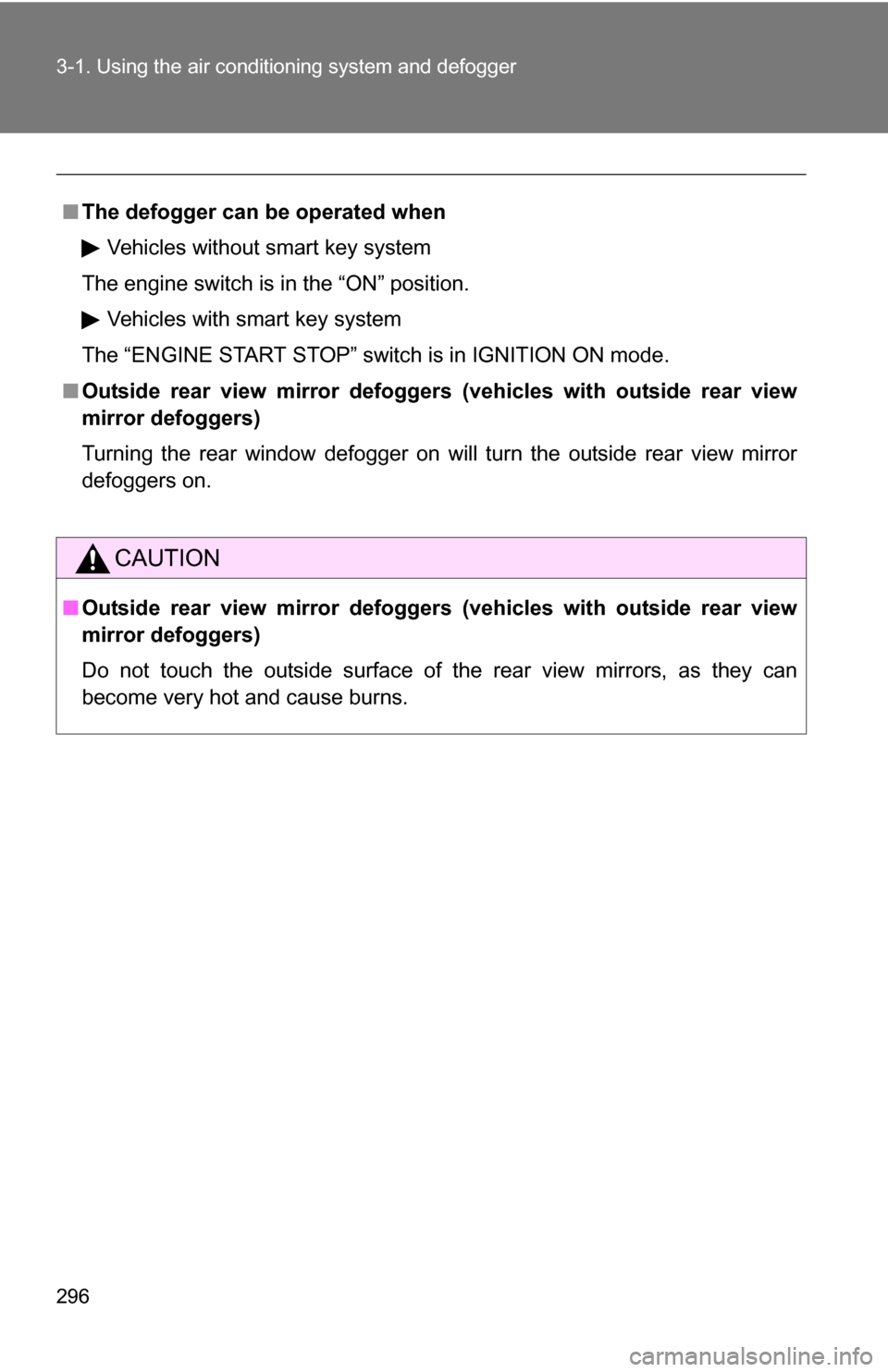
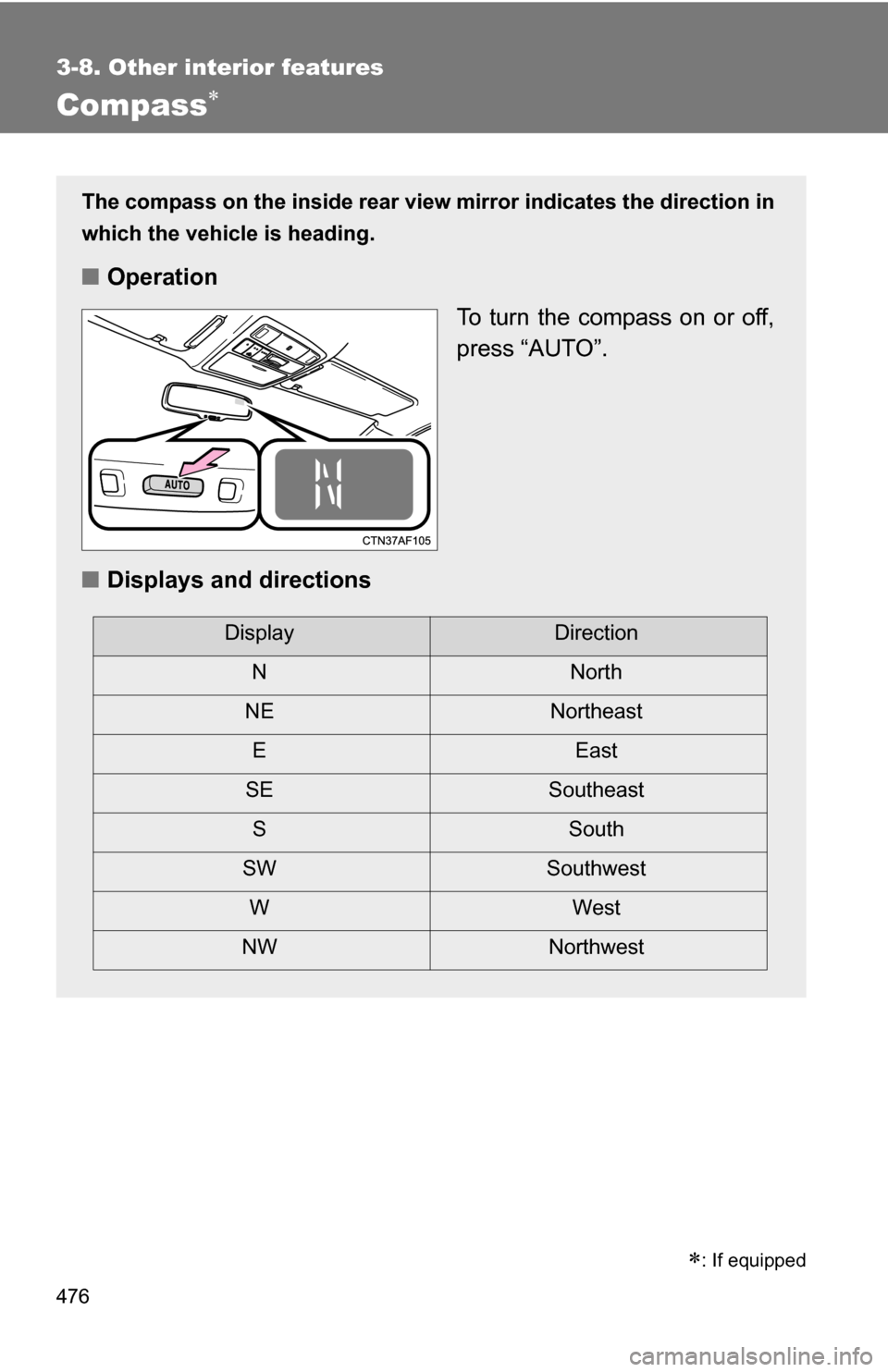
■Matching trailer ball height to trailer coupler height
■ Before towing
Check that the following conditions are met:
●Ensure that your vehicle’s tires are properly inflated. ( P. 630)
● Trailer tires are inflated according to the trailer manufacturer’s recom-
mendation.
● All trailer lights work as required by law.
● All lights work each time you connect them.
● The trailer ball is set at the proper height for the coupler on the trai\
ler.
● The trailer is level when it is hitched.
Do not drive if the trailer is not level, and check for improper tongue
weight, overloading, worn suspension, or other possible causes.
● The trailer cargo is securely loaded.
● The rear view mirrors conform to all applicable federal, state/provincial or
local regulations. If they do not, install rear view mirrors appropriate for
towing purposes.
No matter which class of tow hitch
applies, for a more safe trailer hookup,
the trailer ball setup must be the proper
height for the coupler on the trailer.
Coupler
Trailer ball
Page 272 of 684

272
3-1. Using the air conditioning system and defogger
Front manual air conditioning system ....... 274
Front automatic air conditioning system ....... 281
Rear manual air conditioning system ....... 289
Rear automatic air conditioning system ....... 292
Rear window and outside rear view
mirror defoggers ............ 295
Windshield wiper de-icer ............................ 297
Using the steering wheel climate remote control
switches ......................... 298
3-2. Using the audio system Audio system ................... 299
Using the radio ................. 307
Using the CD player ......... 314
Playing back MP3 and WMA discs ..................... 322
Operating an iPod ............ 330
Operating a USB memory .......................... 337
Optimal use of the audio system ........................... 345
Using the AUX port .......... 349
Using the steering wheel audio switches ............... 351
Detachable pole antenna .......................... 354 3-3. Using the Bluetooth®
audio system
Bluetooth
® audio
system ........................... 357
Using the Bluetooth
®
audio system.................. 360
Operating a Bluetooth
®
enabled portable
player ............................. 365
Setting up a Bluetooth
®
enabled portable
player ............................. 367
Bluetooth
® audio system
setup .............................. 372
3-4. Using the hands-free phone system
(for cellular phone)
Hands-free phone system (for cellular phone)
features .......................... 373
Using the hands-free phone system ................ 377
Making a phone call ......... 386
Setting a cellular phone ... 390
Security and system setup .............................. 395
Using the phone book ...... 399
Interior features3
Page 295 of 684
295
3-1. Using the air conditioning system and defogger
3
Interior features
Rear window and outside rear view mirror defoggers
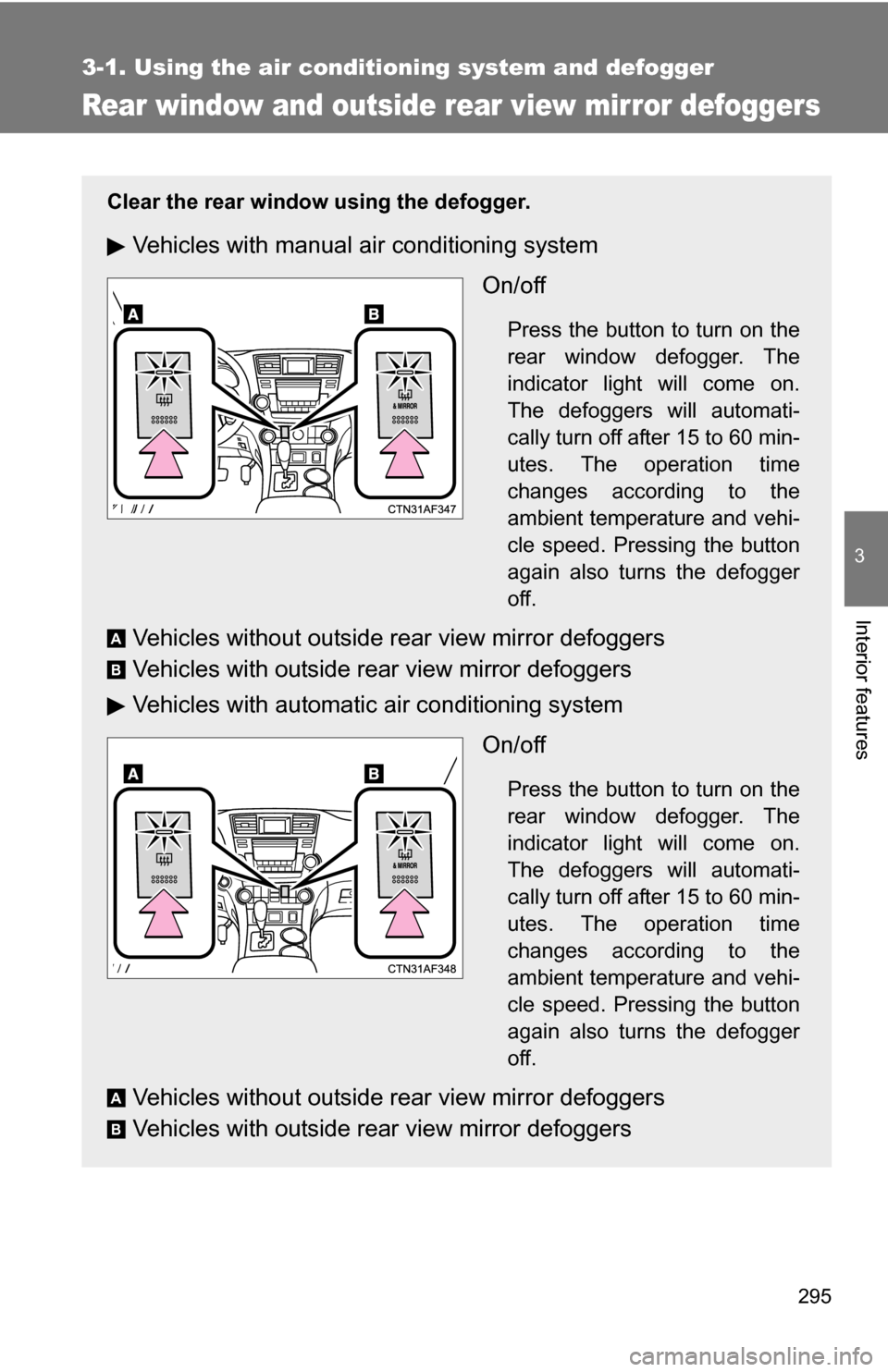
Clear the rear window using the defogger.
Vehicles with manual air conditioning systemOn/off
Press the button to turn on the
rear window defogger. The
indicator light will come on.
The defoggers will automati-
cally turn off after 15 to 60 min-
utes. The operation time
changes according to the
ambient temperature and vehi-
cle speed. Pressing the button
again also turns the defogger
off.
Vehicles without outside rear view mirror defoggers
Vehicles with outside rear view mirror defoggers
Vehicles with automatic air conditioning systemOn/off
Press the button to turn on the
rear window defogger. The
indicator light will come on.
The defoggers will automati-
cally turn off after 15 to 60 min-
utes. The operation time
changes according to the
ambient temperature and vehi-
cle speed. Pressing the button
again also turns the defogger
off.
Vehicles without outside rear view mirror defoggers
Vehicles with outside rear view mirror defoggers
A
B
A
B
Page 296 of 684
296 3-1. Using the air conditioning system and defogger
■The defogger can be operated when
Vehicles without smart key system
The engine switch is in the “ON” position.
Vehicles with smart key system
The “ENGINE START STOP” switch is in IGNITION ON mode.
■ Outside rear view mirror defoggers (vehicles with outside rear view
mirror defoggers)
Turning the rear window defogger on will turn the outside rear view mirror
defoggers on.
CAUTION
■ Outside rear view mirror defoggers (vehicles with outside rear view
mirror defoggers)
Do not touch the outside surface of the rear view mirrors, as they can
become very hot and cause burns.
Page 476 of 684
476
3-8. Other interior features
Compass
The compass on the inside rear view mirror indicates the direction in
which the vehicle is heading.
■ Operation
To turn the compass on or off,
press “AUTO”.
■ Displays and directions
DisplayDirection
NN orth
NE Northeast
EE ast
SE Southeast
S South
SW Southwest
WW est
NW Northwest
: If equipped
Page 478 of 684
478 3-8. Other interior features
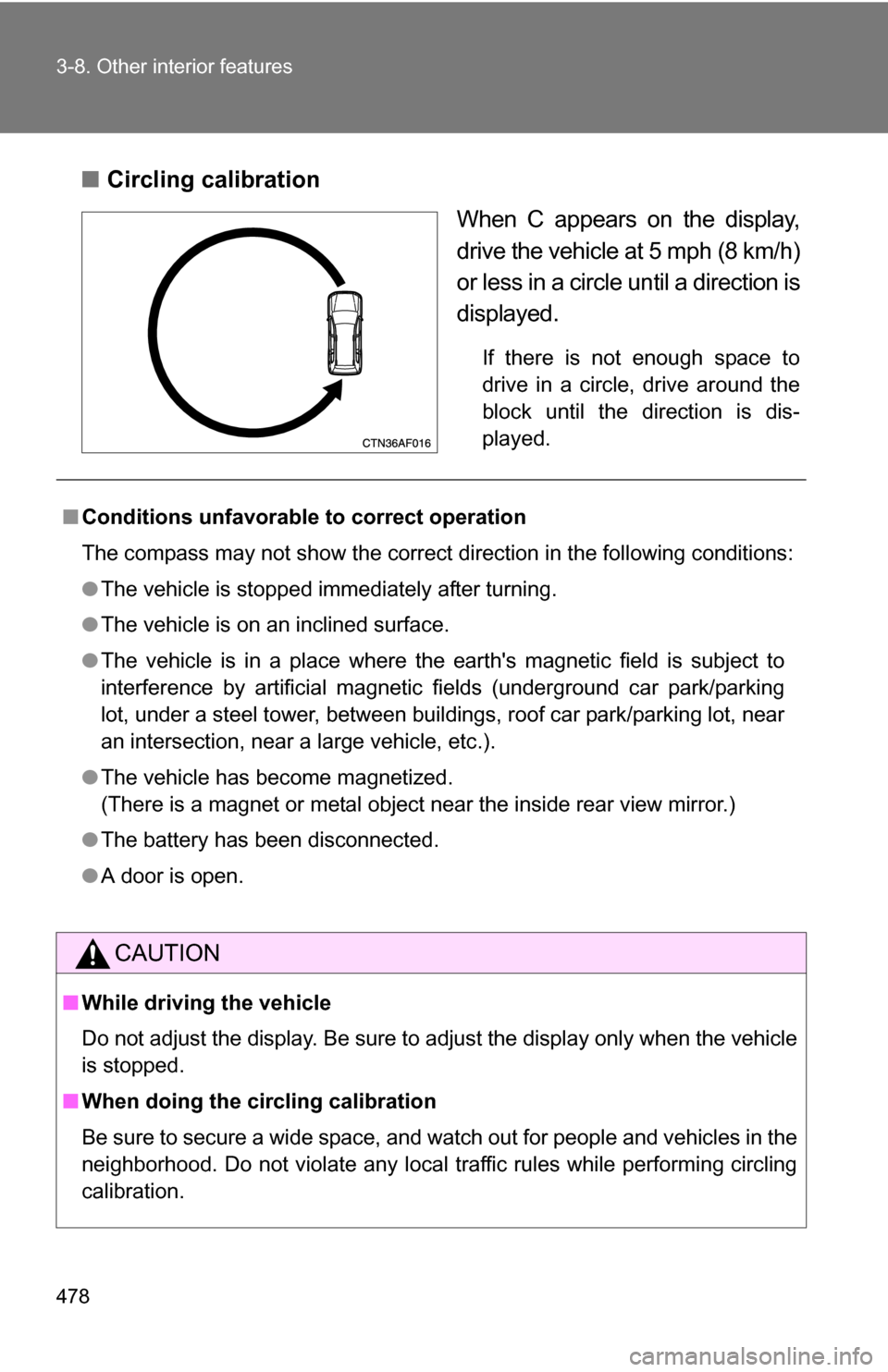
■Circling calibration
When C appears on the display,
drive the vehicle at 5 mph (8 km/h)
or less in a circle until a direction is
displayed.
If there is not enough space to
drive in a circle, drive around the
block until the direction is dis-
played.
■ Conditions unfavorable to correct operation
The compass may not show the correct direction in the following conditions:
●The vehicle is stopped immediately after turning.
● The vehicle is on an inclined surface.
● The vehicle is in a place where the earth's magnetic field is subject to
interference by artificial magnetic fields (underground car park/parking
lot, under a steel tower, between buildings, roof car park/parking lot, near
an intersection, near a large vehicle, etc.).
● The vehicle has become magnetized.
(There is a magnet or metal object near the inside rear view mirror.)
● The battery has been disconnected.
● A door is open.
CAUTION
■While driving the vehicle
Do not adjust the display. Be sure to adjust the display only when the vehicle
is stopped.
■ When doing the circling calibration
Be sure to secure a wide space, and watch out for people and vehicles in the
neighborhood. Do not violate any local traffic rules while performing circling
calibration.
Page 479 of 684
479
3-8. Other interior features
3
Interior features
NOTICE
■
To avoid compass malfunctions
Do not place magnets or any metal objects near the inside rear view mirror.
Doing this may cause a malfunction of the compass sensor.
■ To ensure normal operation of the compass
●Do not perform circling calibration of the compass in a place where the
earth's magnetic field is subject to interference by artificial magnetic fields.
● During calibration, do not operate electric systems (moon roof, power win-
dows, etc.) as they may interfere with the calibration.
Page 546 of 684
546 4-3. Do-it-yourself maintenance
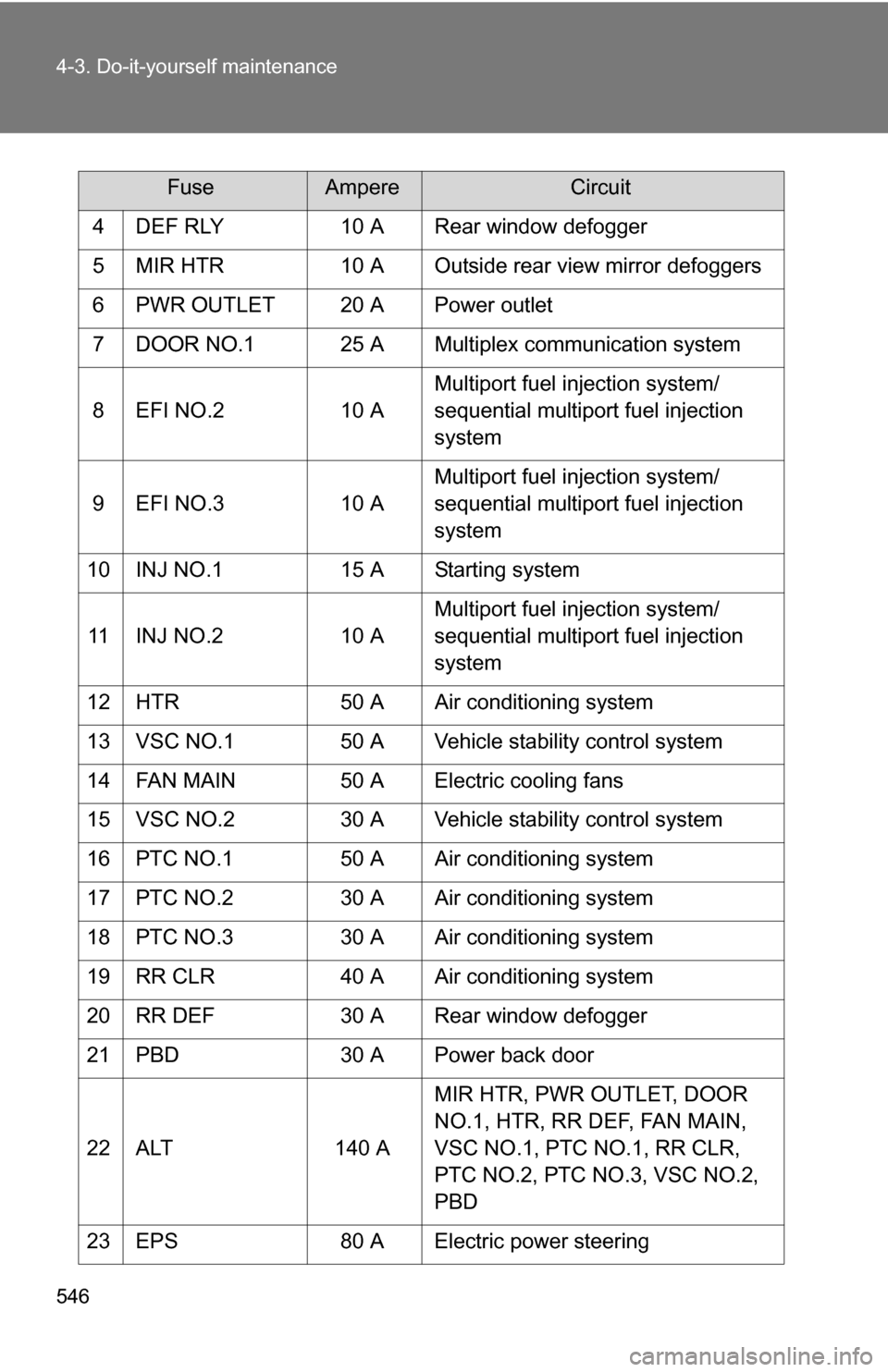
4 DEF RLY10 A Rear window defogger
5 MIR HTR 10 A Outside rear view mirror defoggers
6 PWR OUTLET 20 A Power outlet
7 DOOR NO.1 25 A Multiplex communication system
8 EFI NO.2 10 AMultiport fuel injection system/
sequential multiport fuel injection
system
9 EFI NO.3 10 AMultiport fuel injection system/
sequential multiport fuel injection
system
10 INJ NO.1 15 A Starting system
11 INJ NO.2 10 AMultiport fuel injection system/
sequential multiport fuel injection
system
12 HTR 50 A Air conditioning system
13 VSC NO.1 50 A Vehicle stability control system
14 FAN MAIN 50 A Electric cooling fans
15 VSC NO.2 30 A Vehicle stability control system
16 PTC NO.1 50 A Air conditioning system
17 PTC NO.2 30 A Air conditioning system
18 PTC NO.3 30 A Air conditioning system
19 RR CLR 40 A Air conditioning system
20 RR DEF 30 A Rear window defogger
21 PBD 30 A Power back door
22 ALT 140 AMIR HTR, PWR OUTLET, DOOR
NO.1, HTR, RR DEF, FAN MAIN,
VSC NO.1, PTC NO.1, RR CLR,
PTC NO.2, PTC NO.3, VSC NO.2,
PBD
23 EPS 80 A Electric power steering
FuseAmpereCircuit