Page 230 of 532

230 3-2. Using the audio system
CAUTION
■Canada (type B and type D)
This device complies with Industry Canada licence-exempt RSS
standard(s).
Operation is subject to the following two conditions:
(1) this device may not cause interference, and
(2) this device must accept any interference, including interference that may
cause undesired operation of this device.
Le présent appareil est conforme aux CNR d’Industrie Canada applicables
aux appareils radio exempts de licence.
L’exploitation est autorisée aux deux conditions suivantes : (1) l’appareil ne
doit pas produire de brouillage, et (2) l’utilisateur de l’appareil doit accepter
tout brouillage radioélectrique subi, même si le brouillage est susceptible
d’en compromettre le fonctionnement.
Under Industry Canada regulations, this radio transmitter may only operate
using an antenna of a type and maximum (or lesser) gain approved for the
transmitter by Industry Canada. To reduce potential radio interference to
other users, the antenna type and its gain should be so chosen that the
equivalent isotropically radiated power (e.i.r.p.) is not more than that neces-
sary for successful communication.
Conformément à la réglementation d’Industrie Canada, le présent émetteur
radio peut fonctionner avec une antenne d’un type et d’un gain maximal (ou
inférieur) approuvé pour l’émetteur pa r Industrie Canada. Dans le but de
réduire les risques de brouillage radioélectrique à l’intention des autres
utilisateurs, il faut choisir le type d’antenne et son gain de sorte que la
puissance isotrope rayonnée équivalente (p.i.r.e.) ne dépasse pas l’intensité
nécessaire à l’établissement d’une communication satisfaisante.
Page 231 of 532
231
3-2. Using the audio system
3
Interior features
CAUTION
This equipment complies with IC radiation exposure limits set forth for an
uncontrolled environment and meets RSS-102 of the IC radio frequency
(RF) Exposure rules. This equipment has very low levels of RF energy that it
deemed to comply without maximum permissive exposure evaluation
(MPE). But it is desirable that it should be installed and operated keeping the
radiator at least 20cm or more away
from person's body (excluding extremi-
ties: hands, wrists, feet and ankles).
Cet équipement est conforme aux limites d’exposition aux rayonnements
énoncées pour un environnement non contrôlé et respecte les règles
d’exposition aux fréquences radioélectriques (RF) CNR-102 de l’IC. Cet
équipement émet une énergie RF très faible qui est considérée conforme
sans évaluation de l’exposition maximale autorisée.
Cependant, cet équipement doit être installé et utilisé en gardant une
distance de 20 cm ou plus entre le dispositif rayonnant et le corps (à
l’exception des extrémités : mains, poignets, pieds et chevilles).
Page 233 of 532
233
3-2. Using the audio system
3
Interior features
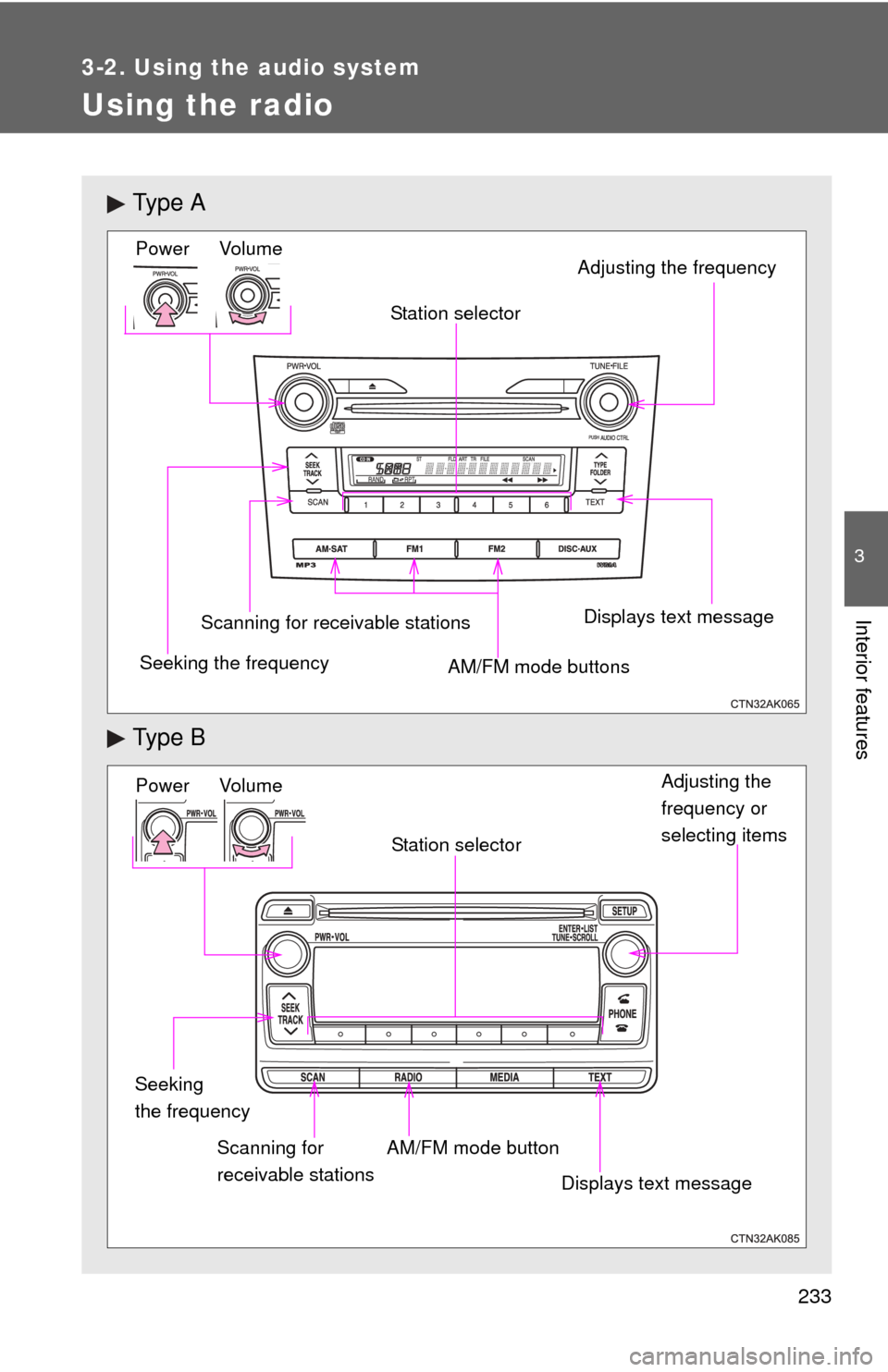
Using the radio
Ty p e A
Ty p e B
Vo lu m e
Seeking the frequency Station selector
AM/FM mode buttons Adjusting the frequency Power
Scanning for receivable stationsDisplays text message
Power Volume
Adjusting the
frequency or
selecting items
Seeking
the frequency AM/FM mode button
Scanning for
receivable stations Station selector
Displays text message
Page 234 of 532
234 3-2. Using the audio system
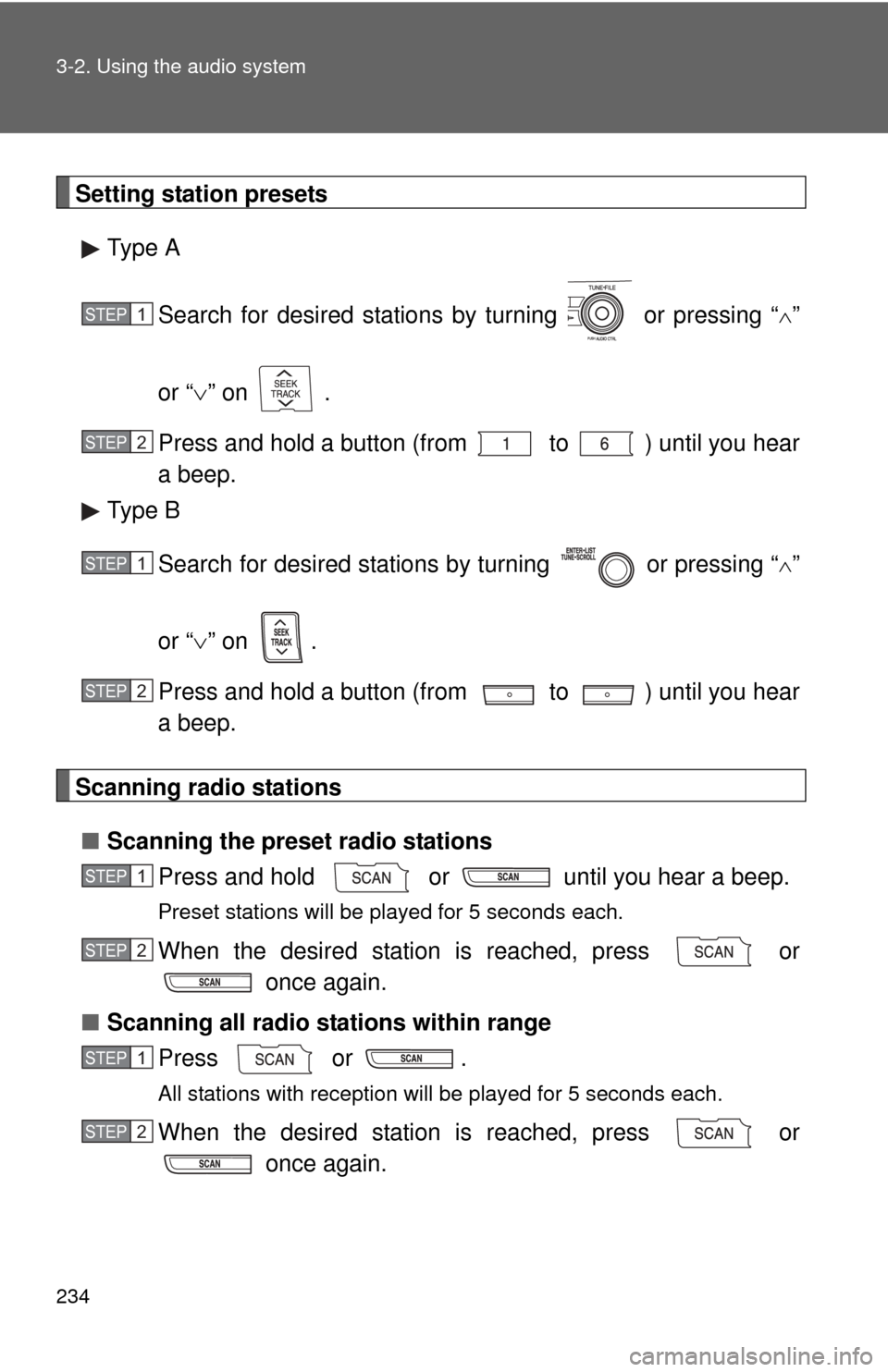
Setting station presetsType A
Search for desired stations by turning or pressing “
”
or “ ” on .
Press and hold a button (from to ) until you hear
a beep.
Type B
Search for desired stations by turning or pressing “
”
or “ ” on .
Press and hold a button (from to ) until you hear
a beep.
Scanning radio stations
■ Scanning the preset radio stations
Press and hold or until you hear a beep.
Preset stations will be played for 5 seconds each.
When the desired station is reached, press or once again.
■ Scanning all radio stations within range
Press or .
All stations with reception will be played for 5 seconds each.
When the desired station is reached, press or once again.
STEP 1
STEP 2
STEP 1
STEP 2
STEP 1
STEP 2
STEP 1
STEP 2
Page 235 of 532
235
3-2. Using the audio system
3
Interior features
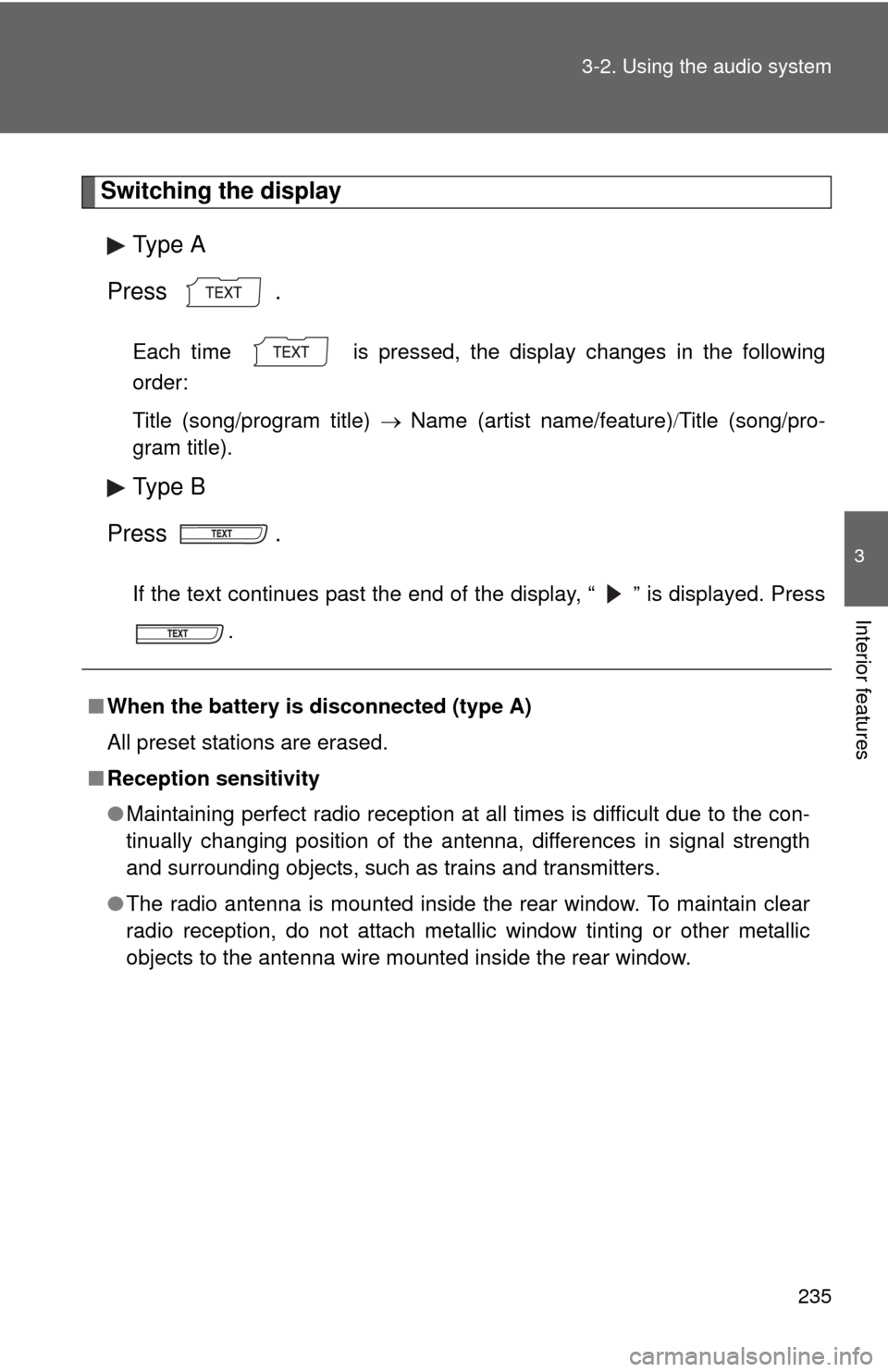
Switching the display
Type A
Press .
Each time is pressed, the display changes in the following
order:
Title (song/program title) Name (artist name/feature) Title (song/pro-
gram title).
Type B
Press .
If the text continues past the end of the display, “ ” is displayed. Press .
■When the battery is disconnected (type A)
All preset stations are erased.
■ Reception sensitivity
●Maintaining perfect radio reception at all times is difficult due to the con-
tinually changing position of the antenna, differences in signal strength
and surrounding objects, such as trains and transmitters.
● The radio antenna is mounted inside the rear window. To maintain clear
radio reception, do not attach metallic window tinting or other metallic
objects to the antenna wire mounted inside the rear window.
Page 236 of 532
236 3-2. Using the audio system
■Certifications for the radio tuner
This equipment has been tested and found to comply with the limits for a
class B digital device, pursuant to Part 15 of the FCC Rules. These limits are
designed to provide reasonable protection against harmful interference in a
residential installation. This equipment generates, uses and can radiate
radio frequency energy and, if not installed and used in accordance with the
instructions, may cause harmful interference to radio communications. How-
ever, there is no guarantee that interference will not occur in a particular
installation.
If this equipment does cause harmful interference to radio or television
reception, which can be determined by turning the equipment off and on, the
user is encouraged to try to correct the interference by trying one or more of
the following:
●Reorienting or relocating the receiving antenna.
● Increasing the separation between the equipment and receiver.
● Connecting the equipment into an outlet on a circuit different from that to
which the receiver is connected.
● Consulting the dealer or an experienc ed radio/TV technician for help.
Page 272 of 532
272 3-2. Using the audio system
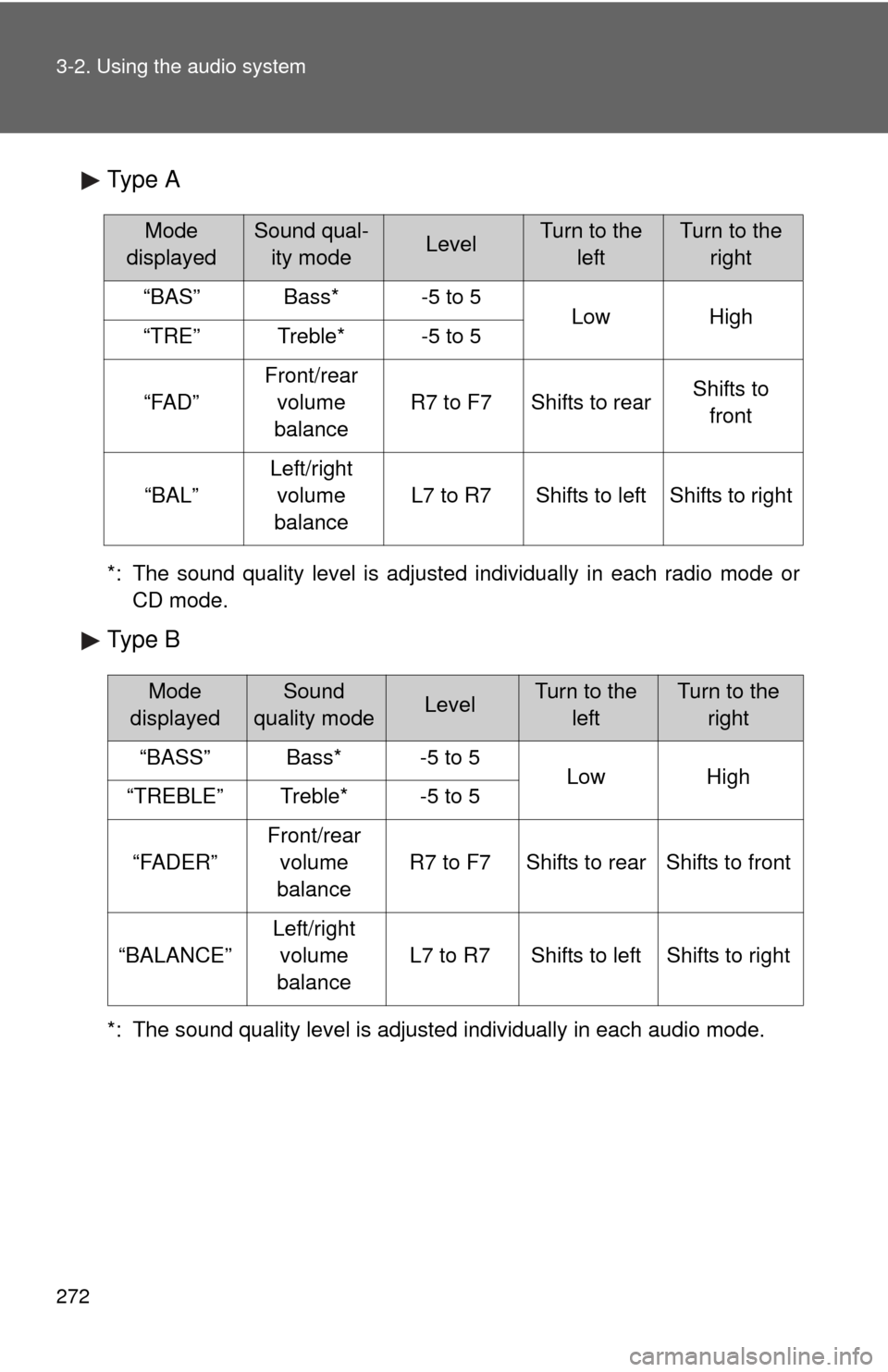
Type A
*: The sound quality level is adjusted individually in each radio mode orCD mode.
Type B
*: The sound quality level is adjusted individually in each audio mode.
Mode
displayedSound qual- ity modeLevelTurn to the leftTurn to the right
“BAS”Bass*-5 to 5LowHigh“TRE”Treble*-5 to 5
“FAD”
Front/rear volume
balance
R7 to F7Shifts to rearShifts to front
“BAL”
Left/right volume
balance
L7 to R7Shifts to leftShifts to right
Mode
displayedSound
quality modeLevelTurn to the leftTurn to the right
“BASS”Bass*-5 to 5LowHigh“TREBLE”Treble*-5 to 5
“FADER”
Front/rear volume
balance
R7 to F7Shifts to rearShifts to front
“BALANCE”
Left/right volume
balance
L7 to R7Shifts to leftShifts to right
Page 273 of 532
273
3-2. Using the audio system
3
Interior features
■
Adjusting the Automatic Sound Levelizer (ASL)
When “ASL” is selected, turning or to the right
changes the amount of “ASL” in the order of “LOW”, “MID” and
“HIGH”.
Turning or to the left turns “ASL” off.
ASL automatically adjusts the volume and tone quality according to vehi-
cle speed.
■Trademark owned by SRS Labs, Inc. (provided to the audio models
with SRS Labs technology)
The audio systems utilize SRS FOCUS
® and SRS TruBass® audio
enhancement technologies, under license from SRS Labs, Inc., in all modes
except AM radio mode.
FOCUS, TruBass, SRS and symbol are trademarks of SRS Labs,
Inc.
FOCUS and TruBass technologies are incorporated under license from
SRS Labs, Inc.
SRS TruBass
® enhances the perception of bass frequencies to provide
deep, rich bass response from any size speaker.
SRS FOCUS
® raises the audio image from non-optimally placed speakers
up to the natural listening height at ear level.