Page 226 of 704
226
2-4. Using other driving systems
4RUNNER_U
Rear view monitor system (rear view mirror-attached type)
The rear view monitor assists the driver by displaying an image of
the area behind the vehicle while r eversing. The image is displayed
in reverse on the screen. This reversed image is a similar image to
the one on the inside rear view mirror.
The rear view image is dis-
played when the shift lever is
in R.
• If the shift lever is shifted out of R, the screen is turned off.
• The screen remains on for approximately 5 minutes.
CTH24AS076
: If equipped
Page 233 of 704
233
2-4. Using other
driving systems
2
When driving
4RUNNER_U
■Smear effect
■ Flicker effect
When the camera is used under fluorescent light, sodium lights, or mercury
lights etc., the lights and the illuminated areas may appear to flicker.
●The sun or headlights are shining
directly into the camera lens.
● A bright object such as a white wall is
reflected in the mirror surface over the
monitor.
If a bright light, such as sunlight reflected
off the vehicle body, is picked up by the
camera, a smear effect* characteristic to
the camera may occur.
*: Smear effect A phenomenon that
occurs when a bright light is picked up
by the camera; when transmitted by the
camera, the light source appears to
have a vertical streak above and below
it.
CTH24AS079
Page 234 of 704

234 2-4. Using other driving systems
4RUNNER_U
CAUTION
■When using the rear view monitor system
Observe the following precautions to avoid an accident that could result in
death or serious injuries:
● Never depend solely on the monitor system when reversing.
● Always check visually and with the mirrors to confirm your intended path is
clear.
● Use your own eyes to confirm the vehicle’s surroundings, as the displayed
image may become faint or dark, and moving images will be distorted, or
not entirely visible when the outside temperature is low. When backing up,
be sure to check behind and all around the vehicle visually and with the
mirrors before proceeding.
● Always check the vehicle surroundi ng area, because the guide lines are
ancillary lines.
● The guide lines are ancillary lines and do not change even if the steeri\
ng
wheel is turned.
● Depicted distances between objects and flat surfaces differ from actual
distances.
● Do not use the system if the back door is open.
■ Conditions which may affect the rear view monitor system
● If the back of the vehicle has been hit, the camera’s position and mounting
angle may have changed. Have the vehicle inspected by your Toyota
dealer.
● Rapid temperature changes, such as when hot water is poured on the
vehicle in cold weather, may cause the system to function abnormally.
● If the camera lens is dirty, it cannot transmit a clear image. Rinse with
water and wipe with a soft cloth. If the camera lens is extremely dirty, wash
with a mild cleanser and rinse.
● The displayed image may be darker and moving images may be slightly
distorted when the system is cold.
■ Caution while driving in reverse
Do not change modes while the vehicle is moving.
Page 308 of 704
308 2-5. Driving information
4RUNNER_U
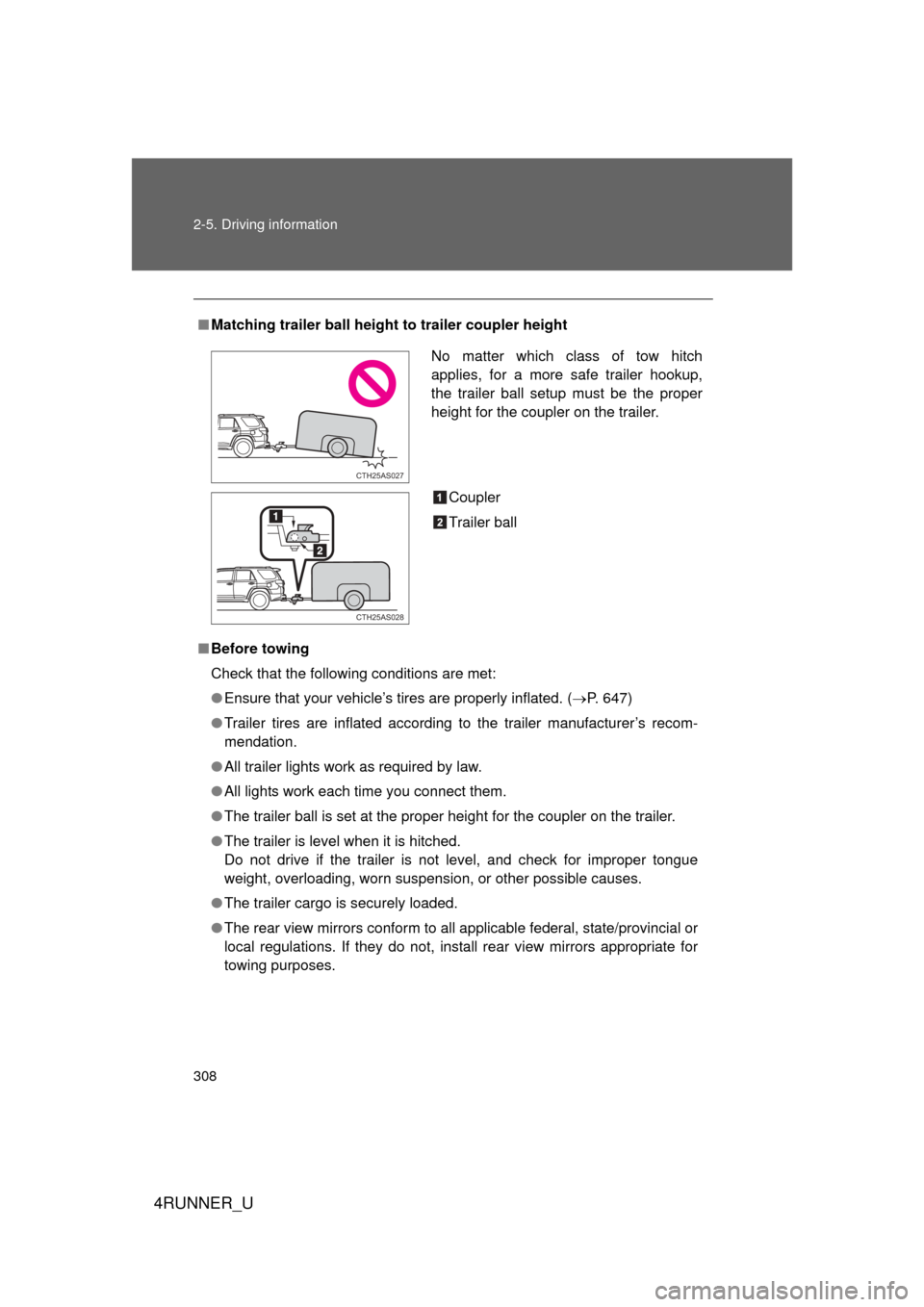
■Matching trailer ball height to trailer coupler height
■ Before towing
Check that the following conditions are met:
● Ensure that your vehicle’s tires are properly inflated. ( P. 647)
● Trailer tires are inflated according to the trailer manufacturer’s recom-
mendation.
● All trailer lights work as required by law.
● All lights work each time you connect them.
● The trailer ball is set at the proper height for the coupler on the trai\
ler.
● The trailer is level when it is hitched.
Do not drive if the trailer is not level, and check for improper tongue
weight, overloading, worn suspension, or other possible causes.
● The trailer cargo is securely loaded.
● The rear view mirrors conform to all applicable federal, state/provincial or
local regulations. If they do not, install rear view mirrors appropriate for
towing purposes.
No matter which class of tow hitch
applies, for a more safe trailer hookup,
the trailer ball setup must be the proper
height for the coupler on the trailer.
Coupler
Trailer ball
CTH25AS027
CTH25AS028
Page 314 of 704
314
4RUNNER_U
3-1. Using the air conditioning system and defogger
Manual air conditioning system ........................... 316
Automatic air conditioning system ........................... 322
Rear window and outside rear view
mirror defoggers ............ 331
Windshield wiper de-icer ............................ 333
3-2. Using the audio system Audio system types .......... 334
Using the radio ................. 341
Using the CD player ......... 348
Playing MP3 and WMA discs............................... 357
Operating an iPod ............ 365
Operating a USB memory .......................... 372
Optimal use of the audio system .................. 379
Using the AUX port .......... 384
Using the steering wheel audio switches ............... 385
Detachable pole antenna .......................... 388
Interior features3
Page 315 of 704
Interior features3
315
4RUNNER_U
3-3. Using the Bluetooth®
audio system
Bluetooth
® audio
system ........................... 391
Using the Bluetooth
®
audio system.................. 394
Operating a Bluetooth
®
enabled portable
player ............................. 399
Setting up a Bluetooth
®
enabled portable
player ............................. 401
Bluetooth
® audio system
setup .............................. 406
3-4. Using the hands-free phone system
(for cellular phone)
Hands-free phone system (for cellular phone)
features .......................... 407
Using the hands-free phone system
(for cellular phone) ......... 412
Making a phone call ......... 420
Setting a cellular phone ............................. 424
Security and system setup .............................. 429
Using the phone book ...... 433
3-5. Using the interior lights Interior lights list ............... 441
• Interior lights .................. 442
• Personal lights ............... 442 3-6. Using the storage features
List of storage features .... 444
• Glove box....................... 445
• Console box ................... 446
• Coin holder .................... 447
• Tissue pocket ................. 448
• Pen holder ..................... 449
• Auxiliary box .................. 450
• Cup holders ................... 452
• Bottle holders ................. 455
3-7. Other interior features Sun visors ........................ 457
Vanity mirrors ................... 458
Clock ................................ 459
Outside temperature display............................ 461
Power outlets (12 V DC) ....................... 464
Power outlets (120 V AC) ..................... 467
Seat heaters..................... 474
Armrest ............................ 476
Assist grips....................... 477
Floor mat .......................... 478
Compass .......................... 480
Luggage compartment features .......................... 486
Garage door opener......... 492
Safety Connect ................ 499
Page 331 of 704
331
3-1. Using the air conditioning system and defogger
3
Interior features
4RUNNER_U
Rear window and outside rear view mirror defoggers
Defoggers are used to defog the rear window, and to remove rain-
drops, dew and frost from the outside rear view mirrors.
Before operating the defoggers, make sure the back window is
completely closed. ( P. 101)
Vehicles with a manual air conditioning system Turns the defoggers on/off
The defoggers will automati-
cally turn off after their opera-
tion time. The operation time
varies depending on the ambi-
ent temperature and vehicle
speed.
Vehicles with an automatic air conditioning systemTurns the defoggers on/off
The defoggers will automati-
cally turn off after their opera-
tion time. The operation time
varies depending on the ambi-
ent temperature and vehicle
speed.
Page 332 of 704
332 3-1. Using the air conditioning system and defogger
4RUNNER_U
■The defoggers can be operated when
● Vehicles without a smart key system:
The engine switch is in the “ON” position.
Vehicles with a smart key system:
The “ENGINE START STOP” switch is in IGNITION ON mode.
● The back window is completely closed.
■ The outside rear view mirror defoggers
Turning the rear window defogger on will turn the outside rear view mirror
defoggers on.
CAUTION
■ When the outside rear view mirror defoggers are on
Do not touch outside surface of the rear view mirrors, as they can become
very hot and burn you.