2013 SUBARU TRIBECA audio
[x] Cancel search: audioPage 192 of 420
Audio set
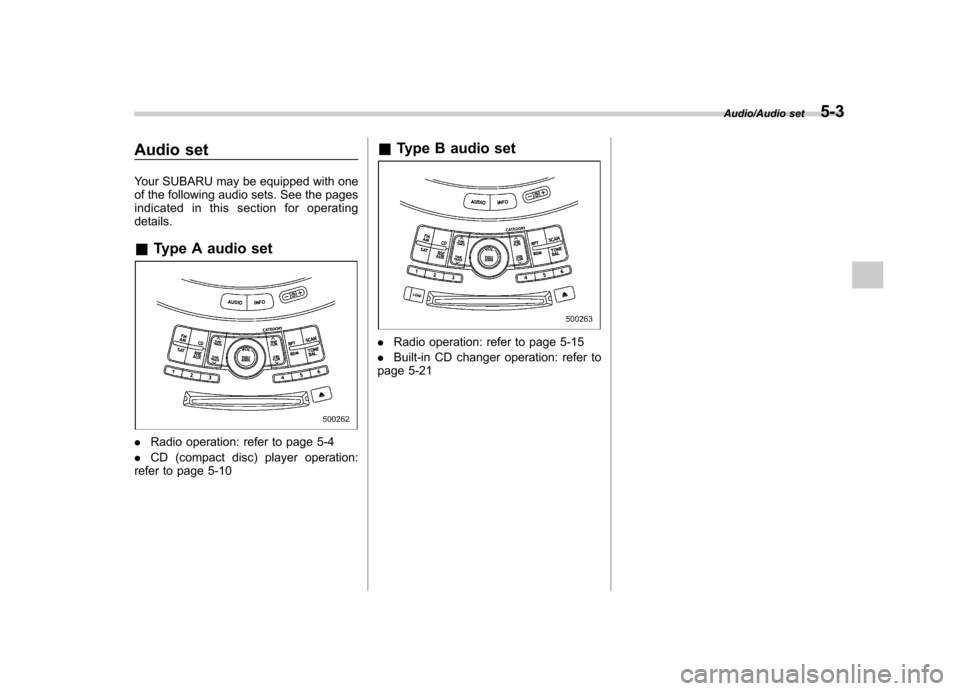
Your SUBARU may be equipped with one
of the following audio sets. See the pages
indicated in this section for operatingdetails. &Type A audio set
.Radio operation: refer to page 5-4
. CD (compact disc) player operation:
refer to page 5-10 &
Type B audio set
.Radio operation: refer to page 5-15
. Built-in CD changer operation: refer to
page 5-21
Audio/Audio set5-3
Page 193 of 420
5-4Audio/Type A audio set
Type A audio set (if equipped)
The audio set will operate only when the ignition switch is in the“Acc ”or “ON ”position.
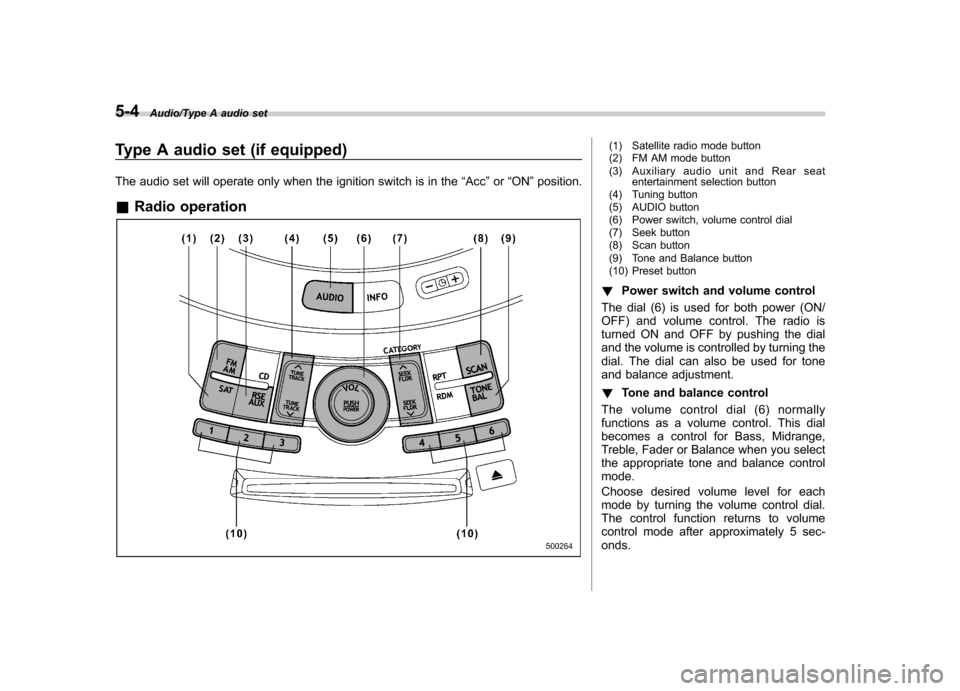
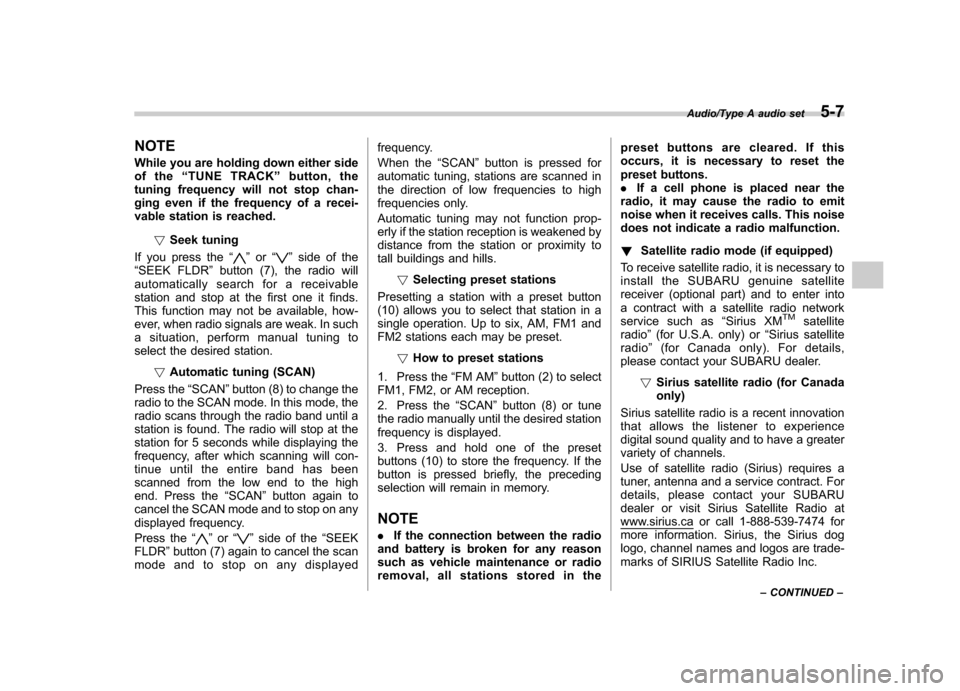
& Radio operation(1) Satellite radio mode button
(2) FM AM mode button
(3) Auxiliary audio unit and Rear seat
entertainment selection button
(4) Tuning button
(5) AUDIO button
(6) Power switch, volume control dial
(7) Seek button
(8) Scan button
(9) Tone and Balance button
(10) Preset button
! Power switch and volume control
The dial (6) is used for both power (ON/
OFF) and volume control. The radio is
turned ON and OFF by pushing the dial
and the volume is controlled by turning the
dial. The dial can also be used for tone
and balance adjustment. ! Tone and balance control
The volume control dial (6) normally
functions as a volume control. This dial
becomes a control for Bass, Midrange,
Treble, Fader or Balance when you select
the appropriate tone and balance controlmode.
Choose desired volume level for each
mode by turning the volume control dial.
The control function returns to volume
control mode after approximately 5 sec-onds.
Page 194 of 420
!To change tone and balance
control modes
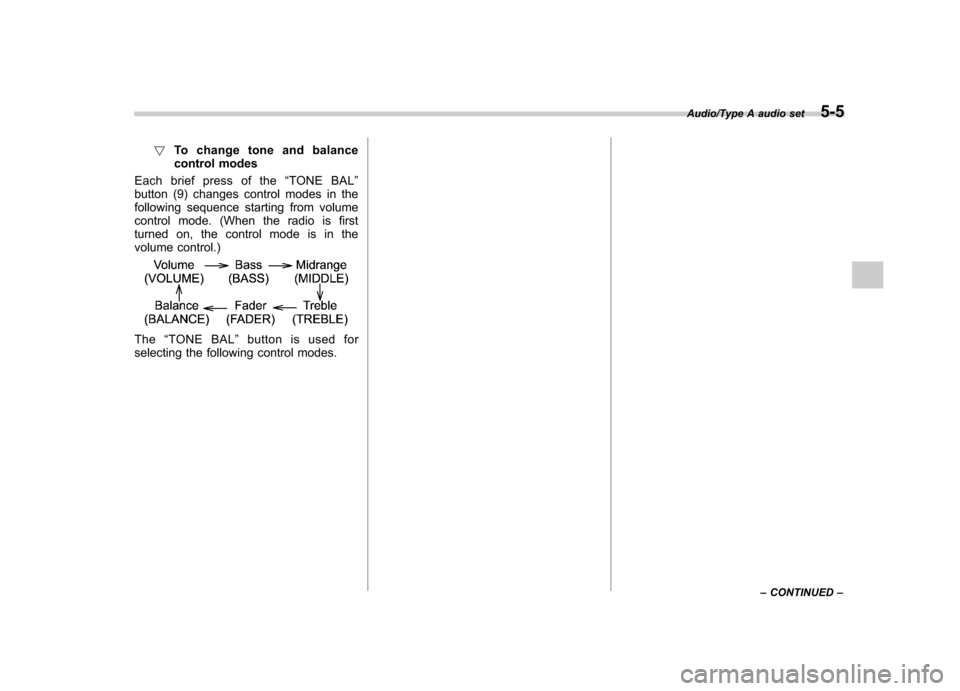
Each brief press of the “TONE BAL ”
button (9) changes control modes in the
following sequence starting from volume
control mode. (When the radio is first
turned on, the control mode is in the
volume control.)
The “TONE BAL ”button is used for
selecting the following control modes.
Audio/Type A audio set5-5
– CONTINUED –
Page 195 of 420
5-6Audio/Type A audio set
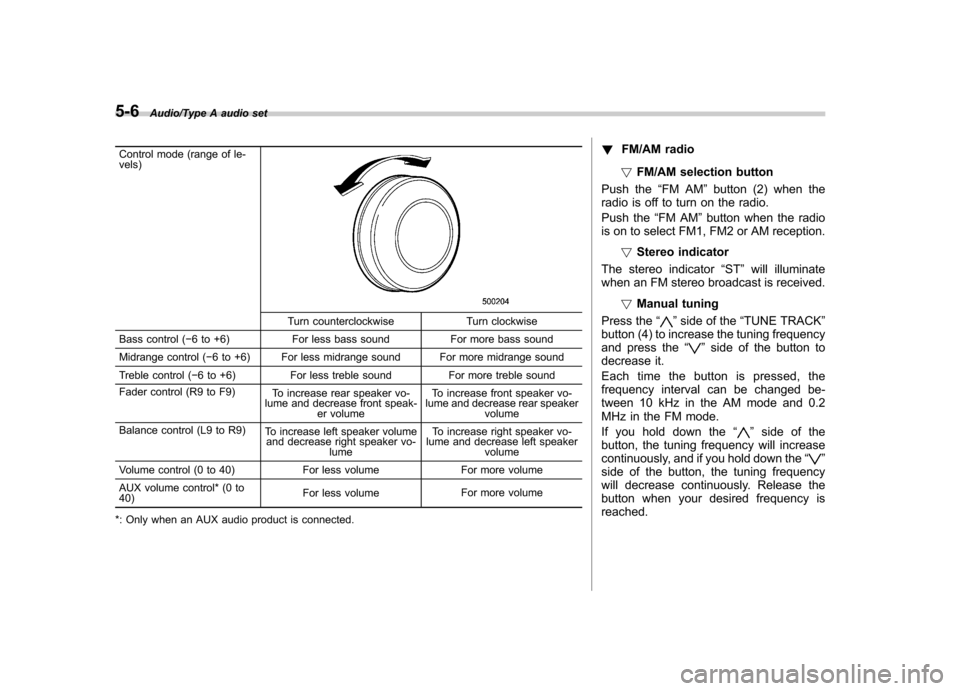
Control mode (range of le- vels)
Turn counterclockwise Turn clockwise
Bass control ( 6 to +6) For less bass sound For more bass sound
Midrange control ( 6 to +6) For less midrange sound For more midrange sound
Treble control ( 6 to +6) For less treble sound For more treble sound
Fader control (R9 to F9) To increase rear speaker vo-
lume and decrease front speak- er volume To increase front speaker vo-
lume and decrease rear speaker volume
Balance control (L9 to R9) To increase left speaker volume
and decrease right speaker vo-
lume To increase right speaker vo-
lume and decrease left speaker
volume
Volume control (0 to 40) For less volume For more volume
AUX volume control* (0 to 40) For less volume
For more volume
*: Only when an AUX audio product is connected. !
FM/AM radio
! FM/AM selection button
Push the “FM AM ”button (2) when the
radio is off to turn on the radio.
Push the “FM AM ”button when the radio
is on to select FM1, FM2 or AM reception.
!Stereo indicator
The stereo indicator “ST ”will illuminate
when an FM stereo broadcast is received.
!Manual tuning
Press the “”side of the “TUNE TRACK ”
button (4) to increase the tuning frequency
and press the “
”side of the button to
decrease it.
Each time the button is pressed, the
frequency interval can be changed be-
tween 10 kHz in the AM mode and 0.2
MHz in the FM mode.
If you hold down the “
”side of the
button, the tuning frequency will increase
continuously, and if you hold down the “
”
side of the button, the tuning frequency
will decrease continuously. Release the
button when your desired frequency isreached.
Page 196 of 420
NOTE
While you are holding down either side
of the“TUNE TRACK ”button, the
tuning frequency will not stop chan-
ging even if the frequency of a recei-
vable station is reached.
!Seek tuning
If you press the “
”or “”side of the
“ SEEK FLDR ”button (7), the radio will
automatically search for a receivable
station and stop at the first one it finds.
This function may not be available, how-
ever, when radio signals are weak. In such
a situation, perform manual tuning to
select the desired station.
!Automatic tuning (SCAN)
Press the “SCAN ”button (8) to change the
radio to the SCAN mode. In this mode, the
radio scans through the radio band until a
station is found. The radio will stop at the
station for 5 seconds while displaying the
frequency, after which scanning will con-
tinue until the entire band has been
scanned from the low end to the high
end. Press the “SCAN ”button again to
cancel the SCAN mode and to stop on any
displayed frequency.
Press the “
”or “”side of the “SEEK
FLDR ”button (7) again to cancel the scan
mode and to stop on any displayed frequency.
When the
“SCAN ”button is pressed for
automatic tuning, stations are scanned in
the direction of low frequencies to high
frequencies only.
Automatic tuning may not function prop-
erly if the station reception is weakened by
distance from the station or proximity to
tall buildings and hills.
!Selecting preset stations
Presetting a station with a preset button
(10) allows you to select that station in a
single operation. Up to six, AM, FM1 and
FM2 stations each may be preset.
!How to preset stations
1. Press the “FM AM ”button (2) to select
FM1, FM2, or AM reception.
2. Press the “SCAN ”button (8) or tune
the radio manually until the desired station
frequency is displayed.
3. Press and hold one of the preset
buttons (10) to store the frequency. If the
button is pressed briefly, the preceding
selection will remain in memory.
NOTE . If the connection between the radio
and battery is broken for any reason
such as vehicle maintenance or radio
removal, all stations stored in the preset buttons are cleared. If this
occurs, it is necessary to reset the
preset buttons..
If a cell phone is placed near the
radio, it may cause the radio to emit
noise when it receives calls. This noise
does not indicate a radio malfunction. ! Satellite radio mode (if equipped)
To receive satellite radio, it is necessary to
install the SUBARU genuine satellite
receiver (optional part) and to enter into
a contract with a satellite radio network
service such as “Sirius XM
TMsatellite
radio ”(for U.S.A. only) or “Sirius satellite
radio ”(for Canada only). For details,
please contact your SUBARU dealer.
!Sirius satellite radio (for Canadaonly)
Sirius satellite radio is a recent innovation
that allows the listener to experience
digital sound quality and to have a greater
variety of channels.
Use of satellite radio (Sirius) requires a
tuner, antenna and a service contract. For
details, please contact your SUBARU
dealer or visit Sirius Satellite Radio at
www.sirius.ca or call 1-888-539-7474 for
more information. Sirius, the Sirius dog
logo, channel names and logos are trade-
marks of SIRIUS Satellite Radio Inc.
Audio/Type A audio set5-7
– CONTINUED –
Page 197 of 420
5-8Audio/Type A audio set
!Sirius XMTMSatellite Radio Acti-
vation (for U.S.A. only)
Models with Sirius XM
TMare eligible for a
3-month complimentary subscription to
the Sirius XM
TMSatellite Radio service.
Activation process:
You can activate the XM Satellite Radio
from the website of the XM Satellite Radio.
For details, visit the website.
!Satellite radio reception
Satellite radio signals are best received in
areas with a clear view of the open sky. In
areas where there are tall buildings, trees,
tunnels or other structures that may
obstruct the signal of the satellites, there
may be signal interruptions. Other circum-
stances that may result in signal loss
include driving near a wall, steep cliff or
hill, or driving on the lower level of a multi-
tiered road or inside a parking garage.
To help reduce this condition, satellite
radio providers have installed ground-
based repeaters in heavily populated
areas. However, you may still experience
reception problems in some areas.
!Displaying satellite radio ID oftuner
When you activate satellite radio, you
should have your satellite radio tuner ID ready because each tuner is identified by
its unique satellite radio tuner ID.
The satellite radio ID will be needed when
you activate satellite radio and receive
satellite radio customer support.
The satellite radio ID can be found on the
audio display by tuning the channel to
“0 ”.
Turn the “TUNE TRACK ”button (4) to
select the satellite radio channel.
!Band selection button
Push the “SAT ”button (1) when the radio
is off to turn on the radio.
Push the “SAT ”button when the radio is
on to select SAT1, SAT2 or SAT3 recep- tion.
!Channel selection
Press “
”of the “TUNE TRACK ”button
(4) to select the next channel and press “
” of the button to select the previous
channel.
Keep pressing “
”of the button to
change to the next channel continuously
and keep pressing “
”of the button to
change to the previous channel continu-
ously.
!Category selection
Press “
”or “”of the “SEEK FLDR ”
button (7) to display the current category. Press “
”again to select the next category, and press
“
”again to select
the previous category.
!Channel scan
Press the “SCAN ”button (8) to change the
radio to the SCAN mode. In this mode, the
radio scans through the channels until a
station is found. The radio will stop at the
station for 5 seconds while displaying the
channel number, after which scanning will
continue until the entire channel has been
scanned from the low end to the high end.
Also during the category selection, chan-
nel scan can be performed in that cate-
gory.
Press the “SCAN ”button again to cancel
the SCAN mode and to stop on any
displayed channel.
!Selecting preset channels
Presetting a channel with a preset button
(10) allows you to select that channel in a
single operation. Up to six, SAT1, SAT2
and SAT3 channels each may be preset.
!How to preset channels
1. Press the “SAT ”button (1) to select
SAT1, SAT2 and SAT3 reception.
2. Press the “SCAN ”button (8) or the
“ TUNE TRACK ”button (4) to select the
channel.
3. Press and hold one of the preset
Page 198 of 420
buttons (10) to store the channel. If the
button is pressed briefly, the preceding
selection will remain in memory. NOTE
If the connection between the radio and
battery is broken for any reason such
as vehicle maintenance or radio re-
moval, all channels stored in the preset
buttons are cleared. If this occurs, it is
necessary to reset the preset buttons.!Display selection
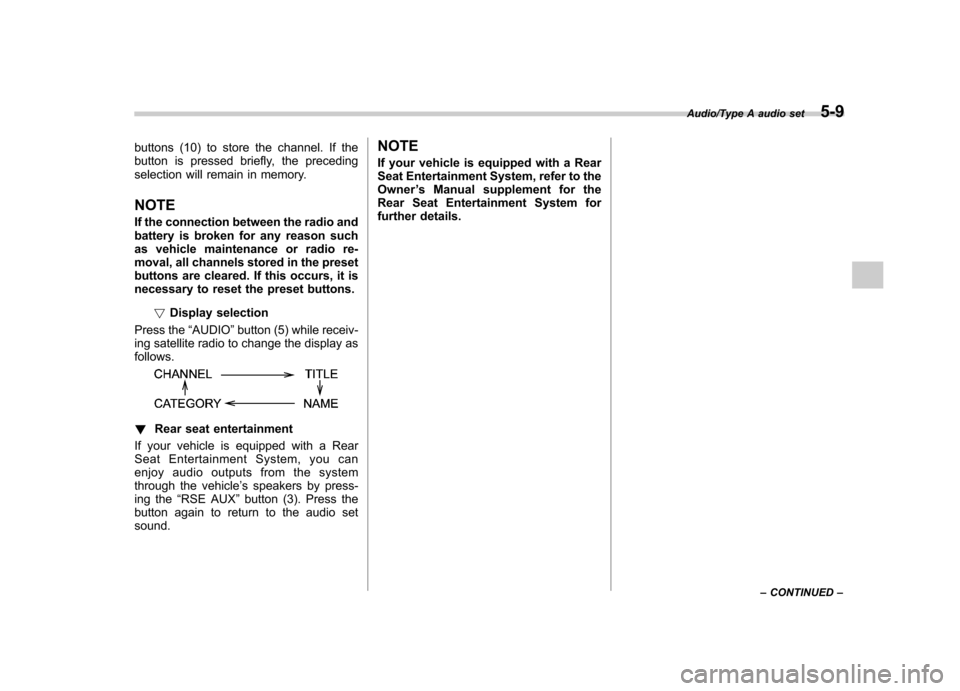
Press the “AUDIO ”button (5) while receiv-
ing satellite radio to change the display asfollows.
! Rear seat entertainment
If your vehicle is equipped with a Rear
Seat Entertainment System, you can
enjoy audio outputs from the system
through the vehicle ’s speakers by press-
ing the “RSE AUX ”button (3). Press the
button again to return to the audio setsound. NOTE
If your vehicle is equipped with a Rear
Seat Entertainment System, refer to the
Owner
’s Manual supplement for the
Rear Seat Entertainment System for
further details.
Audio/Type A audio set5-9
– CONTINUED –
Page 199 of 420
5-10Audio/Type A audio set
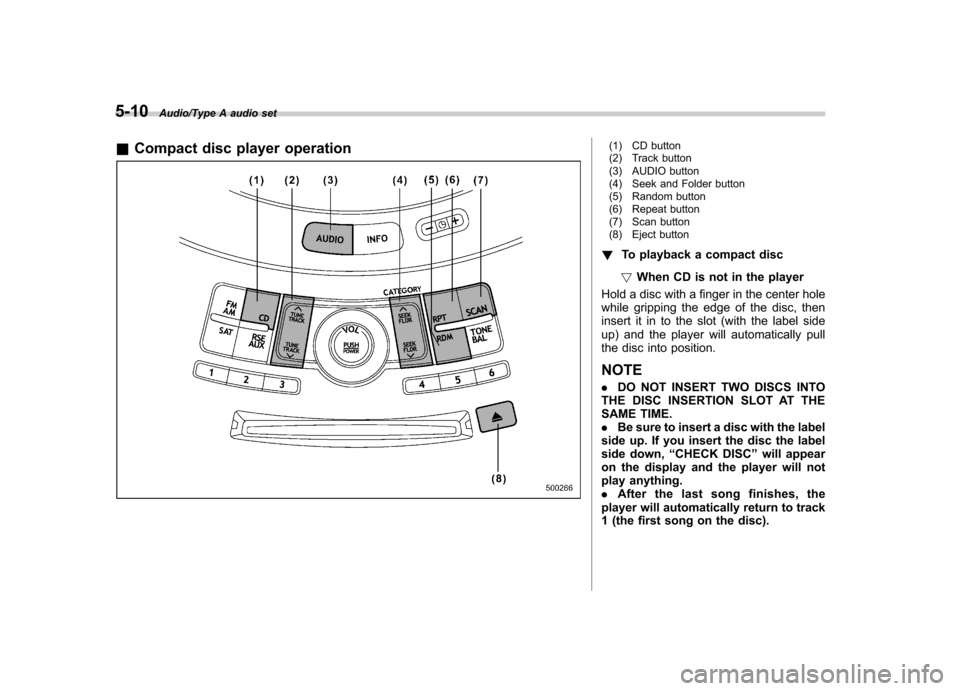
&Compact disc player operation(1) CD button
(2) Track button
(3) AUDIO button
(4) Seek and Folder button
(5) Random button
(6) Repeat button
(7) Scan button
(8) Eject button
! To playback a compact disc
! When CD is not in the player
Hold a disc with a finger in the center hole
while gripping the edge of the disc, then
insert it in to the slot (with the label side
up) and the player will automatically pull
the disc into position.
NOTE . DO NOT INSERT TWO DISCS INTO
THE DISC INSERTION SLOT AT THE
SAME TIME.. Be sure to insert a disc with the label
side up. If you insert the disc the label
side down, “CHECK DISC ”will appear
on the display and the player will not
play anything.. After the last song finishes, the
player will automatically return to track
1 (the first song on the disc).