2013 SUBARU IMPREZA WRX display
[x] Cancel search: displayPage 219 of 414
5-38Audio
used by a movable body identifi-
cation device.
& Using the Hands-free system
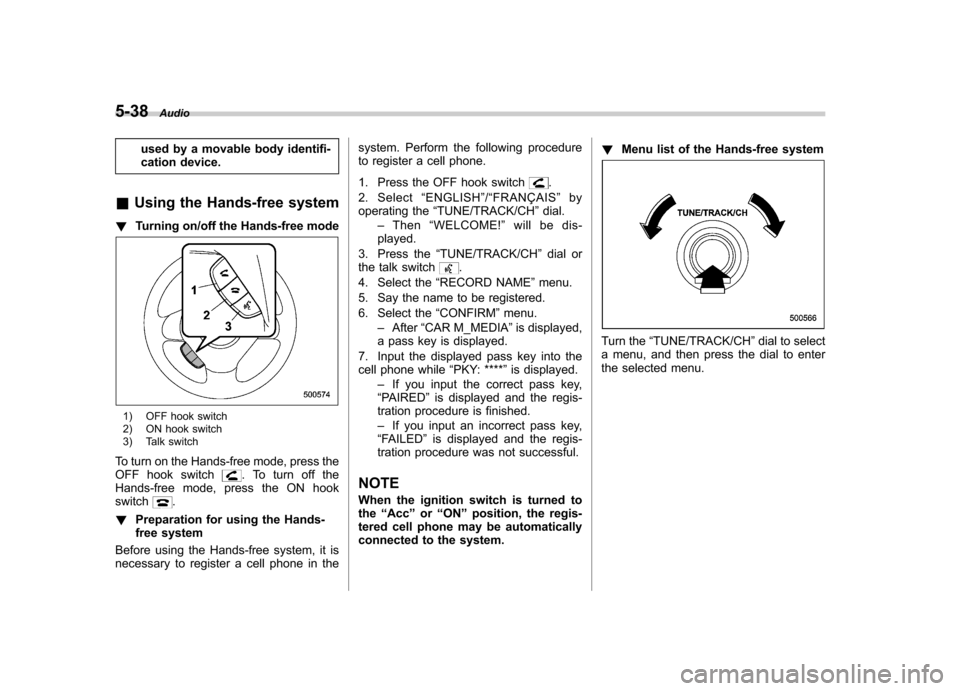
! Turning on/off the Hands-free mode
1) OFF hook switch
2) ON hook switch
3) Talk switch
To turn on the Hands-free mode, press the
OFF hook switch
. To turn off the
Hands-free mode, press the ON hook switch
.
! Preparation for using the Hands-
free system
Before using the Hands-free system, it is
necessary to register a cell phone in the system. Perform the following procedure
to register a cell phone.
1. Press the OFF hook switch
.
2. Select “ENGLISH ”/“ FRANÇAIS ”by
operating the “TUNE/TRACK/CH ”dial.
– Then “WELCOME! ”will be dis-
played.
3. Press the “TUNE/TRACK/CH ”dial or
the talk switch
.
4. Select the “RECORD NAME ”menu.
5. Say the name to be registered.
6. Select the “CONFIRM ”menu.
– After “CAR M_MEDIA ”is displayed,
a pass key is displayed.
7. Input the displayed pass key into the
cell phone while “PKY: **** ”is displayed.
– If you input the correct pass key,
“ PAIRED ”is displayed and the regis-
tration procedure is finished. – If you input an incorrect pass key,
“ FAILED ”is displayed and the regis-
tration procedure was not successful.
NOTE
When the ignition switch is turned to the “Acc ”or “ON ”position, the regis-
tered cell phone may be automatically
connected to the system. !
Menu list of the Hands-free system
Turn the “TUNE/TRACK/CH ”dial to select
a menu, and then press the dial to enter
the selected menu.
Page 223 of 414

5-42Audio
38 security sécurité
39 pair phone jumeler le télé- phone
40 change name modifier le nom
41 select phone sélectionner le tél- éphone
42 list phones lister les télé-phones
43 set pass key configurer le
passe-partout
44 add entry ajouter l ’entrée
45 delete entry supprimer l ’entrée
46 delete speed dial supprimer compo-
sition abrégée
47 by voice vocalement
48 by phone par téléphone
49 call history historique d ’appels
50 set speed dial configurer compo-
sition abrégée
51 incoming entrant
52 outgoing sortant
53 list names lister les noms
54 set PIN configurer NIP
55 phone book lock verrouiller le regis- tre!
Updating phonebook data
! Registering by voice
1. Select the “BY VOICE ”menu.
2. Press the talk switch
.
3. Say the phone number to be regis- tered.
4. Select the “CONFIRM ”menu.
5. Perform either of the following proce- dures. –Select the “RECORD NAME ”menu
by operating the “TUNE/TRACK/CH ”
dial. – Press the talk switch
.
6. Say the name (voice tag) to be registered.
7. Select the “CONFIRM ”menu.
– Then “STORED ”is displayed and
the mode changes to the registering
speed dial mode. Refer to “Registering
speed dial ”F 5-43.
! Registering by phone
1. Select the “BY PHONE ”menu.
2. Select the “CONFIRM ”menu.
– Then “TRANSFER ”is displayed.
3. Transfer the data from the cell phone.
For details about transferring the data,
refer to the instruction manual of the cellphone. 4. Perform either of the following proce-dures.
–Select the “RECORD NAME ”menu
by operating the “TUNE/TRACK/CH ”
dial. – Press the talk switch
.
5. Say the name (voice tag) to be registered.
6. Select the “CONFIRM ”menu.
– Then “STORED ”is displayed and
the mode changes to the registering
speed dial mode. Refer to “Registering
speed dial ”F 5-43.
! Registering by inputting manually
1. Select the “MANUAL INPUT ”menu by
operating the “TUNE/TRACK/CH ”dial.
2. Input the phone number to be regis-tered.
3. Perform either of the following proce- dures. –Select the “RECORD NAME ”menu
by operating the “TUNE/TRACK/CH ”
dial. – Press the talk switch
.
4. Say the name (voice tag) to be registered.
5. Select the “CONFIRM ”menu.
– Then “STORED ”is displayed and
the mode changes to the registering
speed dial mode. Refer to “Registering
Page 224 of 414

speed dial”F 5-43.
NOTE
While inputting the phone numbers, if “ GO BACK ”is chosen using the
“ TUNE/TRACK/CH ”dial, the character
that was input last is deleted. ! Registering from call history
1. Select the “CALL HISTORY ”menu.
2. Select “OUTGOING ”or “INCOMING ”
by operating the “TUNE/TRACK/CH ”dial.
3. Select the phone number by operating the “TUNE/TRACK/CH ”dial.
4. Perform either of the following proce-dures. –Select the “RECORD NAME ”menu
by operating the “TUNE/TRACK/CH ”
dial. – Press the talk switch
.
5. Say the name (voice tag) to be registered.
6. Select the “CONFIRM ”menu.
– Then “STORED ”is displayed and
the mode changes to the registering
speed dial mode. Refer to “Registering
speed dial ”F 5-43.
! Registering from redial
1. Select the “REDIAL ”menu. 2. Select the phone number by operatingthe
“TUNE/TRACK/CH ”dial.
3. Select the “STORE ”menu.
4. Select the “CONFIRM ”menu.
5. Perform either of the following proce-dures. –Select the “RECORD NAME ”menu
by operating the “TUNE/TRACK/CH ”
dial. – Press the talk switch
.
6. Say the name (voice tag) to be registered.
7. Select the “CONFIRM ”menu.
– Then “STORED ”is displayed and
the mode changes to the registering
speed dial mode. Refer to “Registering
speed dial ”F 5-43.
! Registering from call back
1. Select the “CALL BACK ”menu.
2. Select the phone number by operatingthe “TUNE/TRACK/CH ”dial.
3. Select the “STORE ”menu.
4. Select the “CONFIRM ”menu.
5. Perform either of the following proce-dures. –Select the “RECORD NAME ”menu
by operating the “TUNE/TRACK/CH ”
dial. – Press the talk switch
. 6. Say the name (voice tag) to be registered.
7. Select the
“CONFIRM ”menu.
– Then “STORED ”is displayed and
the mode changes to the registering
speed dial mode. Refer to “Registering
speed dial ”F 5-43.
! Registering speed dial
1. After registering phonebook data, se-
lect the “SPEED DIAL ”menu.
2. Press the preset button (from
to) to which you want to register the
phone number. NOTE
If the number to be used is already
registered in speed dial, “OVER-
WRITE? ”will be displayed.
! List names function
The voice tags registered in the phone-
book are spoken by using the list names
function. To use the list names function,
perform the following procedure.
1. Select the “LIST NAMES ”menu.
2. Select the registered data by perform-
ing either of the following procedures. –Press the talk switch
.
– Operate the “TUNE/TRACK/CH ”
Audio
5-43
– CONTINUED –
Page 225 of 414

5-44Audio
dial.
3. After “SELECTED ”is displayed, you
can select the following menus. . “DIAL ”to make a phone call
. “CHANGE NAME ”to change the name
(voice tag) . “SET SPD DIAL ”/“ SET SPEED DIAL ”
to set the speed dial. “DELETE ENTRY ”to delete the name
(voice tag) from the phonebook. “GO BACK ”to go back to the menu
mode
NOTE . After “LIST NAMES ”is selected, if
the OFF hook switch
is pushed, the
selected number is called. . After “LIST NAMES ”is selected, if
no operation is performed, the mem-
ories are displayed and voice tags arespoken. ! Changing voice tag
1. Select the “CHANGE NAME ”menu.
2. Select the phone number by perform-
ing either of the following procedures. –Operate the “TUNE/TRACK/CH ”
dial. – Press the talk switch
and say
the voice tag.
3. Select the “CONFIRM ”menu. –
Then the selected phone number/
name is displayed.
4. Press the talk switch
.
5. Say the new voice tag.
6. Select the “CONFIRM ”menu.
– Then “CHANGED ”is displayed.
! Set speed dial
1. Select “SET SPD DIAL ”by operating
the “TUNE/TRACK/CH ”dial or select
“ SET SPEED DIAL ”by using the voice
command system.
2. Select the phone number by perform-
ing either of the following procedures.
–Operate the “TUNE/TRACK/CH ”
dial. – Press the talk switch
and say
the voice tag.
3. Select the “CONFIRM ”menu.
4. Press the preset button (from
to) to which you want to register the
phone number. NOTE
If the number to be used is already
registered in speed dial, “OVER-
WRITE? ”will be displayed.
! Deleting the phonebook data
1. Select the “DELETE ENTRY ”menu. 2. Select the phone number by perform-
ing either of the following procedures.
–Operate the “TUNE/TRACK/CH ”
dial. – Press the talk switch
and say
the voice tag.
3. Select the “CONFIRM ”menu.
– Then “DELETED ”is displayed and
the selected phonebook data is de- leted.
! Deleting the speed dial
1. Select “DEL SPD DIAL ”by operating
the “TUNE/TRACK/CH ”dial or select
“ DELETE SPEED DIAL ”by using the
voice command system.
2. Press the preset button (from
to) to which you want to delete the
speed dial.
3. Select the “CONFIRM ”menu.
– Then “DELETED ”is displayed and
the selected speed dial is deleted.
! Deleting the redial data
1. Select the “REDIAL ”menu.
2. Select the phone number by operating the “TUNE/TRACK/CH ”dial.
3. Select the “DELETE ”menu.
4. Select the “CONFIRM ”menu.
– Then “DELETED ”is displayed and
the selected redial data is deleted.
Page 226 of 414

!Deleting the callback data
1. Select the “CALLBACK ”menu.
2. Select the phone number by operating the “TUNE/TRACK/CH ”dial.
3. Select the “DELETE ”menu.
4. Select the “CONFIRM ”menu.
– Then “DELETED ”is displayed and
the selected callback data is deleted.
! Making a phone call
! Making a phone call by saying name
1. Press the talk switch
.
2. Say “DIAL BY NAME ”.
3. Press the talk switch
again.
4. Say the desired name (voice tag) to be called.
5. Select the “DIAL ”menu or press the
OFF hook switch
.
! Making a phone call by saying number
1. Press the talk switch
.
2. Say “DIAL BY NUMBER ”.
3. Press the talk switch
again.
4. Say the desired phone number to be called.
5. Select the “DIAL ”menu or press the
OFF hook switch
. !
Making a phone call from speed dial
It is possible to select a phone number
from speed dial registered with the in-
vehicle equipment to make a phone call.
1. Press the preset button (from
to) to which the desired number is
registered.
2. Press the OFF hook switch
.
NOTE
When a preset button for which num-
bers are not registered is pressed, an
error message is indicated on the audioscreen. ! Redial
1. Select the “REDIAL ”menu.
2. Select the desired number by operat-
ing the “TUNE/TRACK/CH ”dial.
3. Select the “DIAL ”menu or press the
OFF hook switch
.
! Callback
1. Select the “CALL BACK ”menu.
2. Select the desired number by operat-
ing the “TUNE/TRACK/CH ”dial.
3. Select the “DIAL ”menu or press the
OFF hook switch
. !
Making a phone call from list name
It is possible to select a phone number
from the list name registered with the in-
vehicle equipment to make a phone call.
For details, refer to “List names function ”
F 5-43.
! Top redial
1. Press the OFF hook switch
and
load the outgoing call history.
2. Select the “DIAL ”menu or press the
OFF hook switch
.
! Taking a phone call and declining
an incoming call
To take a phone call: Press the OFF
hook switch
.
To put an incoming call on hold (only if
the cell phone has this function): Press the
ON hook switch
briefly.
To decline an incoming call (only if the
cell phone has this function): Press and
hold the ON hook switch
.
! Ending a call
Press the ON hook switch
.
Audio
5-45
– CONTINUED –
Page 227 of 414
5-46Audio
!Volume control
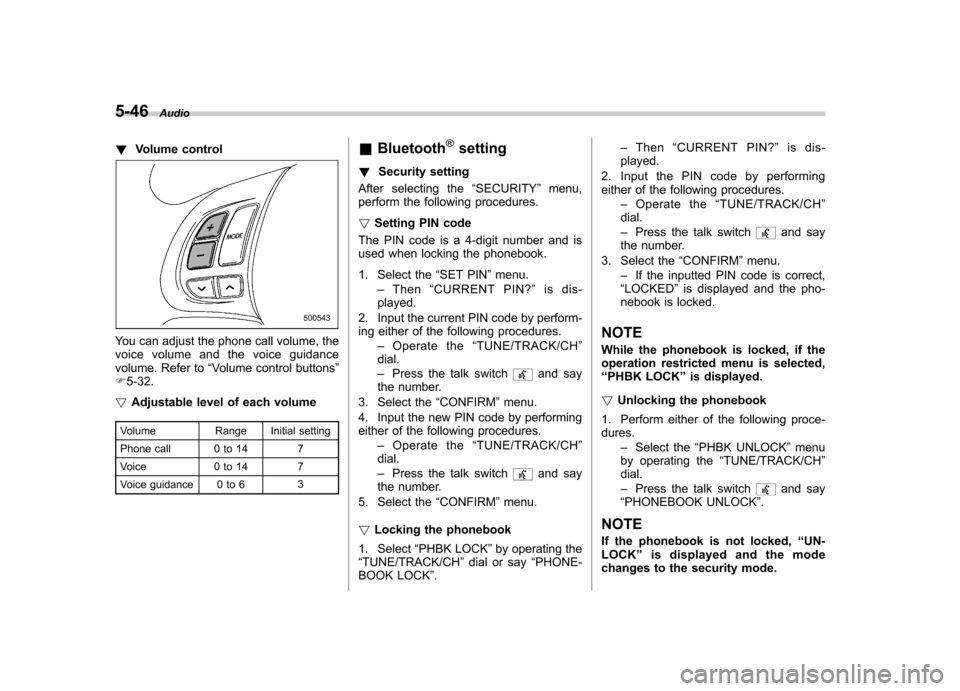
You can adjust the phone call volume, the
voice volume and the voice guidance
volume. Refer to “Volume control buttons ”
F 5-32.
! Adjustable level of each volume
Volume Range Initial setting
Phone call 0 to 14 7
Voice 0 to 14 7
Voice guidance 0 to 6 3&
Bluetooth
®setting
! Security setting
After selecting the “SECURITY ”menu,
perform the following procedures. ! Setting PIN code
The PIN code is a 4-digit number and is
used when locking the phonebook.
1. Select the “SET PIN ”menu.
– Then “CURRENT PIN? ”is dis-
played.
2. Input the current PIN code by perform-
ing either of the following procedures. –Operate the “TUNE/TRACK/CH ”
dial. – Press the talk switch
and say
the number.
3. Select the “CONFIRM ”menu.
4. Input the new PIN code by performing
either of the following procedures. –Operate the “TUNE/TRACK/CH ”
dial. – Press the talk switch
and say
the number.
5. Select the “CONFIRM ”menu.
! Locking the phonebook
1. Select “PHBK LOCK ”by operating the
“ TUNE/TRACK/CH ”dial or say “PHONE-
BOOK LOCK ”. –
Then “CURRENT PIN? ”is dis-
played.
2. Input the PIN code by performing
either of the following procedures. –Operate the “TUNE/TRACK/CH ”
dial. – Press the talk switch
and say
the number.
3. Select the “CONFIRM ”menu.
– If the inputted PIN code is correct,
“ LOCKED ”is displayed and the pho-
nebook is locked.
NOTE
While the phonebook is locked, if the
operation restricted menu is selected,“ PHBK LOCK ”is displayed.
! Unlocking the phonebook
1. Perform either of the following proce-dures. –Select the “PHBK UNLOCK ”menu
by operating the “TUNE/TRACK/CH ”
dial. – Press the talk switch
and say
“ PHONEBOOK UNLOCK ”.
NOTE
If the phonebook is not locked, “UN-
LOCK ”is displayed and the mode
changes to the security mode.
Page 228 of 414

2. After“CURRENT PIN? ”is displayed,
input the PIN code by performing either of
the following procedures.
–Operate the “TUNE/TRACK/CH ”
dial. – Press the talk switch
and say
the number.
3. Select the “CONFIRM ”menu.
– If the inputted PIN code is correct,
“ UNLOCKED ”is displayed and the
phonebook is unlocked.
! Phone setup
After selecting the “PHONE SETUP ”
menu, perform the following procedures. ! Setting pair phone
Refer to “Preparation for using the Hands-
free system ”F 5-38.
! Selecting phone
To select the registered cell phone for
connecting to the in-vehicle equipment,
perform the following procedure.
1. Select the “SELECT PHONE ”menu.
– If no cell phones are registered,
“ EMPTY ”is displayed and the mode
changes to the “PHONE SETUP ”
mode.
2. Select the cell phone by performing
either of the following procedures. –
Operate the “TUNE/TRACK/CH ”
dial. – Press the talk switch
and say
the voice tag.
3. Select the “CONFIRM ”menu.
–“ SELECTED ”is displayed, the se-
lected cell phone is connected to the
in-vehicle equipment and the mode
changes to the “PHONE SETUP ”
mode.
! Changing the voice tag of the cellphone
1. Select the “CHANGE NAME ”menu.
– If no cell phones are registered,
“ EMPTY ”is displayed and the mode
changes to the “PHONE SETUP ”
mode.
2. Select the cell phone by performing
either of the following procedures. –Operate the “TUNE/TRACK/CH ”
dial. – Press the talk switch
and say
the voice tag.
3. Select the “RECORD NAME ”menu.
4. Register the voice tag. For details,
refer to “Preparation for using the Hands-
free system ”F 5-38. !
List phones function
The cell phone voice tags saved in the cell
phone list are spoken by using the list
phones function.
1. Select the “LIST PHONES ”menu.
– If no cell phones are registered,
“ EMPTY ”is displayed and the mode
changes to the “PHONE SETUP ”
mode.
2. Registered cell phones are displayed
in the saved order. While displayed, if the“ TUNE/TRACK/CH ”dial is turned, the
next registered cell phone is displayed.
Press the ON hook button
to close the
Hands-free menu.
3. Select the cell phone by performing
either of the following procedures.
–Operate the “TUNE/TRACK/CH ”
dial. – Press the talk switch
.
4. After “SELECTED ”is displayed, you
can select the following menus. . “SELECT PHONE ”to connect the
selected cell phone . “CHANGE NAME ”to change the voice
tag. “DELETE ”to delete the selected cell
phone from the list. “GO BACK ”to go back to the “PHONE
SETUP ”mode Audio
5-47
– CONTINUED –
Page 229 of 414

5-48Audio
! Setting passkey
1. Select the “SET PASSKEY ”menu.
– After the currently set passkey is
displayed, a new passkey can be entered.
2. Input the new passkey by performing
either of the following procedures. –Operate the “TUNE/TRACK/CH ”
dial. – Press the talk switch
and say
the passkey.
3. Select the “CONFIRM ”menu.
– The new passkey is displayed, the
passkey is changed and the mode
changes to the “PHONE SETUP ”
mode.
! Deleting registered cell phone from
the list
1. Select the “DELETE ”menu.
2. Select a cell phone to be deleted by
performing either of the following proce-dures. –Operate the “TUNE/TRACK/CH ”
dial. – Press the talk switch
and say
the voice tag.
3. Select the “CONFIRM ”menu.
–“ DELETED ”is displayed, the data is
deleted and the mode changes to the “ PHONE SETUP ”mode. !
System setup
After selecting the “SYSTEM SETUP ”
menu, perform the following procedure.
Select the following menus by operatingthe “TUNE/TRACK/CH ”dial.
! Setting guidance volume
To set the guidance volume, perform the
following procedure.
1. Select the “GUIDANCE VOL ”menu.
2. Set the guidance volume by operating the “TUNE/TRACK/CH ”dial.
! Initializing the registered data
To initialize the registered data, perform
the following procedure.
1. Select the “INITIALIZE ”menu.
2. Select the “CONFIRM ”menu.
– First “PLEASE WAIT ”, then “INITI-
ALIZED ”is displayed. The registered
data is initialized and the mode
changes to the last mode.
! Selecting language
To select the language, perform the
following procedure.
1. Select the “SEL LANGUAGE ”menu.
2. Select the desired language by oper-
ating the “TUNE/TRACK/CH ”dial.