Vehicle systems
Vehicle settings
Introduction
This chapter contains information on the following subjects:
Selecting driving mode
44
Vehicle data
45
Auxiliary heater and ventilation
46
ESC system
47
Tyre
47
Driver assistance
47
Parking and manoeuvring
47
Light
48
mirrors and wiper
48
Opening and closing
49
Seats
49
Multifunction display
49
Service
49
Restore factory settings
50
Climatronic settings
50
First and foremost, pay attention to the safety instructions » page 4 , Important
notes .
Settings relating to the vehicle systems can only be made when the ignition is
switched on.
Note
■ The individual systems are described in the » Vehicle Owner's Manual .■For safety reasons, if any system functions are disabled, then some functions,
such as parts of the ESC system, are automatically enabled again after switching
the ignition off and on.■
When you press the button CAR, the system displays the last displayed menu
.
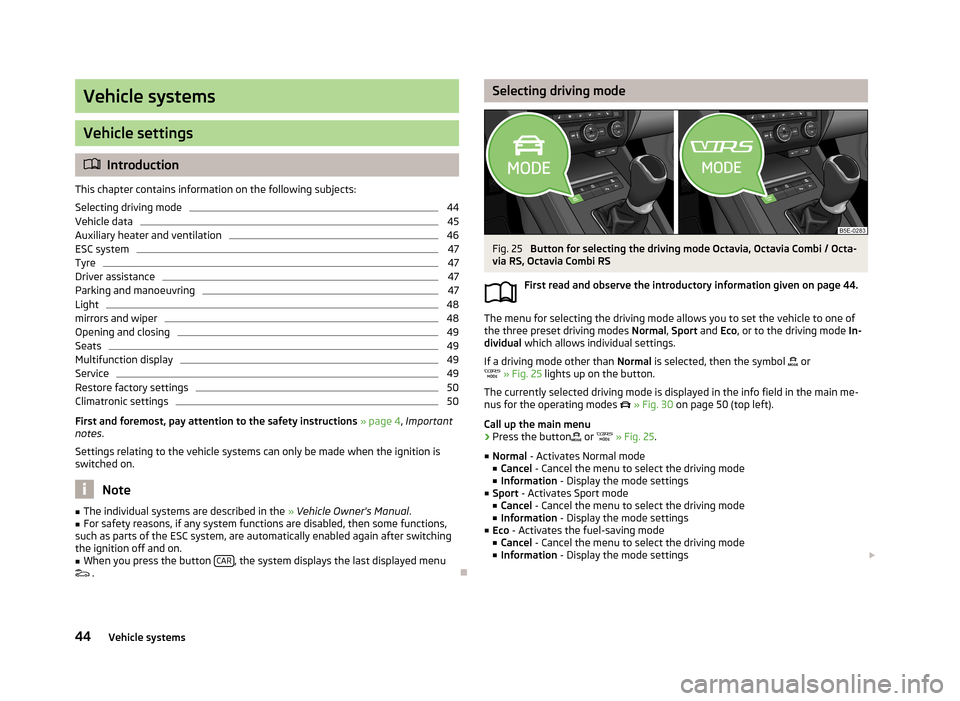
Selecting driving modeFig. 25
Button for selecting the driving mode Octavia, Octavia Combi / Octa-
via RS, Octavia Combi RS
First read and observe the introductory information given on page 44.
The menu for selecting the driving mode allows you to set the vehicle to one of
the three preset driving modes Normal, Sport and Eco, or to the driving mode In-
dividual which allows individual settings.
If a driving mode other than Normal is selected, then the symbol
or
» Fig. 25 lights up on the button.
The currently selected driving mode is displayed in the info field in the main me- nus for the operating modes
» Fig. 30 on page 50 (top left).
Call up the main menu
›
Press the button
or
» Fig. 25 .
■ Normal - Activates Normal mode
■ Cancel - Cancel the menu to select the driving mode
■ Information - Display the mode settings
■ Sport - Activates Sport mode
■ Cancel - Cancel the menu to select the driving mode
■ Information - Display the mode settings
■ Eco - Activates the fuel-saving mode
■ Cancel - Cancel the menu to select the driving mode
■ Information - Display the mode settings
44Vehicle systems
Opening and closingFirst read and observe the introductory information given on page 44.›
Press the button CAR
→ → Opening and closing .
■ Window operation - Window operation settings
■ Conven. opening: - Set the convenience opening feature
■ All windows - All windows
■ Driver window - Driver's window only
■ Off - Deactivates the convenience opening
■ Central locking - Settings for opening and closing of doors
■ Door unlocking: - Set the door unlocking feature
■ All doors - All doors
■ Single door - Driver's door or driver's or passenger door with KESSY system
■ Vehicle side - Doors on the driver's side or on the driver's or passenger's
side with KESSY system
■ Automatic locking - Activate/deactivate automatic locking when starting off
■ Acoustic confirmation - Activate/deactivate acoustic signals when locking/un-
locking the vehicle with an anti-theft alarm system
Seats
First read and observe the introductory information given on page 44.
›
Press the button CAR
→
→ Seats
■ Store seat position - Store the driver's seat position and exterior mirror position
in the remote control key when locking the vehicle
■ Vehicle key activated - Activate/deactivate storing the driver's seat position
and exterior mirror position when locking the vehicle
Multifunction display
First read and observe the introductory information given on page 44.
›
Press the button CAR
→
→ Multifunction display .
■
Current consumption - Switch on/off the display of current fuel consumption in
the display of the instrument cluster
■ Average consumption - Switch on/off the display of average fuel consumption
in the display of the instrument cluster
■ Refuel quantity - Switch on/off the display of refuel quantity in the display of
the instrument cluster
■ Convenience consumers - Switch on/off the display of consumption by conven-
ience consumers on/off in the display of the instrument cluster
■ Eco tips - Switch on/off the display of tips for economical driving in the display
of the instrument cluster
■ Travelling time - Switch on/off the display of travelling time in the display of
the instrument cluster
■ Distance - Switch on/off the display of distance travelled in the display of the
instrument cluster
■ Average speed - Switch on/off the display of average speed in the display of
the instrument cluster
■ Digital speed display - Switch on/off the display of current speed in the display
of the instrument cluster
■ Speed warning - Switch on/off the display of speed warning in the display of
the instrument cluster
■ Oil temperature - Switch on/off the display of oil temperature in the display of
the instrument cluster
■ Coolant temperature - Switch on/off the display of coolant temperature in the
display of the instrument cluster
■ Reset Since start driving data - Reset the single-trip memory in the device
screen and in the display of the instrument cluster
■ Reset Long-term driving data - Reset the long-term memory in the device
screen and in the display of the instrument cluster
Service
First read and observe the introductory information given on page 44.
›
Press the button CAR
→
→ Service .
■ Vehicle no.: - Display the vehicle identification number
■ Inspection: --- / --- - Number of km/days remaining until the next service event
■ Oil change service: --- / --- - Number of km/days remaining until the next oil
change
49Vehicle systems