2013 SKODA CITIGO brake light
[x] Cancel search: brake lightPage 83 of 176

Assist systems
Brake assist systems
Introduction
This chapter contains information on the following subjects:
Electronic Stability Control (ESC)
80
Antilock Braking System (ABS)
81
Traction Control System (TCS)
81
Electronic Differential Lock (EDL)
81WARNING■ A lack of fuel can cause irregular engine running or cause the engine to shut
down. The brake assist systems would then fail to function – risk of accident!■
Adjust the speed and driving style to the current visibility, weather, road and
traffic conditions. The increased safety provided by the brake assist systems
must not tempt you to take safety risks – risk of accident!
■
In the event of an ABS fault, visit a specialist garage immediately. Adjust
your style of driving according to the damage to the ABS, as you will not know
the exact extent of the damage or the extent to which this is limiting the
braking efficiency.
CAUTION
■ All four wheels must be fitted with the same tyres approved by the manufactur-
er to ensure the brake assist systems operate correctly.■
Changes to the vehicle (e.g. to the engine, brakes, chassis) can influence the
functionality of the brake assist systems » page 110, Modifications, adjustments
and technical alterations .
■
If a fault occurs in the ABS system, the ESC, ASR and EDL will also fail to work.
An ABS fault is indicated with the warning light » page 19 .
Electronic Stability Control (ESC)
First read and observe the introductory information and safety warn-
ings
on page 80.
The ESC system helps improve control of the vehicle in situations where it is be-
ing operated at its dynamic limits, such as a sudden change to the direction of
travel. Depending on the conditions of the road surface, the risk of skidding is re-
duced, thereby improving the vehicle's driving stability .
The ESC system is automatically activated each time the ignition is switched on.The direction which the driver wishes to take is determined based on the steering angle and the speed of the vehicle and is constantly compared with the actualbehaviour of the vehicle. In the event of deviations, such as the car beginning to
skid, the ESC system will automatically brake the appropriate wheel.
During an intervention of the system, the warning light
flashes in the instru-
ment cluster.
The following systems are integrated into the electronic stabilisation control
(ESC) :
› Antilock brake system (ABS),
› Traction control (TCS);
› Electronic Differential Lock (EDL)
› Hydraulic Brake Assist (HBA)
› Hill Hold Control (HHC).
In the event of an ESC fault, the ESC warning light
illuminates in the instru-
ment cluster » page 18.
Hydraulic Brake Assist (HBA)
HBA increases the braking effect and helps to shorten the braking distance.
The HBA is activated by very quick operation of the brake pedal. In order to ach-
ieve the shortest possible braking distance, the brake pedal must be applied firm-
ly until the vehicle has come to a standstill.
The HBA function is automatically switched off when the brake pedal is released. The ABS is activated faster and more effectively with the intervention of the HBA.
Hill Hold Control (HHC)
When driving on slopes, HHC allows you to move your foot from the brake pedal to the accelerator pedal without having to use the handbrake.
The system holds the brake pressure produced by the activation of the brakepedal for approx. 2 seconds after the brake pedal is released.
80Driving
Page 84 of 176

The brake pressure drops gradually the more you operate the accelerator pedal. Ifthe vehicle does not start off within 2 seconds, it starts to roll back.
The HHC is active as of a 5 % slope, if the driver door is closed. HHC is always only active on slopes when in forward or reverse start off. When driving downhill, it isinactive.
Antilock Braking System (ABS)
First read and observe the introductory information and safety warn-
ings
on page 80.
ABS prevents the wheels locking when braking. Thus helping the driver to main-
tain control of the vehicle.
The intervention of the ABS is noticeable from the pulsating movements of the
brake pedal which is accompanied by noises.
When the ABS system is active, do not brake periodically or reduce the pressure
on the brake pedal.
Traction Control System (TCS)
First read and observe the introductory information and safety warn-
ings
on page 80.
If the wheels are slipping, the TCS adapts the engine speed to the conditions of
the road surface. The TCS makes it much easier to start off, accelerate and climb
steep hills even if the conditions of the road surface are unfavourable.
The TCS function is automatically activated each time the ignition is switched on.
During an intervention of the system, the warning light flashes in the instru-
ment cluster.
If there is a fault in the TCS, the warning light then lights up in the instrument cluster
» page 19 .
Electronic Differential Lock (EDL)
First read and observe the introductory information and safety warn-
ings
on page 80.
If one of the wheels starts to spin, the EDL system brakes the spinning wheel and transfers the driving force to the other wheels. This ensures the stability of the
vehicle and a quick journey.
The EDL switches off automatically in order to avoid excessive heat generation
on the brake of the wheel being braked. The vehicle can continue to be driven
and has the same characteristics as a vehicle not fitted with EDL. The EDL
switches on again automatically as soon as the brake has cooled down.
Parking aid
Introduction
This chapter contains information on the following subjects:
Function
82
Visual parking system
82WARNING■ The parking aid is not a substitute for the driver paying proper attention and
it is always the driver's responsibility to take care when reversing the vehicle
or carrying out similar manoeuvres. Pay particular attention to small children
and animals as they are not recognised by the parking aid sensors.■
Before reversing, you should make sure that there are no small obstacles,
such as rocks, thin posts, trailer drawbars etc. behind your vehicle. Such ob-
stacles may not be recognised by the parking aid sensors.
■
Under certain circumstances, surfaces of certain objects and types of cloth-
ing cannot reflect the system signals. Thus, these objects or people who wear
such clothing are not recognised by the System sensors.
■
External sound sources can have a detrimental effect on the system. Under
adverse conditions, this may cause objects or people to not be recognised by the system.
81Assist systems
Page 86 of 176

WARNINGConcentrate fully at all times on your driving! As the driver you are fully re-
sponsible for the operation of your vehicle. Only use the system so that you
are in full control of your vehicle in every traffic situation - risk of accident!
Note
■ The visual parking system is shown in the screen of the multifunction device
Move & Fun within a few seconds of shifting into reverse gear.■
More information about the mobile multifunction device Move & Fun can be
found in the digital operating manual in the device » page 64, Multifunction de-
viceMove & Fun .
Cruise Control System
Introduction
This chapter contains information on the following subjects:
Storing a speed
84
Changing a stored speed
84
Off temporarily
84
Switch off completely
84
The Cruise Control System (CCS) maintains a set speed, more than 25 km/h, with-
out you having to actuate the accelerator pedal.
This is only possible within the range which is permitted by the power output and
braking power of the engine.
The warning light
illuminates in the instrument cluster when the cruise control
system is switched on.
WARNING■ For safety reasons, the cruise control system must not be used in dense
traffic or on unfavourable road surfaces (such as icy roads, slippery roads,
loose gravel) – risk of accident!■
The saved speed may only be resumed if it is not too high for the current
traffic conditions.
■
Always deactivate the cruise control system after use to prevent the system
being switched on unintentionally.
CAUTION
■ The cruise control system is not able to maintain a constant speed when driving
in areas with steeper gradients. The weight of the vehicle increases the speed at which it travels. Therefore, shift to a lower gear in good time or slow the vehicle
down by applying the foot brake.■
It is not possible to switch on the cruise control system on vehicles fitted with a
manual gearbox if the first gear or reverse gear is engaged.
■
It is not possible on vehicles fitted with an automatic gearbox to switch on the
cruise control system if the selector lever is in the position N or R.
■
The Cruise Control System may automatically switch off when some assist sys-
tems (e.g. ESC, City Safe Drive) intervene, when the speed exceeds maximum per-
missible engine speed, or if a similar event takes place.
83Assist systems
Page 88 of 176

START-STOP
Introduction
This chapter contains information on the following subjects:
Starting/shutting down the engine
85
Operating conditions of the system
85
Manually activating/deactivating the system
86
The START-STOP system helps you to save fuel while at the same time reducing
harmful exhaust emissions and CO 2 emissions.
The function is automatically activated each time the ignition is switched on. In the start-stop mode, the engine automatically switches to the vehicle's idle phase, e.g. when stopped at traffic lights. The engine restarts automatically
where necessary.
The system can work only if the following basic conditions are met.
The driver's door is closed.
The driver has fastened the seat belt.
The bonnet is closed.The driving speed was higher than 4 km/h after the last stop.
WARNING■ The brake servo unit and power steering only operate if the engine is run-
ning.■
Never let the vehicle roll with the engine switched off.
CAUTION
Always deactivate the START-STOP system before driving through wa-
ter » page 78 .Note■
If the driver's seat belt is removed for more than 30 seconds or the driver's door
is opened during stop mode, the engine must be started manually with the key.■
After manually starting the engine on vehicles with manual transmission, auto-
matic engine shut down is not possible until the vehicle has travelled the re- quired minimum distance for START-STOPmode.
■
Changes to the outdoor temperature can have an effect on the internal temper-
ature of the vehicle battery even after several hours. If the vehicle remains out-
doors for a long time in minus temperatures or in direct sunlight, it can take sev-
eral hours until the internal temperature of the vehicle battery reaches a suitable temperature for proper operation of the START STOP system.
Starting/shutting down the engine
First read and observe the introductory information and safety warn-ings
on page 85.
›
Stop the vehicle (where necessary, apply the handbrake).
›
Put the gear stick into Neutral.
›
Release the clutch pedal.
Automatic engine shut down (STOP phase) takes place. The warning symbol
appears in the instrument cluster display.
›
Depress the clutch pedal.
The automatic start procedure takes place again (START phase). The warning
symbol
goes out.
Operating conditions of the system
First read and observe the introductory information and safety warn-ings
on page 85.
The START-STOP system is very complex. Some of the procedures are hard tocheck without servicing.
No engine shut down is carried out
Before each STOP phase, the system checks whether certain conditions have
been met. No engine shut down takes place in the following situations.
85Assist systems
Page 89 of 176
›The engine has not reached the minimum temperature for the START STOP
mode.
› The temperature inside the vehicle has not reached the desired temperature
set in the air-conditioning system/heating.
› The external temperature is very low/high.
› The windscreen defroster / ventilation is switched on at the maximum air tem-
perature (air conditioning) setting.
› The parking aid is activated.
› The charge state of the vehicle battery is too low.
› The stationary vehicle is on a steep slope or a steep downhill section.
› The idling speed is too high.
› The steering angle is too large (manoeuvring).
The warning symbol
appears in the instrument cluster display.
The automatic start procedure takes place again
During the STOP phase, the engine fires up without any active driver intervention, e.g. in the following situations.
› The vehicle begins to roll, e.g. on a slope.
› The difference between the temperature setting of the air-conditioning sys-
tem/heating and the temperature of the interior is too large.
› The windscreen defroster / ventilation is switched on at the maximum air tem-
perature (air conditioning) setting.
› The brake pedal was pressed several times (the pressure in the braking system
is too low).
› The charge state of the vehicle battery is too low.
› The current consumption is too high.
Manually activating/deactivating the system
Fig. 80
Button for the START-STOP sys-
tem
First read and observe the introductory information and safety warn-
ings on page 85.
Activation/deactivation
›
Press the symbol button » Fig. 80 .
When start-stop mode is deactivated, the warning light in the button lights up.
Note
If the system is deactivated during the STOP phase, the automatic start proce-
dure takes place.
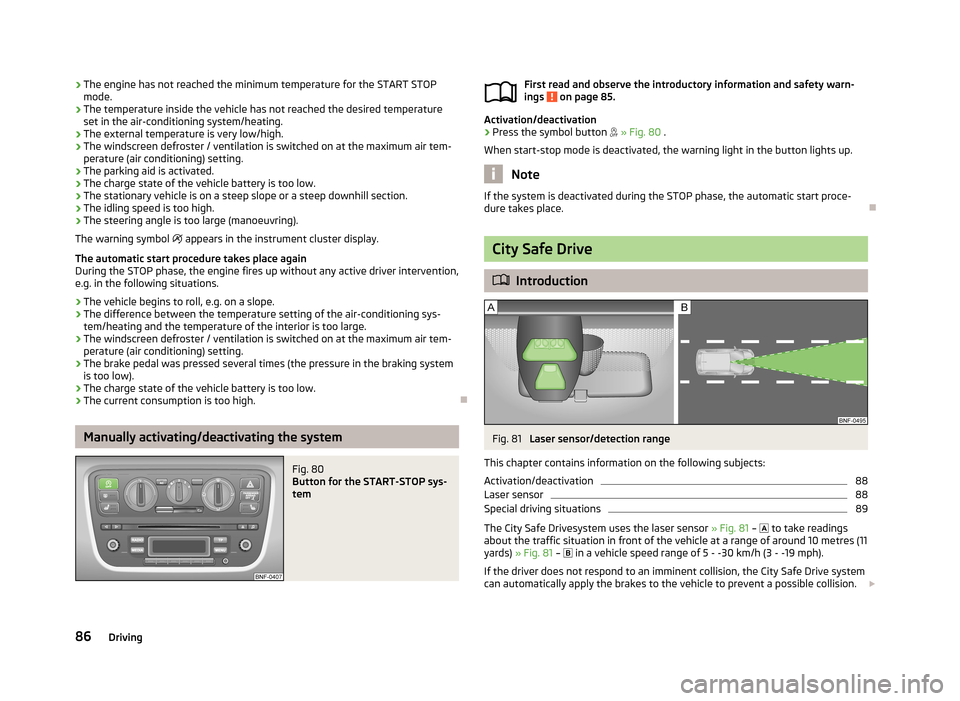
City Safe Drive
Introduction
Fig. 81
Laser sensor/detection range
This chapter contains information on the following subjects:
Activation/deactivation
88
Laser sensor
88
Special driving situations
89
The City Safe Drivesystem uses the laser sensor » Fig. 81 –
to take readings
about the traffic situation in front of the vehicle at a range of around 10 metres (11
yards) » Fig. 81 –
in a vehicle speed range of 5 - -30 km/h (3 - -19 mph).
If the driver does not respond to an imminent collision, the City Safe Drive system
can automatically apply the brakes to the vehicle to prevent a possible collision.
86Driving
Page 121 of 176

This wax protection does not need to be inspected or re-applied.If any small amount of wax flow out of the cavities at high temperatures, thesemust be removed with a plastic scraper and the stains cleaned using a petroleum cleaner.WARNINGSafety regulations should be observed when using petroleum cleaner to re-
move wax – risk of fire!
Wheels
First read and observe the introductory information and safety warn-
ings
on page 115.
Wheel rims
Also thoroughly wash the wheel rims when washing the vehicle on a regular ba- sis.
Regularly remove salt and brake abrasion, otherwise the rim material will be cor-
roded.
Damage to the paint layer on the wheel rims must be touched up immediately.
Light alloy wheels
After washing thoroughly and treat the wheel rims with a protective product for
light alloy wheels. Products which cause abrasion must not be used to treat the
wheel rims.
CAUTION
Severe layers of dirt on the wheels can also result in wheel imbalance. This may
show itself in the form of a wheel vibration which is transmitted to the steering
wheel which, in certain circumstances, can cause premature wear of the steering.
This means it is necessary to remove the dirt.
Underbody protection
First read and observe the introductory information and safety warn-ings
on page 115.
The underside of your vehicle is protected for life against chemical and mechani-
cal influences.
When driving, it cannot be guaranteed that no damage to the protective layer will
occur.
We recommend having the protective layer underneath the vehicle and the chas-
sis checked — preferably before the beginning of winter and at the end of winter.
WARNINGNever use additional underbody protection or anti-corrosion agents for ex-
haust pipes, catalytic converters or heat shields. When the engine reaches its
operating temperature, these substances may ignite - risk of fire!
Taking care of the interior
Introduction
This chapter contains information on the following subjects:
Natural leather
119
Artificial leather, cloths and Alcantara ®
120
Seat covers
120
Seat belts
121
Regular and proper care helps to ensure efficiency and maintain the
value of your
vehicle.
We recommend using vehicle care products from ŠKODA Original Accessories. These are available from ŠKODA Partners. The usage instructions on the packagemust be observed.
118General Maintenance
Page 132 of 176

›Take the bonnet support out of its holder 3
» Fig. 104 in the direction if the
arrow and secure the opened bonnet by inserting the end of the support in the
opening 4
designed for it.
Closing
›
Lift the bonnet slightly and unhook the bonnet support. Insert the bonnet sup-
port into the holder
3
designed for this purpose » Fig. 104.
›
Let the bonnet drop into the lock carrier lock from a height of around 20 cm – do
not push it in .
WARNINGCheck that the bonnet is closed properly.
CAUTION
Never open the bonnet using the locking lever » Fig. 103.
Engine compartment overview
Fig. 105
Schematic diagram: Engine compartment
First read and observe the introductory information and safety warn- ings
on page 127.
Engine oil dipstick
131
Engine oil filler opening
131
Coolant expansion reservoir
132123Brake fluid reservoir133Vehicle battery134
Windscreen washer fluid reservoir
129
Radiator fan
First read and observe the introductory information and safety warn-
ings
on page 127.
The radiator fan is powered by an electric motor. Operation is controlled accord-
ing to the temperature of the coolant.
WARNINGAfter switching off the ignition, the fan may intermittently continue to oper-
ate for approx. 10 minutes.
Windscreen washer system
Fig. 106
Engine compartment: Wind-
screen washer fluid reservoir
First read and observe the introductory information and safety warn- ings on page 127.
The windscreen washer fluid reservoir is located in the engine compartment and
contains the cleaning fluid for the windscreen or rear window.
The capacity of the windscreen washer fluid reservoir is approximately 3 litres.
Water alone is not sufficient to intensively clean the windscreen. We recommend using clean water together with a screen cleaner from the range of ŠKODA Origi-
nal Accessories (with antifreeze in winter) , which will remove any stubborn dirt.
456129Inspecting and replenishing
Page 136 of 176

›Check the level of coolant in the coolant expansion bottle
» Fig. 108. The cool-
ant level when the engine is cold must lie between the “MIN” and “MAX” mark-
ings. The level may also rise slightly above the “MAX” marking when the engine is warm.
If the coolant level in the coolant expansion tank is too low, this is indicated by
the warning light lighting up in the instrument cluster » page 18, Coolant .
We still recommend inspecting the coolant level directly at the reservoir from
time to time.
Loss of coolant
A loss of coolant is first and foremost an indication of a leak in the system. Do
not merely top up the coolant. Have the cooling system checked by a specialist
garage.
Replenishing
First read and observe the introductory information and safety warn-
ings
on page 132.
Only top up with new coolant.
›
Switch off the engine.
›
Allow the engine to cool.
›
Place a cloth over the cap of the coolant expansion tank and unscrew the cap carefully .
›
Replenish the coolant.
›
Turn the cap until it clicks into place.
Do not use an alternative additive if the specified coolant is not available in an emergency. In this case, use just water and have the correct mixing ratio of water
and coolant additive restored by a specialist garage as soon as possible.
Brake fluid
Introduction
This chapter contains information on the following subjects:
Checking the brake fluid level
133
Changing
134WARNING■ The engine compartment of your car is a hazardous area. The following
warning instructions must be followed at all times when working in the en-
gine compartment » page 127.■
If the fluid level has dropped below the MIN marking » Fig. 108 on page 132,
do not continue your journey - there is the risk of an accident! Seek help
from a specialist garage.
■
Do not use used brake fluid - the function of the brake system may be im-
paired – risk of accident!
CAUTION
Brake fluid damages the paintwork of the vehicle.
Note
The brake fluid is changed as part of a compulsory inspection service.
Checking the brake fluid level
Fig. 109
Engine compartment: Brake fluid
reservoir
First read and observe the introductory information and safety warn-
ings on page 133.
The brake fluid reservoir is located in the engine compartment.
›
Switch off the engine.
›
Open the bonnet.
›
Check the level of brake fluid in the reservoir » Fig. 109.
The level must be between the “MIN” and “MAX” markings.
133Inspecting and replenishing