2013 SKODA CITIGO heating
[x] Cancel search: heatingPage 60 of 176

Heating and air-conditioning
Heating, ventilation and cooling
Introduction
This chapter contains information on the following subjects:
Air outlet vents
57
The heating effect is dependent upon the coolant temperature, thus full heat output only occurs when the engine has reached its operating temperature.
If the cooling system is switched on, the temperature and air humidity drops in
the vehicle. The cooling system prevents the windows from misting up during
winter months.
It is possible to briefly activate recirculated air mode to enhance the cooling ef-
fect.
Please refer to the information regarding the recalculated air mode for air-condi-
tioning » page 61 .
WARNINGFor your own safety and that of other road users, ensure that all the windows
are free of ice, snow and misting. Please familiarize yourself about how to cor- rectly operate the heating and ventilation systems, how to demist and defrost
the windows, as well as with the cooling mode.
CAUTION
■ The air inlet in front of the windscreen must be free from ice, snow or leaves,
for example, to ensure that the heating and cooling system works properly.■
After switching on the cooling Condensation from the evaporator of the air con-
ditioning may drip down and form a puddle below the vehicle. This is not a leak!
Note■ The used air streams out through the vents in the luggage compartment.■We recommend that you do not smoke in the vehicle when the recirculating air
mode is operating since the smoke which is drawn at the evaporator from the in-
terior of the vehicle forms deposits in the evaporator of the air conditioning sys- tem. This produces a permanent odour when the air conditioning system is oper-ating which can only be eliminated through considerable effort and expense (re-
placement of compressor).
Air outlet vents
Fig. 62
Air outlet vents
First read and observe the introductory information and safety warn-
ings
on page 57.
Warmed, not warmed fresh or cooled air will flow out of the opened air outlet
vents according to the setting of the control dial and the outside atmospheric
conditions.
Opening
›
To open the air outlet vents
1
» Fig. 62 , press on the air outlet vent.
Closing
›
To close the air outlet vents
1
» Fig. 62 , fold the fins back.
Changing the air flow direction
›
Adjust the flow direction by turning the fins.
57Heating and air-conditioning
Page 61 of 176

NoteDo not cover the air outlet vents with objects of any kind.
Heating
Introduction
This chapter contains information on the following subjects:
Control elements
58
Setting
59
Control elements
Fig. 63
Heating: Control elements
First read and observe the introductory information given on page 58.
Functions of the individual controls » Fig. 63 :
Set the temperature (turn to the left: to reduce the temperature: turn to the
right: to increase temperature)
Set the blower stage (stage 0: Fan out, stage 4: the highest blower speed) Set the direction of the air outlet » page 57
Controls
A
and
C
can be set at any position in between.
WARNINGThe blower should always be on to prevent the windows from misting up.
ABC58Using the system
Page 62 of 176

SettingFirst read and observe the introductory information given on page 58.
Recommended basic settings of the heating controls.
Set-upSetting the regulator » Fig. 63 on page 58Air outlet vents 1 » Fig. 62 on page 57ABCDefrosting the windscreen and side windowsTo the right up to the stop3Open and align with the side windowFree windscreen and side windows from mistDesired temperature2 or 3
Open and align with the side windowThe fastest heatingTo the right up to the stop3OpeningComfortable heatingDesired temperature2 or 3
OpeningFresh air mode – ventilationTo the left up to the stopDesired positionOpeningNoteIf the air distribution is positioned towards the windows, the total amount of air is
used to defrost the windows and thus no air will be fed to the footwell. This can
lead to restriction of the heating comfort.
Air conditioning system
Introduction
This chapter contains information on the following subjects:
Control elements
60
Setting the air conditioning system
61
Recirculated air mode
61
Using the air conditioning system economically
62
Operational problems
62The cooling system only operates if the following conditions are met. The cooling system is switched on » page 60.
The engine is running.
The outside temperature is above approx. +2 °C.
The blower switch is switched on (positions 1-4).
The cooling system is switched off at a high coolant temperature in order to pro-
vide cooling at a high load of the engine.
CAUTION
■ Under certain circumstances, air at a temperature of about 5 °C can flow out of
the vents when the cooling system is switched on.■
Lengthy and uneven distribution of the air flow out of the vents (especially
around the feet) and large differences in temperature, for example, when getting
out of the vehicle, can cause susceptible individuals to catch a cold.
59Heating and air-conditioning
Page 63 of 176

NoteWe recommend that you have the air conditioning system cleaned by a specialist
garage once every year.
Control elements
Fig. 64
The air conditioning system: Control elements
First read and observe the introductory information and safety warn- ings
on page 59.
Functions of the individual controls » Fig. 64 :
Set the temperature (turn to the left: to reduce the temperature: turn to the right: to increase temperature)
Set the blower stage (stage 0: Fan out, stage 4: the highest blower speed)
Set the direction of the air outlet » page 57
Switch recirculation on / off » page 61
Switching the cooling system on/off
ABCDENote■ If the air distribution is positioned towards the windows, the total amount of air
is used to defrost the windows and thus no air will be fed to the footwell. This can lead to restriction of the heating comfort.■
The warning light in the button ( » Fig. 64, Pos.
E
) lights after activation,
even if not all of the conditions for the function of the cooling system have been met » page 59 . As a result, the readiness for cooling is signalled when all condi-
tions are satisfied » page 59.
60Using the system
Page 64 of 176

Setting the air conditioning systemFirst read and observe the introductory information and safety warnings
on page 59.
Recommended basic settings of the air conditioning controls.
Set-upSetting the regulator » Fig. 64 on page 60Button » Fig. 64 on
page 60Air outlet vents 1 » Fig. 62
on page 57ABCDEDefrost/defog windscreen and
side windows a)Desired tempera-
ture3 or 4ActivatedOpen and align with the side window
The fastest heatingTo the right up tothe stop3Short ,
then Switched offOpeningComfortable heatingDesired tempera-
ture2 or 3
Switched offOpeningThe fastest coolingTo the left up to
the stopbriefly 4, then 2 or 3Short ,
then ActivatedOpeningComfortable coolingDesired tempera-
ture1, 2 or 3ActivatedOpen and align to the roofFresh air mode – ventilationTo the left up tothe stopDesired positionSwitched offOpeninga)
We recommend that you do not use this setting in countries with high humidity levels. This can result in heavy cooling of the window glass and the following fogging from outside.
Recirculated air mode
First read and observe the introductory information and safety warn-ings
on page 59.
Recirculated air mode mostly prevents polluted air outside the vehicle from get-ting into the vehicle, for example when driving through a tunnel or when standing in a traffic jam.
Switching on
›
Move the sliding regulator
D
» Fig. 64 on page 60 into position .
Switching off›Move the sliding regulator D » Fig. 64 on page 60 into position .WARNINGDo not leave recirculated air mode on over a longer period of time, as “stale”
air can cause fatigue of the driver and passengers, reduce attention levels and
also cause the windows to mist up. The risk of having an accident increases.
Switch off recirculated air mode as soon as the windows start to mist up.
61Heating and air-conditioning
Page 73 of 176

HandbrakeFig. 69
Handbrake
First read and observe the introductory information and safety warn-ings on page 68.
Apply
›
Pull the handbrake lever firmly upwards.
Loosening
›
Pull the handbrake lever up slightly and at the same time push in the locking
button » Fig. 69 .
›
Move the lever right down while pressing the lock button.
The handbrake warning light
lights up when the handbrake is applied, provided
the ignition is on.
A warning signal sounds if the vehicle is inadvertently driven off with the hand-
brake applied.
The handbrake warning is activated if the vehicle is driven at a speed of more
than around 6 km/h for more than 3 seconds.
WARNINGPlease note that the handbrake must be fully released. A handbrake which is only partially released can result in the rear brakes overheating. This can havea negative effect on the operation of the brake system – risk of accident!
Manual gear changing and pedals
Introduction
This chapter contains information on the following subjects:
Manual gear changing
70
Pedals
71
Manual gear changing
Fig. 70
Shift pattern of the transmission
First read and observe the introductory information given on page 70.
Always depress the clutch pedal all the way down. This prevents uneven wear to
the clutch.
The gearshift indicator must be observed when changing gear » page 12.
Only engage reverse gear when the vehicle is stationary. Depress the clutch pedal
and hold it fully depressed. Wait a moment before reverse gear is engaged to
avoid any shift noises.
The reversing lights will come on once reverse gear is engaged, provided the igni- tion is on.
WARNINGNever engage reverse gear when driving – risk of accident! 70Driving
Page 76 of 176

When the accelerator pedal is fully depressed, the Kick-down function is activated
in any forward driving mode.
The gearbox shifts down one or more gears depending on the vehicle speed and engine speed, and the vehicle accelerates.
The gearbox does not shift up into the highest gear until the engine has reached
its maximum revolutions for this gear range.WARNINGRapid acceleration, particularly on slippery roads, can lead to loss of vehicle
control – risk of accident!
Operational faults
First read and observe the introductory information and safety warn-
ings
on page 71.
In the event of a fault in the automatic gearbox, warning lights may light up in the instrument panel » page 20,
Automated transmission
.
Emergency programme
The transmission switches to the emergency programme, if there is a fault in the
automatic transmission.
Indications of an activated emergency programme include the following.
› Only certain gears are selected.
› The reverse gear
R cannot be used.
Gearbox overheating
The gearbox may become too hot due to frequent repeated starting or stop-and-
go traffic, for example.
The vehicle does not start off after engaging the selector lever position
If the vehicle does not start off, the problem may be that the selector lever is not
completely in the selected position. In such an instance, press the brake pedal
and put the selector lever into the required position.
Running in
Introduction
This chapter contains information on the following subjects:
New engine
73
New tyres
74
New brake pads
74
New engine
First read and observe the introductory information given on page 73.
The engine has to be run in during the first 1 500 kilometres.
Up to 1 000 kilometres
›
Do not drive faster than 3/4 of the maximum speed of the gear in use, i.e. 3/4 of
the maximum permissible engine speed.
›
No full throttle.
›
Avoid high engine speeds.
›
Do not tow a trailer.
From 1 000 up to 1 500 kilometres
Gradually increase the power output of the engine up to the full speed of the
gear engaged, i.e. up to the maximum permissible engine speed.
The red scale of the rev counter indicates the range in which the system beginsto limit the engine speed.
During the first operating hours the engine has higher internal friction than later until all of the moving parts have harmonized. The driving style which you adopt
during the first approx.1 500 kilometres plays a decisive part in the success of running in your car.
Never drive at unnecessarily high engine speeds even after the running-in period.
On vehicles fitted with a manual gearbox, at the very latest shift up into the next
gear when the red area is reached. Observe the recommended gear » page 12,
Recommended gear . Very high engine speeds when accelerating (accelerator) are
automatically restricted »
.
73Starting-off and Driving
Page 89 of 176
›The engine has not reached the minimum temperature for the START STOP
mode.
› The temperature inside the vehicle has not reached the desired temperature
set in the air-conditioning system/heating.
› The external temperature is very low/high.
› The windscreen defroster / ventilation is switched on at the maximum air tem-
perature (air conditioning) setting.
› The parking aid is activated.
› The charge state of the vehicle battery is too low.
› The stationary vehicle is on a steep slope or a steep downhill section.
› The idling speed is too high.
› The steering angle is too large (manoeuvring).
The warning symbol
appears in the instrument cluster display.
The automatic start procedure takes place again
During the STOP phase, the engine fires up without any active driver intervention, e.g. in the following situations.
› The vehicle begins to roll, e.g. on a slope.
› The difference between the temperature setting of the air-conditioning sys-
tem/heating and the temperature of the interior is too large.
› The windscreen defroster / ventilation is switched on at the maximum air tem-
perature (air conditioning) setting.
› The brake pedal was pressed several times (the pressure in the braking system
is too low).
› The charge state of the vehicle battery is too low.
› The current consumption is too high.
Manually activating/deactivating the system
Fig. 80
Button for the START-STOP sys-
tem
First read and observe the introductory information and safety warn-
ings on page 85.
Activation/deactivation
›
Press the symbol button » Fig. 80 .
When start-stop mode is deactivated, the warning light in the button lights up.
Note
If the system is deactivated during the STOP phase, the automatic start proce-
dure takes place.
City Safe Drive
Introduction
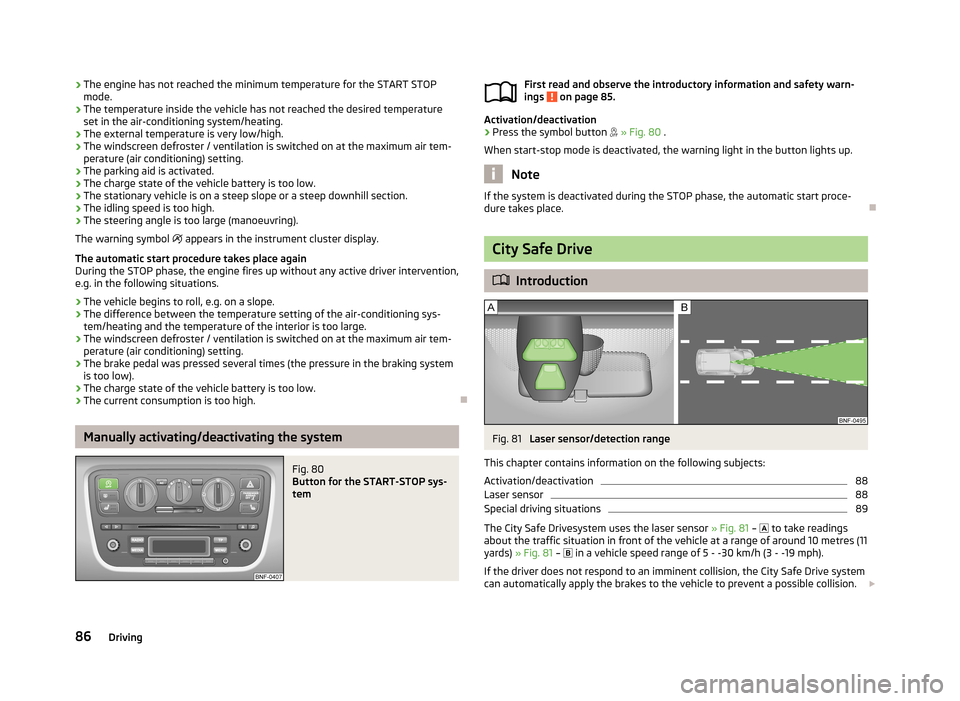
Fig. 81
Laser sensor/detection range
This chapter contains information on the following subjects:
Activation/deactivation
88
Laser sensor
88
Special driving situations
89
The City Safe Drivesystem uses the laser sensor » Fig. 81 –
to take readings
about the traffic situation in front of the vehicle at a range of around 10 metres (11
yards) » Fig. 81 –
in a vehicle speed range of 5 - -30 km/h (3 - -19 mph).
If the driver does not respond to an imminent collision, the City Safe Drive system
can automatically apply the brakes to the vehicle to prevent a possible collision.
86Driving