2013 RENAULT SCENIC automatic transmission
[x] Cancel search: automatic transmissionPage 61 of 115
37B-61
MR-372-J84-37B000$504.mif
V11
ELECTRONIC PARKING BRAKE
Fault finding – Interpretation of faults
FPA
Vdiag No.: 0C, 04, 08,
0D, 11
37B
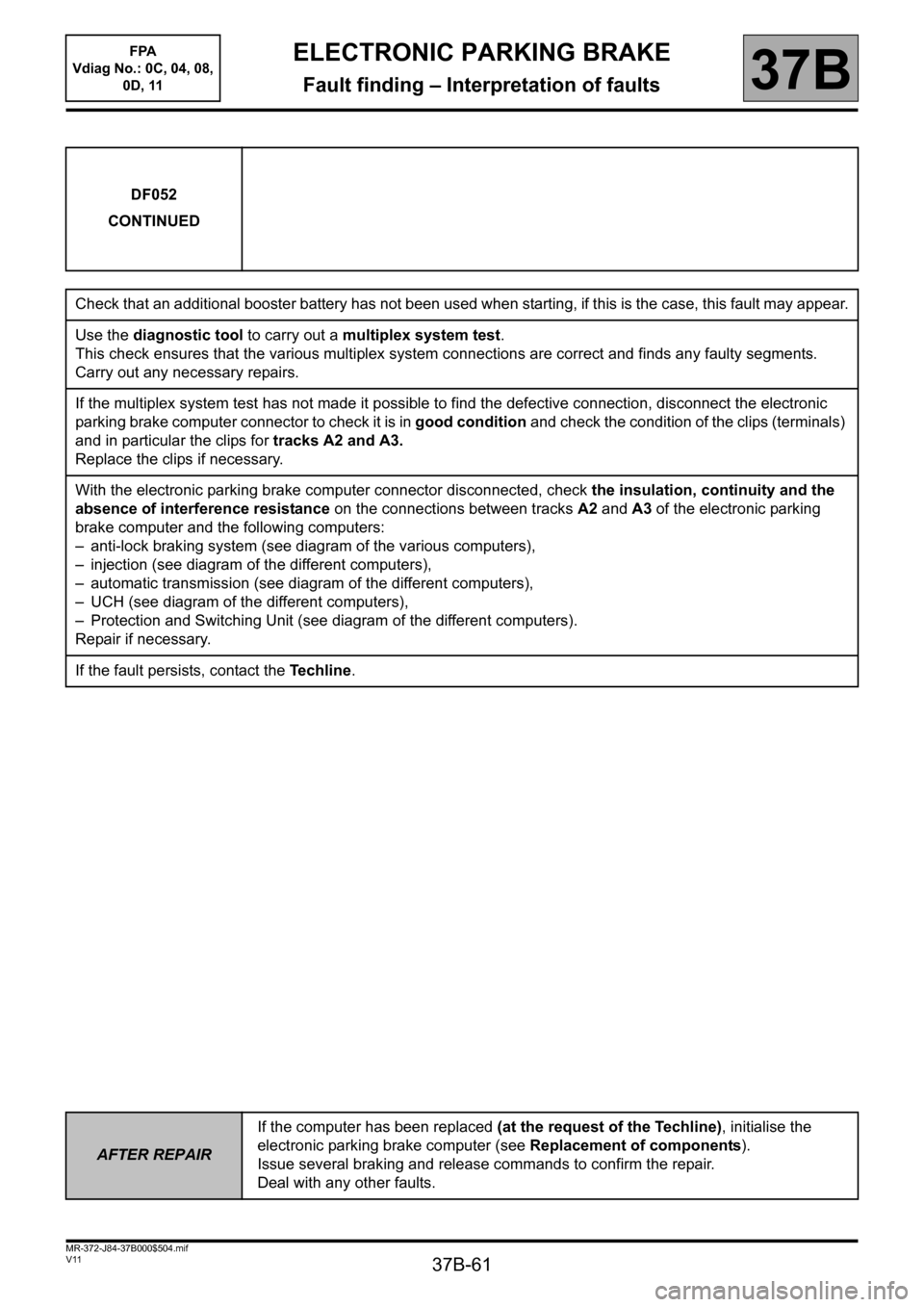
DF052
CONTINUED
Check that an additional booster battery has not been used when starting, if this is the case, this fault may appear.
Use the diagnostic tool to carry out a multiplex system test.
This check ensures that the various multiplex system connections are correct and finds any faulty segments.
Carry out any necessary repairs.
If the multiplex system test has not made it possible to find the defective connection, disconnect the electronic
parking brake computer connector to check it is in good condition and check the condition of the clips (terminals)
and in particular the clips for tracks A2 and A3.
Replace the clips if necessary.
With the electronic parking brake computer connector disconnected, check the insulation, continuity and the
absence of interference resistance on the connections between tracks A2 and A3 of the electronic parking
brake computer and the following computers:
– anti-lock braking system (see diagram of the various computers),
– injection (see diagram of the different computers),
– automatic transmission (see diagram of the different computers),
– UCH (see diagram of the different computers),
– Protection and Switching Unit (see diagram of the different computers).
Repair if necessary.
If the fault persists, contact the Techline.
AFTER REPAIRIf the computer has been replaced (at the request of the Techline), initialise the
electronic parking brake computer (see Replacement of components).
Issue several braking and release commands to confirm the repair.
Deal with any other faults.
Page 64 of 115

37B-64
MR-372-J84-37B000$504.mif
V11
ELECTRONIC PARKING BRAKE
Fault finding – Interpretation of faults
FPA
Vdiag No.: 0C, 04, 08,
0D, 11
37B
DF055
CONTINUED
2. DEF
NOTESSpecial notes:
This fault is generated after the automatic parking brake is
switched on whilst driving or following an internal reset.
With the anti-lock braking system, this detection is active at
> 0.6 mph (> 1 km/h), otherwise the multiplex signal
emitted by the injection computer must be 1.
Note:
The driver is only informed of this fault after 16 successive
detections.
This fault may be due to battery disconnections or vehicle
supply faults, in which case it is associated with fault 1.DEF
(battery voltage too low) dealt with previously.
If the frequency counter (PR016) > 3 and if the onboard network (battery, wiring) analysis does not bring up any
present or stored fault under battery voltage, contact the Techline.
Check that the battery, battery - starter - alternator connection lead, battery earth - chassis lead and the chassis
earth - engine and transmission assembly lead are in good condition.
Repair if necessary.
Check the charging circuit: the alternator should not supply a voltage of less than + 12 V or greater than + 14.4 V
(engine at idle speed).
Carry out the necessary repairs.
track H4
(except Laguna II, Vel Satis and Espace IV)
track G4+12V
track H2
(except Laguna II, Vel Satis and Espace IV)
track G2earth
Repair if necessary (see the vehicle wiring diagram).
If the fault is still present, check that no electrical system using the same supply fuse as the electronic parking
brake computer is faulty.
If the fault persists, contact the Techline.
AFTER REPAIRIf the computer has been replaced (at the request of the Techline), initialise the
electronic parking brake computer (see Replacement of components).
Issue several braking and release commands to confirm the repair.
Deal with any other faults.
Page 78 of 115

37B-78
MR-372-J84-37B000$576.mif
V11
FPA
Vdiag No.: 0C, 04, 08,
0D, 11ELECTRONIC PARKING BRAKE
Fault finding – Conformity check37B
SUB-FUNCTION: AUTOMATIC APPLICATION
NOTESOnly carry out this conformity check after carrying out a complete check using the
diagnostic tool.
Application conditions: ignition on (forced + after ignition, see Introduction)
Note:
The interpretation of these statuses and parameters is only valid with the
ignition switched on, the statuses and parameters displayed in blue on the
diagnostic tool is information supplied by other computers, which are transmitted via
the multiplex network. If these variables display inconsistent values, check that the
multiplex system test has not shown up any faulty connections. Repair the faulty
multiplex connections before looking for a possible problem with the signals.
Each sub-function in this test is associated with a Fault finding chart.
Special notes
The diagnostic tool may display the message Computer busy when displaying
statuses and parameters. This message is displayed when the parking brake is
applying or releasing the brake, because the computer gives priority to controlling the
motor before transmitting variables. If this message is displayed, exit the current
screen and then return to it.
Order FunctionParameter or Status
Checked or ActionDisplay and notes Fault finding
1Assisted
braking
configurationET022:Automatic
braking
configurationWITH or WITHOUTDepending on the customer's
request, the electronic parking
brake computer may be
configured WITH or WITHOUT
assisted braking when the
engine stops. Refer to the
interpretation of status ET022
Automatic braking
configuration.
2Computer
electrical supplyET001:+ After ignition
feedIgnition off: ABSENT
Ignition on: PRESENTIn the event of a fault on this
status, refer to the interpretation
of status ET001: + after ignition
feed.
3EnginePR015:Engine speed0rpmIn the event of a fault with this
parameter and these statuses,
make sure that the injection
computer is in fact sending
signals (absence of faults DF036
No injection multiplex
transmission and DF052
Multiplex network).
If the fault is still present, run
fault finding on the injection
computer (see 13B, Diesel
injection or 17B, Petrol
injection). ET019:EngineSTOPPED
Other possibilities
depending on the
operating status of the
engine:
RUNNING
- UNDER STARTER
- STALLED
Page 82 of 115
37B-82
MR-372-J84-37B000$576.mif
V11
FPA
Vdiag No.: 0C, 04, 08,
0D, 11ELECTRONIC PARKING BRAKE
Fault finding – Conformity check37B
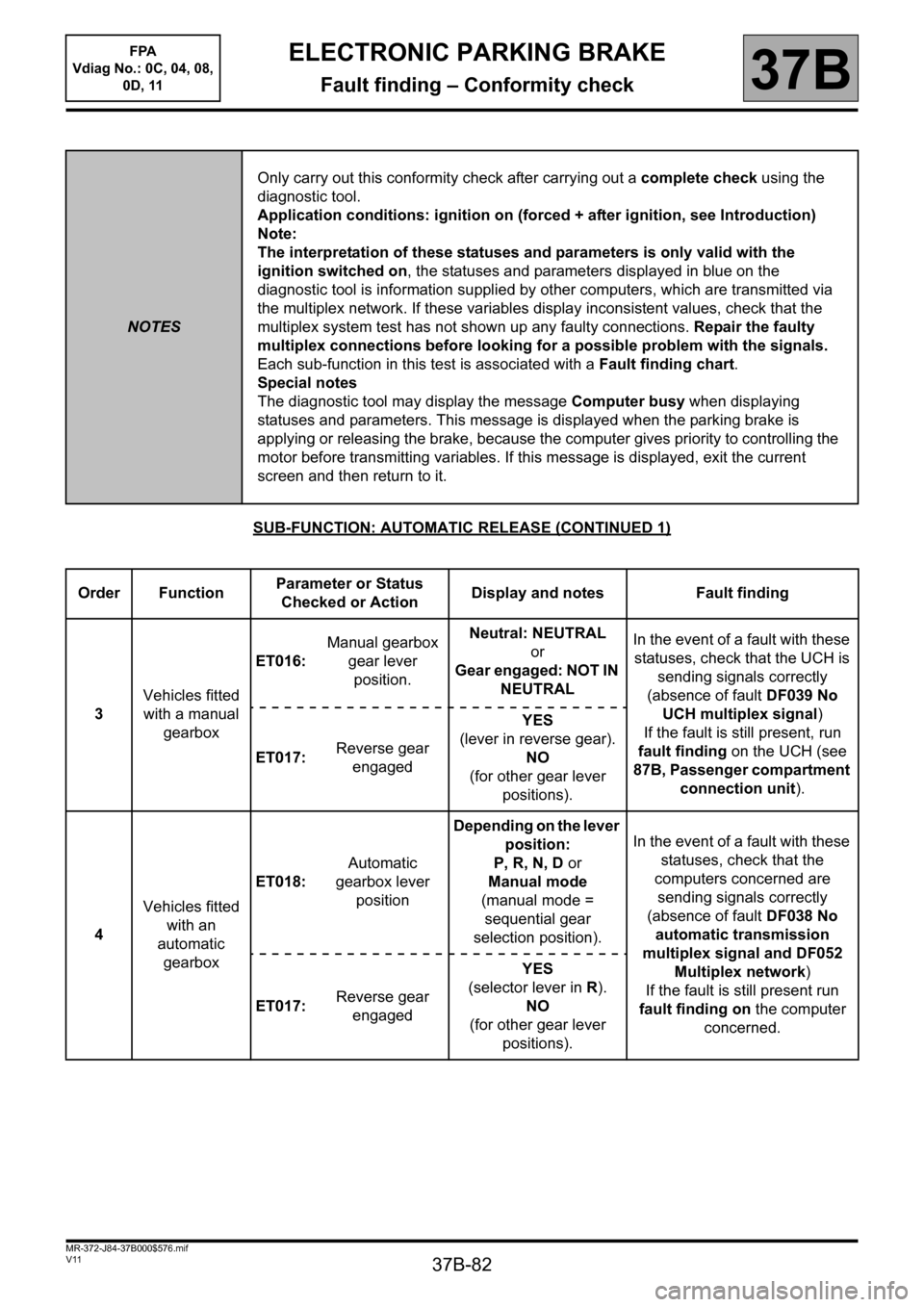
SUB-FUNCTION: AUTOMATIC RELEASE (CONTINUED 1)
NOTESOnly carry out this conformity check after carrying out a complete check using the
diagnostic tool.
Application conditions: ignition on (forced + after ignition, see Introduction)
Note:
The interpretation of these statuses and parameters is only valid with the
ignition switched on, the statuses and parameters displayed in blue on the
diagnostic tool is information supplied by other computers, which are transmitted via
the multiplex network. If these variables display inconsistent values, check that the
multiplex system test has not shown up any faulty connections. Repair the faulty
multiplex connections before looking for a possible problem with the signals.
Each sub-function in this test is associated with a Fault finding chart.
Special notes
The diagnostic tool may display the message Computer busy when displaying
statuses and parameters. This message is displayed when the parking brake is
applying or releasing the brake, because the computer gives priority to controlling the
motor before transmitting variables. If this message is displayed, exit the current
screen and then return to it.
Order FunctionParameter or Status
Checked or ActionDisplay and notes Fault finding
3Vehicles fitted
with a manual
gearboxET016:Manual gearbox
gear lever
position.Neutral: NEUTRAL
or
Gear engaged: NOT IN
NEUTRALIn the event of a fault with these
statuses, check that the UCH is
sending signals correctly
(absence of fault DF039 No
UCH multiplex signal)
If the fault is still present, run
fault finding on the UCH (see
87B, Passenger compartment
connection unit). ET017:Reverse gear
engagedYES
(lever in reverse gear).
NO
(for other gear lever
positions).
4Vehicles fitted
with an
automatic
gearboxET018:Automatic
gearbox lever
positionDepending on the lever
position:
P, R, N, D or
Manual mode
(manual mode =
sequential gear
selection position).In the event of a fault with these
statuses, check that the
computers concerned are
sending signals correctly
(absence of fault DF038 No
automatic transmission
multiplex signal and DF052
Multiplex network)
If the fault is still present run
fault finding on the computer
concerned. ET017:Reverse gear
engagedYES
(selector lever in R).
NO
(for other gear lever
positions).
Page 85 of 115

37B-85
MR-372-J84-37B000$576.mif
V11
FPA
Vdiag No.: 0C, 04, 08,
0D, 11ELECTRONIC PARKING BRAKE
Fault finding – Conformity check37B
SUB-FUNCTION: AUTOMATIC RELEASE (CONTINUED 4)
NOTESOnly carry out this conformity check after carrying out a complete check using the
diagnostic tool.
Application conditions: ignition on (forced + after ignition, see Introduction)
Note:
The interpretation of these statuses and parameters is only valid with the
ignition switched on, the statuses and parameters displayed in blue on the
diagnostic tool is information supplied by other computers, which are transmitted via
the multiplex network. If these variables display inconsistent values, check that the
multiplex system test has not shown up any faulty connections. Repair the faulty
multiplex connections before looking for a possible problem with the signals.
Each sub-function in this test is associated with a Fault finding chart.
Special notes
The diagnostic tool may display the message Computer busy when displaying
statuses and parameters. This message is displayed when the parking brake is
applying or releasing the brake, because the computer gives priority to controlling the
motor before transmitting variables. If this message is displayed, exit the current
screen and then return to it.
Order FunctionParameter or Status
Check or ActionDisplay and
NotesFault finding
8EnginePR015:Engine speed0rpmIn the event of a fault with this
parameter and these statuses,
make sure that the injection
computer is in fact sending
signals (absence of faults
DF036 No injection multiplex
transmission and DF052
Multiplex network).
If the fault is still present, run
fault finding on the injection
computer (see 13B, Diesel
injection or 17B, Petrol
injection). ET019:EngineSTOPPED
Other possibilities
depending on the operating
status of the engine:
- RUNNING
- UNDER STARTER
- STALLED (in the event
where the engine is not
stopped in the normal way)
Page 106 of 115
37B-106
MR-372-J84-37B000$936.mif
V11
ELECTRONIC PARKING BRAKE
Fault finding – Fault finding chart
FPA
Vdiag No.: 0C, 04, 08,
0D, 11
37B
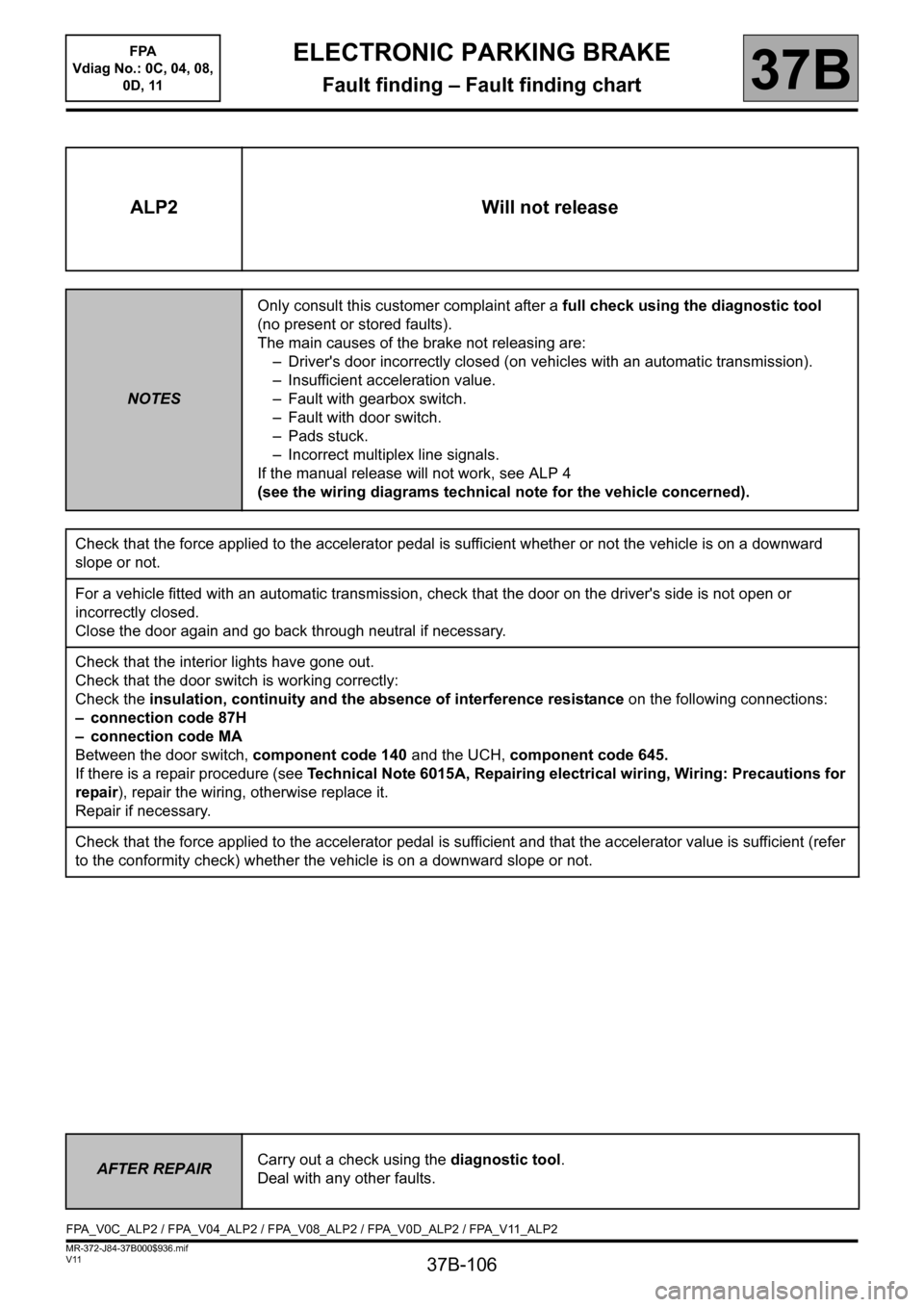
ALP2 Will not release
NOTESOnly consult this customer complaint after a full check using the diagnostic tool
(no present or stored faults).
The main causes of the brake not releasing are:
– Driver's door incorrectly closed (on vehicles with an automatic transmission).
– Insufficient acceleration value.
– Fault with gearbox switch.
– Fault with door switch.
– Pads stuck.
– Incorrect multiplex line signals.
If the manual release will not work, see ALP 4
(see the wiring diagrams technical note for the vehicle concerned).
Check that the force applied to the accelerator pedal is sufficient whether or not the vehicle is on a downward
slope or not.
For a vehicle fitted with an automatic transmission, check that the door on the driver's side is not open or
incorrectly closed.
Close the door again and go back through neutral if necessary.
Check that the interior lights have gone out.
Check that the door switch is working correctly:
Check the insulation, continuity and the absence of interference resistance on the following connections:
– connection code 87H
– connection code MA
Between the door switch, component code 140 and the UCH, component code 645.
If there is a repair procedure (see Technical Note 6015A, Repairing electrical wiring, Wiring: Precautions for
repair), repair the wiring, otherwise replace it.
Repair if necessary.
Check that the force applied to the accelerator pedal is sufficient and that the accelerator value is sufficient (refer
to the conformity check) whether the vehicle is on a downward slope or not.
AFTER REPAIRCarry out a check using the diagnostic tool.
Deal with any other faults.
FPA_V0C_ALP2 / FPA_V04_ALP2 / FPA_V08_ALP2 / FPA_V0D_ALP2 / FPA_V11_ALP2