Page 235 of 364
233
01FIRST STEPS
Peugeot Connect Media Navigation (NG4 3D) NAVIGATOR
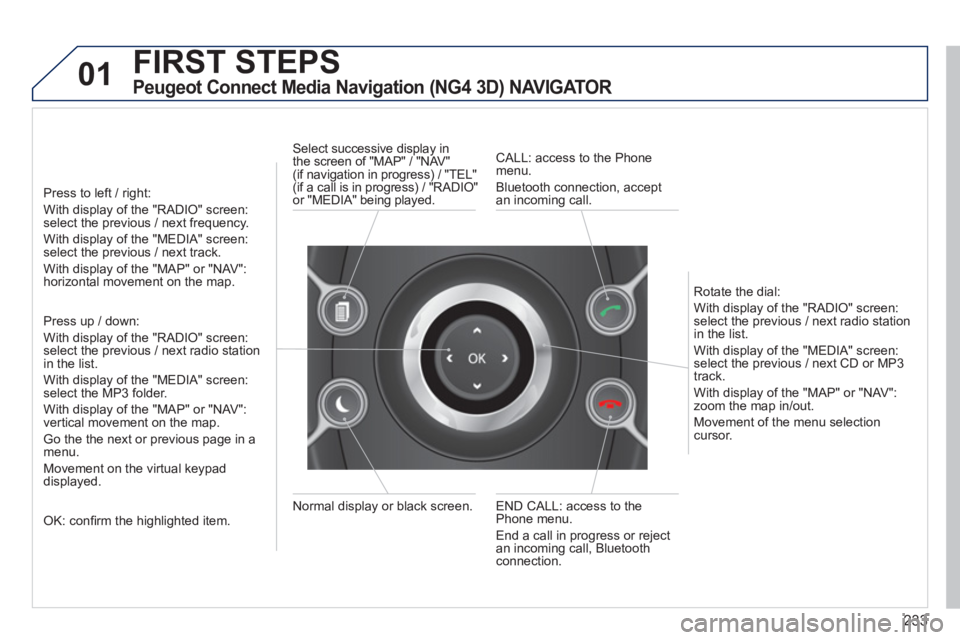
Press to left / right:
With display of the "RADIO" screen: select the previous / next frequency.
With display of the "MEDIA" screen: select the previous / next track.
With display of the "MAP" or "NAV":horizontal movement on the map.
Press up / down:
With display of the "RADIO" screen: select the previous / next radio stationin the list.
With display of the "MEDIA" screen: select the MP3 folder.
With display of the "MAP" or "NAV":
vertical movement on the map.
Go the the next or previous pa
ge in a menu.
Movement on the virtual keypad
displayed.
OK: confi rm the highlighted item.
END CALL: access to the Phone menu.
End a call in pro
gress or reject
an incoming call, Bluetooth connection. Normal displa
y or black screen. Select successive displa
y in
the screen of "MAP" / "NAV"(if navigation in progress) / "TEL" (if a call is in progress) / "RADIO"
or "MEDIA" being played.
CALL: access to the Phonemenu.
Bluetooth connection, accept
an incomin
g call.
Rotate the dial:
With displa
y of the "RADIO" screen: select the previous / next radio station
in the list.
With displa
y of the "MEDIA" screen: select the previous / next CD or MP3
track.
With displa
y of the "MAP" or "NAV":zoom the map in/out.
M
ovement of the menu selection cursor.
Page 238 of 364
236
02 VOICE COMMANDS AND STEERING MOUNTED CONTROLS
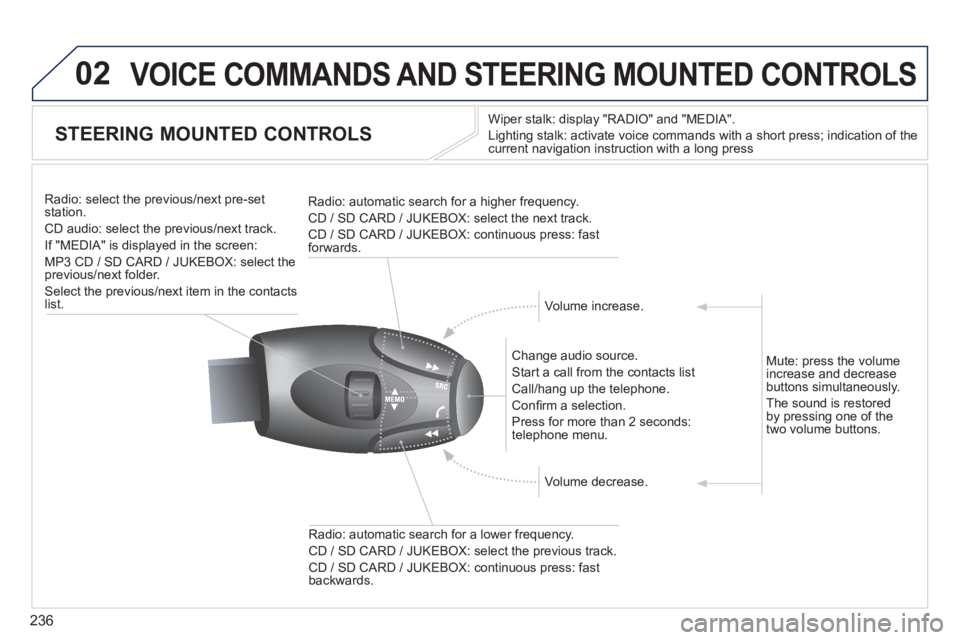
STEERING MOUNTED CONTROLS
Wiper stalk: display "RADIO" and "MEDIA".
Li
ghting stalk: activate voice commands with a short press; indication of the current navigation instruction with a long press
Change audio source.
Start a call from the contacts list
Call/han
g up the telephone.
Confi rm a selection.
Pr
ess for more than 2 seconds:
telephone menu.
Radio: automatic search for a lower frequenc
y.
CD / SD CARD / JUKEBOX: select the previous track.
CD / SD CARD / JUKEBOX: continuous press: fast backwards. Radio: select the previous
/next pre-setstation.
CD audio: select the previous/next track .
If "MEDIA" is displa
yed in the screen:
MP
3 CD / SD CARD / JUKEBOX: select the
previous/next folder.
Select the previous/next item in the contacts list.
Radio: automatic search
for a higher frequency.
CD / SD CARD / JUKEBOX: select the next track.
CD / SD CARD / JUKEBOX: continuous press: fast
forwards.
Volume increase.
Volume decrease. Mute: press the volume
increase and decreasebuttons simultaneously.
Th
e sound is restoredby pressing one of the
two volume buttons.
Page 239 of 364
237
03
SETUP
TRAFFIC
MEDIA
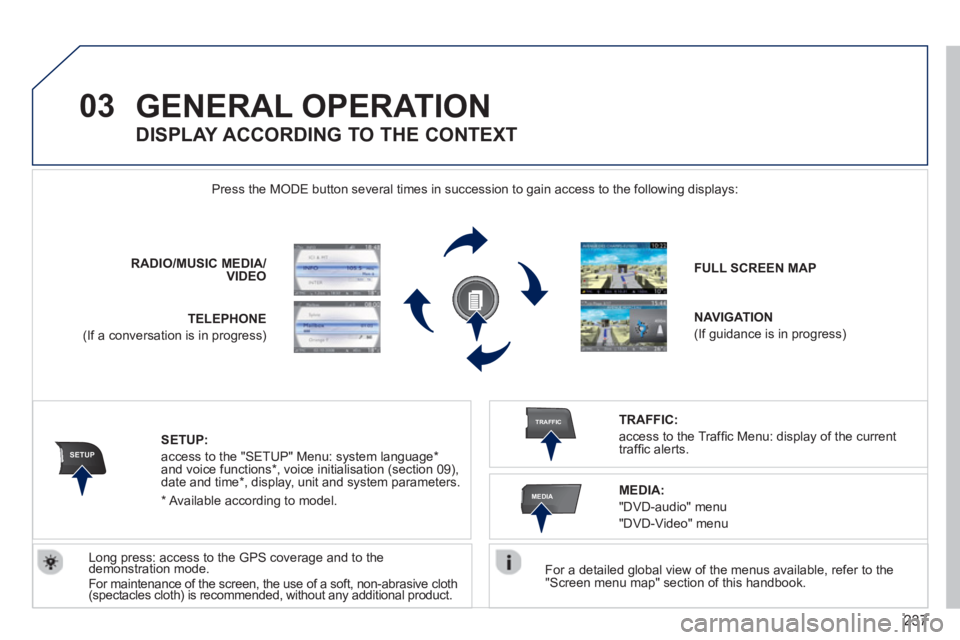
GENERAL OPERATION
For a detailed global view of the menus available, refer to the "Screen menu map" section of this handbook.
Press the M
ODE button several times in succession to gain access to the following displays:
Long press: access to the GPS coverage and to the demonstration mode. gpgp
For maintenance of the screen, the use of a soft, non-abrasive cloth (spectacles cloth) is recommended, without any additional product. RADIO
/MUSICMEDIA/VIDEO
TELEPHONE
(If a conversation is in progress)
FULL SCREEN MAP
NAVIGATION
(If guidance is in progress)
SETUP:
access to the "SETUP" Menu: system language *
and voice functions * , voice initialisation (section 09),
date and time * , display, unit and system parameters.
TRAFFIC:
access to the Traffi c Menu: display of the current
traffi c alerts.
DISPLAY ACCORDING TO THE CONTEXT
MEDIA:
"DVD-audio" menu
"DVD-Video" menu
*
Available accordin
g to model.
Page 240 of 364
238
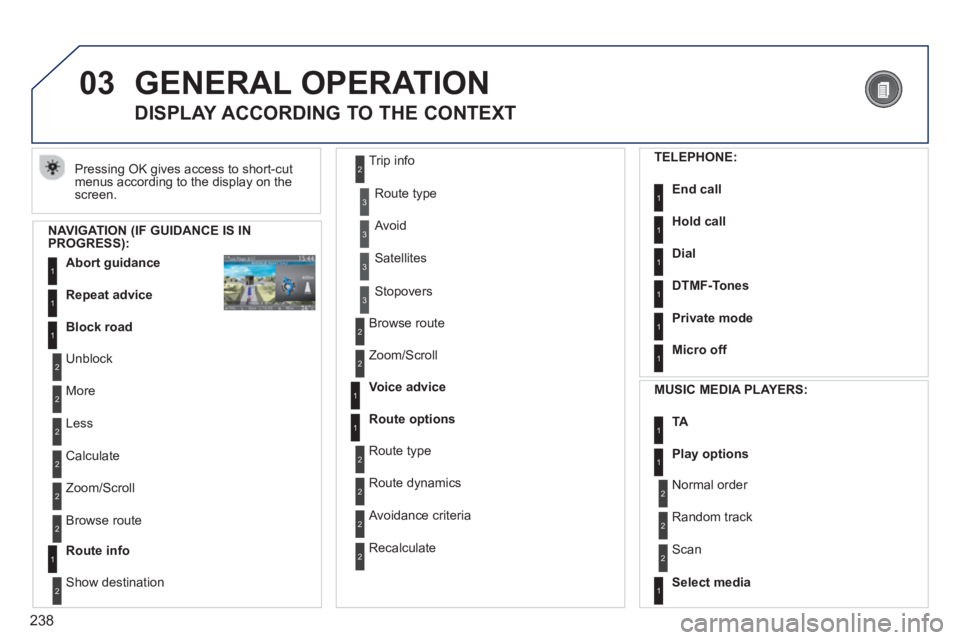
03 GENERAL OPERATION
Pressing OK gives access to short-cut
menus according to the display on the screen.
DISPLAY ACCORDING TO THE CONTEXT
NAVIGATION (IF GUIDANCE IS IN PROGRESS):
Abort guidanc
e1
1
1
Repeat advice
Block road
2
2
Unblock
M
ore
2
Less
3
3
Route type
Avoid
3 Satellites
2
2
Calculate
Z
oom/Scroll
2
Browse route
1Route info
2
2
Show destination Trip in
fo
3
Stopovers
2
2
Browse route
Zoom/Scroll
1
1
Voice advice
Route options
2
2
Route type
Route dynamics
2 Avoidance criteria
2
Recalculate
TELEPHONE:
End call1
1
1
1
Hold call
Dial
DTMF-Tones
1Private mode
1Micro off
MU
SIC MEDIA PLAYERS:
TA1
1Play options
1Select media
2
2
Normal order
R
andom track
2 Scan
Page 241 of 364
239
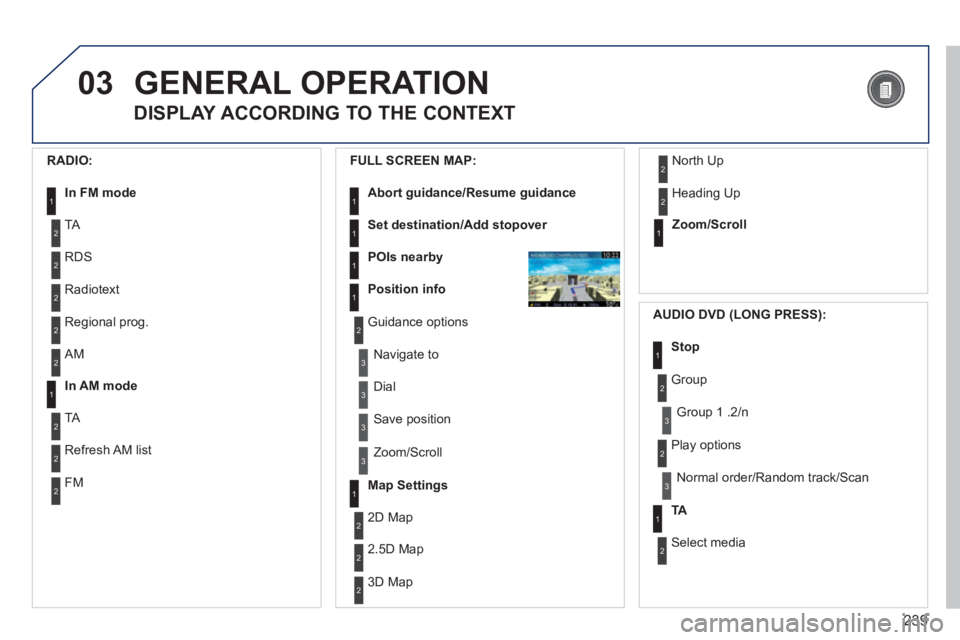
03GENERAL OPERATION
DISPLAY ACCORDING TO THE CONTEXT
RADIO:
In FM mode1
2
2
TA
RDS
2Radiotext
2Regional prog.
FULL
SCREEN MAP:
Abort guidance/Resume guidance1
1
1
1
Set destination/Add stopover
POIs nearby
Position info
2Guidance options
3
3
Navigate to
Dial
3 Save position
3
Zoom/Scroll
Map Settings1
1Zoom/Scroll
2
2
2D Map
2.5D Map
23D Map
2 North Up
2
Heading Up
AUDIO DVD (LONG PRESS):
1Stop
2 Group
3Group 1 .2/n
TA1
2 Select media
2
Play options
3Normal order/Random track/Scan
2AM
In AM mode1
2
2
TA
Refresh AM list
2FM
Page 242 of 364
240
03
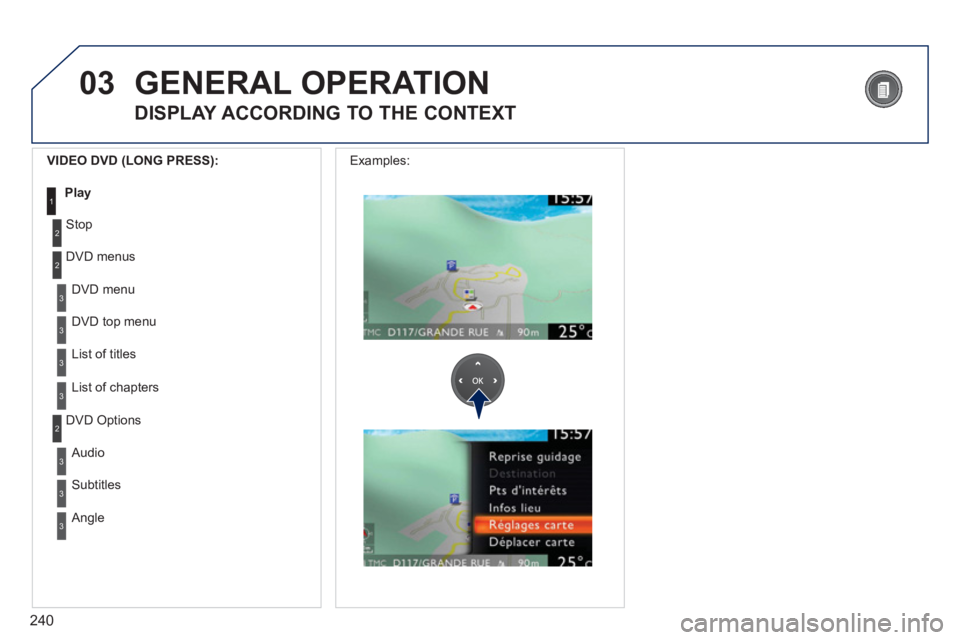
3
3
DVD menu
DVD top menu
3
List of titles
3
List of chapters
VIDEO DVD (LONG PRESS):
Play1
GENERAL OPERATION
DISPLAY ACCORDING TO THE CONTEXT
2
2
Stop
DVD menus
3
3
Audio
Subtitles
3 Angle
2 DVD Options Examples:
Page 243 of 364
241
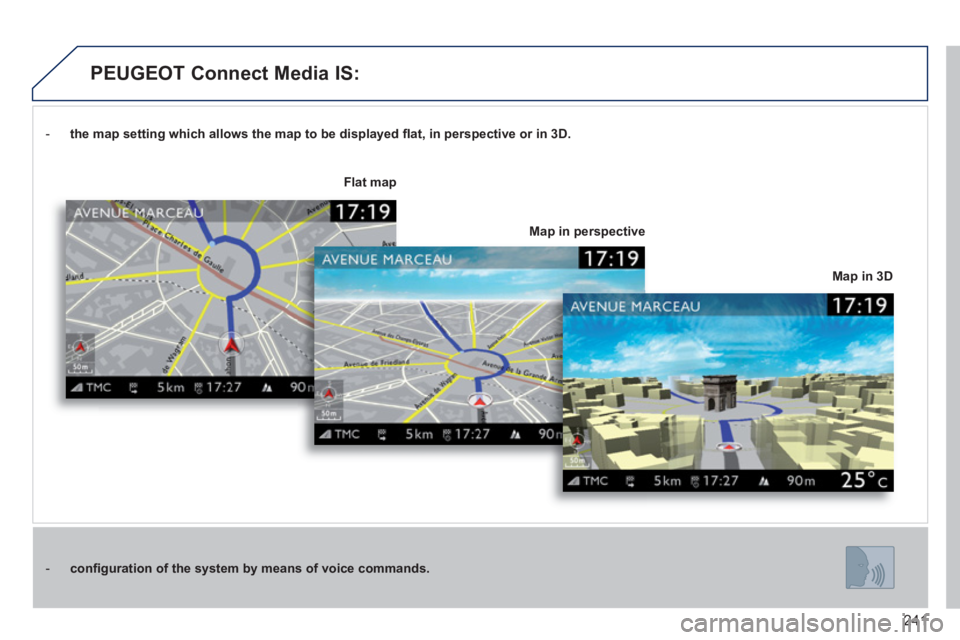
- the map setting which allows the map to be displayed fl at, in perspective or in 3D.
- confi guration of the system by means of voice commands.
Map in 3D
Flat map
Map in perspective
PEUGEOT Connect Media IS:
Page 245 of 364
243
04
2ABC3DEF5JKL4GHI6MNO8TUV7PQRS9WXYZ0*#
1RADIO MEDIANAV TRAFFIC
SETUPADDR
BOOK
2ABC3DEF5JKL4GHI6MNO8TUV7PQRS9WXYZ0*#
1RADIO MEDIANAV TRAFFIC
SETUPADDR
BOOK
2ABC3DEF5JKL4GHI6MNO8TUV7PQRS9WXYZ0*#
1RADIO MEDIANAV TRAFFIC
SETUPADDR
BOOK
2ABC3DEF5JKL4GHI6MNO8TUV7PQRS9WXYZ0*#
1RADIO MEDIANAV TRAFFIC
SETUPADDR
BOOK
2ABC3DEF5JKL4GHI6MNO8TUV7PQRS9WXYZ0*#
1RADIO MEDIANAV TRAFFIC
SETUPADDR
BOOK
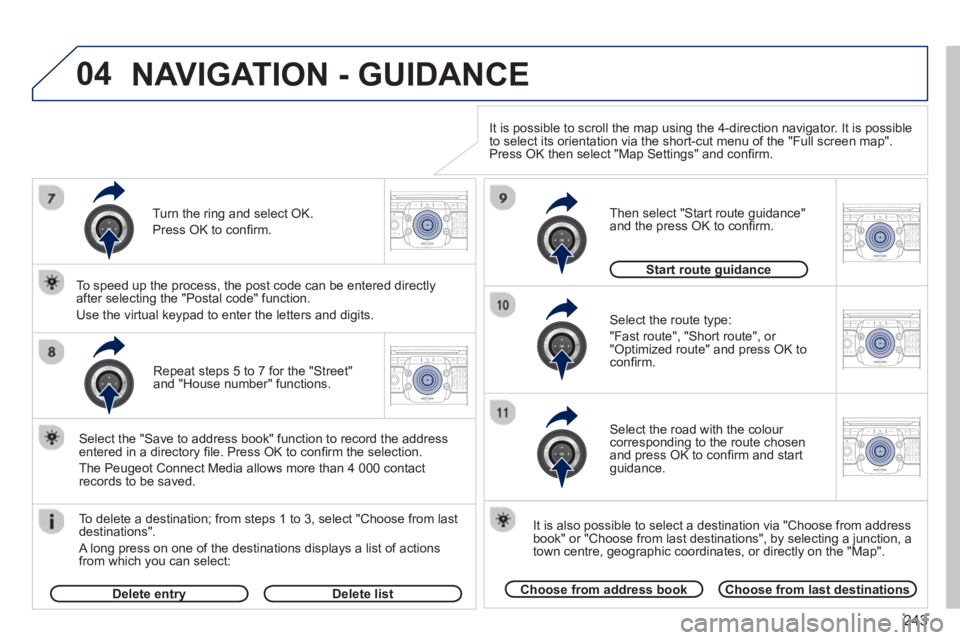
Repeat steps 5 to 7 for the "Street" and "House number" functions.
To delete a destination; from ste
ps 1 to 3, select "Choose from last destinations".
A long press on one of the destinations displays a list of actions
from which you can select:
Select the "Save to address book" function to record the address
entered in a directory fi le. Press OK to confi rm the selection.
The Peu
geot Connect Media allows more than 4 000 contact
records to be saved.
To speed up the process, the post code can be entered directl
y
after selecting the "Postal code" function.
Use the virtual keypad to enter the letters and digits.
Select the route type:
"Fast route"
, "Short route", or "Optimized route" and press OK to confi rm.
Then select "Start route
guidance"
and the press OK to confi rm.
It is also
possible to select a destination via "Choose from address
book" or "Choose from last destinations", by selecting a junction, a
town centre, geographic coordinates, or directly on the "Map".
Choose from last destinationsChoose from address book
Start route guidanceg
It is possible to scroll the map using the 4-direction navigator. It is possible
to select its orientation via the short-cut menu of the "Full screen map".
Press OK then select "Map Settings" and confi rm.
Select the road with the colour corresponding to the route chosen
and press OK to confi rm and start guidance.
Turn the rin
g and select OK.
Press
OK to confi rm.
Delete entryyDelete list
NAVIGATION - GUIDANCE