2013 PEUGEOT 308 CC display
[x] Cancel search: displayPage 42 of 268

2
40
MULTIFUNCTION SCREENS
Example: setting of the duration of the
"guide-me-home" lighting
Press the " " or " " buttons, then
the "OK" button to select the menu
required.
Press the " " or " " buttons,
then the "OK" button to select the
"Guide-me-home headlamps" line. "Diagnosis vehicle"
menu
Press the "MENU" button to gain
access to the main menu.
Press the arrows, then the "OK"
button to select the " Diagnosis vehi-cle " menu. On the "
Diagnosis vehicle " menu,
select the following application:
Alert log
This summarises the active warning
messages, displaying them in succes-
sion in the multifunction screen. Once this menu has been selected, you
can consult the alert log.
Defi ne the vehicle parameters
Once this menu has been selected, you
can activate or deactivate the following
equipment:
- selective unlocking (refer to "Access"),
- "guide-me-home" lighting (refer to
"Visibility"),
- interior mood lighting (refer to "Vis- ibility"),
-
daytime running lamps (refer to "Visibility"),
- rear parking sensors (refer to "Driving").
"Personalisation-
Configuration" menu
Once this menu has been selected, you
have access to the following functions:
- defi ne the vehicle parameters,
- display confi guration,
- choice of language.
"Telephone" menu
With the PEUGEOT Connect Sound
switched on, once this menu has
been selected you can confi gure your
Bluetooth hands-free kit (pairing), con-
sult the various telephone directories
(calls log, services...) and manage your
communications (pick up, hang up, call
waiting, secret mode...).
For more information on the "Telephone"
application, refer to the PEUGEOT
Connect Sound section.
Page 43 of 268
2
!
!
41
MULTIFUNCTION SCREENS
For safety reasons, confi guration
of the multifunction screen by the
driver must be done only when sta-
tionary.
Display confi guration
Once this menu has been selected, you
have access to the following settings:
- brightness-video setting,
- date and time setting,
- choice of units.
Choice of language
Once this menu has been selected,
you can change the language used by
the display (Deutsch, English, Espanol,
Français, Italiano, Nederlands,
Portugues, Portugues-Brasil, Russe,
Türkçe * ).
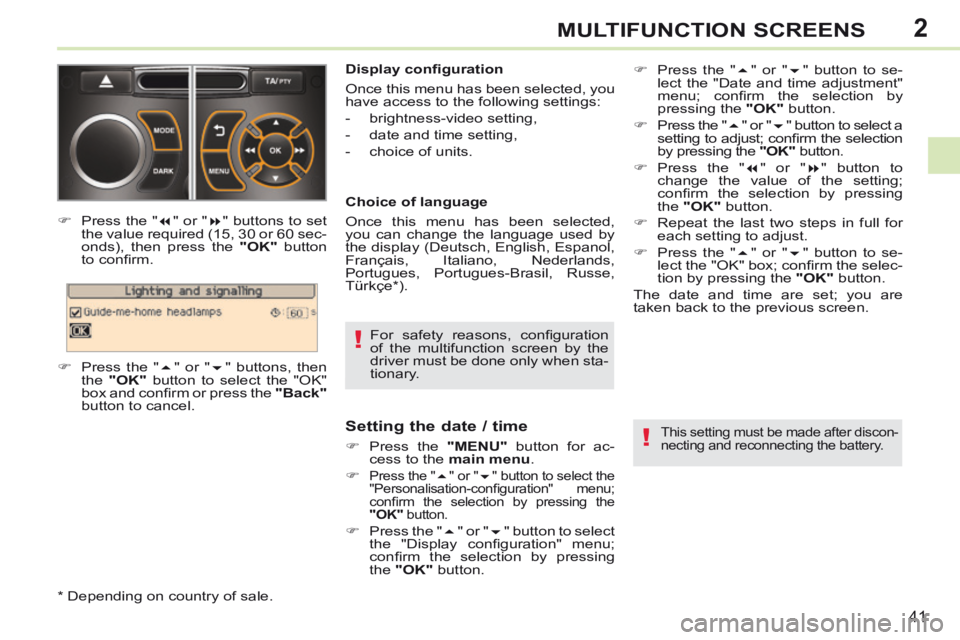
Press the "
" or " " buttons to set
the value required (15, 30 or 60 sec-
onds), then press the "OK" button
to confi rm.
Press the " " or " " buttons, then
the "OK" button to select the "OK"
box and confi rm or press the "Back"
button to cancel.
* Depending on country of sale.
Setting the date / time
Press the "MENU" button for ac-
cess to the main menu .
Press the " " or " " button to select the
"Personalisation-confi guration" menu;
confi rm the selection by pressing the
"OK" button.
Press the " " or " " button to select
the "Display confi guration" menu;
confi rm the selection by pressing
the "OK" button.
This setting must be made after discon-
necting and reconnecting the battery.
Press the " " or " " button to se-
lect the "Date and time adjustment"
menu; confi rm the selection by
pressing the "OK" button.
Press the " " or " " button to select a
setting to adjust; confi rm the selection
by pressing the "OK" button.
Press the " " or " " button to
change the value of the setting;
confi rm the selection by pressing
the "OK" button.
Repeat the last two steps in full for each setting to adjust.
Press the " " or " " button to se-
lect the "OK" box; confi rm the selec-
tion by pressing the "OK" button.
The date and time are set; you are
t aken back to the previous screen.
Page 44 of 268

2
!
i
42
MULTIFUNCTION SCREENS
"SETUP" menu
Press the "SETUP" button to gain
access to the confi guration menu:
- "Display confi guration",
- "Voice synthesiser",
- "Choice of language",
- "Vehicle settings",
- "Alert log".
For safety reasons, confi guration
of the multifunction screen by the
driver must be done only when sta-
tionary.
Displays in the screen
Depending on the context, it displays:
- time,
- date,
- altitude,
- ambient temperature (the value dis- played fl ashes if there is a risk of
ice),
- the sequences of opening and clos- ing the roof,
- visual parking sensor information,
- audio functions,
- telephone information and direc- tories,
- satellite navigation system infor- mation,
- settings menus for the screen, navi- gation system and vehicle equip-
ment.
RETRACTABLE COLOUR SCREEN (WITH PEUGEOT CONNECT NAVIGATION (RT6)) Controls
From the navigation system control
panel, to select one of the applications:
press the dedicated "RADIO" ,
"MUSIC" , "NAV" , "TRAFFIC" ,
"PHONE" or "SETUP" button to
gain access to the corresponding
menu,
turn the knob A to select a function,
an item in a list,
press button B to confi rm the selec-
tion,
or
press the "Back" button to abandon
the current operation and return to
the previous display. For operation of the retractable
screen (opening, closing, adjust-
ment of the position, etc.), refer to
the section "Access to the retract-
able screen".
For more information on these applica-
tions, refer to the "PEUGEOT Connect
Navigation (RT6)" section.
Page 45 of 268

2
i
!
43
MULTIFUNCTION SCREENS
Display confi guration
This menu is used to select the colour
scheme for the screen, adjust its bright-
ness, set the date and time and select
the units for distance (km or miles),
fuel consumption (l/100 km, mpg or
km/l) and temperature (°Celsius or
°Fahrenheit).
Voice synthesiser
This menu is used to set the volume for
navigation instructions and to select the
type of voice (male or female).
Choice of language
This menu allows you to select the
language used by the screen: French,
English, Italian, Portuguese, Spanish,
German, Dutch, Turkish, Polish,
Russian). Vehicle settings *
This menu is used to activate or deacti-
vate certain driving and comfort equip-
ment, sorted by category:
- Access to the vehicle
● Plip action: "Driver's door" or "All doors".
- Parking assistance
- Rear wiper operation ● Operation of rear wiper in reverse (Rear wiper coupled to reverse;
see "Visibility"),
- Lighting confi guration (see "Visibility"):
●
Duration of guide-me-home lighting,
● Directional headlamps (Main / ad- ditional directional lighting),
● Mood lighting (Interior mood light- ing),
● Daytime running lamps ** .
Alert log
This summarises the active alerts by
displaying their associated messages
in turn.
* Depending on version.
** Depending on country of sale. When setting the time you can
select "Synchronise minutes with
GPS", so that the minutes are set
automatically by satellite reception.
Setting the date / time
Press the
"SETUP" menu for ac-
cess to the confi guration menu.
Turn the knob A to select "Display
confi guration"; confi rm the selection
by pressing the button B .
Turn the knob A to select "Set date
and time"; confi rm the selection by
pressing the button B .
Turn the knob A to select a setting
to adjust; confi rm the selection by
pressing the button B .
Press the" " or " " button to change
the value of the setting; confi rm the se-
lection by pressing the button B .
Repeat the last two steps in full for each setting to adjust.
The date and time are set; you are
t aken back to the previous screen.
This setting must be made after disconnect-
ing and reconnecting the battery.
Page 46 of 268

2
44
MULTIFUNCTION SCREENS
Access to the retractable screen
The screen opens automatically when
the ignition is switched on. It closes au-
tomatically three seconds after switch-
ing off the ignition if the audio and
telematics system is switched off.
You can open or close the screen at
any time, with the ignition on, using
control A .
- Press button A : the screen folds.
- Press button A again: the screen opens again. You can adjust the angle of the screen
to one of four defi ned positions, by re-
peated presses on the front or back of
the control
B . The position of the screen
is memorised on closing. Adjusting the angle of the screen
If you have closed the screen, it will
open again automatically:
- on switching on the audio and navi- gation system (unless it had been
closed manually while the system
was in operation),
- when an outgoing telephone call is made,
- when a voice command is given,
- when a warning message linked with the STOP warning lamp is displayed
(PEUGEOT Connect Navigation
(RT6)).
Page 50 of 268

3
ii
i
48
COMFORT
When the engine is cold, to prevent
too great a distribution of cold air,
the air fl ow will reach its optimum
level gradually.
In cold weather, it favours the dis-
tribution of warm air to the wind-
screen, side windows and footwells
only. On entering the vehicle, if the in-
terior temperature is much colder
or warmer than the comfort value,
there is no need to change the
value displayed in order to obtain
the comfort required. The system
corrects the difference in tempera-
ture automatically and as quickly
as possible.
The air conditioning can only operate
with the engine running. The driver and front passen-
ger can each adjust the tem-
perature to their requirements.
Turn control 2 or 3 to the left or to
the right respectively to decrease or
increase this value.
A setting around the value 21 provides
optimum comfort. However, depend-
ing on your requirements, a setting be-
tween 18 and 24 is normal.
You are advised to avoid a left / right
setting difference of more than 3. 4. Automatic visibility programme
The automatic comfort pro-
gramme may not be suffi cient
to quickly demist or defrost
the windscreen and side win-
dows (humidity, several pas-
sengers, ice, etc.).
In this case, select the automatic visibility programme.
The system automatically controls the
air conditioning, the air fl ow and the air
intake and provides optimum distribu-
tion of the ventilation to the windscreen
and side windows.
Automatic operation
Press the "AUTO" button.
The indicator lamp in the
button comes on. 2. Driver's side adjustment
DUAL-ZONE DIGITAL AIR CONDITIONING
We recommend the use of this mode:
it permits automatic and optimised ad-
justment of all of the functions, passen-
ger compartment temperature, air fl ow,
air distribution and air recirculation, in
accordance with the comfort value that
you have chosen.
This system is designed to operate effec-
tively in all seasons, with automatic adap-
tation in the "cabriolet" confi guration. The value indicated on the display cor-
responds to a level of comfort and not
to a temperature in degrees Celsius or
Fahrenheit.
To switch it off, press the "visibility"
button again or press the "AUTO"
button, the indicator lamp in the but-
ton goes off and the indicator lamp
in the "AUTO" button comes on.
1. Automatic comfort programme
3. Passenger's side adjustment
With Stop & Start, when demist-
ing has been activated, the STOP
mode is not available.
Page 51 of 268

3
!
i
49
COMFORT
Manual operation
If you wish, you can make a different
choice from that offered by the system
by changing a setting. The other func-
tions will still be controlled automati-
cally.
Pressing the "AUTO" button returns
the system to completely automatic
operation.
Press this button to switch off the air conditioning. 6. Air distribution adjustment
Press one or more buttons to direct the air fl ow towards
the:
7. Air fl ow adjustment Turn this control to the left to decrease the air fl ow or
to the right to increase the
air fl ow.
8. Air intake / Air recirculation
Switching the system off
Turn the air fl ow control to the left until all of the indicator lamps go off.
This action switches off all of the func-
tions of the system.
Temperature related comfort is no lon-
ger guaranteed but a slight fl ow of air,
due to the movement of the vehicle, can
still be felt.
Turn the air fl ow dial to the right or press the "AUTO" button to reacti-
vate the system with the values set
before it was switched off.
Press this button for recir- culation of the interior air.
The indicator lamp in the
button comes on.
5. Air conditioning On / Off
Avoid prolonged operation in inte-
rior air recirculation mode or driving
for long periods with the system off
(risk of condensation and of dete-
rioration of the air quality).
-
windscreen and side windows (dem-
isting or defrosting),
- windscreen, side windows and vents,
- windscreen, side windows, vents and
footwells,
- vents and footwells,
- vents,
- footwells,
- windscreen, side windows and foot- wells.
The air fl ow indicator lamps, between
the two fans, come on progressively ac-
cording to the value requested. As soon as possible, press this but-
ton again to permit the intake of out-
side air and prevent the formation of
condensation. The indicator lamp in
the button goes off.
For maximum cooling or heating
of the passenger compartment, it
is possible to exceed the minimum
value 14 or the maximum value 28.
Turn control 2 or 3 to the left
until "LO" is displayed or to the
right until "HI" is displayed. 9. Mono-zone / Dual-zone
Press this button to equal-ise the comfort value on the
passenger side with that
on the driver's side (mono-
zone). The indicator lamp in
the button comes on.
Air recirculation enables the passenger
compartment to be isolated from exte-
rior odours and smoke.
Switching the system off could result in
discomfort (humidity, condensation).
Press this button again to return to
automatic operation of the air con-
ditioning. The indicator lamp in the
"A/C" button comes on.
Page 65 of 268

4
!
i
63
ACCESS
Locating your vehicle
Press the closed padlock to locate your locked ve-
hicle in a car park.
Electronic engine immobiliser
The key contains an electronic chip
which has a special code. When the
ignition is switched on, this code must
be recognised in order for starting to be
possible.
This electronic engine immobiliser locks
the engine management system a few
minutes after the ignition is switched off
and prevents starting of the engine by
anyone who does not have the key.
Anti-theft protection
In the event of a fault, you are
informed by illumination of this
warning lamp, an audible signal
and a message in the screen.
In this case, your vehicle will not start;
contact a PEUGEOT dealer as soon as
possible.
This is indicated by lighting of the cour-
tesy lamps and side spotlamps and
fl ashing of the direction indicators for a
few seconds.
Starting the vehicle
Insert the key in the ignition switch.
The system recognises the starting
code.
Turn the key fully towards the dash- board to position 3 (Starting) .
When the engine starts, release the key.
Switching the vehicle off
Immobilise the vehicle.
Turn the key fully towards you to po-sition 1 (Stop) .
Remove the key from the ignition switch.
Switching off the engine leads to a
loss of braking assistance.
Keep safely, away from your vehicle,
the label attached to the keys given to
you on acquisition of the vehicle. If the key has been left in the igni-
tion switch at position
2 (Ignition
on) , the ignition will be switched off
automatically after one hour.
To switch the ignition back on, turn
the key to position 1 (Stop) , then
back to position 2 (Ignition on) .
Key left in the "Ignition on" position
On opening the driver's door, an alert
message is displayed, accompanied by
an audible signal, to remind you that the
key is still in the ignition switch at posi-
tion
1 (Stop) .