2013 PEUGEOT 2008 stop start
[x] Cancel search: stop startPage 203 of 324

9
201
Technical data
Engines1.6 litree-HDi 92 hp1.6 litre e- HDi 115 h p
Gearboxes
Electronic
(6-speed)
Manual(6-speed)
Model codes: CU...9HP8/PS
9HD8/S
Cubic capacity (cc)
1 560
1 560
Bore x stroke (mm) 75 x 88.3
75 x 88.3
Max power: EU standard
(kW)
* 6884
Max power engine speed
(rpm) 4 000 3 600
Max torque: EU standard
(Nm)
230
270
Max torque engine speed (rpm) 1 750
1 750
F
uel
Diesel Diesel
Catalytic converter yes
yes
Particle emission filter yes
yes
OIL CAPACITIES (in litres)
Engine (with filter replacement) -3.75
.../S: e-HDi model fitted with Stop & Start.
* The maximum power corresponds to the value type approved on a test bed, under conditions defined by European legislation (Directive 1999/99/EC).
Diesel engines and gearboxes
Page 220 of 324
05
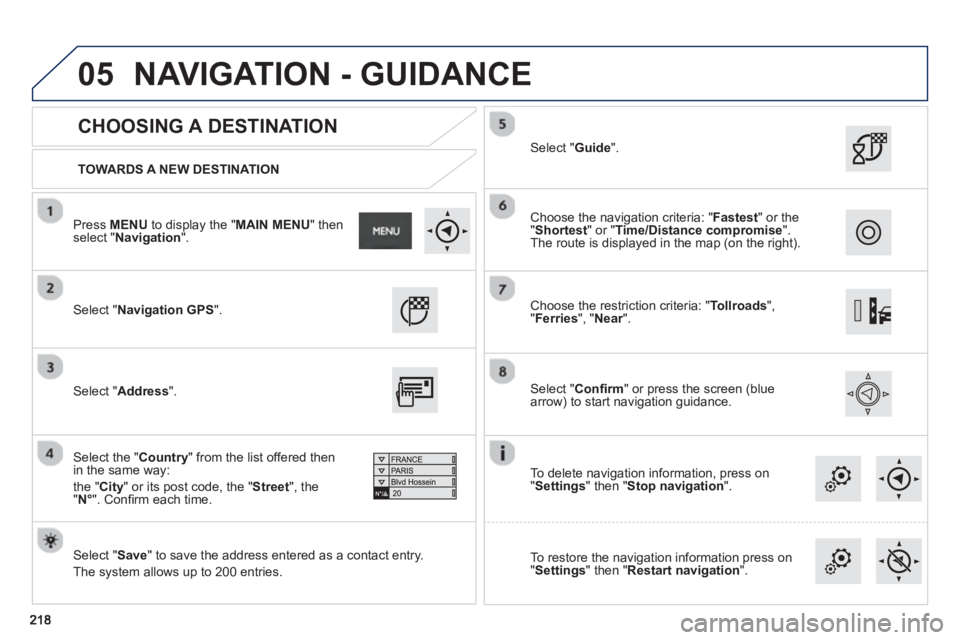
TOWARDS A NEW DESTINATION
CHOOSING A DESTINATION
Select "Navigation GPS
".
Select "Save
" to save the address entered as a contact entry.
The s
ystem allows up to 200 entries.
Select "Confi rm" or press the screen (blue
arrow) to start navigation guidance.
Select "Address
".
Select the " Country
" from the list offered then in the same way:
th
e " City" or its post code, the "Street", the
" N°
". Confi rm each time.
Select "Guide ".
Choose the restriction criteria: "Tollroads",
" Ferries", " Near".
r
Choose the navigation criteria: " Fastest
" or the
"Shortest
" or " Time/Distance compromise".The route is displayed in the map (on the right).
To delete navi
gation information, press on
" Settings
" then " Stop navigation
".
To restore the navi
gation information press on
"Settings
" then " Restart navigation".
Press MENUto display the " MAIN MENU " then select " Navigation".
NAVIGATION - GUIDANCE
Page 286 of 324
05
284
USING THE TELEPHONE
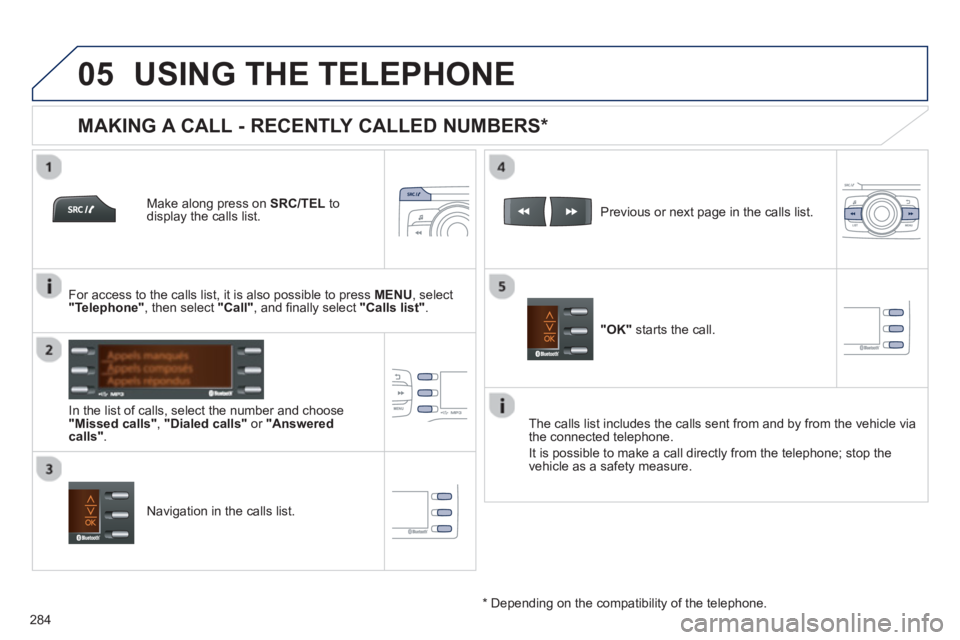
Make along press on SRC/TEL
to display the calls list.
In the list o
f calls, select the number and choose "Missed calls","Dialed calls"or "Answered calls".
Previous or next page in the calls list.
"OK"
starts the call.
MAKING A CALL - RECENTLY CALLED NUMBERS *
Navigation in the calls list. The calls list includes the calls sent from and b
y from the vehicle via
the connected telephone.
It is possible to make a call directl
y from the telephone; stop the
vehicle as a safety measure.
*
Depending on the compatibility of the telephone.
For access to the calls list, it is also
possible to press MENU, select "Telephone"
, then select "Call"
, and fi nally select "Calls list".
Page 295 of 324
293
FREQUENTLY ASKED QUESTIONS
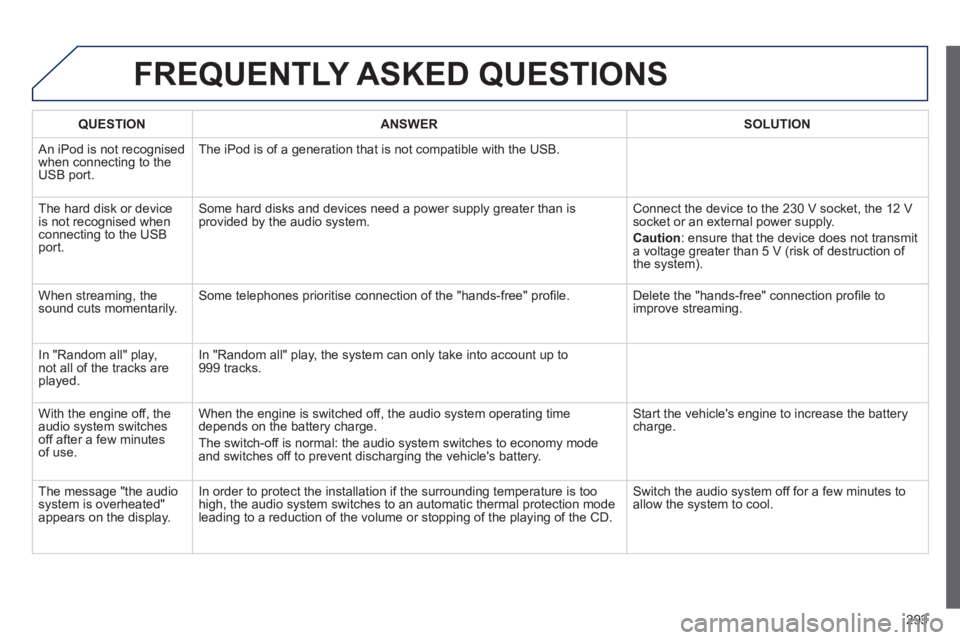
QUESTIONANSWERSOLUTION
An iPod is not recognisedwhen connecting to the
USB port.The iPod is o
f a generation that is not compatible with the USB.
Th
e hard disk or deviceis not recognised whenconnecting to the USBport. Some hard disks and devices need a power suppl
y greater than is
provided by the audio system. Connect the device to the 230 V socket, the 12 V socket or an external power supply.
Caution
:
ensure that the device does not transmit
a voltage greater than 5 V (risk of destruction of
the system).
When streaming, the
sound cuts momentarily. Some telephones prioritise connection of the "hands-free" profi le. Delete the "hands-free" connection profi le to
improve streaming.
In "Random all" pla
y,not all of the tracks areplayed.In "Random all" pla
y, the system can only take into account up to 999 tracks.
With the en
gine off, the
audio system switches off after a few minutes of use. When the en
gine is switched off, the audio system operating time
depends on the battery charge.
The switch-off is normal: the audio s
ystem switches to economy mode and switches off to prevent discharging the vehicle's battery. Start the vehicle's en
gine to increase the batterycharge.
The messa
ge "the audio system is overheated"
appears on the display. In order to protect the installation i
f the surrounding temperature is too
high, the audio system switches to an automatic thermal protection mode leading to a reduction of the volume or stopping of the playing of the CD.
Switch the audio system off for a few minutes to
allow the system to cool.
Page 313 of 324
FREQUENTLY ASKED QUESTIONS
QUESTIONANSWER SOLUTION
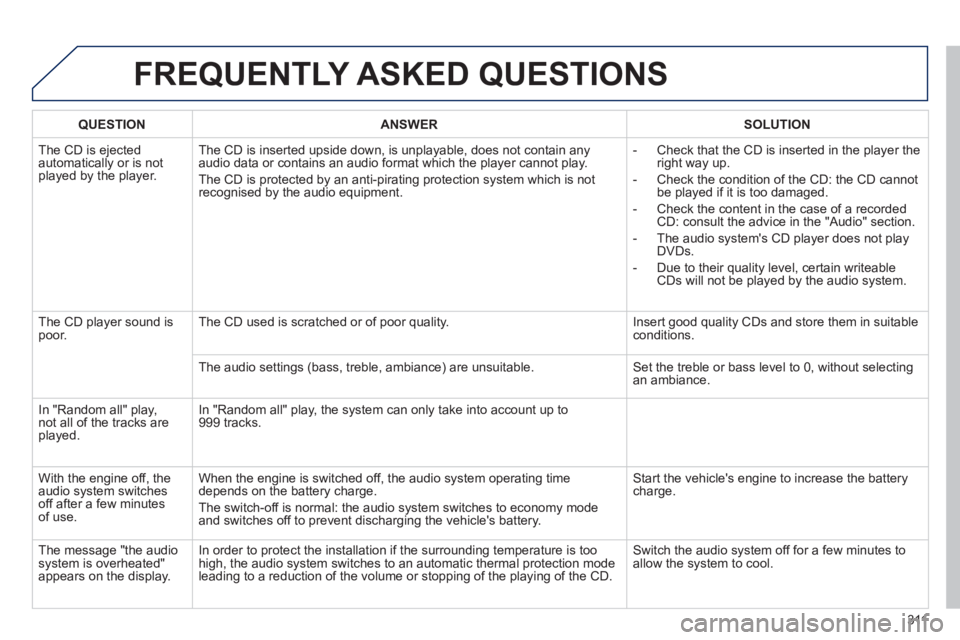
The CD is ejected
automatically or is not played by the player. The CD is inserted upside down, is unpla
yable, does not contain any audio data or contains an audio format which the player cannot play.
The CD is protected b
y an anti-pirating protection system which is not recognised by the audio equipment.
- Check that the CD is inserted in the pla
yer the
right way up.
-
Check the condition of the CD: the CD cannot
be played if it is too damaged.
-
Check the content in the case of a recordedCD: consult the advice in the "Audio" section.
- The audio s
ystem's CD player does not play
DVDs.
- Due to their qualit
y level, certain writeableCDs will not be played by the audio system.
The CD pla
yer sound ispoor.The CD used is scratched or of poor quality. Insert good quality CDs and store them in suitable conditions.
The audio settin
gs (bass, treble, ambiance) are unsuitable. Set the treble or bass level to 0, without selectingan ambiance.
In "Random all" play,not all of the tracks areplayed.
In "Random all" play, the system can only take into account up to 999 tracks.
With the en
gine off, the
audio system switches
off after a few minutes of use. When the en
gine is switched off, the audio system operating time
depends on the battery charge.
The switch-o
ff is normal: the audio system switches to economy mode and switches off to prevent discharging the vehicle's battery.
Start the vehicle's engine to increase the batterycharge.
The message "the audio system is overheated"
appears on the display. In order to protect the installation if the surroundin
g temperature is toohigh, the audio system switches to an automatic thermal protection mode leading to a reduction of the volume or stopping of the playing of the CD. Switch the audio s
ystem off for a few minutes to
allow the system to cool.
311
Page 316 of 324

314
Visual search
Instruments and controls
Courtesy lamps 120 Interior mood lighting 121 Rear view mirror 62 Emergency or assistancecall 123, 207
Opening the bonnet 185
Manual parking brake 79
5/6 -speed manual gearbox 80 5 -speed electronic gearbox 81-83 6 -speed electronic gear control gearbox 84-87
Automatic gearbox 88-90 Gear shift indicator 91 Stop & Start 92-94 Hill start assist 95
Dashboard fuses 166-169
USB por t / Auxiliary socket 73 Additional USB port 73
Heating, ventilation 63 - 65 Manual air conditioning 65-66 Dual-zone air conditioning 67- 69 Front demisting / defrosting 70 Rear screen emist/defrost 70
Touch screen 209-268 Bluetooth audio system 269-294
Door mirrors 61-62 Electric windows, deactivating 53-54
Audio system 295-311
Setting the date/time 43
Glove box fuses 170
Page 322 of 324

320
Alphabetical index
T
V
U
Snow chains ..................................................158Spare wheel..........................................151,152Speed limiter...........................................r96, 100Starting the vehicle .........................................78Steering mounted controls, audio...........................................211, 271, 297Stopping the vehicle.....................78, 83, 87, 90Stop & Start........42, 70,92,172, 185, 188,196Storage......................................................71,72Stowing rings ..................................................75Synchronising the remote control...................49Synthesiser, voice.........................................231System, ASR .................................................127
W
Table of weights ....................................199,202Ta b l e s o f e ngines.........................198, 200, 201Tables of fuses..............................................166Tank, fuel...............................................188, 190Technical data.......................................198-205Telephone.............................................250-281Te m p e r a t u r e , c o o l a nt ......................................33Temperature adjustment...........................65, 67Te mperature control for heated seats............58Te m p o r a ry tyre repair kit ...............................145Third brake lamp...........................................165TMC (Tr affic info)..........................................226Tools ..............................................................151To u c h screen...........................................40, 209To w b a r...........................................................r179Towed loads ..........................................199,202Towing another vehicle.................................178Traction control (ASR)..............27, 29,124,127Traffic information (TA).........................227, 274
Traffic information (TMC).....................226,227Tr a i l e r............................................................r179Tr i p c o m p u t e r............................................r38-42
Tyre pressures ..............................................206Tyres................................................................19
Unlocking........................................................44Unlocking the boot ..........................................55Update risk areas..........................................222Updating the date............................................43Updating the time ............................................43USB.................................77, 240, 244, 279, 305USB player....................................................r240
Vehicle identification .....................................206
Ventilation ...........................................14,63-69
Warning lamps ..........................................23-32Warning triangle..............................................77Wash-wipe, rear............................................r117Washing (advice)...........................................181Weights.................................................199,202Window controls..............................................53Wiper, rear.....................................................r117Wiper control stalk.................................116-119Wipers .............................................26, 116, 11 9